UPI QR Code Generator
Let customers pay you from any UPI app with one scan, Google Pay, PhonePe, Paytm, or BHIM. Add your UPI ID and an optional amount, no card machine needed.



UPI QR Code: QR Code Generator for UPI
Accept payments online across bank accounts and payment wallets


What Is a UPI QR Code?
A UPI QR code lets you share your UPI ID with customers, allowing them to pay you online. Users can scan the UPI QR code from any UPI app to make the payment. It can also store your VPA, payee name, amount, and transaction remark. Businesses, freelancers, service providers, and merchants can use a UPI payment QR code to accept payments without sharing bank details manually or using POS hardware.
What UPI Details Can You Add to the QR Code?
You can create a UPI payment QR code using the details needed for payment collection.
UPI ID or VPA
Enter your UPI ID or VPA to create a UPI ID to QR code or VPA to QR code. This allows customers to scan the code and pay directly through their preferred UPI app.
Payee Name
Add the name of the person, merchant, shop, or business receiving the payment. This helps customers verify the recipient before completing the payment.
Amount
You can create a UPI QR code with amount if you want customers to pay a fixed amount. This is useful for bills, invoices, donations, entry fees, subscriptions, and standard service charges.
Transaction Remark
Add a payment remark to help identify the purpose of the transaction, such as order number, invoice number, donation, booking, consultation, or service payment.
Create and Manage UPI QR Codes With QRCodeChimp
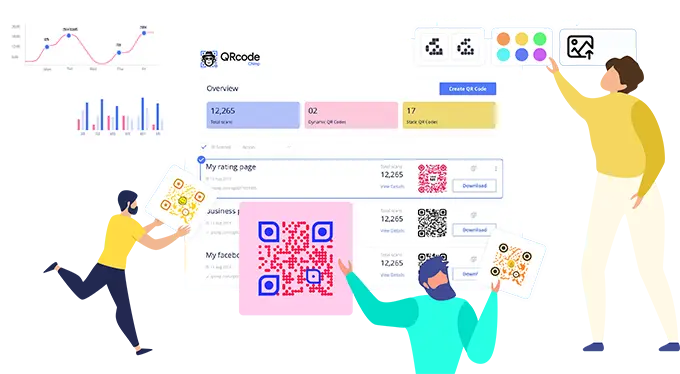
QRCodeChimp allows you to create and manage your UPI QR codes. Let's look at the key features of QRCodeChimp:


How to Get More Scans on Your UPI QR Code?
Follow these best practices to get more scans on your UPI QR code:
Make it easy to scan
Ensure your UPI QR code is clear, sharp and large enough to scan without effort. A minimum print size of 0.8 by 0.8 inches helps prevent scanning issues, especially in busy environments. A clean code created through a reliable UPI QR generator improves scan accuracy further.


Use a clear CTA
People scan more when they know what to expect. Add a simple CTA like Scan to Pay or Scan to Contribute. QR stickers with built-in CTAs can guide users instantly and increase conversions.
Choose the location wisely
Location is one of the biggest factors for scan rates. Display your UPI QR code where it is easy to spot such as checkout counters, entrances, billing desks, tables, product shelves or packaging.


Make it visually appealing
A visually attractive QR code captures attention faster. Use shapes, frames, colors and design elements to make your UPI QR code stand out while keeping it easily scannable.
How Does a UPI QR Code Work?
Here's how a UPI QR code works:


Benefits of a UPI QR Code
A UPI QR code makes it easier for customers to pay and helps businesses collect payments without cash, card machines, or manual bank detail sharing.
1️⃣
Instant Payments
Customers can scan your UPI QR code and complete the payment from their preferred UPI app. This makes payment collection faster and more convenient.
2️⃣
Works with All UPI Apps
A UPI QR code can be scanned using Google Pay, PhonePe, Paytm, BHIM, and other UPI enabled apps. Customers can use the payment app they already prefer.
3️⃣
No Hardware Required
You do not need a card machine or payment terminal to accept UPI payments. A printed or digital UPI QR code is enough for customers to scan and pay.

4️⃣
Secure and Reliable
Customers review and approve the payment in their own UPI app. This keeps the payment process familiar and reliable.
5️⃣
Ideal for Offline and Online Use
Use your UPI QR code at physical counters, events, pop-up stalls, invoices, WhatsApp messages, websites, social posts, and digital payment requests.
6️⃣
Free and Easy to Maintain
You can create a free UPI QR code online, customize it, download it, and use it wherever customers need a quick scan and pay option.
Who Should Use a UPI QR Code?
All physical stores should use a UPI QR code, including:





Frequently Asked Questions
- How to create a UPI QR Code?
- What is a UPI QR code generator?
- Are people still using UPI QR Code?
- Does a UPI QR code expire?
- Is it possible to generate and print large batches of UPI QR Codes?
- Will I need to generate a new QR code if I change my bank account number?
- Can I create a UPI QR code for free?
- Can I create a UPI QR code from my UPI ID or VPA?
- Can I create a UPI QR code with a fixed amount?
- Can I create a UPI QR code with a logo?
- Which apps can scan a UPI QR code?
- Are people still using UPI QR codes?
- Can I create bulk UPI QR codes?
- Does a UPI QR code expire?
Frequently Asked Questions
How to create a UPI QR Code?
Follow these steps to create a UPI QR code:
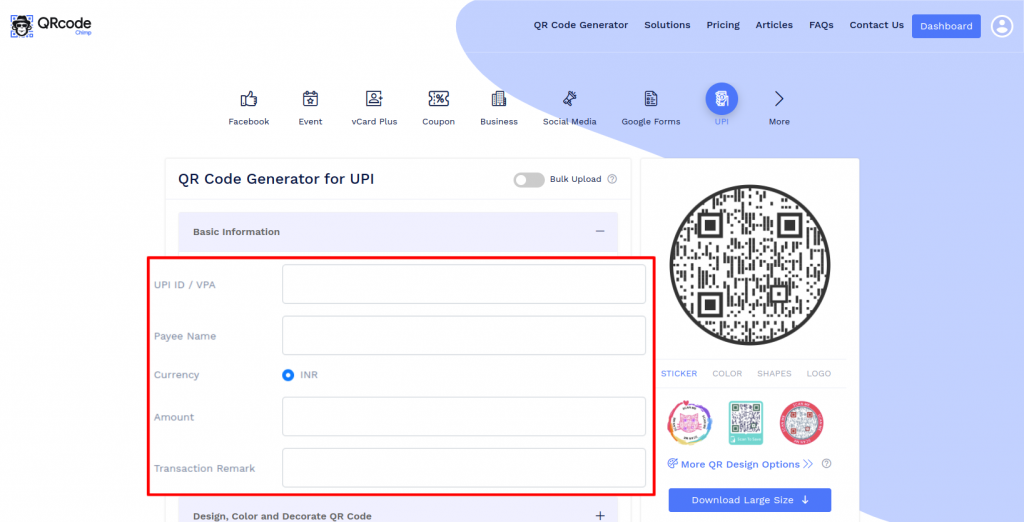
Step 1: Enter the Basic Information
Enter the basic information like UPI ID/VPA, payee name, amount, and transaction remark.
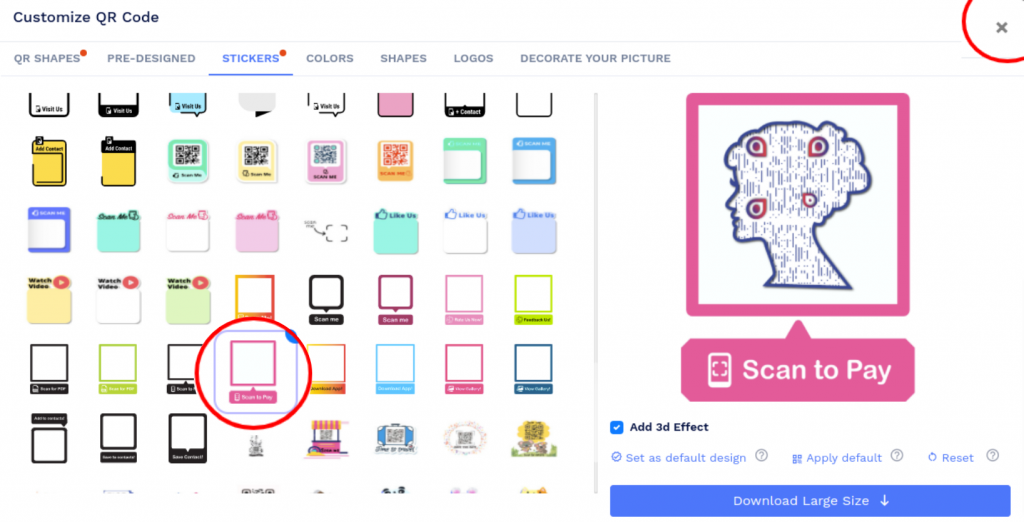
Step 2: Design Your QR Code
Click on 'Design Color and Decorate QR Code' to customize your QR Code design (ex: adding color, shape, sticker).
Note: Click on the 'x' icon of the 'Customize QR Code' popup to save changes.
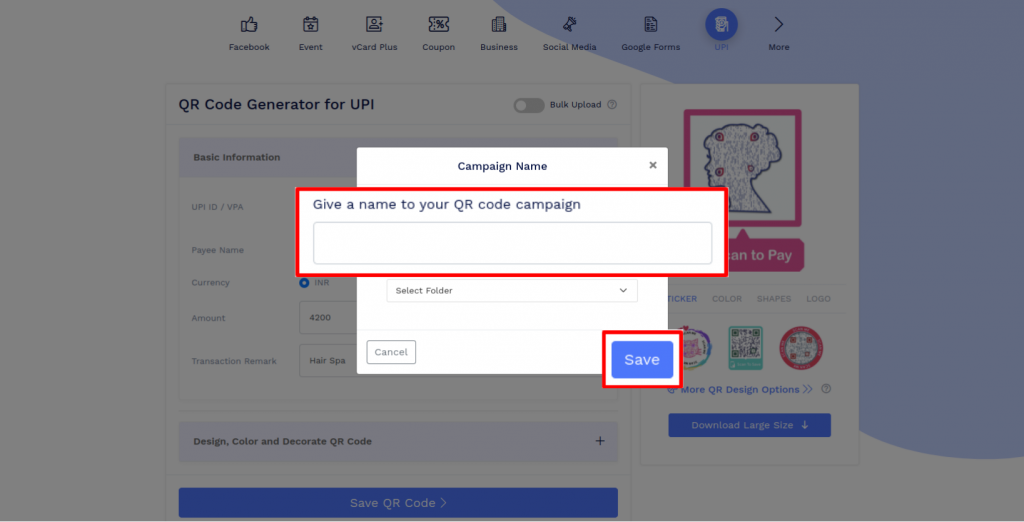
Step 3: Save and Download
Save the QR Code by clicking on the 'Save QR Code' button, entering the QR name, and then clicking on 'Save.'
Note: Make sure to scan your QR Code from different devices (iOS and Android) before printing for production.
What is a UPI QR code generator?
A UPI QR code generator is an online tool that lets you create a QR code using your UPI ID or VPA. Customers can scan the QR code with a UPI app and complete the payment after reviewing the details.
Are people still using UPI QR Code?
The sudden surge in UPI payments worldwide has not receded as the economy opened up after two devastating waves of Covid. It made people get used to using QR codes for payments, many of whom were first-time scanners. The convenience of not exchanging any details, carrying cash, wallet, or ATM cards has only merits for all.
Does a UPI QR code expire?
The Static QR code for UPI will remain valid as long as your bank account details associated with it are functional. It is absolutely free to create and forever to keep.
Is it possible to generate and print large batches of UPI QR Codes?
Yes, you can use QR Code Chimp's Bulk upload feature to generate QR Codes in large batches directly into your system.
This is ideal for businesses that need to convert multiple UPI id to QR codes at once, ensuring all codes follow consistent branding and format.
Will I need to generate a new QR code if I change my bank account number?
Since a Static QR Code cannot be edited once generated and printed, you will have to create a new UPI QR code if you change your bank account number.
Whenever details change, you can instantly generate a new code using QRCodeChimp’s UPI to QR Generator and update it across your payment channels.
Can I create a UPI QR code for free?
Yes. You can create a free UPI QR code with QRCodeChimp. Enter your UPI details, customize the QR code, and download it for print or digital sharing.
Can I create a UPI QR code from my UPI ID or VPA?
Yes. You can use your UPI ID or VPA to create a UPI QR code. Add your UPI ID, payee name, amount if needed, and transaction remark, then customize and download the QR code.
Can I create a UPI QR code with a fixed amount?
Yes. You can enter an amount while creating your UPI QR code. When customers scan the QR code, the amount appears in their UPI app so they can review and approve the payment.
Can I create a UPI QR code with a logo?
Yes. QRCodeChimp lets you create a UPI QR code with logo, colors, QR shapes, and stickers with built-in CTA text. Make sure the final design remains easy to scan.
Which apps can scan a UPI QR code?
Customers can scan a UPI QR code using popular UPI apps such as Google Pay, PhonePe, Paytm, BHIM, and other UPI enabled payment apps.
Are people still using UPI QR codes?
Yes. UPI QR codes are widely used for quick digital payments at stores, restaurants, service counters, delivery points, events, and by individual service providers. Customers can scan a UPI QR code from a supported UPI app and complete the payment after confirming the details.
Can I create bulk UPI QR codes?
Yes. QRCodeChimp supports bulk upload, so you can create multiple UPI QR codes for branches, counters, staff members, events, stalls, departments, or client campaigns.
Does a UPI QR code expire?
A static UPI QR code does not expire on its own. It continues to work as long as the UPI ID/VPA and linked bank account remain active. If your UPI ID or account details change, you should create and print a new UPI QR code.
Hear What Our Customers Have to Say!