Communicating and connecting across linguistic boundaries is essential for global engagement, as the world is becoming increasingly interconnected. QRCodeChimp understands this need and addresses it head-on with its advanced Multi-lingual support.
By offering an impressive array of 24 languages other than English, we ensure that you can create QR codes in your native language with ease. This feature is more than just a convenience—it’s a way to make QR code creation and usage inclusive and user-friendly.
Why Multi-Lingual Support Matters?

Multi-lingual support is a bridge connecting diverse cultures and languages. For businesses and individuals looking to reach a wider audience, the ability to communicate in the audience’s native language is invaluable.
QRCodeChimp’s approach to multi-lingual support enhances user experience and ensures that all users have equal access to its powerful features.
How to Switch to Your Preferred Language on QRCodeChimp
Below mentioned are the steps to swtich to your preferred language.
Step 1: Visit the QRCodeChimp website.
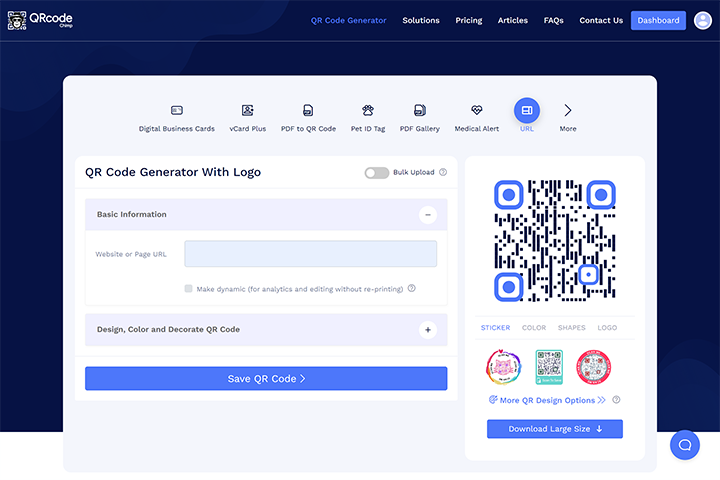
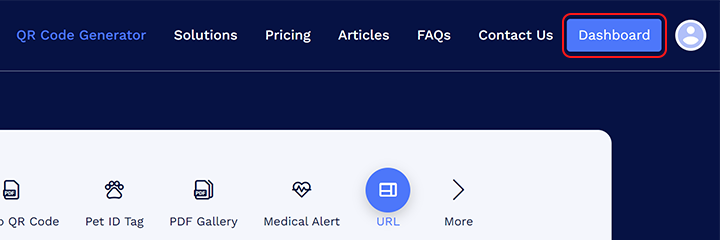
Step 2: Login and navigate to the Dashboard.
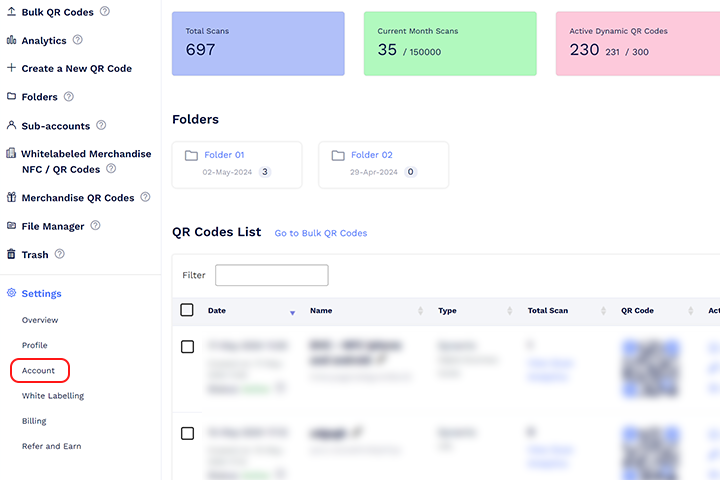
Step 3: Select the account account in the settings menu.
Step 4: Find the Locale section and choose your preferred language from the dropdown menu.
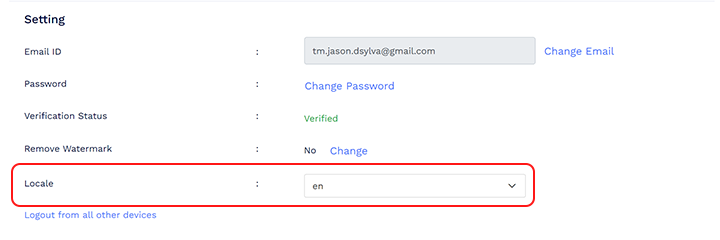
Follow the steps above to switch to your preferred language. For subsequent visits, access QRCodeChimp by entering the URL with your language code instead of “www.qrcodechimp.com.” For example, use “es.qrcodechimp.com” for Spanish or “fr.qrcodechimp.com” for French.
Language Codes to Switch to Your Native Language
Europe
| Language | Code |
|---|---|
| French | fr |
| Spanish | es |
| Italian | it |
| German | de |
| Portuguese | pt |
| Romanian | ro |
| Danish | da |
| Dutch | nl |
| Croatian | hr |
| Czech | cs |
| Russian | ru |
| Finnish | fi |
| Luxembourgish | lb |
| Polish | pl |
| Norwegian | no |
| Swedish | sv |
| Ukrainian | uk |
Asia
| Language | Code |
|---|---|
| Hindi | hi |
| Vietnamese | vi |
| Chinese(Simplified) | zh-CN |
| Chinese(Traditional) | zh-TW |
| Korean | ko |
| Japanese | ja |
Conclusion
QRCodeChimp’s multi-lingual support highlights its dedication to inclusivity and user convenience. Offering over 20 languages and simple methods for switching among them ensures that users from different linguistic backgrounds can navigate the platform with ease. This approach broadens the reach of QRCodeChimp’s innovative features and enhances the user experience, making it more personal and accessible.
Whether for personal use or professional purposes, QRCodeChimp helps you bridge language barriers and connect with a global audience effortlessly, making it a top choice for anyone looking to leverage the versatile power of QR codes.
Frequently Asked Questions
Are all features of QRCodeChimp available in all supported languages?
Yes, all features of QRCodeChimp are available in all supported languages. This ensures a consistent and fully functional experience, regardless of the language you choose, when creating QR codes, accessing analytics, or using customization tools.
Do I need to create a new account to use a different language on QRCodeChimp?
No, you do not need to create a new account. QRCodeChimp allows you to switch languages easily within your existing account through website settings or by modifying the URL.
You may also like
Approval-Based Digital Business Cards: A Smarter Workflow for HR Teams
Discover how approval-based digital business cards help HR teams ensure branding consistency, prevent misuse, and manage employee cards at scale.
How a Consumer Electronics Brand Fixed Its Post-Purchase Gap Using Form QR Codes
Learn how a consumer electronics brand improved warranty registration and post-purchase engagement using Form QR Codes. Discover the strategy, implementation, and results.
QRCodeChimp’s Analytics Dashboard: A Step-by-step Guide
A guide to QRCodeChimp’s analytics dashboard. Leverage the unique advanced features and metrics to optimize your marketing campaigns.
Link Click Analytics in QRCodeChimp: How To Find Your Top Performing Links
Learn how to track link click analytics in QRCodeChimp, identify top-performing links, and optimize QR code campaigns using link-level insights and analytics.
Most Popular
Contact Sales
