Medical practice is rarely static. Clinic hours change, physicians rotate between locations, and many doctors consult across multiple hospitals or private practices. Yet most doctors still rely on printed business cards that freeze contact details in time. When numbers change or schedules shift, outdated cards continue to circulate, leading to missed calls, delayed appointments, and frustration for patients trying to reach the right doctor. The stakes are significant, as according to the World Health Organization, at least half of the world’s population still lacks access to essential health services, and even small communication barriers can widen that gap.
Digital business cards for doctors replace that uncertainty. With one scan or tap, patients and referring doctors can immediately call your clinic, book an appointment, get directions, or join a telehealth consultation. Instead of reprinting cards every time something changes, you update your information once, and it reflects everywhere your card has been shared.
For physicians, this is not a cosmetic upgrade. It is a practical improvement in accessibility, continuity of care, and professional efficiency.
- What a digital business card means for doctors
- Ways digital business cards for doctors improve daily practice
- How doctors should structure their digital business card
- Keep patient contact simple and compliant
- Automate follow-ups without adding administrative burden
- What doctors should measure
- A practical way for doctors to start
- Why this shift matters for physicians
- Frequently asked questions
What a digital business card means for doctors
A digital business card is a secure, mobile-friendly professional profile shared through a QR code or NFC tap. When patients scan it, they can save your contact details directly to their phone and take immediate action using clearly labeled options such as Call Clinic, Book Appointment, or Join Video Visit.
Unlike a static website page, a digital card is designed for action. It removes unnecessary navigation and focuses on helping patients reach you quickly.
Doctors can update clinic locations, consultation hours, or telehealth links in real time without having to redistribute new cards. Top platforms like QRCodeChimp also support security measures such as MFA and GDPR compliance, helping physicians maintain professional standards while offering patients a simple experience.
In practice, the digital card becomes a physician’s always-current access point.
Ways digital business cards for doctors improve daily practice
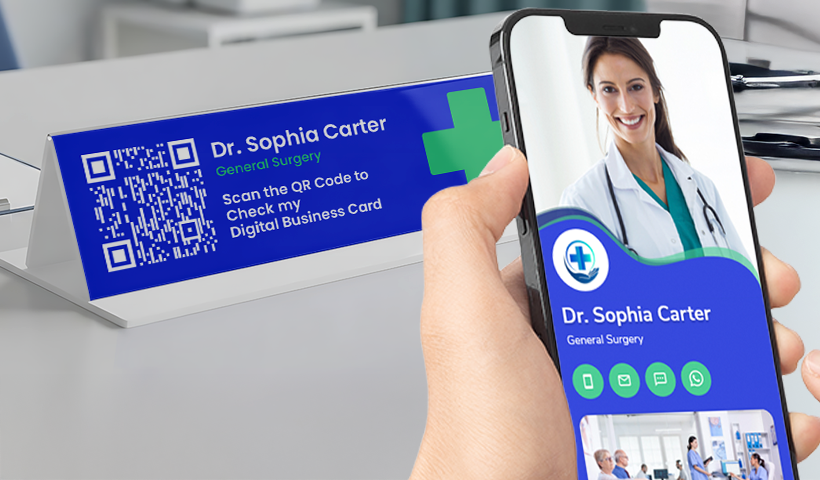
1. During in-clinic visits
Patients frequently need directions, follow-up booking links, or contact information after consultation. A displayed QR code lets them instantly save your details, reducing lost cards and repeated calls for basic information.
Patients leave the clinic already connected to you.
2. In telemedicine consultations
Telehealth often involves sending multiple links through messages or emails. A digital business card for doctors centralizes access to appointments, video consultation links, and follow-up instructions in one place.
Patients no longer search their inbox before appointments, helping consultations start on time.
3. For referrals between doctors
Referrals depend on accurate contact information. A digital card ensures referring physicians always reach your current clinic or consultation channel, even if your schedule or practice location changes.
This reduces delays and strengthens professional collaboration.
4. For multi-location and visiting physicians
Doctors who consult at multiple hospitals or conduct visiting hours often struggle with outdated printed cards. A digital business card updates instantly when schedules or locations change, ensuring patients always see the correct information.
How doctors should structure their digital business card
A physician’s digital card should remain clear, professional, and focused on patient access.
Core profile details
- Name and medical credentials
- Specialty and sub-specialty
- Clinic locations with addresses
- Consultation hours
- Languages spoken
Primary patient actions
- Call clinic
- Book appointment
- Get directions
- Join teleconsultation
Supporting elements can include accepted insurance panels, patient education resources, or professional memberships. A professional headshot and short introduction video can also build patient trust before the first visit.
Every element should serve one purpose: make it easier for patients to reach you confidently.
Keep patient contact simple and compliant
A digital business card should function as an access point, not a medical intake form.
If you enable a callback request, collect only essential details such as name, contact number, preferred time, and reason for contact. Avoid collecting clinical information through the card itself and direct patients to secure hospital portals or approved communication systems when medical data is required.
This approach maintains convenience while reducing compliance risk.
Automate follow-ups without adding administrative burden
Digital business cards become significantly more effective when connected to simple automation.
Appointment requests can be routed automatically to booking systems. After-hours scans can direct patients to emergency or on-call numbers. Automated confirmation messages reassure patients that their request has been received.
For doctors, this reduces manual coordination and prevents missed patient inquiries.
What doctors should measure
Digital cards provide visibility that paper cards never could.
Physicians can track:
- total scans
- peak contact times
- most-used actions such as booking or directions
These insights help doctors adjust consultation availability, improve patient access, and understand how patients prefer to connect.
Even a brief weekly review can improve appointment conversion and reduce communication gaps.
A practical way for doctors to start
Begin with your primary clinic profile. Add essential contact actions, enable appointment booking, and test the experience on both Android and iPhone devices.
Place your QR code where patients naturally look:
- consultation desks
- prescription sheets
- clinic signage
- email signatures
Review usage after the first week and refine based on patient behavior.
Why this shift matters for physicians
For doctors, accessibility is not a marketing feature; it directly affects patient care. When patients cannot reach the right number or find accurate clinic information, treatment continuity suffers.
A digital business card for doctors keeps your professional identity current, shareable, and immediately actionable. Patients reach you faster, referrals move smoothly, and your practice adapts without constant reprinting or administrative effort.
With QRCodeChimp, physicians can replace static contact sharing with dynamic digital business cards that stay up to date in real time, track engagement, and ensure patients consistently reach the right doctor without delay.
Frequently asked questions
What is a digital business card for doctors?
It is a living profile you share with a QR code or an NFC tap. People scan, save your contact to their phone, add a wallet pass, and act on clear buttons like Call, Book, Directions, and Telehealth.
How does this differ from a typical clinic web page?
It is built for instant action. One scan shows the next step; you can edit details anytime without a reprint, and patients can save you to their phone and wallet in seconds.
What should I include on my card?
Name and degrees, specialty and sub-specialty, locations with hours, languages, and primary actions like Call, Book, Directions, Telehealth, Message, and On-call. Add insurance panels, publications, and patient education if useful.
Can I update locations or hours without reprinting?
Yes. Edit once and the card updates everywhere, which helps with rotations and locum shifts.
Can I use it for telehealth visits?
Yes. Add a ‘Join Video’ button, consent and information links, and post-visit resources to the same page.
Is it secure and compliant for a hospital setting?
You can require a passcode on scan for staff cards and use enterprise controls like MFA and SSO, with compliance support such as SOC 2 Type II and GDPR.
Should I collect medical details on the form?
No. Use the form for contact intake only, including your name, phone number, email, preferred time, and a brief reason. Route diagnoses and records to secure portals.
How do follow-ups get routed to the right team?
Use webhooks to send submissions to your CRM, helpdesk, or sheet, or use a direct API. Trigger SMS acknowledgements to patients and alerts to staff, without clinical content.
How do we roll this out across a department or hospital?
Bulk create cards, delegate editing to practice managers, sync with your directory to auto-provision, and lock design with templates. Use SSO and branded URLs to build trust.
Terms & Disclaimer
This digital solution allows you to share professional information via QR code or link. Any information stored may be publicly accessible to anyone who scans the code or accesses the URL. Do not store confidential, sensitive, or HIPAA-protected information.
This solution is not HIPAA compliant and is provided “as is,” without any warranties. QRCodeChimp is not liable for any direct or indirect losses or damages arising from its use. By using this solution, you agree to these terms and assume full responsibility for the information you share, and agree to indemnify QRCodeChimp, its directors, employees, and partners from any related claims.
You may also like
How to Group Cards in QRCodeChimp Entra ID Setup
Learn to organize digital business cards effectively using QRCodeChimp Entra ID grouping. Simplify card management by group, filter, or all-in-one.
Steps to Integrate Microsoft Entra ID (Azure AD) with QRCodeChimp
Learn how to connect Microsoft Entra ID with QRCodeChimp to automate digital business card creation, improve security, and simplify onboarding.
Blurry QR Code? Why It Happens and How to Fix It
Blurry QR code? Learn what causes poor QR clarity and how to fix low resolution, resizing, compression, printing, and design issues for reliable scanning.
Airbnb QR Codes: Share Useful Information and Enhance Guest Experience
Discover practical ways Airbnb hosts can use QR codes to share WiFi, guides, directions, and property information while improving the guest experience.
Most Popular
Contact Sales
