Managing public utilities means juggling aging infrastructure, tight budgets, and high citizen expectations. You need practical ways to streamline field operations and improve customer service without a massive investment. The solution might be simpler than you think: QR code in utilities.
This guide moves past theory and shows you practical, real-world applications of a QR code in utilities. We’ll cover how your electricity, water, gas, and waste management services can use this technology for immediate gains. Because they are low-cost, easy to deploy, and fully measurable, QR codes offer a direct path to better operational efficiency, stronger safety protocols, and a more responsive experience for the civilians you serve.
Scan-first field operations

Make field work easier to execute and audit with scannable touchpoints at every step.
Tag every asset
Put a unique QR on each meter, pump, transformer, hydrant, or vehicle. One scan opens specs, warranty dates, service history, and spare parts lists. That cuts phone calls and guesswork at the site.
Speed up work orders
Place a QR at the job point such as a cabinet door, meter box, or pole. Technicians scan to open a pre-filled maintenance form with the asset ID and location. They add photos, notes, and parts used, then mark the job done in real time. Completions feed straight to your CMMS or ticketing tool.
Keep inventory tight
Label tools, spares, and vehicle stock bins with QR codes. Crews scan items in and out to track custody, usage, and reorder levels. You reduce loss, shrink truck rolls, and keep audits clean.
Verify hydrants, poles, and meters
Use QR tags for GPS check-ins and time stamps at the asset. Show the last inspection date, the next due date, and any open defects. This creates a reliable trail for compliance and audits.
Put safety steps where the work happens
Attach a QR to valves, lockers, and panels. One scan shows lockout tagout SOPs, hazard notes, and PPE checklists. Crews stay aligned on the exact procedure for that asset.
How to implement fast:
Start with dynamic codes on a trusted domain. Standardize your template with asset ID, location, owner, and target URL. Use a platform like QRCodeChimp to bulk-generate codes and update content without reprinting. Train crews to scan before they start work and to log completion via the same code.
Outcome you can measure:
Expect lower mean time to repair, fewer repeat visits, and cleaner inventory records.
This is the practical side of QR codes in utilities: fewer taps, faster fixes, safer jobs.
One-scan customer experiences
One-scan customer experiences
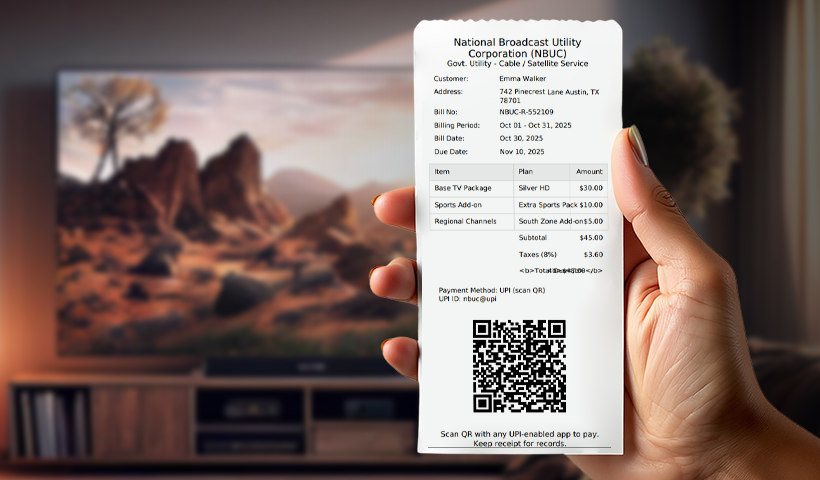
Make every interaction quick and traceable with scannable touchpoints. Residents go straight to what they need: payments, applications, issue reporting, information, or feedback. Your team also gets clear analytics on usage and outcomes.
Pay bills in seconds
Print a QR code on every bill so one scan opens a secure payment page with the account number already filled in. Residents pay faster, delays drop, and call volume goes down. You can also track scans and completed payments to measure impact.
New connections and KYC
Place QRs on flyers, field camps, and service counters to open an application form pre-filled with service area details. Applicants can upload KYC documents, choose appointment slots, and track status updates. This reduces errors and speeds up turnarounds.
Report outages and leaks
Put QRs on poles, pumps, and public boards so the report form captures location and time automatically. Residents can add photos or videos, and tickets are routed to the right depot with an instant acknowledgment sent to the reporter.
Tariffs and conservation tips
Run seasonal QR campaigns to promote energy and water savings. Update tips, tools, and calculators without reprinting materials. Share tariff changes, slab examples, and bill estimators, and measure which pieces get the most engagement.
Collect feedback fast
After a visit or call, share a QR that opens a 10-second CSAT or NPS survey. Responses auto-tag by team and area, and low scores trigger alerts for supervisors so you can close the loop quickly.
Make it easy to manage: use dynamic codes on a trusted domain and a platform like QRCodeChimp to bulk-generate and update links. These flows show qr code in utilities that remove friction for residents and your teams.
Scan-first safety, compliance, and cyber
Make safety, security, and compliance information available in one scan, so crews get what they need fast and you keep full control over access and auditing.
Put safety data one scan away
Link on-site signs to MSDS, PPE checklists, and confined-space entry steps. Show asset-specific hazards and isolation points. Keep pages short and mobile-first, and use compressed PDFs so crews can load them quickly in the field.
Lock down your QR ecosystem
Use a trusted custom domain with TLS. Protect linked pages with role-based access and strong authentication. Train field staff to spot tampering and QRLjacking. Print tamper-evident labels and include a human-readable short URL. Rotate links with dynamic codes and log every scan.
Speed up incident response
Post QRs for emergency contacts, depot numbers, and site maps. Include first-aid videos and step-by-step checklists. Auto-capture location and time on submissions to help dispatch faster.
Keep regulators in the loop
Give inspectors a QR to the latest permits, environmental clearances, and inspection certificates. Track which documents were viewed and when. Set review dates so nothing goes stale.
These guardrails make QR codes in utilities safe, auditable, and field-ready.
Scan-first training and SOPs
Make training and standard work easy to access in the field so crews learn fast, follow the right steps, and you keep proof of completion.
Micro-learning on every tool
Stick a QR on tools, vehicles, and panels. One scan opens a 60 to 90 second how-to video or step guide. Cache content for poor signal and compress files for quick load. Use version control so crews always see the latest SOP.
Quizzes that close the loop
After a toolbox talk, show a QR for a five question quiz. The system auto grades, records completion, and syncs to your LMS or HR system. Low scores are flagged to supervisors and prompt a quick refresher.
Guided starts for new hires
Create QR routes across depots and yards. Each stop includes a short video and a checklist. Capture photo proof, time, and location at critical steps. Wrap up with e-sign, PPE issued, and a first shift brief.
Make it workable fast
Use dynamic codes on a trusted domain and host mobile pages for videos and SOPs. Map fields to your LMS through a webhook or CSV. Standardize naming, owners, and review dates. A platform like QRCodeChimp helps you bulk generate and update without reprinting.
What improves
You get faster ramp up, fewer safety slips, and consistent SOP use at the asset.
Roll out in four steps
Start with a focused plan and build momentum as you prove results.
Pick your pilot
Choose three high-impact flows: asset tags, outage reporting, and bill payments. Set clear success metrics like scan-to-completion rate, MTTR shift, and payment completion. Limit the scope to one service area and two depot teams, and use dynamic codes on a custom domain.
Build the content
Create one mobile page per use case with short forms and large tap targets. Pre-fill known fields via QR parameters and show clear success screens. Compress PDFs and videos for quick load and keep files under 2 MB. Print a short URL and a helpline next to every code.
Set governance
Assign an owner for each code and landing page. Establish a naming convention such as Dept-UseCase-AssetID-Location-v01. Define SLAs so broken links are fixed within 4 hours and content updates happen within 2 days. Run monthly link checks and quarterly content reviews.
Scale with a platform
Use QRCodeChimp to bulk-generate dynamic codes, standardize label templates, and align with your brand kit. Keep a master registry with the code, URL, owner, status, and last review date. Train crews and call center staff on scan-first workflows, and upgrade to durable, weather-rated labels for field assets.
Quick KPI table
| KPI | Definition | Target for pilot |
|---|---|---|
| Scan analytics | Scans by location, time, device | Baseline in week 1 |
| Conversion rate | Conversions divided by scans | 25 to 40 percent |
| MTTR shift | Post minus pre MTTR | Reduce by 15 to 25 percent |
| Adoption rate | Active coded assets divided by total | 60 percent in 60 days |
Learn more: A Complete Guide to QR Code Analytics
Risks and guardrails
Make your QR program safe, consistent, and ready for audits.
Prevent phishing and spoofing
Use a trusted custom domain with HTTPS for every link. Keep landing pages clearly branded with your logo and name. Print a human-readable short URL next to each code. Apply tamper-evident labels and place codes where overlays are hard to stick. Train crews to spot fake stickers and report them on sight.
Stop content drift
Assign a clear owner for each code and page. Set review dates with automatic reminders for time-sensitive content. Show a visible “last updated” date and version on pages and PDFs. Archive old files and redirect retired links to a safe notice.
Provide offline fallbacks
Add a short URL and a helpline number near the code. Offer a text-only page that loads fast on weak networks. Cache key SOPs and forms on devices used in the field.
Respect privacy and consent
Collect only the information needed to serve the request. Explain the purpose, storage length, and who can see the data. Use clear consent text and require an explicit checkbox. Mask sensitive fields and auto-purge data on a set schedule. Log access and changes so audits are straightforward.
Conclusion
QR codes give you a simple, fast path to modernize public utilities. Start with 2 to 3 high-impact use cases, measure results like scan-to-action and MTTR, and scale what proves value.
- Pick focused pilots and a single service area.
- Build mobile pages, compress files, and brand clearly.
- Assign owners, set SLAs, and keep a live registry.
- Review monthly, improve links and content quickly.
You have a clear plan for QR code in utilities. Create your first dynamic QR code set with QRCodeChimp and launch a pilot in one service area today.
Frequently asked questions
What problems does a QR code in utilities actually solve?
It reduces field friction and customer effort. One scan pulls specs, SOPs, service history, or a payment/reporting form so crews stop guessing at the asset, and residents don’t wrestle with portals. You cut calls, repeats, and delays.
Where should we put the codes?
Tag every asset and touchpoint: meters, pumps, transformers, hydrants, lockers, vehicles, job cabinets, poles, bills, flyers, and public boards. Each QR opens what that moment needs: docs for crews, forms for residents.
Static vs. dynamic: What’s the difference and which should we use?
Static links never change and break when content moves. Dynamic codes keep the printed code the same but let you update the target URL anytime. Use dynamic for almost everything in utilities so you can fix content without reprinting.
What’s a practical way to start?
Run a small pilot in one service area with three flows: asset tags, outage reporting, and bill payments. Standardize templates (asset ID, location, owner, target URL), use dynamic codes, and set SLAs to repair links in 4 hours and update content in 2 days.
How do we train and enforce usage?
Make “scan first” the rule. Add short videos (60–90 seconds) per tool or panel, quizzes after toolbox talks, and guided QR routes for new-hire orientations. Sync completions to your LMS/HR so supervisors can close gaps fast.
Will this work across electricity, water, gas, and waste?
Yes. The pattern is the same: unique asset tags, pre-filled forms, safety steps on site, and clear customer flows. Start small, prove value with metrics, then scale to more assets and teams.
You may also like
Approval-Based Digital Business Cards: A Smarter Workflow for HR Teams
Discover how approval-based digital business cards help HR teams ensure branding consistency, prevent misuse, and manage employee cards at scale.
How a Consumer Electronics Brand Fixed Its Post-Purchase Gap Using Form QR Codes
Learn how a consumer electronics brand improved warranty registration and post-purchase engagement using Form QR Codes. Discover the strategy, implementation, and results.
QRCodeChimp’s Analytics Dashboard: A Step-by-step Guide
A guide to QRCodeChimp’s analytics dashboard. Leverage the unique advanced features and metrics to optimize your marketing campaigns.
Link Click Analytics in QRCodeChimp: How To Find Your Top Performing Links
Learn how to track link click analytics in QRCodeChimp, identify top-performing links, and optimize QR code campaigns using link-level insights and analytics.
Most Popular
Contact Sales
