QR code usage surged by over 323% between 2021 and 2024. On QRCodeChimp’s platform alone, over 6.6 million QR codes have been created, and more than 200 million scans have been registered since 2019.
The adoption curve is not flattening or declining; it is surging upward.
Using QR codes in 2026 is no longer a differentiator. It’s the norm. Businesses that haven’t integrated QR codes into their operations are leaving a proven revenue channel on the table.
But a QR code is just the touchpoint. The platform is what determines what happens next. And platforms have changed.
The better ones today aren’t just generators. They handle brand consistency across teams, integrate with existing IT systems, provide analytics that inform real decisions, and scale without creating operational headaches. The gap between a basic generator and a platform built for teams is significant and shows up quickly.
QRCodeChimp has been in this space since 2019. Since then, it has established itself as the platform of choice for teams and enterprises that need more than a QR code and a scan count: brand control, deployment infrastructure, compliance credentials, and analytics that actually mean something.
This review takes a close look at what QRCodeChimp delivers, what it does well, and honestly, where it can improve.
First Impressions
Before you even create an account, QRCodeChimp lets you into the full product. Browse solutions, try the builder, explore customization options, and preview the final QR code. No sign-up wall, no “start your free trial” gate. You just use it.
That’s not how most platforms work, and the contrast is noticeable. It tells you something about how confident the team is in what they’ve built.
Once you do sign up, the dashboard is busy in the best way. Everything is there: QR code management, analytics, forms, folders, subaccounts, and bulk operations. It could easily feel like too much. It doesn’t, partly because the layout is logical and partly because tooltips appear exactly where you need them, explaining what something does without sending you to a help article.
Someone with no prior experience on a platform like this can get up to speed quickly. For enterprise teams onboarding large numbers of users, low friction matters more than it might seem on paper.
Manage Your Team Without Losing Control with Subaccounts & Role-Based Access
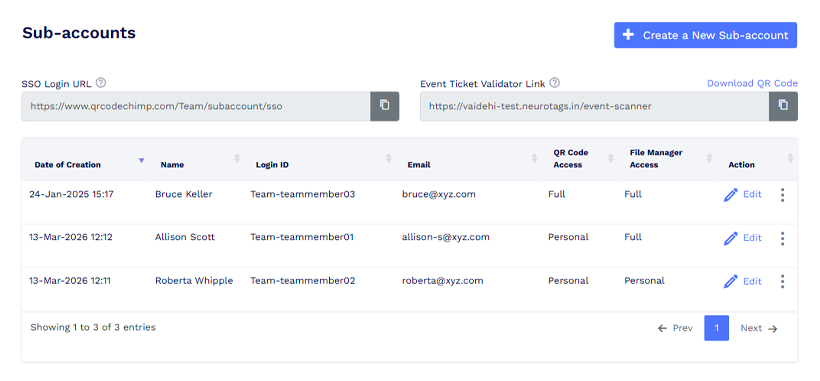
As your QR code initiatives grow, things can get messy fast. Multiple people are creating QR codes, uploading files, and making edits. Without some structure around who can access what, it’s easy to lose track or end up with someone overwriting work that wasn’t theirs.
QRCodeChimp handles this with subaccounts and role-based access. The setup is about as simple as it gets: create a login ID, add a name and email, and the user receives their credentials automatically. That’s it. They’re in.
The useful part is what you control after that. Each subaccount gets either full access, where they can see and manage everything in the account, or personal access, where they only see what they’ve created themselves.
The file manager has the same toggle. And critically, these two settings are independent. You can give someone full QR code access but restrict them to their own files. Or the reverse. Whatever matches how your team actually works.
It’s not a sophisticated permissions system, which enables you to keep a distributed team organized without turning access management into its own project.
Deploy QR Codes at Scale with Bulk Creation
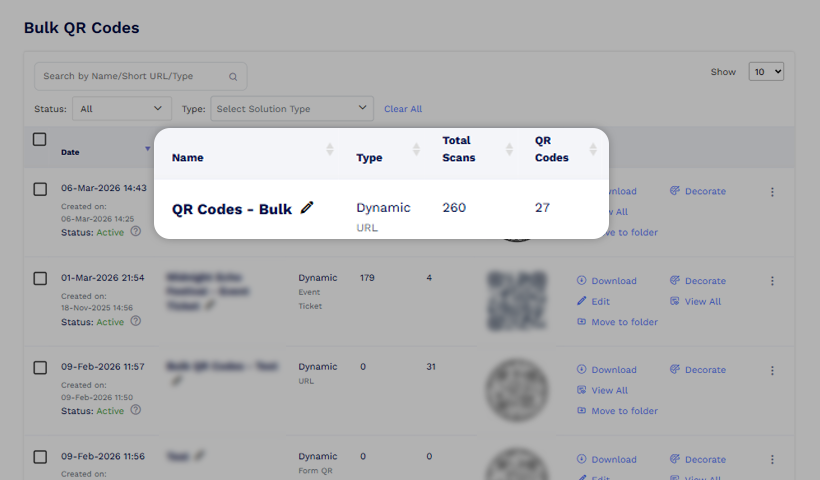
Creating QR codes one at a time is fine until it isn’t. The moment you’re looking at a product catalog, a multi-location rollout, or a campaign with hundreds of variations, manual creation becomes impractical.
QRCodeChimp gives teams two ways to handle scale.
The first is spreadsheet upload. Prepare your data in a CSV or Excel file, upload it, and the codes are generated in a single step. For teams creating QR codes across product lines or locations, this is the kind of feature that turns a day’s work into a few minutes.
The second is more interesting: an approval-based flow where users submit a form request and an admin approves it before the code is created.
This applies to page-type QR codes, such as event QR codes, product pages, PDF galleries, and multi-URL codes.
Most teams will gravitate toward one or the other depending on how they’re set up. Having both available is the right call.
Keep Everything Organized with Folders & Asset Management
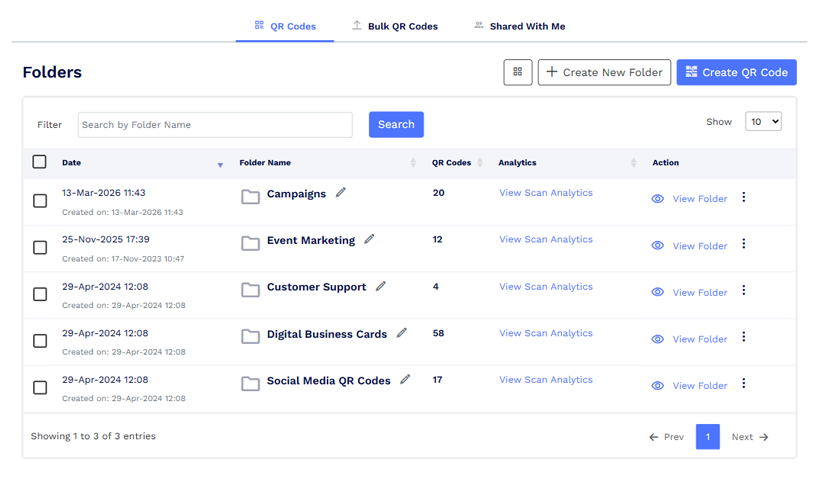
The bigger your QR code library gets, the more you feel the absence of structure. Folders are QRCodeChimp’s answer to that, and they’re more useful than they first appear.
You can organize QR codes into folders based on your use case: by campaign, location, team, or product line. Standard enough. What’s less standard is that each folder has its own access controls and analytics.
The access settings let you restrict who manages what without changing individual code permissions. The folder-level analytics let you see how an entire campaign or location is performing in a single view, rather than pulling numbers line by line and adding them up yourself.
For a marketing team running concurrent campaigns, or a business managing QR codes across multiple sites, that’s a genuinely useful combination. It keeps the library from becoming a flat list of hundreds of codes with no context.
Make Every Scan On-Brand with White Labeling & Custom Branding
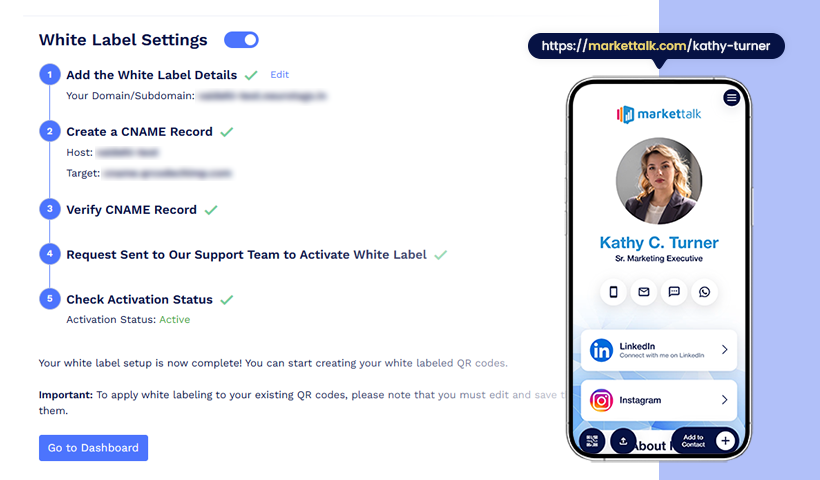
Two things can quietly undermine brand consistency in a QR code campaign. A URL that carries someone else’s platform name. And a QR code that looks like every other black-and-white square.
QRCodeChimp addresses both, and the depth here is one of the platform’s more distinctive features.
You can enable white labeling to replace QRCodeChimp’s default URL with your own domain on page-type QR codes. The landing experience carries your brand end-to-end. For agencies managing QR codes on behalf of clients, or enterprises where brand control is non-negotiable, this removes a detail that would otherwise be hard to explain to a client or a procurement team.
On the QR code itself, you can embed a logo, apply brand colors, and choose from a range of custom shapes.
The Image to QR feature takes it further: use your brand logo as a background, and the output looks like your logo has been converted into a QR code. It’s scannable, it holds up visually, and it’s the kind of thing that gets noticed when it appears on packaging or a display.
These features matter most when QR codes are customer-facing. When the code is part of how your brand shows up in the world, a generic square is a missed opportunity.
Turn Scans Into Decisions with Advanced Analytics
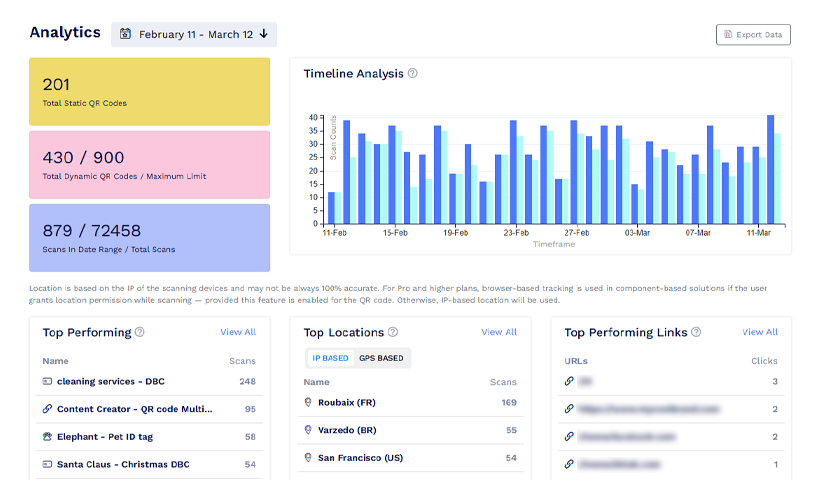
Most platforms give you a scan count. QRCodeChimp gives you something you can actually act on.
At the account level, you get:
- Total static and dynamic QR codes
- Total scans across any date range
- Top performing codes
- Top locations
- Top performing links
- Hour-of-day and day-of-week breakdowns
- Device and browser analysis
- Geographic data down to the country, state, and city level using both IP and GPS
The same depth is available at the individual code level. At the folder level, you get a consolidated view of the entire campaign without manually pulling numbers.
Most teams won’t use all of this all the time. But the teams that need it, marketing teams optimizing campaign performance, operations teams tracking field usage, leadership teams presenting QR code ROI, will find it genuinely useful rather than having to stitch data together from multiple places.
Higher tiers add daily email reports and Excel export for teams that need analytics feeding into existing workflows rather than a separate dashboard to check.
Collect Data and Capture Leads with Forms
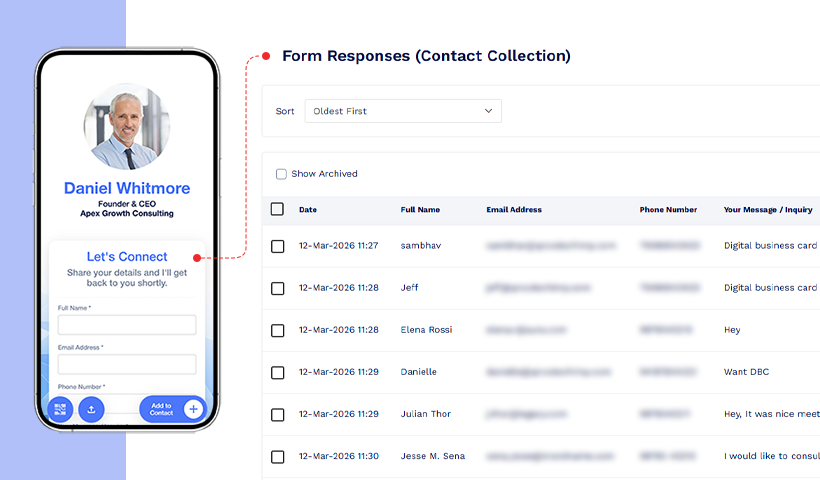
A QR code that just takes someone to a webpage is a one-way interaction. Forms are where it becomes a two-way one.
QRCodeChimp offers forms in two ways:
- A dedicated Form QR code solution when the form is the entire purpose of the scan, and
- A form component that can be added to any page-type QR code as either an inline element or an overlay.
Field types cover most real-world needs: text, email, phone, multiple choice, checkbox, date, time, dropdown, multiselect, and file upload. Responses go to the Form Responses section in the dashboard, organized automatically with no extra setup.
From there, you can use API invocation to route submissions to any third-party platform, whether that’s a CRM, a marketing tool, or an internal system. You can also use SMS invocation to send a real-time alert when someone submits.
For teams collecting leads at events, running customer feedback programs, or processing registrations across multiple locations, this is a meaningfully more capable setup than what most QR code platforms offer, even on their paid tiers.
Match Every Business Need with 30+ QR Code Solutions
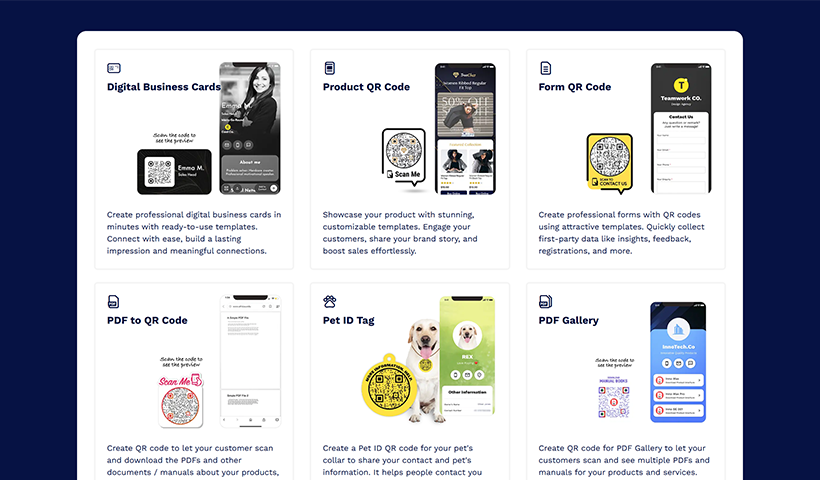
Rather than giving you a blank QR code and leaving you to figure out what it points to, QRCodeChimp offers purpose-built solutions for specific use cases. Over 30 of them.
The range is broad.
- Marketing: landing pages, coupons, social media, feedback, Google reviews.
- Events: ticketing, event pages, Google Calendar, meeting links.
- Content distribution: PDF, PDF Gallery, Image Gallery, Presentation, Video Preview.
- Operations: Menu, Payments, UPI, Google Maps.
- Professional use: vCard, Resume, App Download.
- And Smart QR Code, which routes people to different destinations based on device, day, or time of scan.
The practical value isn’t the number. It’s that each solution comes pre-configured with the right template and the relevant fields. A restaurant setting up a menu QR code doesn’t start from a blank page. An event organizer building a ticketing flow doesn’t configure it from scratch. The platform handles the structure. The team handles the content.
Get Seamless IT Approvals with SOC-2 Certification and GDPR Compliance
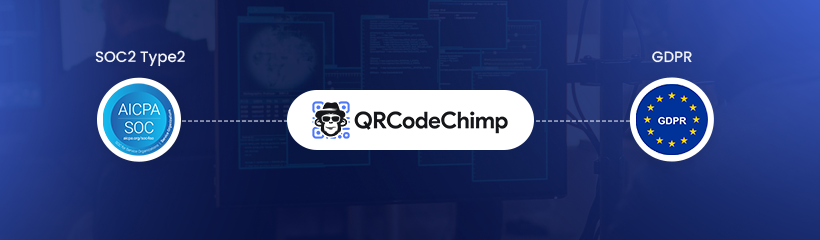
Security pages on SaaS platforms can be thin. A few buzzwords, a padlock icon, and a vague mention of enterprise-grade infrastructure. QRCodeChimp’s credentials are more substantive than that.
The platform is SOC-2 certified, which means an independent auditor has reviewed its security, availability, and data confidentiality controls. It’s not self-declared.
It’s GDPR-compliant, indicating that the platform meets the data protection standards that matter to European customers and to any organization handling their data. For teams operating across regions or selling into enterprise accounts, these are real requirements.
Data is encrypted in transit and at rest. SSO login connects QRCodeChimp to your existing identity provider, keeping access management consistent with the rest of your IT stack. The Data Processing Agreement documents exactly how data is handled and stored, which reduces the back-and-forth that procurement and legal teams typically generate when evaluating a new vendor.
Overall, QRCodeChimp is built to gain IT and security approvals fast.
What Does It Actually Cost: Pricing
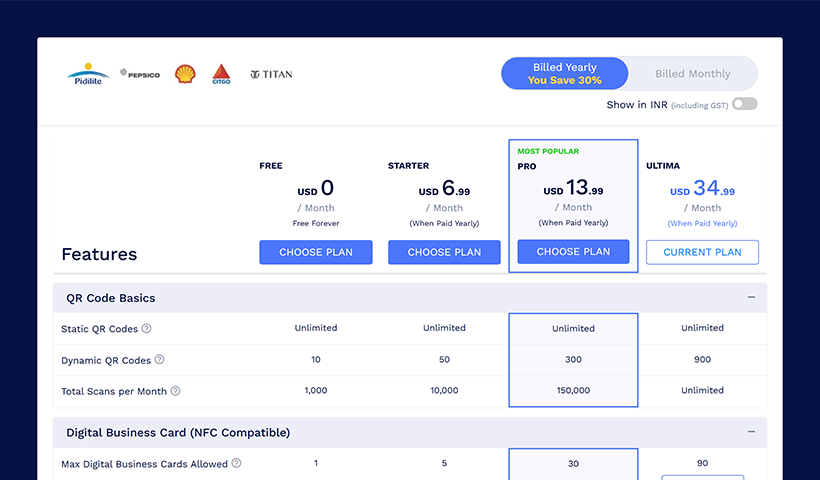
The free plan is worth starting with, not just as a trial, but as a working tier. 10 dynamic QR codes, unlimited static codes, basic analytics, and full QR code customization, including shapes, colors, and logo embedding. For an individual or a small team, that’s a functional setup before spending anything.
Starter is $6.99/month annually ($9.99/month monthly): 50 dynamic QR codes, UTM tracking, ads and analytics integrations, and priority support. Enough for a small business running a few active campaigns.
Pro at $13.99/month annually ($19.99/month monthly) is where it becomes a real team product. 300 dynamic QR codes, advanced analytics with precise location tracking, bulk upload, 2 subaccounts, 10 folders, API and SMS invocation, and event ticket sharing. The jump from Starter to Pro is significant. Most teams with more than one person managing QR codes will feel it immediately.
Ultima at $34.99/month annually ($49.99/month monthly) adds white labeling, 900 dynamic QR codes, unlimited scans, 4 subaccounts, 50 folders, analytics Excel download, and high-priority support with a virtual meeting option. For agencies and enterprises that need the platform behind their own brand with room to operate at scale, this is the right tier.
Ultima scales up to 5x for organizations that need more volume, and an Enterprise plan is available with custom pricing and dedicated support. Annual billing saves 30%, and the first purchase comes with a 15-day full refund guarantee, which removes most of the risk from committing upfront.
The pricing model rewards scale. It’s structured around QR code volume and team infrastructure, not around gating features behind the highest plan.
Where It Falls Short
No honest review skips this part.
QRCodeChimp doesn’t have the brand recognition of some of the more heavily marketed tools in this space. If you asked a random group of marketers to name a QR code platform, this one might not come up first.
That’s not a reflection of what the product can do, but it does mean you’re less likely to stumble across it organically. It’s the kind of platform you find when you’re actually looking, not one that finds you.
The dashboard is comprehensive, which is both a strength and a caveat. There’s a lot there, and on first login, it can feel like a lot to take in. The navigation is logical once you’ve spent some time with it, and the tooltips help, but there’s a genuine ramp-up period.
Users who just want to create a single QR code quickly may find the interface more involved than they expected. Give it some time, and it clicks. But that initial impression is worth acknowledging.
Verdict
QRCodeChimp is a well-built platform that earns its reputation among teams that have tried to manage a QR code program on something less capable.
The analytics depth is real. The team infrastructure, subaccounts, access controls, folders, and bulk creation are designed for organizations that actually need to run a QR code program, not just generate occasional codes. The security credentials hold up to scrutiny. The 30+ purpose-built solutions reduce setup time in ways that compound when you’re operating at scale.
It’s not the simplest tool in the category. If you need one QR code for one purpose and nothing else, there are lighter options. But for teams and enterprises that need a platform they can actually build a program around, QRCodeChimp is a serious choice. It’s been doing this since 2019, and the product shows it.
You may also like
How to Make a QR Code for a Link?
Explore how to create a QR code for a link like your website, social media, or YouTube. QR codes will enhance traffic and engagement on your digital platforms.
QR Tiger Alternative: Why Are Teams and Brands Moving to QRCodeChimp
Compare QR Tiger and QRCodeChimp to find the better QR code platform. Discover key differences in features, pricing, analytics, and more to make the right choice.
Top 10 Free QR Code Generators to Help You Market in 2026
The most important aspect of using QR codes for your business is selecting the right QR code generator. Here are ten free QR code generators to help you get started.
QRCodeChimp Delivers a Better Digital Business Card Experience Than POPL
Discover why thousands choose QRCodeChimp over POPL. More design control, better security, flexible pricing, and a friction-free digital business card experience.
Most Popular
Contact Sales
