HR teams often need to issue digital business cards to specific groups of employees. Sales teams need them. Recruiters need them. Leadership needs them. But many other employees do not.
The challenge is straightforward: how do you create digital business cards for selected employees without manually designing each one or allowing unauthorized versions to be created?
QRCodeChimp already supported individual and bulk digital business card creation. But many organizations wanted a more controlled process where employees submit their details through a form, and HR approves the request before a card is generated.
That is exactly what the new approval-based digital business card workflow delivers. Here is how this update works and how it helps HR teams create cards at scale with greater control and efficiency.
- The Challenge: Employees Need Cards, HR Needs Oversight
- The Solution: QRCodeChimp’s Approval-Based Digital Business Card Workflow
- Step-by-step: How to set up approval-based workflows for creating digital business cards
- Benefits of approval-based digital business cards for HR managers
- Wrap up
- Frequently asked questions
The Challenge: Employees Need Cards, HR Needs Oversight
Let’s look at some issues HR teams may face while creating employee digital business cards at scale.
No streamlined request-and-approval process for digital cards
Many organizations want digital business cards only for selected employees. But without a proper request system, HR ends up creating cards manually or managing scattered spreadsheets. HR teams need a simple way for employees to submit their details and a structured process to approve requests before a card is created.
Inconsistency in fields, design, and branding
If employees create their own digital business cards independently, they may use different layouts, colors, or structures. The result is conflicting brand versions, creating a confusing experience for clients, partners, and anyone interacting with your team.
Keeping a track of all digital cards
As the organization grows, tracking every employee’s card becomes harder. Manual monitoring is prone to missed errors, duplicate cards, and outdated information that can reflect poorly on the company.
Only if there were a streamlined process for approving creation requests, right?
Keep reading, because that’s exactly what this update allows you to do. 🤩
The Solution: QRCodeChimp’s Approval-Based Digital Business Card Workflow
QRCodeChimp lets you create approval-based workflows for digital business cards.
You start by creating a bulk batch that serves as the master template, then generate a form from it. Employees submit their details through this form, and you choose whether their cards are created instantly or only after HR approval.
This gives employees a simple way to request cards while keeping full control in HR’s hands.
Let’s look at the key highlights of this new feature:
- Employees submit their details through a structured form.
- HR can approve or reject requests before a card is created.
- Keep the fields consistent for all the cards.
- Every created card stays organized inside a bulk QR code.
- The entire system scales easily, even for large teams.
How does it benefit HRs and reduce their overhead?
This workflow significantly reduces manual effort for HR while keeping the entire process structured and controlled. Instead of tracking who needs a digital business card and creating each one manually, employees submit their own details through a simple form whenever they need a card.
HR no longer has to maintain lists, follow up over emails, or manage scattered requests. If approvals are enabled, HR simply reviews the submission and approves it. Once approved, the digital business card is created automatically using the predefined template and shared with the employee.
This approach keeps all cards consistent and compliant while allowing employees to generate cards on demand. HR maintains full oversight without micromanagement, making the system easy to scale even as teams grow or roles change frequently.
By shifting card creation to employees and limiting HR’s role to simple approvals, this workflow significantly reduces HR workload and ongoing administrative overhead.
Step-by-step: How to set up approval-based workflows for creating digital business cards
Setting up an approval-based workflow for creating digital business cards is easier than you think. Just follow these simple steps to get started.
Step 1: Create the structure for your digital business cards
In this step, you’ll create a digital business card structure that will be followed for all the digital cards your employees create. Think of it as a master template.
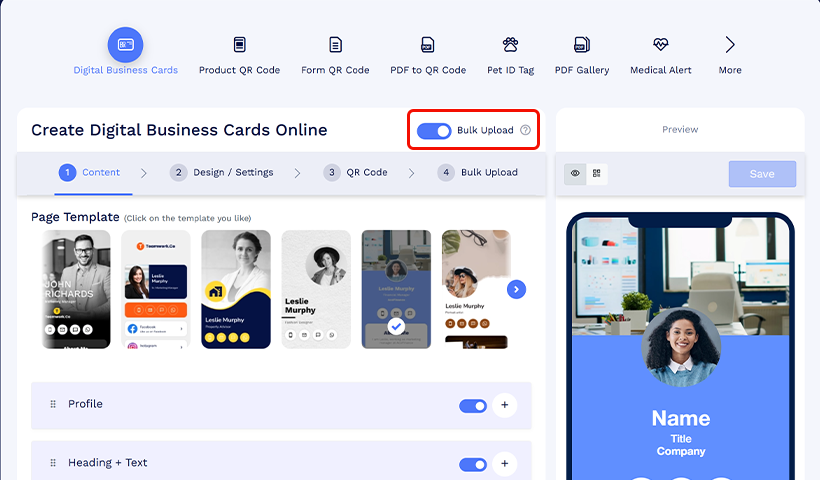
1.1 Go to the Digital Business Card solution and enable bulk upload.
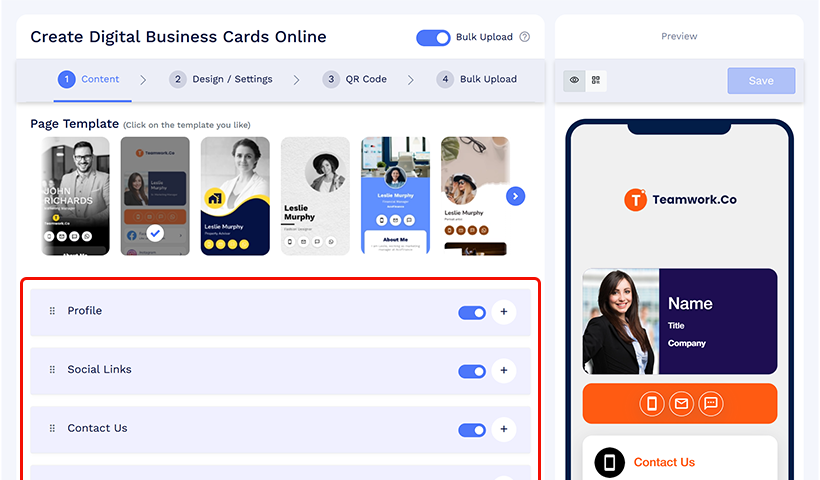
1.2 On the Content tab, create and manage the structure of your digital business cards by adding, removing, or rearranging fields based on your requirements and design preferences.
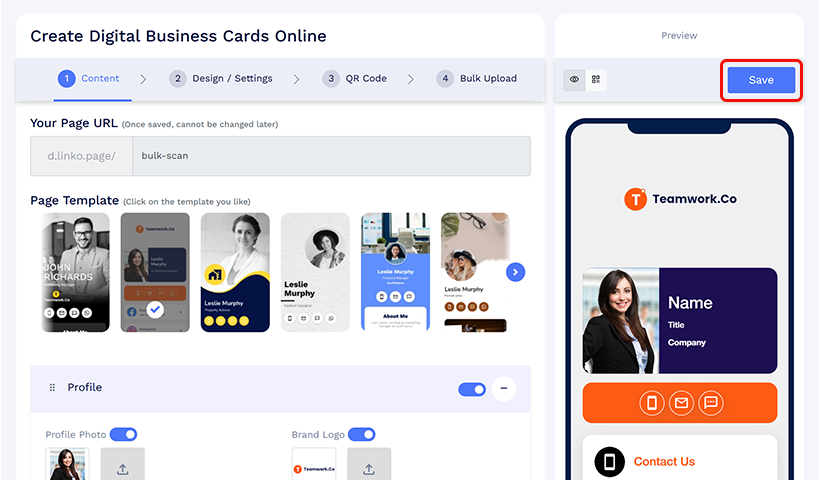
1.3 Save the bulk QR code batch.
Step 2: Create a form with digital business card fields
After saving your bulk, go to the Form QR code solution and follow these steps.
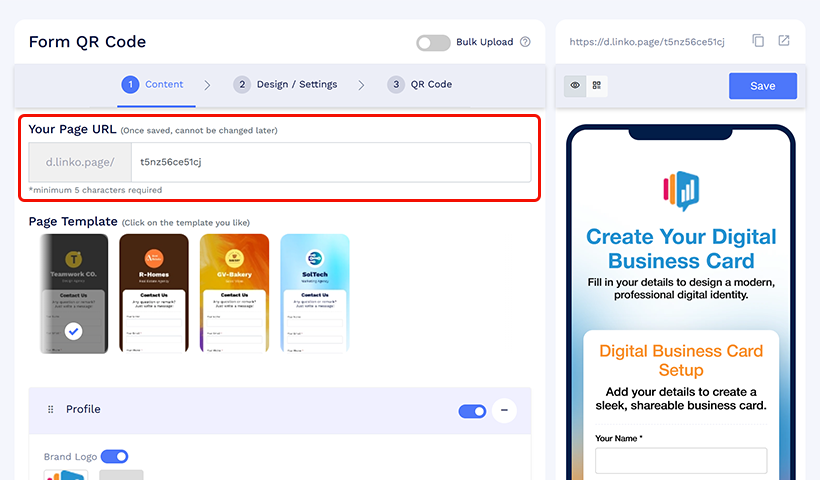
2.1 Pick the page code (URL) and design for your form.
2.2 Add the form fields. Make sure these fields match the ones you added to your digital business card structure.
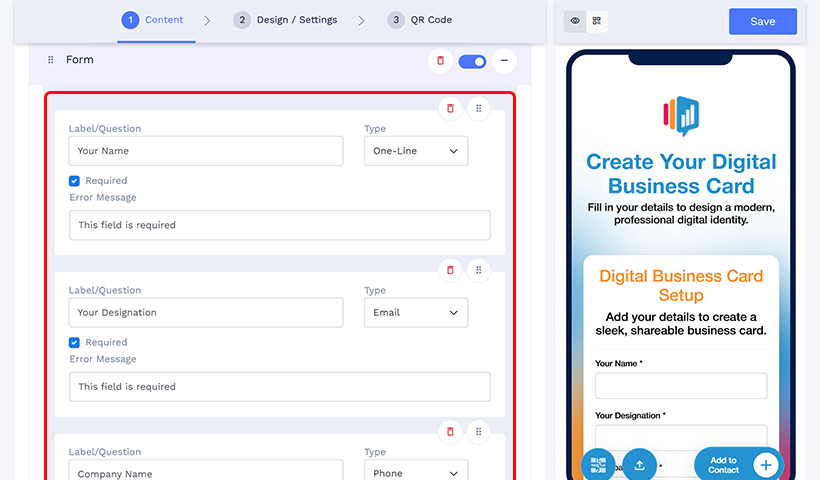
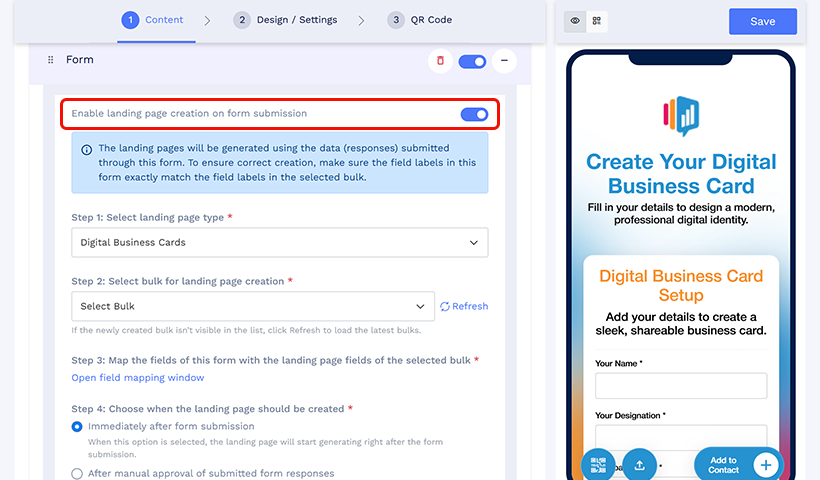
2.3 Enable the “Enable landing page creation on form submission” option.
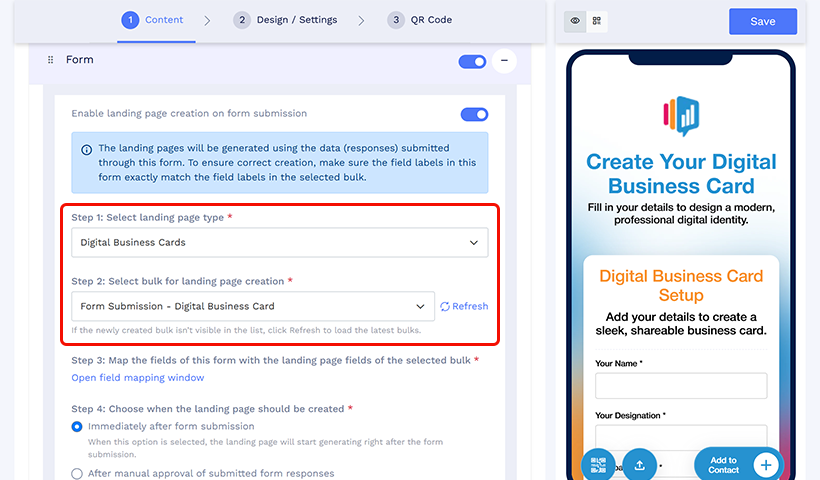
2.4 Set the landing page type to Digital Business Cards, select the bulk that you recently saved in the previous step.
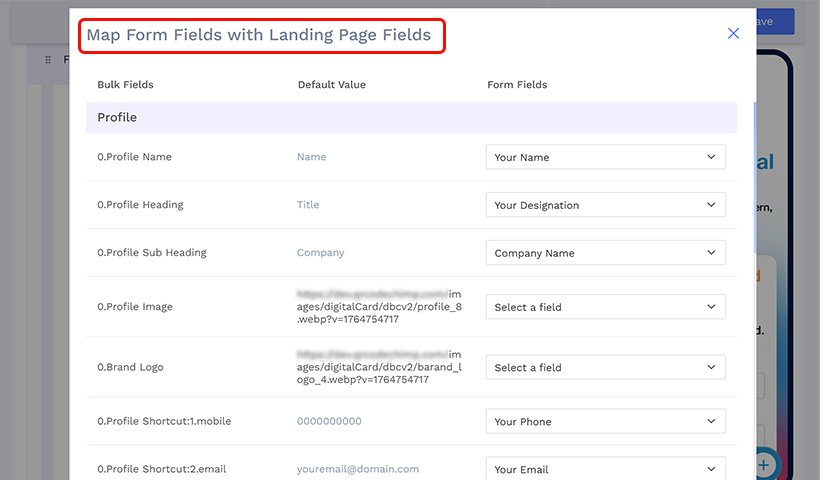
2.5 Click “Open field mapping window” and map your form fields to the fields of your digital business card.
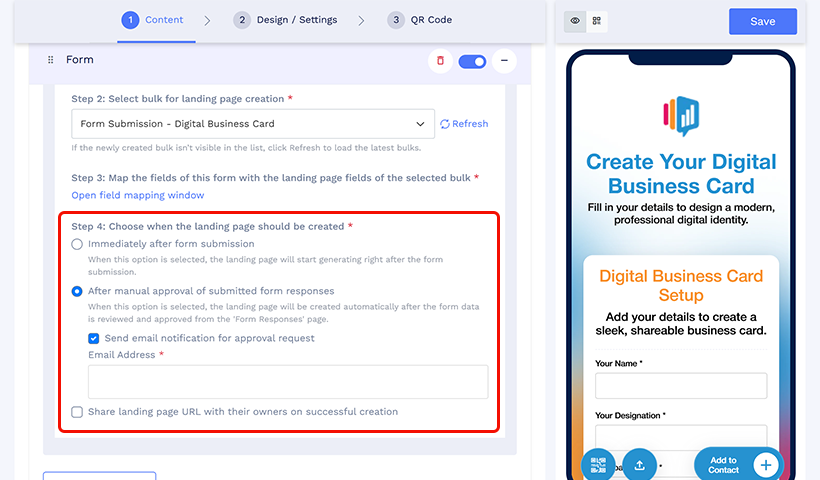
2.6 Choose whether you want the digital business cards to be created immediately after form submission or after manual approval from your side.
2.7 Save the Form QR code and share the URL with your employees.
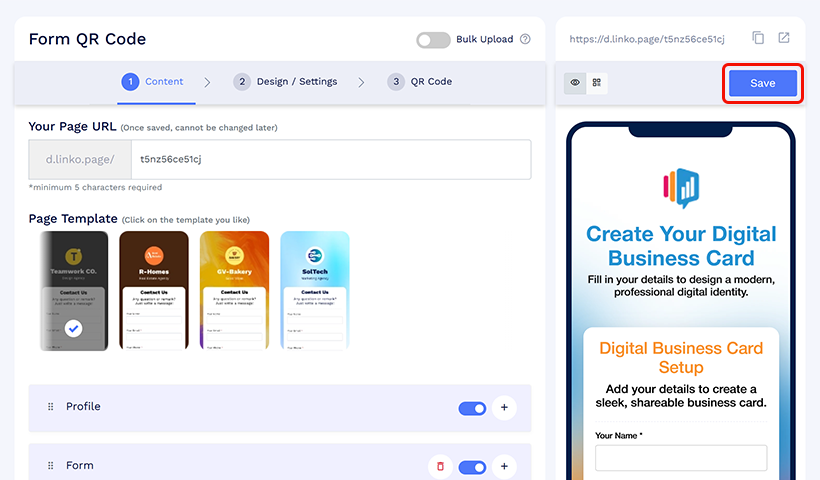
Note: If you want to update the design, fields, or structure of your digital business card, first update the card template. Then update the form to include the new fields and map them correctly. Once you save these changes, they will apply to all existing and future digital business cards created through that form.
Step 3: Approve digital business cards creation
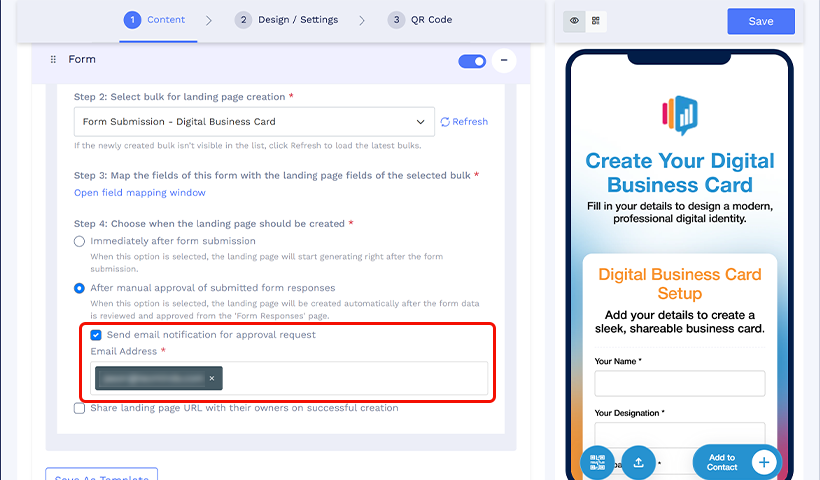
3.1 In the “Choose when the landing page should be created” section, select “After manual approval of submitted form responses.”
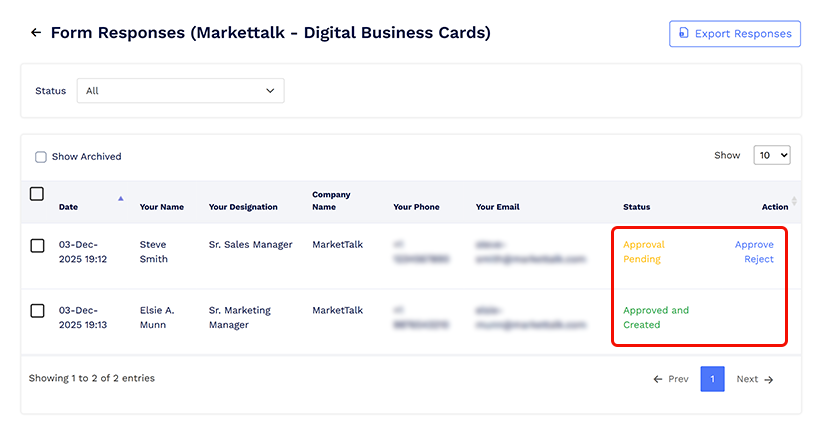
3.2 Go to “Form Responses“ and identify the correct form using the “Form Name“ you entered during creation. Click “View Responses” to view all the submissions, then Approve or Reject them as needed.
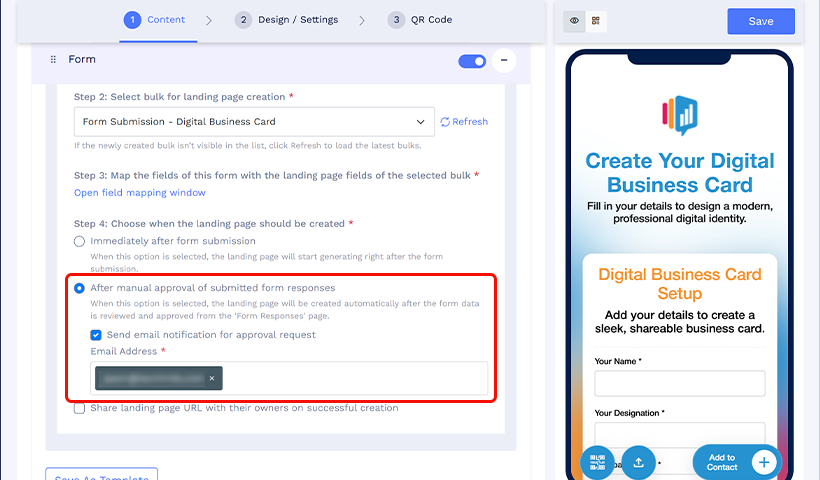
3.3 To get email notifications when someone submits a form, enable the “Send email notification for approval request” option and add the email ID on which you want to receive the emails.
Once you approve the request, the digital business card is sent to the respective card owner via email. The record for each newly created card gets added to the bulk record sheet, allowing you to manage everything in one place.
With this workflow, HR does not need to proactively manage card creation. Employees request digital business cards only when needed, and HR simply approves them. This eliminates manual tracking and reduces ongoing administrative work.
Note: If HR approval isn’t needed, you can disable the “After manual approval of submitted form responses.” Just share the form with the employees, and they can submit it to generate their digital business cards without the need for any HR intervention.
Benefits of approval-based digital business cards for HR managers
An approval-based workflow gives HR teams the structure they need while still keeping the process easy for employees. Here are the key advantages.
✅ Card creation based on request and approval (with minimal HR effort)
Employees can submit their details through a simple form, and HR can approve each request before a digital business card is generated. This ensures only the right employees receive cards without manual tracking or scattered information.
HR no longer needs to track who needs a card or manually create one. Employees initiate requests, and HR simply approves them, reducing day-to-day workload.
🎨 Maintain consistency in design, structure, and card fields
Every card follows the same layout and brand style. HR sets the template once, and every employee card stays aligned with company standards.
⚠️ Oversee card creation and reduce the risk of misuse
HR reviews each submission before a card is created, preventing unauthorized or incorrect information from being published.
💻 Manage all created digital business cards in one place
All cards stay connected to the same bulk batch. HR can view, filter, and manage them from a single spreadsheet without sorting through scattered emails or files.
💼 Enable faster onboarding for new employees
New hires fill out the form, and HR approves their card quickly. No manual design work, no delays, and no inconsistencies.
Wrap up
Approval-based workflows reduce HR workload by eliminating manual card creation, follow-ups, and tracking. Employees request cards through a simple form, and HR reviews and approves them while maintaining complete control.
This update gives HR teams a cleaner, more reliable system for creating and managing employee cards at scale. It prevents misuse, reduces errors, and maintains your company’s identity across every card.
Frequently asked questions
Can HR control which employees are allowed to request digital business cards?
Yes. HR controls access by sharing the form only with specific teams, departments, or internal channels. Even if the form is shared broadly, no digital business card is created unless HR approves the submission (when approval is enabled), ensuring only authorized employees receive cards.
What happens if an employee submits incorrect or incomplete information?
HR can review the submission in the Form Responses section and reject it if corrections are needed. The card is not created until the request is approved, preventing inaccurate or non-compliant cards from being published.
How does this workflow prevent employees from creating unauthorized card designs?
Employees never design their own cards. They only submit information through a structured form. The final digital business card is generated exclusively from HR’s predefined template, eliminating the risk of off-brand layouts, colors, or fields.
Where can HR track all approved and rejected card requests?
All submissions and created cards are tracked inside the bulk QR code record sheet and Form Responses dashboard. HR can view approval status, filter entries, and manage all employee cards from one centralized location.
Is HR approval mandatory for every digital business card request?
No. HR can choose whether cards are created immediately after form submission or only after manual approval. This flexibility allows teams to enable approvals for sensitive roles while allowing instant creation for trusted groups if needed.
You may also like
How to Use QR Codes for Study Materials, Syllabus, and Assignments
Learn how to use QR codes for education to share syllabi, assignments, and study materials. Simplify access, save time, and track student engagement.
Simplifying Document Access in Real Estate with QR Codes
Learn how QR codes simplify real estate document access. Share brochures, disclosures, and closing files securely with dynamic, trackable QR codes.
How to Build Meaningful Connections at Conferences
Build meaningful connections at conferences with these practical networking tips. Learn how to start authentic conversations, follow up, and nurture professional relationships.
When Excel Broke: How QRCodeChimp Simplified Digital Business Cards for a Fast-Growing IT/ITES Enterprise
Discover how a fast-growing IT/ITES enterprise replaced Excel uploads with QRCodeChimp’s form-based automation to create branded digital business cards faster, with HR control.
Most Popular
Contact Sales
