Today’s mobile-first business environment demands a strong social media presence, which can elevate personal or professional branding by several notches. However, maintaining all your social media profiles and encouraging your prospects to connect across several platforms can be a struggle.
However, your audience is unlikely to jump between multiple platforms, so your efforts to boost engagement may lose impact.
What if there’s a better approach?
Introducing the social media QR code – a perfect solution for businesses with multiple social media handles. It consolidates all your social media profile links in one QR code so your audiences can access them with just a single scan.
Social media QR code makes it easier for users to connect with you, allowing you to get new followers and increase brand visibility.
Intrigued? Read this article to learn how to create a single QR code for all your social media accounts.
Steps to create one QR code for all your social media accounts
Log in to your QRCodeChimp account, visit the QR Code Generator for Social Media page, and follow these steps to create a social media QR code.
1. In the “Content” tab, enter a page code for your landing page under Your Page Code. The page code will be the URL of your social media landing page. If you skip this step, our system will generate the page code for you.

Note: The page code cannot be changed after saving the QR code.
2. Scroll down to Page Template, and choose a page template for your page.

3. Head to the Profile section, and add your profile photo, name, heading, and description.

4. Move down to the Heading + Text section to add a heading and description for your landing page.

5. Head to the Social Links section, and add the social media profiles you want to add. Click on ‘Add Link’ to add more social links.

6. Scroll down to the Contact Us section and enable it if you want to share your contact information. Then click on the “+” icon beside the toggle to add your contact details.
7. Click on the Add Component button to add more components, like forms, appointment calendars, and products, to your social media landing page.

8. Once done, click on Next to go to the “Design/Settings” page.

9. In the Background Image section, select the background image or video for your landing page.
10. Then, scroll down and choose a Color, Font Style, Card Style, and Page Loader. You can also use a custom CSS by adding it in the Custom CSS section.
11. Enable UTM Tracking if needed, review your Page Settings, and enable Passcode Protection if you want.
12. If you prefer to use this page design in the future, you can click on Save this Style, and it’ll appear later under the Saved Style tab.
13. Once done, click on Next to go to the “QR Code” tab.
14. Under Customize QR Code, customize your social media QR code using shapes, colors, stickers, and your brand logo.
✍🏻 Note: After making changes, click the ‘x’ icon on the ‘Customize QR Code’ popup to update and save the changes.
15. Once done, click Save, give a name to your QR code, select a folder if needed, and click Save again to save your QR code.
That’s it. Your QR code is saved and ready to share. You can find your saved QR codes in your dashboard.
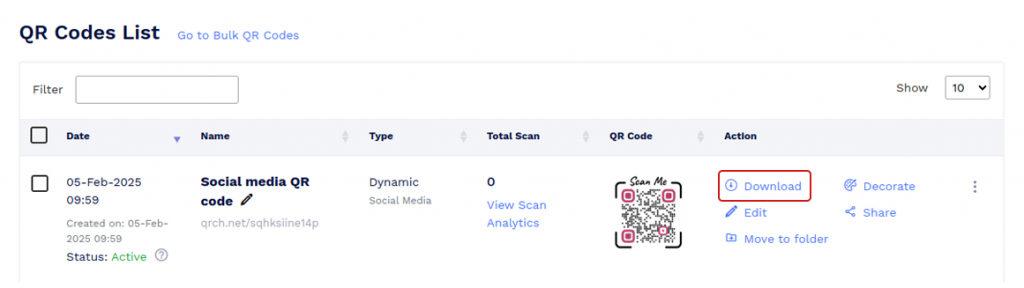
📌 Note: Scan your QR Code from different devices (iOS and Android) before printing for production.
Why Choose QRCodeChimp’s Social Media QR Code
QRCodeChimp’s Social Media QR Code gives you a powerful way to turn every scan into meaningful engagement. It brings your social presence, brand content, and customer actions together in one seamless micro-page that’s easy to build and impossible to ignore.
Whether you want more followers, more leads, or more customers, this solution helps you create the perfect journey in seconds.
Let’s look at the powerful capabilities of our social media QR code solution.
✅ A unified social hub that puts all your profiles front and center.
✅ Rich media components that showcase your brand with eye-catching images and videos.
✅ Brand-aligned customization that lets you design a page that feels uniquely yours.
✅ Instant contact options with buttons, maps, and cards that make reaching you effortless.
✅ Trust-boosting testimonials and reviews that influence customer decisions.
✅ Product and offer highlights that promote your items and drive stronger conversions.
✅ High-intent lead forms that help you capture interest right at the moment of discovery.
✅ Scheduling and booking tools that simplify appointments and reduce drop-offs.
✅ Real-time editing that lets you update your content anytime without changing the QR code.
Benefits of using one QR code for all social media profiles
Here are a few benefits of using a social media QR code:
✅ Convenience for users: Users can easily find and follow all your social media profiles without searching for each one individually.
✅ Increased engagement: Streamlining access to your social media platforms will make you more likely to gain followers and interactions.
✅ Easy promotion: QR codes simplify marketing efforts for events, products, or services.
✅ Dynamic updates: If your social media URLs change, you can update the landing page without reprinting the QR code.
✅ Multiple platform promotion: Encourage users to connect with you across multiple platforms, expanding your online presence.
🧐 Explore more: What is a Social Media QR Code and Why You Should Have One?
Who should use one QR code for all social media accounts
Social media QR code benefits everyone looking to increase followers and engagement. A few of them are:
✅ Businesses and brands: Businesses can use social media QR codes to direct customers to specific campaigns running on their social media pages.
✅ Content creators and influencers: Social media QR code benefits content creators, influencers, virtual trainers, and freelancers. These QR codes enable them to easily share their social media profile links and encourage people to follow them instantly.
✅ Nonprofits and activists: Nonprofit organizations can use QR codes to share campaign updates and for fundraising drives where donations can be made with a simple click on social media accounts.
✅ Artists and musicians: Artists can use these QR codes to direct fans to their latest works on TikTok, Instagram, or other social media accounts.
✅ Restaurants and cafes: Place QR codes on menu cards or tables for customers to follow you on social media for discounts and other updates.
✅ Event organizers: These people can use QR codes to increase engagement among attendees. QR codes can be scanned by attendees at the event to get complete updates on event happenings and for photo sharing on social media.
Conclusion
Creating a single QR code that links to all your social media accounts efficiently centralizes your online presence. You can seamlessly direct your audience to all your profiles in one scan using a QR code generator and a landing page service. This saves time for potential followers or clients and enhances your networking capabilities.
Frequently asked questions
Can I link multiple social media accounts to one QR code?
Yes, you can link all your social media accounts to one QR code. You can create a social media QR Code for this.
Is creating a social media QR code free?
Yes. With QRCodeChimp, you can create a social media QR code for free.
You may also like
Approval-Based Digital Business Cards: A Smarter Workflow for HR Teams
Discover how approval-based digital business cards help HR teams ensure branding consistency, prevent misuse, and manage employee cards at scale.
How a Consumer Electronics Brand Fixed Its Post-Purchase Gap Using Form QR Codes
Learn how a consumer electronics brand improved warranty registration and post-purchase engagement using Form QR Codes. Discover the strategy, implementation, and results.
QRCodeChimp’s Analytics Dashboard: A Step-by-step Guide
A guide to QRCodeChimp’s analytics dashboard. Leverage the unique advanced features and metrics to optimize your marketing campaigns.
Link Click Analytics in QRCodeChimp: How To Find Your Top Performing Links
Learn how to track link click analytics in QRCodeChimp, identify top-performing links, and optimize QR code campaigns using link-level insights and analytics.
Most Popular
Contact Sales
