Networking in music rarely happens at a desk. It happens between sets, backstage, in crowded rooms, or during conversations that last less than a minute. You meet the right person, exchange a few words, and then move on. If sharing your details is slow, awkward, or forgettable, the opportunity usually ends there.
Paper business cards don’t hold up in these environments. They get lost, go out of date after your next release, and can’t carry your sound, visuals, or work. Links shared later are easy to ignore, and follow-ups often never happen.
A digital business card for musicians replaces that fragile handoff with a single scan or tap. It lets you share your music, booking links, and press assets instantly, while the connection is still warm. Because the card updates in real time, you set it up once and keep using it. New single out, tour dates added, EPK refreshed – everything stays current without reprinting or resending links. Every introduction leads somewhere concrete, not to a forgotten piece of paper.
What your digital card should actually do
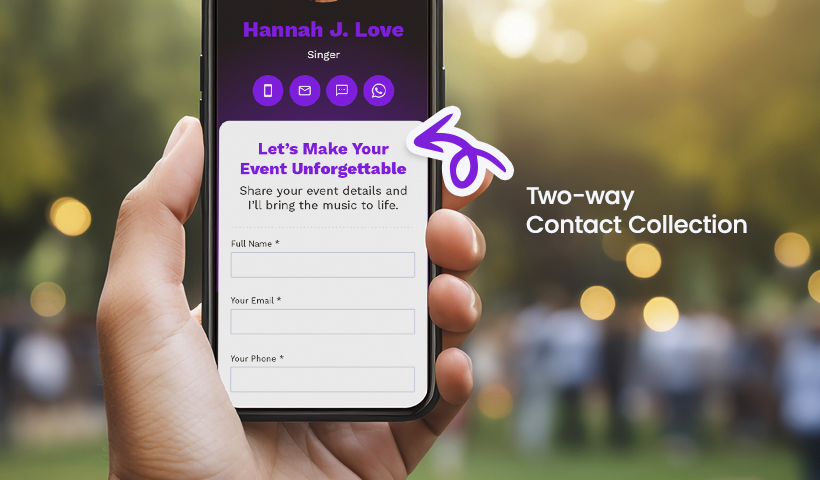
A digital business card needs to hold up in real situations, not just look polished on a screen. At a merch table, backstage, or in a quick hallway exchange, sharing has to take seconds. QR and NFC make that possible, while saving the card to Apple Wallet or Google Wallet keeps it accessible even when connectivity is unreliable.
More importantly, the card should work as a compact profile. It should give context fast: who you are, what you sound like, and what the next step is. A short bio, strong visual, press quote, and clear actions like Listen, Book a show, or Request stems remove friction for bookers and collaborators. Embedding audio or video ensures your sound is part of the first interaction, not an afterthought.
Finally, it must remain flexible. You should be able to update links anytime, protect unreleased demos or private EPKs with a passcode, and time-bound campaigns so pre-saves or premieres appear and expire automatically. A digital business card from QRCodeChimp supports this by letting you manage updates, access, and visibility from a single dashboard, so your digital presence stays current as your work evolves.
Digital business card playbooks by role
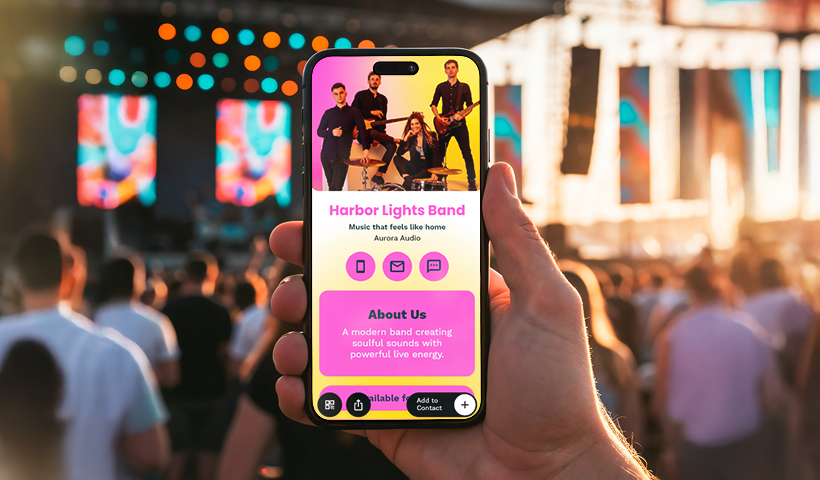
A digital business card for musicians is not one-size-fits-all. Tailor the card to your role so that every scan automatically triggers the next step.
Solo artists
Use your face and a one-line hook.
- Add: hero image, 60–90 word bio, genre tags, top track link, EPK, socials.
- CTAs: Listen, Book a show, Join street team, Tip jar.
- Extras: passcode EPK for buyers, Wallet pass for quick sharing.
Bands
Give a clean snapshot that works for any member.
- Add: group photo, short stage plot PDF, tech rider, city list, upcoming dates.
- CTAs: Book the band, Press photos, Advance the show.
- Extras: one shared white-label URL, member links tucked inside a submenu.
Managers and agents
Make routing painless for buyers.
- Add: roster grid, territories, holds calendar, stage sizes served, and fee range bands.
- CTAs: Hold a date, Request a quote, EPK bundle download.
- Extras: form logic that tags inquiries by artist and city for pipeline tracking.
Labels and A&R
Surface what helps decisions, hide what does not.
- Add: priority releases, one-sheet PDFs, streaming growth stats, and short wins list.
- CTAs: Pitch a demo, Request stems, Schedule a call.
- Extras: private A&R cards with passcode for early listens and deal docs.
Producers and songwriters
Lead with sound, then workflow.
- Add: 4–6 track reel, genre specialties, DAWs, turnaround time, publishing splits note.
- CTAs: Request session, Send brief, Licensing inquiry.
- Extras: form to collect key, tempo, reference tracks, and budget range.
Session players
Make availability and rates clear.
- Add: reel, gear list, styles, travel radius, rate card, endorsements.
- CTAs: Check availability, Hold a date, Send chart.
- Extras: calendar view, auto-reply with a file-upload link for charts and stems.
Live crew and engineers
Show competence and safety first.
- Add: roles covered, consoles and rigs, certifications, tour history, day rates.
- CTAs: Advance details, Hire for run, Emergency sub request.
- Extras: downloadable input list template and quick-share contact as Wallet pass.
DJs
Keep it fast for nightlife bookings.
- Add: mixes, genres, booth needs, set lengths, residencies, and press shots.
- CTAs: Book tonight, Request rider, Media kit.
- Extras: time-boxed links for guestlist forms that open during event week.
Music educators
Reduce friction for new students.
- Add: lesson formats, levels taught, instruments, scheduling policy, and pricing.
- CTAs: Trial lesson request, Join waitlist, Parent FAQ.
- Extras: intake form that feeds a sheet; auto-confirmation with materials checklist.
Publicists and promo teams
Make press pulls and pitches easy.
- Add: current campaigns, press releases, photo drive, talking points, coverage links.
- CTAs: Request interview, Download press kit, Add to media list.
- Extras: link-level analytics to see which outlets click which assets.
Venues and promoters
Help artists and agents self-serve.
- Add: specs, backline, capacity, stage plot, settlement details, promo assets.
- CTAs: Submit a hold, Send advance, Download venue pack.
- Extras: QR at the box office for set times and a post-show feedback form.
Music students and emerging artists
Keep it simple and credible.
- Add: short bio, two best tracks, performance clips, mentor references, goals.
- CTAs: Book a small gig, Request feedback, Collaboration inquiry.
- Extras: private link for in-progress demos so you can share selectively.
Pro tip: build one master template, then clone and tweak per role. Keep the first two CTAs context-specific, place admin links lower, and always test the flow on a phone in low light with a spotty signal.
Field playbooks you can copy
These plug-and-play flows are ready to run today with your digital business card for musicians. Each one follows the same loop: scan >> form >> automation >> analytics.
Live shows
🎯 Goal: move fans from hello to merch in one minute.
- Set up: print a table tent with your QR. Headline CTA: Get setlist + merch code.
- Flow: scan >> short form for name and email >> instant card with setlist link and a limited merch code.
- Automation: send entries to Sheets or your CRM for post-show emails.
- KPIs: scans, contact saves, merch redemptions.
- Pro tip: add a timer to the thank-you screen to make the code feel time-bound.
Backstage and press
🎯 Goal: give media what they need without leaking assets.
- Set up: create a private card with a passcode. CTA: Press kit & photos.
- Flow: scan >> passcode gate >> card with EPK, photo drive, credits.
- Automation: tag entries by event and outlet for clean follow-up.
- KPIs: link-level clicks to EPK, photo downloads, follow-up replies.
- Pro tip: rotate the passcode per event and expire access after the run.
Session players
🎯 Goal: turn interest into held dates fast.
- Set up: card section titled Availability & rate card with a Hold a date form.
- Flow: scan >> form captures project, dates, budget range, contact >> auto-reply confirms receipt.
- Automation: route new holds to a calendar pipeline and notify by email or chat.
- KPIs: qualified holds, conversion to confirmed sessions, and average time to reply.
- Pro tip: show a simple calendar view with next open slots to reduce back-and-forth.
Music educators
🎯 Goal: book more trials with less admin.
- Setup: CTA reads Trial lesson request with a short intake.
- Flow: scan >> form captures instrument, level, preferred time >> thank-you screen links to a starter checklist.
- Automation: auto-log to Sheets and send a templated welcome note.
- KPIs: saves-through rate (contact saves divided by scans), trial bookings, and show-up rate.
- Pro tip: keep the form to three fields. Add a Wallet pass so parents can find you quickly later.
Make your next intro count
Paper cards can’t match your fast moving world. A digital business card for musicians keeps you ready in every context. One scan or tap shares your profile, music, booking links, and private assets. The form captures intent. Automation sends entries to your sheet or CRM. Analytics show what converts.
Interested?
Start simple. Build one card, test it at a show, and watch the scan → form → automation → analytics loop do the heavy lifting. Update links when you drop a single. Gate press-only files. Keep the design on brand. Networking becomes a repeatable system rather than a stack of lost papers.
Frequently asked questions
What is a digital business card for musicians?
A digital business card for musicians is an updatable, interactive card that lets you share your bio, tracks, booking links, press assets, and more with a scan or tap. It’s a convenient, digital solution that replaces traditional paper business cards.
How does a digital business card for musicians work?
You can create a personalized digital card with a unique QR code or NFC tag. When someone scans or taps the code, they’ll access your card, which includes your music, booking links, bio, and other relevant content. The card updates in real-time, so you never need to reprint it.
How can I customize my digital business card?
You can customize your card with your bio, hero image, music, booking links, social media buttons, and even private files like press kits or unreleased demos. You can tailor the card for different roles such as solo artists, bands, agents, and educators.
What are the benefits of using a digital business card for networking?
A digital card makes networking faster and more effective. You can share your details instantly at live shows, backstage, or any other networking event. Contact is captured immediately, and you can automate follow-ups via integration with a CRM or spreadsheets.
How do I track the success of my digital business card?
You can track KPIs like the number of scans, contact saves, link clicks, and redemptions of offers (like merch codes) using QR Code Chimp’s analytics tools. This helps you measure the effectiveness of your networking and follow-ups.
Can I protect private content on my digital business card?
Yes, you can enable passcode protection on your card, so only those with the passcode can access unreleased demos, private EPKs, or other exclusive content. This ensures sensitive material remains secure while allowing easy sharing.
How can I integrate my digital business card with other tools?
Your digital business card can integrate with tools like Google Sheets, CRMs, and email marketing platforms. For instance, contact details entered through your form can be automatically logged and categorized for follow-up.
Can I use a digital business card at live shows?
Yes, you can print your digital business card’s QR code on table tents, posters, or even merchandise. Fans can scan it to access your setlist, merch code, or exclusive content instantly.
How does a digital business card help with press and media?
For press events, you can create a private, passcode-protected card that grants media access only to your press kit, photos, and other promotional materials. This ensures that you control what they can see while protecting your intellectual property.
How can a music educator use a digital business card?
Music educators can use a digital business card to streamline the booking process for trial lessons. They can include an intake form, lesson details, pricing, and scheduling options. This helps reduce admin and increase student sign-ups.
You may also like
How to Ensure Instant Student Access to Recorded Lectures?
Learn how to give students instant access to recorded lectures using dynamic QR codes. Reduce LMS friction, improve findability, and boost engagement.
When Excel Broke: How QRCodeChimp Simplified Digital Business Cards for a Fast-Growing IT/ITES Enterprise
Discover how a fast-growing IT/ITES enterprise replaced Excel uploads with QRCodeChimp’s form-based automation to create branded digital business cards faster, with HR control.
Simplifying Document Access in Real Estate with QR Codes
Learn how QR codes simplify real estate document access. Share brochures, disclosures, and closing files securely with dynamic, trackable QR codes.
30+ Proven Virtual Networking Event Ideas to Build Real Connections
Discover 30+ proven virtual networking event ideas that reduce fatigue, spark real conversations, and build lasting connections. Includes formats, platform tips, and QR code strategies.
Most Popular
Contact Sales
