You build your business on conversations, quick trust, and the first 30 seconds. In fitness, those first impressions compound. Most trainers meet new clients through people they already know. 84% of new clients come from referrals and another 19% come from networking, which means every encounter can be a pipeline moment.
A digital business card makes that moment effortless. One scan shares who you are, how to reach you, and why you’re worth booking. Unlike paper that gets lost, your card lives on your phone and works like a mini portfolio. You can add a short intro video, before-and-after photos, class schedules, links to social profiles, and a “book now” button. It is the fastest way to move someone from a good chat to a saved contact to a session on the calendar.
You also do far more than one-to-one sessions. 66% of trainers lead small-group training alongside personal training, and nearly 47% teach multiple class types such as yoga or Pilates. Your work is multi-threaded, so your card should be too. One link should showcase your roles, credentials, and offers without forcing people to hunt for information.
This playbook shows you how to turn a casual hello into a booked consult using a digital business card for personal trainer growth. You will learn what to include, how to share it quickly, how to capture leads without friction, and how to follow up on time. By the end, you will have a simple system that helps you look professional, collect more warm leads, and grow faster.
Why every personal trainer needs a digital business card
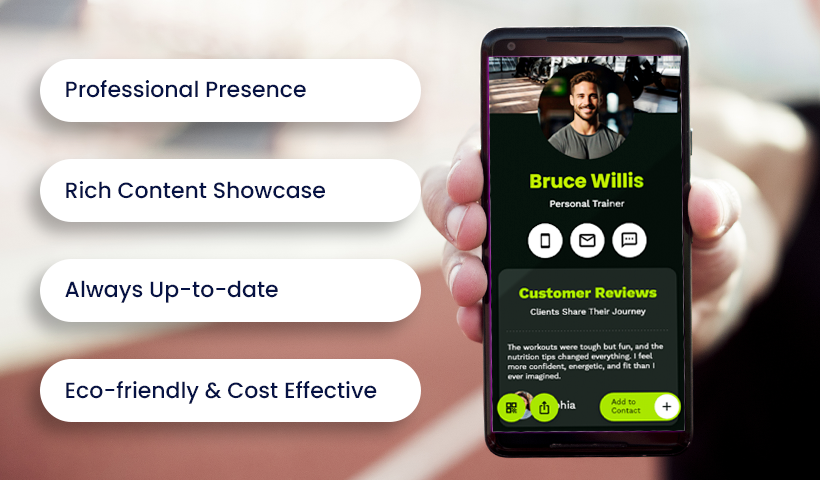
Instant professional presence
You meet prospects in fast, informal moments at the gym, at a health fair, or after class. A digital business card lets you share your details in two seconds with a QR code or link. They scan and your profile opens with your name, role, phone, email, and a clear next step. No paper to lose and no awkward typing. You look organized and current, and you turn a quick chat into a saved contact.
Rich content showcase
Paper cards stop at a name and number. Your digital card works like a compact portfolio. Add a 20 to 30 second intro video, before and after photos, certifications, class schedule, and social links. Prospects can see your coaching style, browse your Instagram tips, and tap a book now button without leaving the page. This depth builds trust faster and positions your digital business card for personal trainer marketing as the smartest link you can share.
Always up to date
Jobs change, numbers change, offers evolve. Edit your card once and every future scan shows the latest version. Refresh your headshot, update prices, add new testimonials, or switch schedules without reprinting anything. You control what clients see and you keep bad data out of their phones.
Eco friendly and cost effective
No stacks to print, no reorders, no waste. Going digital cuts recurring costs and keeps your brand clean and modern. Share your QR in your email signature, on posters, on a T shirt, or at the studio counter and let one link work everywhere.
Build a client ready digital business card
Create a digital business card in QRCodeChimp, then tailor it to your brand and role. Use this checklist to launch a polished digital business card for personal trainer growth in minutes.
1) Create a compelling profile
- Add your name, title, phone, email, website.
- Upload a clear headshot and your logo if you have one.
- Write a short headline that states your niche and credential.
- Keep everything accurate so updates are easy later.
Copy starter:
Headline: ACE Certified Trainer | Strength and Nutrition Coach
Bio: I help busy professionals get stronger in 45 minute sessions with simple nutrition habits.
2) Design to reflect your brand
- Pick a template, then match colors and fonts to your style.
- Use a clean background or a training photo that does not fight the text.
- Keep contrast high for mobile readability.
- Add a short tagline or slogan if it helps recall.
3) Add engaging content
- Embed a 20 to 30 second intro video.
- Add a gallery with before and after results, plus one sentence outcomes.
- Link Instagram, YouTube, TikTok, Facebook, LinkedIn.
- Include a clear booking button that points to your scheduler.
- Describe key programs with short blurbs and a learn more link.
Copy starters:
CTA: Book a Free Assessment
Program: 4 Week Bootcamp — three sessions per week with coach check ins
4) Add the right components in QRCodeChimp
- Scheduling or calendar: connect Calendly or Google Calendar and show live availability with a Schedule a Session button.
- Testimonials or reviews: add two short quotes with names to provide social proof.
- Services or packages: list options such as 1 to 1 coaching, small group, online coaching, nutrition guidance.
- Portfolio gallery: include 3 to 6 photos or certificates to build credibility.
- All your handles: turn on social icons and add links to your blog or press mentions so people do not need to search.
5) Organize the layout
- Order your sections for quick action:
- Hero with headshot and headline
- Primary CTA
- Proof block with photos and testimonials
- Services or packages
- Scheduler
- Social links and contact
- Keep sections short and scannable, and avoid clutter.
6) Test before sharing
- Preview on iPhone and Android, then check that text is readable without zoom.
- Tap every link and button to confirm they work.
- Test Save to Contacts so your details store correctly.
- Load the page on cellular data to confirm images and video play smoothly.
- Fix anything that slows the experience, then publish and grab your QR.
Share in seconds with QR, NFC, and Wallet
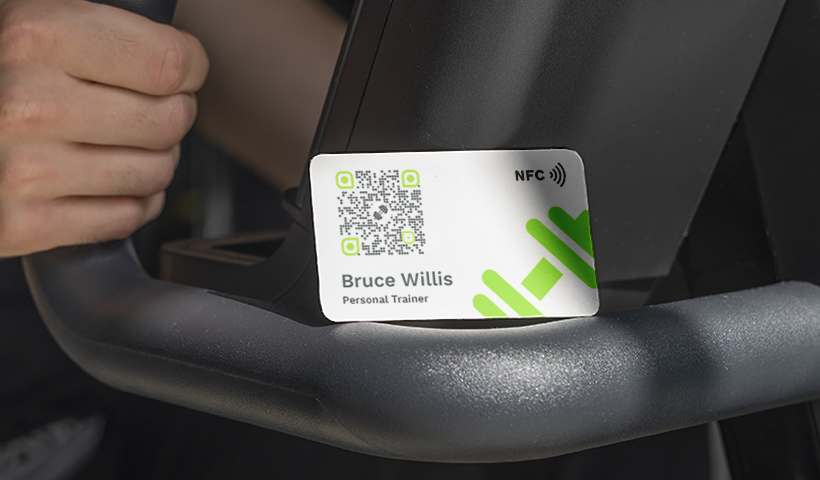
QR code sharing
Your card should be ready the moment someone asks for your details. QRCodeChimp creates a QR code for your profile, which you can save to your phone’s gallery for quick access. When a prospect scans it with the camera, your card opens at once, no typing required. Print the same QR on gym posters, checkout counters, flyers, or the back of a few paper cards for a hybrid setup. You can even place it on a T shirt or water bottle to spark conversations. The goal is simple: one scan, your info on their screen.
One tap NFC cards
If you want a fast, memorable handoff, use an NFC card or tag. Link the NFC chip to your card URL, then tap it to a modern smartphone to launch your profile. No app. No scanning. It feels smooth and shows you are organized with your tools. Keep one in your pocket for floor walkarounds, events, or post class chats. For a digital business card for personal trainer networking, this is the quickest way to move from hello to saved contact.
Add to phone or wallet
Make your own access instant too. Add your card to your phone’s home screen or to Apple Wallet or Google Wallet, so your QR is one tap away. During a conversation, open it in a second and let the other person scan. Encourage prospects to save your details from the card page using the Save to Contacts button. That creates a contact with your name, number, email, and link, which means you live in their address book instead of a desk drawer.
Small tips that raise conversions
Keep your screen brightness high when showing the QR so phones scan quickly. Place the QR on eye level signage where people wait. Use short link text next to the code so visitors know what they get, for example “Scan to book a free assessment.” Carry both NFC and QR so you can match the other person’s preference.
Turn scans into qualified leads
Built in contact form
Your digital business card can collect contacts the moment it is scanned. In QRCodeChimp, enable the Collect Contact form so viewers see a quick prompt for name and email before, or while, they view your profile. You give your details and you receive theirs in the same flow. At a charity workout or expo, twenty scans can become ten warm leads without a clipboard.
No extra apps or steps
Prospects do not install anything. The form loads on their phone, is mobile friendly, and takes seconds to complete. Use simple invite text like Interested in training? Drop your email for a free starter plan. Friction drops and completion rates rise because the ask happens in the moment.
Ask just enough
Keep the form to two or three fields. Name and email are the baseline. Add phone only if you plan to call or text. If you want quick context, include one custom question such as What is your top goal right now? Short forms convert. Long forms lose people. For a digital business card for personal trainer outreach, signal privacy and consent clearly if you plan to send emails.
Smooth handoff to your profile
After they hit Submit, the form closes and your full card opens. They can watch your intro video, check packages, and book a slot. They feel helped, not intercepted. Meanwhile, you have a lead waiting in your dashboard with exactly the details you asked for.
Conversations, not data entry
Since contact exchange is handled in the background, you can keep talking about goals, injuries, or timelines instead of spelling email addresses. You look organized and respectful of their time. Later, you follow up while the chat is still fresh, reference their goal, and point them to the right offer.
Manage leads and follow up fast
Centralized lead storage
- Every form submission from your card lands in the QRCodeChimp dashboard under Form Data.
- Treat it like a lightweight CRM. You see name, email, phone, and any custom answers at a glance.
- Use it daily so no lead hides in texts or sticky notes.
- Tip: add a short “source” field to your form. It helps you see what works: expo, gym floor, class, or referral.
Export or download data
- Click export to get CSV or Excel, then move leads to Mailchimp, HubSpot, or Google Sheets.
- Keep a master sheet with columns for status, last touch, next step, and notes.
- Create saved views by source or offer so campaigns stay organized.
- For a digital business card for personal trainer workflow, keep a separate tab for trials vs paid clients.
Respond quickly
Aim for first contact in 24 to 48 hours. Faster is better.
- Set two windows on your calendar for outreach. Morning review, end of day follow up.
- Use short, specific messages that point to one clear action.
Copy starters:
Subject: Great meeting you yesterday
Hi Jane, thanks for scanning my card at the gym. Here is the stretch guide I promised. Book a 20 minute assessment here: <link>.
Text: Hi Alex, this is Priya from the Saturday bootcamp. Want help with your 5k plan? Grab a free consult: <link>.
Prioritize and triage
- Reply first to leads that shared a clear goal or timeline.
- Tag contacts by intent: Ready now, Warm, Nurture.
- Use templates for each stage so you move fast:
- Ready now: link to scheduler.
- Warm: send a quick resource and ask one question.
- Nurture: invite to newsletter or a free class.
Archive and organize
- In the dashboard, mark handled leads as archived so today’s list stays clean.
- Add notes like “met after spin class” or “knee pain, wants low impact.”
- Create simple labels: Assessments, Small group, Online coaching, Corporate.
- Review weekly: new, in progress, converted, closed.
Simple follow up system
- New scan arrives.
- Log source and intent in your sheet.
- Send first touch within 24 hours.
- If no reply, send a helpful nudge on day 3 with a resource.
- Final check on day 7 with a clear choice: book, join a class, or subscribe.
- Move to nurture list and archive the record.
Privacy and consent
- Keep contacts inside your account or approved tools.
- Ask permission before adding anyone to bulk email.
- Offer an easy opt out in every campaign.
- Store only what you need to serve the client.
Automate lead capture and follow ups
Why automation matters
Your time belongs on the floor, not in spreadsheets. Automating lead flow moves contacts from your card to your tools the moment a form is submitted. It prevents typos, shortens response time, and gives every prospect a next step. For a digital business card for personal trainer growth, this is the backbone that keeps interest from going cold.
Connect with Zapier in minutes
Zapier links QRCodeChimp to thousands of apps without code. Create a Zap that listens for new form submissions, then choose what happens next. Add the contact to a Mailchimp list, create a lead in HubSpot or Salesforce, or append a row in Google Sheets. Map fields like name, email, phone, and goal. Add tags such as Source: Expo or Offer: Free Assessment so future campaigns stay targeted.
Build scenarios with Make
Prefer Make. Create a webhook in Make, copy the URL, then open your card settings in QRCodeChimp and turn on Invoke API. Paste the URL and save. Now every submission hits your scenario. Send the data to Monday.com for outreach tasks, to Google Sheets for tracking, or to your CRM for owner assignment and pipeline status. Drag and drop modules to add logic like send a welcome email only if the person opted in.
How the pieces work together
Your card shows a short form. The prospect submits it. QRCodeChimp posts the data to your webhook. Zapier or Make receives it and performs the actions you defined. The lead lands where it should with the fields you need, usually in real time. You do not need to export files or copy and paste anything.
No lead left behind
Events can produce dozens of scans in an afternoon. Automation captures every one. Each record carries the context you asked for, such as goal or preferred time. Set an instant email that delivers a resource, for example a stretch guide or class schedule, then hand off to your normal follow up sequence. You look responsive and organized even on your busiest day.
Scale without extra effort
Five leads a week or fifty use the same workflow. Add branches as you grow. Route corporate inquiries to a separate pipeline. Drop bootcamp signups into a newsletter segment. Trigger SMS reminders for assessments. The system keeps building your list while you coach.
Turn quick hellos into clients
Strong relationships and good timing build your business. A digital card gives you both. With instant sharing, rich content, lead capture, and automated follow up, your card works like a compact portfolio and a quiet marketing engine in your pocket.
This is not about flash. It is about speed and clarity. You look current when you share a QR or tap an NFC card, you reply faster because contacts flow straight into your tools, and you keep building a clean list you can act on. Each scan becomes a saved contact, a booked consult, or a warm lead you can nurture.
Your card also helps beyond client intake. If you are interviewing at a gym or pitching a corporate program, one link can show credentials, references, class clips, and schedules in a format that is easy to share and easy to save. Treat it as your always updated profile. It is a digital business card for personal trainer growth and a simple proof of your professionalism.
Start now with the basics in this playbook. Create your card, tailor the design, wire the form to your CRM or email list, and share it everywhere you meet people. Over time, you will see smoother conversations, quicker bookings, and a network that compounds.
Frequently asked questions
What should I put on my digital business card as a trainer?
Your name, credential, headline, photo, phone, email, location, a primary CTA, packages, schedule link, 2 short testimonials, and social links. Keep it clear and scannable.
How do I get more people to scan it?
Show the QR at eye level, raise your phone brightness, add a short prompt like “Scan to book a free assessment,” and offer a quick value add such as a stretch guide.
Can a digital business card replace my website?
It can act like a focused landing page. If you already have a site, link to it. If you do not, the card can cover the essentials and capture leads.
How does lead capture work?
Enable a short form. When someone scans, they can share name and email while viewing your profile. You get contacts ready for follow up.
What form fields convert best?
Keep it to two or three fields. Name and email are must haves. Add one question such as goal or preferred time. Short forms get more submissions.
How fast should I follow up?
Within 24 to 48 hours. Use one clear action per message, like a booking link. If no reply, send a helpful nudge on day 3 and a last check on day 7.
How do I share it in person?
Use the on screen QR for quick scans. Carry an NFC card or tag linked to your profile for one tap sharing.
How do I share it online?
Add the link to social bios, email signature, WhatsApp preset replies, and your site’s contact page. Use the same link everywhere.
Should I show prices on the card?
If your pricing is simple, list it. If you customize, show starting rates and invite people to book a free assessment.
You may also like
Approval-Based Digital Business Cards: A Smarter Workflow for HR Teams
Discover how approval-based digital business cards help HR teams ensure branding consistency, prevent misuse, and manage employee cards at scale.
Best Digital Business Card Makers for 2026 – Secure, Enterprise, and Scalable
Discover the best digital business card platforms for 2026. Compare the top 8 solutions with features like branding, CRM integration, analytics, and enterprise-grade security to find the right fit for your team or business.
When Excel Broke: How QRCodeChimp Simplified Digital Business Cards for a Fast-Growing IT/ITES Enterprise
Discover how a fast-growing IT/ITES enterprise replaced Excel uploads with QRCodeChimp’s form-based automation to create branded digital business cards faster, with HR control.
30+ Proven Virtual Networking Event Ideas to Build Real Connections
Discover 30+ proven virtual networking event ideas that reduce fatigue, spark real conversations, and build lasting connections. Includes formats, platform tips, and QR code strategies.
Most Popular
Contact Sales
