In 2024, nearly 4.2 million emails were sent and received each second globally! Astonishing, isn’t it? This staggering figure underscores the enduring importance of email in modern communication, despite the rise of other channels like social media and messaging apps over the years.
Most businesses still rely on email as their primary communication channel due to its professional format and ability to directly reach audiences. And now, with tools like email QR codes, the process becomes even more streamlined. No typing. No mistakes. Just instant, frictionless communication.
In this guide, we’ll explore how email QR codes work, the benefits they bring, and the optimal ways to use them.
Let’s dive in.
How does a QR code for email work?
When scanned, an email QR code opens a pre-written or pre-drafted email with the recipient’s email address, subject line, and message on the user’s default email app. This makes communication easier and faster, eliminating the need to type all the details manually and thus ensuring accuracy. Moreover, it simplifies business interactions, especially in scenarios where quick responses are crucial, such as customer support, event sign-ups, or appointment requests.
How to create an email QR code?
Here’s the step-by-step process for creating an QR Code for email using QRCodeChimp.
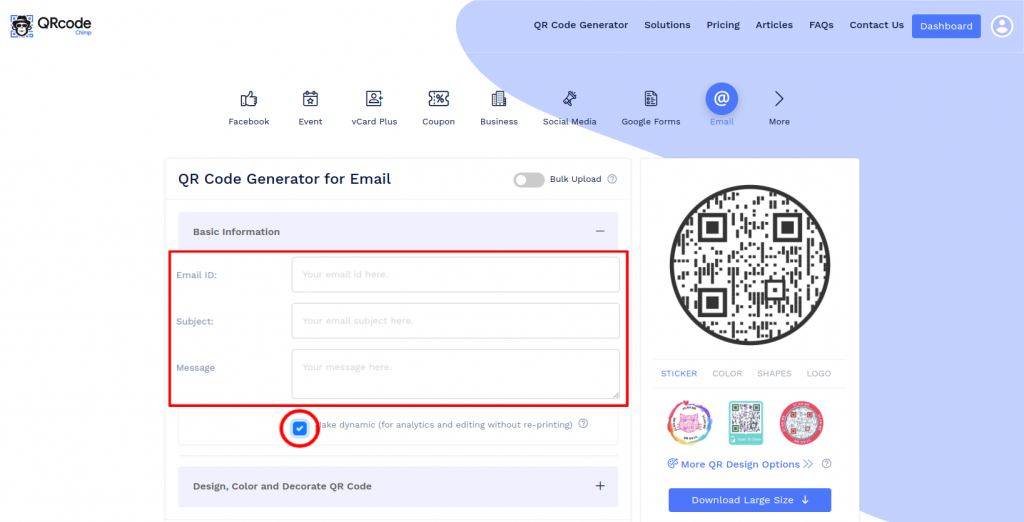
Step 1: Enter Email Details
Enter the recipient’s email ID, subject, and message.
Note: Select the “Make Dynamic” option if you want to track scans and edit the email ID, subject, or message later without reprinting (optional).
Step 2: Design Your QR Code
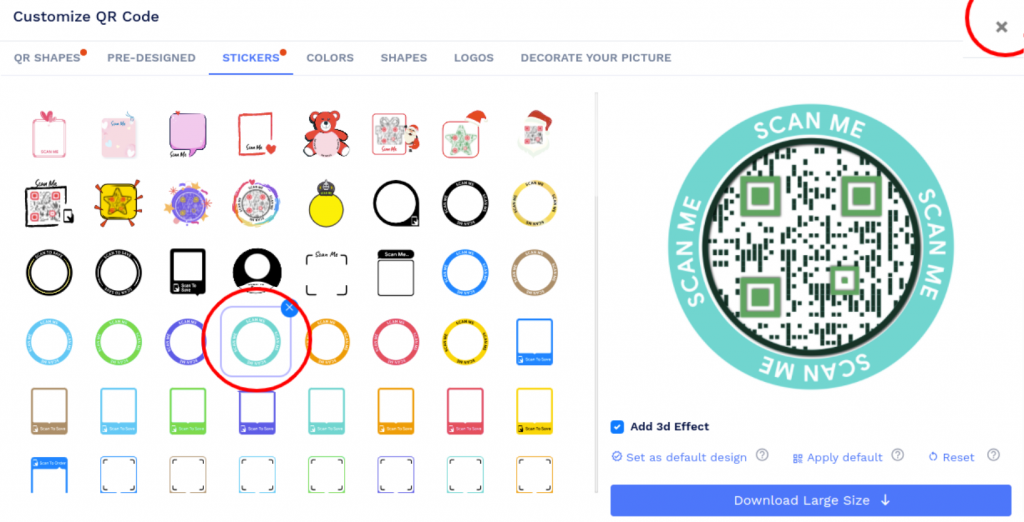
Click “Design, Color, and Decorate QR Code” to customize your QR code (for example, add colors, shapes, or stickers). Click the “x” icon in the customization popup to save your changes.
Step 3: Save and Download
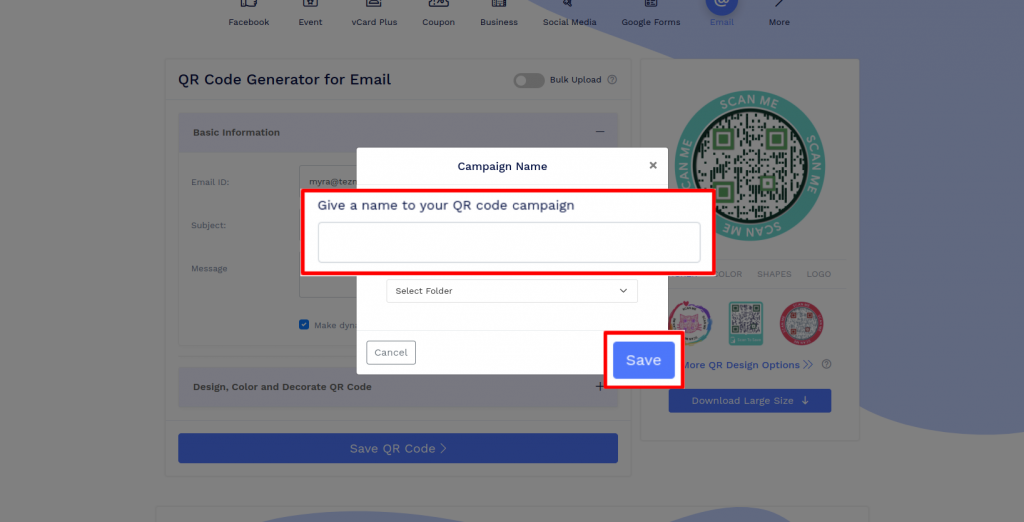
Click “Save QR Code”, enter a name for your QR code, and then click Save.
Important: Test your QR code by scanning it from different devices (iOS and Android) before printing for production.
What are the benefits of using QR codes for email?

Here’s how QR codes can add to your email communication efforts, making them quicker, easier, and more effective. Look at the key benefits.
✔️ Instant, seamless communication
Email QR codes enable users to compose emails in seconds, eliminating the hassle of manually typing out email addresses and the main content. This solution streamlines the process of email communication, making it quick and effortless for both businesses and customers, whether it’s for feedback emails, inquiries, or support requests.
✔️ Reduced typos, increased accuracy
Manual entry often results in mistyped email addresses or significant typos in the email body. With QR codes for email, such errors can be easily avoided. These codes are linked to pre-filled emails, which minimize communication errors and ensure higher accuracy and reliability, particularly in fast-paced or high-volume scenarios.
✔️ Enhanced engagement and better conversions
Email QR codes make it easier for potential customers to connect with brands, encouraging instant engagement and faster conversions. By making the communication process frictionless, these codes help increase customer inquiries, drive more sign-ups, and improve lead generation.
✔️ Real-time analytics
These QR codes enable you to track key metrics, such as scan time, device type, location, and frequency. These real-time insights into customer behavior further enable you to fine-tune your email strategy, personalize follow-ups, and drive higher engagement.
Smart use cases of email QR codes
Take a look at some practical and effective ways to use them.
📅 Event registrations or sign-ups
Add the QR code for email to event flyers or digital invites. When someone scans it, they will be redirected to a pre-written RSVP email, for instance, “I’d like to register for the (event name) to be held on (date).” With just a simple scan and a tap, attendees can sign up for events on the spot, making the RSVP process quick and hassle-free.
💬 Customer support
You can place the QR code on product packaging, user guides, or manuals to direct users to customer support emails. These emails could include text like, “I’m having an issue with the (product name). Need your assistance.” This removes or reduces the effort that goes into typing these emails, leading to faster responses and issue resolution.
✅ Lead generation
If you’re a marketing agency, you should strategically place these QR codes on marketing materials, such as business cards, brochures, and flyers. When scanned, the codes redirect potential clients to pre-filled marketing emails. This seamless approach helps you capture leads instantly, eliminating friction and enhancing your lead generation efforts.
💼 Job applications
Companies or HR managers can use QR codes for email to streamline the job application process for potential candidates. They can place these codes at job fair booths, on career brochures, and job recruitment posters or ads. For example, upon scanning, the QR code opens a pre-generated email like: “I’m interested in applying for this position (job role). Please revert if you think I’m a suitable candidate.”
👨🏻💼 Appointment booking or consultation requests
Healthcare providers, consultants, or wellness coaches can add email QR codes to their websites, business cards, reception desks, flyers, and even email signatures. These codes offer a swift and seamless way for patients, clients, and others to schedule appointments or consultations. It saves them from the hassle of navigating complex booking systems, while improving user convenience and accelerating response rates.
Best practices to keep in mind when creating QR codes for email
Follow these guidelines to ensure your email QR codes deliver a smooth user experience.
👉 Try to keep the email subject line and body relevant, concise, and action-oriented, encouraging users to hit the “send” button promptly.
👉 Always provide users with a clear call-to-action next to the QR code, such as “Scan to Inquire Now” or “Scan to RSVP via Email.”
👉 Test the QR code to ensure it works across various devices, including Android and iOS, as well as email apps like Gmail and Outlook.
👉 Avoid overloading the email content with too much text, as this can affect the QR code’s functionality.
👉 Always use dynamic QR codes for flexibility. These QR codes enable you to update the email content later without needing to reprint the codes.
👉 Customize your QR code to match your brand’s colors or logo. However, make sure you don’t overdo it, as it might impact the code’s scannability.
👉 Ensure the email QR code is optimized for mobile devices and allows smooth navigation. This is because most users today scan QR codes using smartphones.
Conclusion
A simple yet powerful tool for driving digital interactions, email QR codes can turn curiosity into action with just a quick scan. These codes make communication effortless for both businesses and their customers, whether it’s for event sign-ups, handling support inquiries, or generating leads.
Now’s the time to start embedding these codes into your marketing materials and customer touchpoints to reduce friction, boost response rates, and deliver seamless user experiences. And QRCodeChimp offers the best-in-class solution to supercharge your email strategy with a host of advanced QR code features.
Frequently asked questions
How do QR codes for email work?
When scanned, the QR code redirects the user to their email app with pre-written fields such as the recipient’s email address, subject, and body text. It offers users a fast and error-free way to send emails.
What are the benefits of using QR codes for email?
Here are some benefits of using them:
- Streamlined, faster communication
- Fewer typos and errors
- Enhanced engagement and conversions
- Better lead generation
Can I track my email QR code?
Yes. Make sure you’re using a dynamic QR code to track data like total scan count, scan time, location, and scanning devices used in real time.
Do I need internet access to use email QR codes?
Yes, users typically require access to an internet connection to send the email. However, they may not need it for scanning the code, depending on their device.
Can I update my email QR code content after printing it?
Yes, only if you’re using a dynamic QR code. Unlike static codes, dynamic codes allow updates without regenerating or reprinting the codes.
You may also like
Approval-Based Digital Business Cards: A Smarter Workflow for HR Teams
Discover how approval-based digital business cards help HR teams ensure branding consistency, prevent misuse, and manage employee cards at scale.
Best Digital Business Card Makers for 2026 – Secure, Enterprise, and Scalable
Discover the best digital business card platforms for 2026. Compare the top 8 solutions with features like branding, CRM integration, analytics, and enterprise-grade security to find the right fit for your team or business.
How a Consumer Electronics Brand Fixed Its Post-Purchase Gap Using Form QR Codes
Learn how a consumer electronics brand improved warranty registration and post-purchase engagement using Form QR Codes. Discover the strategy, implementation, and results.
QRCodeChimp’s Analytics Dashboard: A Step-by-step Guide
A guide to QRCodeChimp’s analytics dashboard. Leverage the unique advanced features and metrics to optimize your marketing campaigns.
Most Popular
Contact Sales
