Event ticket management is more than just sending passes to attendees. It’s about creating a smooth, reliable experience for both organizers and guests.
Earlier, with QRCodeChimp, you could already create QR-powered tickets and manage attendees. With our latest updates, creating, distributing, and tracking event tickets is now more powerful, flexible, and effortless.
Here is a look at the latest features and how they elevate your event management experience.
Richer ticket details for better clarity
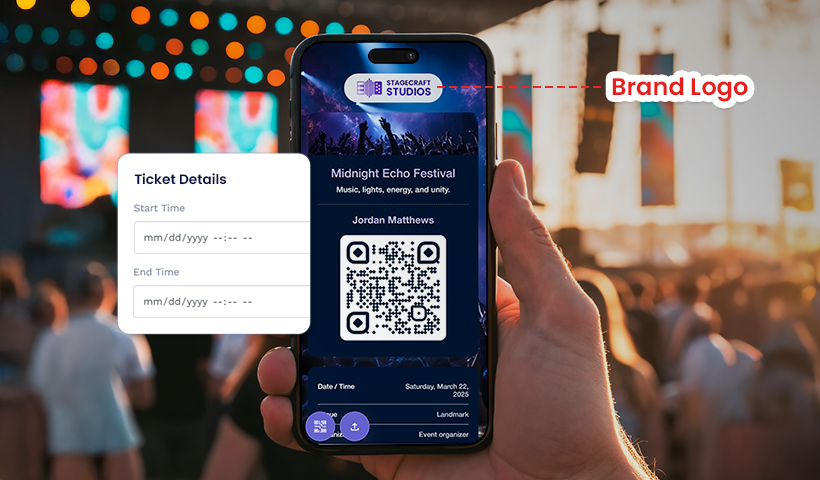
You can now add customizable fields to your event tickets, including entry rules, seat or zone information, parking instructions, and more. You can also enrich your tickets with components such as image galleries, PDFs, or forms.
This helps you provide all essential information upfront, reduce confusion during entry, and give attendees complete confidence before the event.
Imagine organizing a large music event with multiple zones and specific entry instructions.
Instead of sending long emails or answering last-minute questions, you simply add seating zones, parking details, and entry guidelines right inside the ticket. As a result, attendees know exactly where to go, what rules to follow, and how to enter smoothly.
This cuts down confusion at the gate and creates a much calmer entry experience.
Simplified multi-day passes
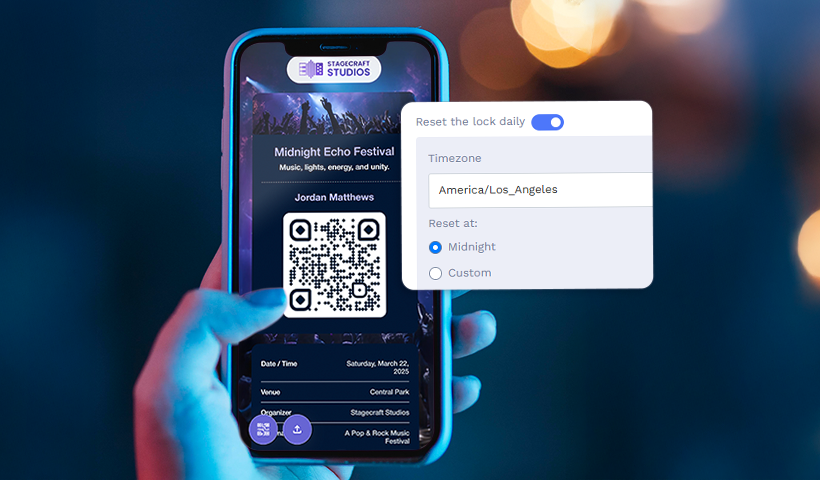
Managing multi-day events is now simpler than ever. With the new “Reset the lock daily” option, scan limits can refresh daily at midnight or at a custom time set by the organizer.
This allows one ticket to work across multiple event days while keeping the scan limit intact. It removes the need to create separate tickets for each day and still maintains full control over daily entry.
Think about a three-day automobile fest where the same attendees return each day. Instead of issuing three separate tickets and dealing with misplaced or duplicated passes, you enable the daily reset lock.
Guests use the same ticket each day, and the scan limit resets automatically. It feels seamless for the attendees and saves you hours of manual work.
Personalized ticket sharing via email
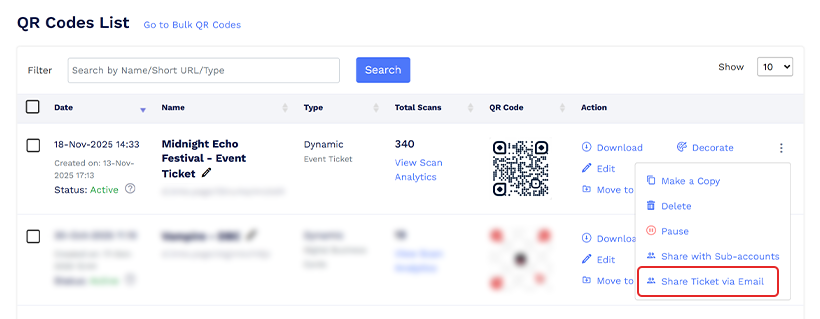
The new “Share Ticket via Email” feature lets you send tickets directly to each attendee’s inbox. The email includes a link that allows guests to access their ticket instantly and confirm their attendance.
You can also attach a downloadable ticket PDF to the email. The PDF can be fully customized to match your branding, creating a more memorable and engaging experience for attendees.
This minimizes lost or misplaced tickets, improves convenience, and increases the likelihood of attendees showing up.
Let’s say you’re organizing a corporate conference with hundreds of employees spread across offices. Instead of distributing tickets manually or relying on messaging apps, you send each attendee a personalized ticket link by email.
They open their inbox, and their ticket is right there. It is simple, convenient, and significantly reduces the risk of people losing or not finding their ticket.
Smarter RSVP tracking for better attendance insight
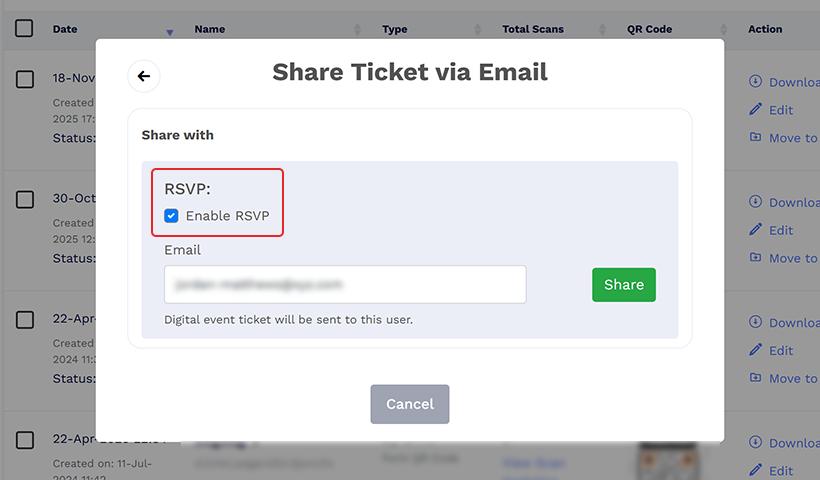
You can now enable RSVP while sharing event tickets via email. Attendees who receive the ticket via email can confirm their attendance with Yes, No, or Maybe and update their response at any time.
This gives organizers a clearer view of expected turnout and helps improve planning, staffing, and resource allocation.
Let’s go back to the previous example of organizing a corporate event for several employees. While sharing the event ticket by email, you can enable the RSVP option. Employees will be able to confirm whether they’ll attend with a quick Yes, No, or Maybe.
As responses come in, you get a clear sense of how many people are likely to join. This makes it much easier to plan seating, refreshments, and logistics without any guesswork, because your attendance forecast updates in real time.
Instant event attendance summary
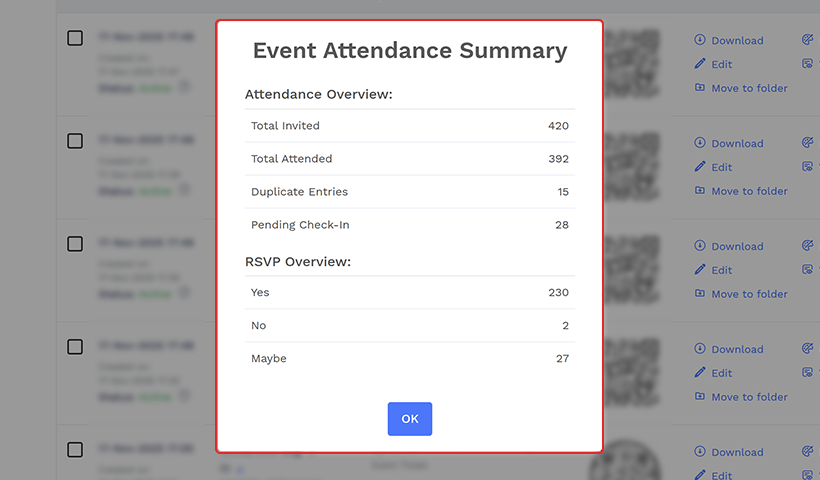
The new “Event Attendance Summary” feature lets organizers view key attendance insights directly in the dashboard.
Instead of downloading a report, you can now view metrics like Total Invited, Total Attended, Duplicate Entries, Pending Check-ins, and RSVP details in your dashboard with a single click.
This makes event tracking faster, easier, and far more convenient.
Think about running a busy business workshop event and wanting to see how check-ins are progressing.
Instead of downloading a report every time, you just open your dashboard and get a clear snapshot of Total Invited, Total Attended, and Pending Check-ins.
With this instant overview, you can manage crowds better and make quick decisions on the fly.
Why these updates matter
We are committed to helping you run more organized and successful events. With enhanced ticket details, RSVP support, better sharing options, and other improvements, you now have more control and clarity over your events than ever before.
You may also like
Approval-Based Digital Business Cards: A Smarter Workflow for HR Teams
Discover how approval-based digital business cards help HR teams ensure branding consistency, prevent misuse, and manage employee cards at scale.
How a Consumer Electronics Brand Fixed Its Post-Purchase Gap Using Form QR Codes
Learn how a consumer electronics brand improved warranty registration and post-purchase engagement using Form QR Codes. Discover the strategy, implementation, and results.
QRCodeChimp’s Analytics Dashboard: A Step-by-step Guide
A guide to QRCodeChimp’s analytics dashboard. Leverage the unique advanced features and metrics to optimize your marketing campaigns.
Link Click Analytics in QRCodeChimp: How To Find Your Top Performing Links
Learn how to track link click analytics in QRCodeChimp, identify top-performing links, and optimize QR code campaigns using link-level insights and analytics.
Most Popular
Contact Sales
