Every QR code represents a moment of decision. It’s a digital door with no label; easy to see, but not always compelling to open. The Call to Action (CTA) is what turns that brief glance into a measurable, high-intent action. It’s the difference between a scan and a shrug.
Here at QRCodeChimp, we’ve analyzed countless campaigns. The data is clear: a generic “Scan Me” CTA consistently underperforms. Campaigns that use clear, benefit-driven prompts see significantly higher conversion lifts. Because you’re not just telling them what to do, but why it’s worth the 3-second effort to pull out their phone.
Here’s our definitive guide to mastering the QR code call to action. We’ll break down the mechanics of conversion, give you a “stealable” formula, explore copy principles, and provide over 50 ready-to-use examples. Most importantly, we’ll show you how to add them perfectly using QRCodeChimp’s built-in design tools.
- What is a QR code CTA (and what it isn’t)
- The conversion mechanics in 90 seconds
- The CTA formula (steal this)
- 6 Core copy principles for QR code CTAs
- CTA patterns mapped to common QR use cases
- 50+ ready-to-use QR code CTA lines you can copy & paste
- Design & placement that amplify your CTA
- How to add a high-converting CTA with QRCodeChimp
- Stop asking, start directing
What is a QR code CTA (and what it isn’t)
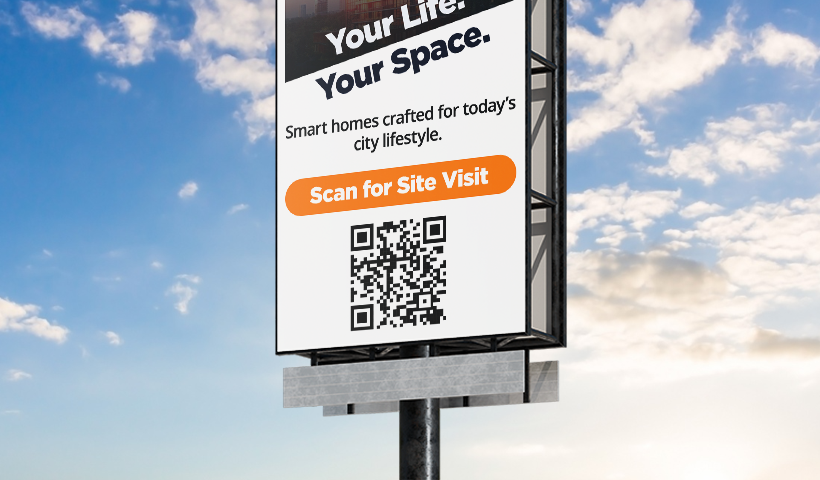
A QR code CTA is a short, directive instruction placed directly next to your QR code. Its sole purpose is to tell a user exactly what to do (scan) and what specific value they will receive in return (the payoff).
It is neither a passive label (“Our Website” is not a CTA) nor is it a vague suggestion (“Scan for more” is weak). It doesn’t define the “more” and doesn’t create curiosity.
A powerful QR code CTA is a command rooted in a benefit, like “Scan to Get 20% Off” or “Scan to Watch the Tutorial.” It bridges the physical and digital worlds by providing a clear, compelling reason to cross.
The conversion mechanics in 90 seconds
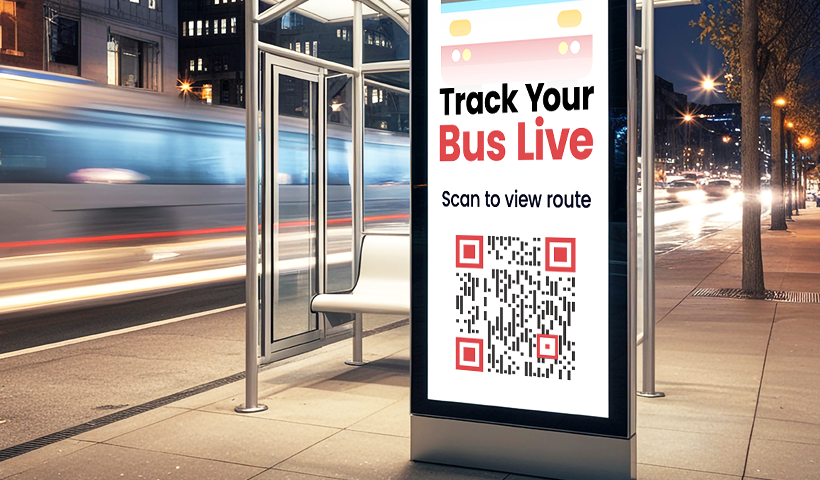
To write a great CTA, you must understand the user’s mindset. When someone sees your QR code, their brain runs a near-instant cost-benefit analysis.
- Context: The user sees your QR code in a physical location (a trade show banner, a coffee cup, a magazine ad).
- The “Friction” Calculation: The user has a brief internal dialogue: “Is this worth the effort of pulling out my phone, opening the camera, and scanning?” This mental hurdle is your conversion friction.
- The CTA’s Job: The CTA for QR code is your sales pitch. It must immediately answer, “What’s in it for me?” It must prove that the reward (a discount, helpful info, a free download) is greater than the friction.
- Trust: A clear CTA builds trust. “Scan for the Full Menu” promises exactly that. “Scan for a Surprise” feels risky and is often ignored.
- The Scan: Convinced of the value, the user pulls out their phone and scans the code.
- The Payoff (Message Match): The user lands on a digital page that perfectly matches the promise of the CTA. When you create a QR code with QRCodeChimp, you’re not just creating a code; you’re creating this entire funnel. The payoff must be seamless. If your CTA says “Download the PDF,” your QR code should link directly to that PDF, not your homepage.
The CTA formula (steal this)
Stop guessing. The most effective QR code CTAs follow a simple, two-part formula. We’ve built our design tools around this very principle.
$$ [Action \ Verb] + [Specific \ Benefit \ or \ Outcome] $$
This formula is your golden ticket. Let’s break it down.
Part 1: The Action Verb
This is the engine of your QR code call to action. It’s a direct command. Weak CTAs are passive; strong CTAs start with an action-oriented verb.
- Weak: “Our Menu”
- Strong: “See Our Menu”
- Weak: “Free Ebook”
- Strong: “Get Your Free Ebook”
Part 2: The Specific Benefit/Outcome
This is the “What’s In It For Me?” (WIIFM). It’s the user’s motivation. It answers the “why” and quantifies the value.
- Weak: “Scan to Shop”
- Specific: “Scan to Shop This Look”
- Weak: “Scan for Info”
- Specific: “Scan for Nutritional Info & Allergens”
- Weak: “Scan to Enter”
- Specific: “Scan to Enter to Win a $100 Gift Card”
Putting the Formula into Practice:
| Bad (Generic) | Good (Formula-Based) |
| Scan Me | Scan to Get 20% Off |
| Website | Scan to See Our Full Gallery |
| Video | Scan to Watch the ‘How-To’ Guide |
| Scan to Download the Free Checklist |
6 Core copy principles for QR code CTAs
The formula gives you the structure. These principles, which we champion at QRCodeChimp, give you the persuasive power.
- Clarity Over Cleverness
Your QR code CTA is read at a glance, often by a user in motion. This is not the place for witty puns or vague “creative” copy. “Scan for a New Dimension” is meaningless. “Scan for the AR Try-On” is perfect. The user must know exactly what will happen when they scan. - Start with a Strong Action Verb
We covered this in the formula, but it’s the most important rule. Your CTA must be a command, not a suggestion. Use verbs that imply instant action and benefit.- Use: Get, Download, Join, Watch, Shop, See, View, Enter, Discover, Save, Book, Grab.
- Avoid: Click Here (they’re not on a computer), Learn More (too vague), Submit (too high-friction).
- Emphasize the “WIIFM” (What’s In It For Me?)
The user’s primary motivation is self-interest. Always frame the benefit around them.- Good: “Scan for Our Newsletter”
- Better: “Scan to Get Weekly Tips”
- Best: “Scan to Get Your Free Marketing Toolkit”
- Create Urgency (When Appropriate)
If the offer is time-limited, say so. Urgency is a powerful motivator that pushes a user from “I’ll do it later” to “I have to do this now.” You can even set this up with our Dynamic QR Codes, linking to an offer that truly expires.- “Scan for 15% Off Today Only”
- “Scan to Enter Before 5 PM”
- “Scan to Grab Your Limited-Stock Item”
- Keep It Brief
A QR code call to action is micro-copy. It must be scanned and understood in under three seconds. Aim for 3-7 words. A QR code on a busy subway poster has a shorter optimal CTA length than one on a product box that a user holds in their hand. Our CTA frames are designed to fit this micro-copy perfectly. - Ensure 100% Message Match
This is the most critical rule. The promise of your CTA must be the reality of your landing page. If your CTA is “Scan to Download the PDF,” your QRCodeChimp PDF QR code must trigger an immediate download or link to a page with a single “Download” button. If it goes to your homepage, you’ve broken the user’s trust and lost the conversion forever.
CTA patterns mapped to common QR use cases
Here are common goals and the CTA patterns that work best for them. We’ve designed specific QR code types within QRCodeChimp for every one of these use cases.
1. Use Case: Driving Sales & E-commerce
- Goal: To get a user to make a purchase or view a product.
- Pattern: [Action] + [Offer/Discount] or [Action] + [Specific Product]
- Why it Works: This pattern directly appeals to the user’s desire to shop and save money. The value is immediate and transactional.
- Swipeable Examples:
- “Scan to Get 20% Off Your Order”
- “Scan for Free Shipping”
- “Scan to Shop This Look” (Perfect for retail displays)
- “Scan for Today’s Secret Deal”
- “Scan to Buy Now”
2. Use Case: Information & Education
- Goal: To provide added value, instructions, or context. (Use our PDF, Video, or URL QR code types for this).
- Pattern: [Action] + [Specific Information]
- Why it Works: It satisfies curiosity at the exact moment it arises. This is perfect for menus, packaging, or museum exhibits.
- Swipeable Examples:
- “Scan to See the Full Menu”
- “Scan for Nutritional Info”
- “Scan to Watch the ‘How-To’ Video”
- “Scan to Read Product Reviews”
- “Scan to Learn Our Story”
3. Use Case: Lead Generation & List Building
- Goal: To capture a user’s contact information (email, phone) in exchange for a valuable asset.
- Pattern: [Action] + [Valuable Asset]
- Why it Works: It frames the scan as a fair trade. The user provides their information and, in return, gets a high-value piece of content.
- Swipeable Examples:
- “Scan to Download Your Free Ebook”
- “Scan to Get the Free Checklist”
- “Scan to Join the VIP List”
- “Scan to Subscribe for Weekly Tips”
- “Scan to Get Our Free Toolkit”
4. Use Case: Events, Apps & Registration
- Goal: To get a user to RSVP, download an application, or join an event. (Our Event or App Download QR codes are built for this).
- Pattern: [Action] + [Access/Entry]
- Why it Works: The CTA acts as a gateway. It’s the “front door” to the app or event, simplifying the sign-up process.
- Swipeable Examples:
- “Scan to RSVP”
- “Scan to Get the App”
- “Scan to Add to Your Calendar”
- “Scan to Join the Waitlist”
- “Scan to Register for the Webinar”
5. Use Case: Social Media & Engagement
- Goal: To grow your social following or gather user-generated content/feedback. (Use our Social Media QR code to link to all your profiles at once).
- Pattern: [Action] + [Community/Platform]
- Why it Works: It’s a low-friction invitation to connect with your brand on a platform the user already trusts.
- Swipeable Examples:
- “Scan to Follow Us on Instagram”
- “Scan to See Our TikToks”
- “Scan to Enter the Contest”
- “Scan to Share Your Feedback”
- “Scan to Leave a Review”
50+ ready-to-use QR code CTA lines you can copy & paste
Here is a swipe file of effective QR code call to action phrases, grouped by their primary goal. Feel free to use these directly in the QRCodeChimp generator.
To Get a Discount or Offer:
- Scan for 15% Off
- Scan for Your BOGO Coupon
- Scan for Instant Savings
- Scan to Unlock Your Deal
- Scan for 24-Hour Flash Sale
- Scan for Your Free Gift
- Scan to Get Free Shipping
- Scan for Today’s Deals
To View Content or Information:
- Scan for the Full Menu
- Scan to Watch the Video
- Scan to Read the Guide
- Scan for Product Specs
- Scan for Nutritional Info
- Scan to See the Gallery
- Scan to Read Reviews
- Scan to Hear the Audio Guide
- Scan to Meet the Artist
- Scan for ‘How-To’ Steps
- Scan for Our Story
To Download an Asset:
- Scan to Download the App
- Scan to Get the PDF
- Scan to Save the Guide
- Scan to Get Your Free Ebook
- Scan for the Free Checklist
- Scan for the Free Toolkit
- Scan to Download the Map
To Join, Register, or Subscribe:
- Scan to Join the Club
- Scan to RSVP
- Scan to Subscribe
- Scan to Register Now
- Scan to Join the VIP List
- Scan to Join the Waitlist
- Scan for Exclusive Access
- Scan to Register for the Webinar
- Scan to Get Our Newsletter
To Take a Specific Action:
- Scan to Shop Now
- Scan to Book Your Spot
- Scan to Pay Here
- Scan to Enter to Win
- Scan to Take the Quiz
- Scan to Vote
- Scan to Book a Demo
- Scan to Schedule an Appointment
- Scan to Order Now
- Scan to Pre-Order
To Connect or Share:
- Scan to Follow Us
- Scan to Follow on Instagram
- Scan for Instant Savings
- Scan to Join Our FB Group
- Scan to Leave a Review
- Scan to Contact Us
- Scan to Chat with Us
- Scan to Share Your Feedback
- Scan to Take the Survey
- Scan for Support
- Scan to ‘Check In’
Design & placement that amplify your CTA
A great QR code CTA can be defeated by bad design. The words and the visuals must work together. This is why we built such a robust design suite into QRCodeChimp.
- Use a CTA Frame: Never just float text above or below a QR code. It looks unprofessional and gets lost. The most effective method, available in our generator, is to use a CTA Frame. This is a design element that boxes the QR code and includes a dedicated, clean space for your CTA text.
- Contrast and Readability: Your CTA must be instantly legible. Use a clean, sans-serif font. Our design tools let you change the font and color to ensure high contrast between the text and its background (e.g., black text on a white frame, or white text on a dark brand-colored frame).
- Proximity is Key: The CTA for QR code must be immediately adjacent to the code itself. The user’s eye should see the code and the instruction as a single, unified element. Our frames do this automatically.
- Strategic Placement: The physical context of the QR code determines its placement.
- On a Poster: Place the code and CTA at eye level.
- On a Restaurant Table: The CTA should be simple and obvious (“Scan for Menu & Pay”).
- On Product Packaging: The CTA should offer added value (“Scan for Recipes” or “Scan for Video Guide”).
- Add Visual Cues: Don’t be afraid to add a small arrow pointing to the code or a simple “scan” icon (like a phone). Many of our pre-designed frames include these visual cues to guide the user’s eye and reinforce the desired action.
How to add a high-converting CTA with QRCodeChimp
We make this incredibly simple. You don’t need a separate graphic designer or complex software. You can add your custom CTA directly into your QR code’s design in seconds.
Here’s the step-by-step process:
- Pick your QR type. Use a Dynamic QR Code so you can update links or offers later.
- Choose a frame in the editor. Start from the Dynamic URL Generator and pick a frame with built-in CTA text.
- Customize it. Modify frame text, colors, logo, and add short microcopy (“No app needed”).
- Design help: Custom QR Codes Guide
- Track performance. Add UTM parameters and link them to GA4 for campaign-level tracking:
- GA4 + UTM Overview
- UTM Setup Tutorial
- Enable UTM Tracking
- Find the UTM Option
- Measure and iterate. Learn from data using:
- QR Code Analytics Guide
- Analytics Dashboard Overview
Stop asking, start directing
A QR code is a bridge. A generic “Scan Me” sign is a weak invitation to cross. A powerful, benefit-driven QR code call to action is a clear, compelling sign that points to the treasure on the other side.
By moving away from vague labels and adopting the [Action Verb] + [Specific Benefit] formula, you change the user’s entire motivation. You’re no longer hoping for their curiosity; you are directing their action by proving your value.
What is a QR code CTA?
It’s a short text near a QR code that encourages scanning and clarifies the outcome like “Scan to get offer.”
How long should a QR code call to action be?
Ideally, 2–7 words. Long CTAs reduce readability and urgency.
What makes a good CTA for QR codes?
Clarity, benefit, and urgency. Example: “Scan to save $200 today.”
Should I include incentives?
Definitely. Offers, deadlines, or emotional rewards (like “Join the club”) boost conversions.
You may also like
Approval-Based Digital Business Cards: A Smarter Workflow for HR Teams
Discover how approval-based digital business cards help HR teams ensure branding consistency, prevent misuse, and manage employee cards at scale.
How a Consumer Electronics Brand Fixed Its Post-Purchase Gap Using Form QR Codes
Learn how a consumer electronics brand improved warranty registration and post-purchase engagement using Form QR Codes. Discover the strategy, implementation, and results.
QRCodeChimp’s Analytics Dashboard: A Step-by-step Guide
A guide to QRCodeChimp’s analytics dashboard. Leverage the unique advanced features and metrics to optimize your marketing campaigns.
Link Click Analytics in QRCodeChimp: How To Find Your Top Performing Links
Learn how to track link click analytics in QRCodeChimp, identify top-performing links, and optimize QR code campaigns using link-level insights and analytics.
Most Popular
Contact Sales
