A dynamic QR code is an editable, trackable QR code. You can change the destination or information connected to it after creating, downloading, or printing the code. The QR code image remains the same, so you do not need to replace it every time the content changes.
Static QR codes work differently, and the difference costs money. Their destination is baked into the pattern, so the code is only ever as current as the day it was printed. Restructure your website a year after a static code went onto 5,000 product boxes, and every one of those codes still scans perfectly. It just lands on a 404. Nothing is broken, and nothing can be fixed. There is only a reprint.
A dynamic QR code makes that a two-minute edit. Change the destination in your dashboard, and the boxes already sitting in stores start working again.
That gap shows up anywhere printed material outlives the information on it: packaging, menus, business cards, event signage, brochures, and print campaigns.
- How a dynamic QR code works
- Where dynamic QR codes earn their place
- How to create a dynamic QR code
- How to update a dynamic QR code after printing
- What you can track and control after printing
- Best practices for dynamic QR codes
- Why create dynamic QR codes with QRCodeChimp
- When a dynamic QR code is the right choice
- Frequently asked questions
How a dynamic QR code works
A dynamic QR code does not store your content. It stores a managed short URL that redirects to your content. The redirect is what makes the code editable.
- You enter a destination: a website, landing page, PDF, form, product page, or profile.
- The platform generates a short URL and encodes that into the QR pattern.
- Someone scans the code, hits the short URL, and gets redirected to the current destination.
- You change the destination later. Every scan from that point forward lands on the new content.
Because the redirect is served online, a dynamic QR code needs an internet connection on the scanning device and a working provider server. That is the trade you make for editability, and it is worth understanding before you commit a print run to it.
The short URL also tends to produce a lighter QR pattern than encoding a long destination URL directly. A less dense pattern can be easier to read at small sizes, though print quality, contrast, placement, and scanning distance still do most of the work in whether a code scans reliably.
Static codes have no redirect layer at all, which is why they cannot be edited or tracked. They are still the right choice for information that will never change and does not need measuring.
For a full breakdown of which type fits which job, read the static vs. dynamic QR code comparison.
Where dynamic QR codes earn their place
Two questions settle it. How long will the printed item stay in circulation, and how likely is the content behind it to change during that time? When the answer to the first is “longer than a print cycle,” a dynamic code pays for itself. The table below maps the common cases.
| Use case | What changes over time | QRCodeChimp solution |
|---|---|---|
| Product packaging | Instructions, warranty info, support links, offers | Product QR code |
| Restaurant menus | Seasonal items, pricing, specials | Menu or PDF QR code |
| Print campaigns | Offers, landing pages, seasonal creative | Dynamic URL QR code |
| Business cards | Job title, phone number, company, profile links | Digital business cards |
| Events | Agenda, venue, speakers, session resources | Event ticket QR code |
| Lead capture and feedback | Form fields, survey questions, campaign targeting | Form QR code |
| Multiple destinations from one code | Which links are live, and in what order | Multi-URL QR code |
Packaging is the case from the opening, and it is the one where a single code can do several jobs over a product’s life: setup instructions at launch, updated support content a year in, a recall notice after that. None of it requires new packaging.
Business cards are the other case worth calling out, because there the content changes faster than almost anywhere else. People switch roles, numbers, and companies constantly. A printed card with a static code is wrong the day someone gets promoted. A card carrying a dynamic code stays correct, because the profile behind it is edited rather than the card reprinted.
How to create a dynamic QR code
Creating a dynamic QR code with QRCodeChimp takes three steps. The Dynamic URL solution used below is dynamic only, so there is nothing to switch on. If you use the standard URL solution instead, tick Make dynamic before saving. Leaving it unchecked gives you a static code you cannot edit or track after printing.
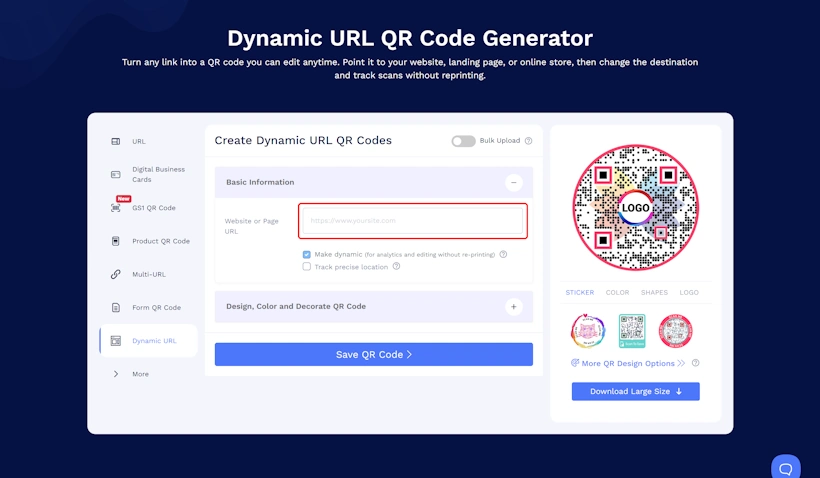
Step 1: Open the Dynamic URL QR code generator
Go to the Dynamic URL QR code solution and enter the webpage URL you want people to land on.
Step 2: Customize the design
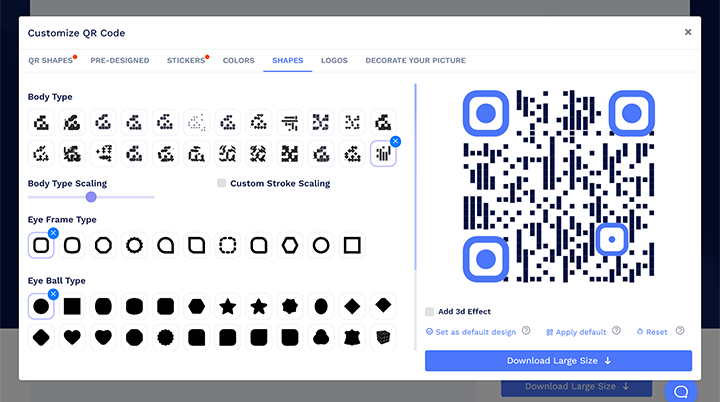
Open Design, Color and Decorate QR Code to set the shape, colors, logo, and pattern. Keep strong contrast between the pattern and its background, and do not let a logo cover the finder patterns in the corners.
Step 3: Save and test before you print
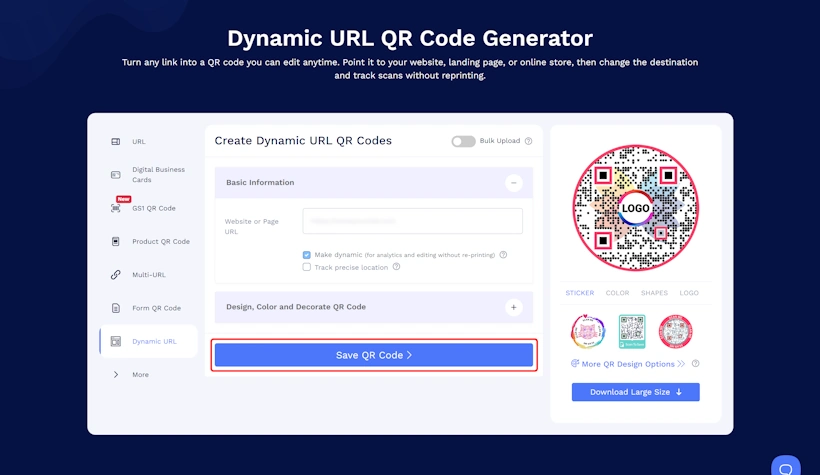
Select Save QR Code, name it, and save it to your account. Then scan it on more than one phone and confirm the destination loads properly on a small screen.
Testing is the step people skip, and it is the one that costs money when a print run goes out wrong.
Create a dynamic QR code you can update after it’s printed, and see every scan it earns.
How to update a dynamic QR code after printing
Updating a live code takes seconds and does not change the printed image.
- Sign in to your QRCodeChimp account.
- Find the QR code in your dashboard.
- Select the edit option.
- Change the URL, file, or page content.
- Save.
Anyone who scans the code after that point sees the new destination. Anyone holding an old printout is holding a code that still works.
One rule matters more than the rest: do not delete a dynamic QR code that is already printed or in circulation. Deleting the record can break every copy of that code in the field. Edit it instead. If you need it to stop working temporarily, pause it.
What you can track and control after printing
Editing is half the value. The other half is that a dynamic code reports back, and that you can change how it behaves without touching the print.
Scan analytics
QRCodeChimp’s dynamic QR code analytics can include:
- Total and unique scans
- Time and day of each scan
- Location-based scan data
- Device, operating system, and browser
- Performance by individual QR code and by folder
What is available depends on your plan. The practical implication is that offline marketing becomes measurable: you can see which poster, which store, which magazine, or which event actually produced scans.
To get that comparison, you need separate codes for the placements you want to compare. One code used everywhere reports one undifferentiated number. Five codes across five stores tell you which store is working.
Routing by device, day, or time
A Smart QR code sends different people to different destinations from the same printed code, based on rules you set: device type, day of the week, or time of day. A restaurant can point one table-tent code at the lunch menu until 4pm and the dinner menu after. An app campaign can send iOS scans to the App Store and Android scans to Google Play. The code on the wall never changes.
Pausing and campaign dates
Supported dynamic codes can be paused and resumed from the dashboard, and you can set campaign start and end dates so a promotional code stops serving an expired offer on its own.
Google Analytics
QRCodeChimp supports GA4 integration for hosted landing page solutions on eligible paid plans. Scan data stays in the QRCodeChimp dashboard; on-page behavior shows up in GA4. Note that QR traffic lands as Direct unless you add UTM parameters. For the full setup, see QR codes in Google Analytics.
Best practices for dynamic QR codes
Most dynamic QR code failures are not technical. They come from treating the code as disposable, or from forgetting that a printed code makes a promise to whoever scans it.
✅ Keep the destination true to the printed message
If the flyer says the code opens a menu, it should keep opening a menu. Editability is not permission to redirect people somewhere unrelated once the campaign ends. Send them to a sensible replacement, not a bait-and-switch. Trust is the thing that gets you the second scan.
✅ Design for the phone
Almost every scan happens on a phone, usually standing up, often on mobile data. Test the destination on a small screen. Check that forms are usable, videos load, and PDFs are not a 15MB download.
✅ Check your scan and code limits before a big run
Dynamic codes on QRCodeChimp are subject to a monthly scan allowance and a cap on active dynamic codes. If the monthly scan limit is exhausted, the code pauses until the allowance resets next cycle. Before a high-volume campaign, confirm your plan covers the scans you expect. Ultima and higher plans include unlimited scans.
✅ Name and organize codes properly
“QR code 47” is how the wrong code gets edited during a live campaign. Use descriptive names and folders, especially when you are managing codes across multiple products, stores, clients, or team members.
✅ Retest after every update
Changing a destination is quick enough that it is easy to do it and move on. Scan the code afterwards and confirm it lands where you think it does.
Why create dynamic QR codes with QRCodeChimp
QRCodeChimp offers over 40 dynamic QR code solutions covering websites, professional profiles, product information, documents, forms, events, menus, galleries, and social links.
What that supports in practice:
- Updates without reprinting. Change the destination or the landing page content; the printed code keeps working.
- Scan analytics. Measure offline placements the way you measure online campaigns.
- Campaign start and end dates. Promotional codes that stop serving an expired offer on their own.
- Design control. Shapes, colors, logos, and stickers, so the code matches the brand rather than fighting it.
- Bulk creation and folders. Generate codes in volume for product lines, store locations, or an entire sales team, and manage them in one place rather than one at a time.
- Team and subaccount access. Give people the codes they need without giving everyone the keys to everything.
- White labeling. Serve scans from your own domain rather than a third-party URL, available on Ultima plans.
- Security and compliance. Multi-factor authentication, SOC 2 Type II certification, and GDPR compliance.
The free plan includes 10 dynamic QR codes, 1,000 total scans per month, and unlimited static codes, which is enough to test a real campaign before committing budget. Dynamic code limits and monthly scan allowances scale from there. See pricing for the full breakdown.
When a dynamic QR code is the right choice
Use a dynamic QR code when at least one of these is true:
- The linked information may change, even once.
- The code will be printed or distributed and cannot easily be replaced.
- You want to know whether the campaign worked.
- You want different scanners to reach different destinations.
- The code will stay in circulation longer than the content behind it.
If none of those apply, a static code is fine and free. If any of them do, the reprint you avoid usually costs more than the plan does.
Frequently asked questions
Do dynamic QR codes expire?
Dynamic QR codes have no built-in expiry date. They stop working only under specific conditions: the monthly scan limit is exhausted (the code pauses and resumes when the allowance resets), a scheduled campaign end date passes, the plan is downgraded, or the code or account is deleted. More detail in do QR codes expire.
Can I change a dynamic QR code after printing it?
Yes. Edit the destination or the landing page content from your dashboard. The QR code image does not change, and the printed code keeps working.
How many times can I update a dynamic QR code?
There is no limit on how many times you can change the destination or content behind a dynamic QR code.
Can I convert a static QR code into a dynamic one?
You can convert a saved static QR code in your QRCodeChimp account, but the conversion generates a new QR code image. You have to download and print the new code. Any static code you already printed will keep opening its original fixed content and will never reflect updates. In practice, an already-printed static code cannot be made dynamic; it can only be replaced.
Do dynamic QR codes need an internet connection?
Yes. The redirect is served online, so the scanning device needs connectivity. Static codes that open websites need it too. Static codes carrying plain text or contact details can display that data without going online.
Can I tell a dynamic QR code apart from a static one by looking at it?
Not reliably. The two can look identical. A short URL inside the code hints at a managed redirect, but appearance alone proves nothing. Check the code in your account dashboard to be sure.
Can I pause a dynamic QR code temporarily?
Yes. Supported dynamic codes can be paused and resumed from the dashboard. While paused, scans will not reach the normal destination. Pausing is the safe alternative to deleting a code that is already in circulation.
What happens if I delete a dynamic QR code?
Deleting it can stop the printed code from redirecting. Never delete a code that has been printed, shared, or applied to products. Edit it or pause it instead. Deleted codes go to Trash and can be restored within 30 days.
You may also like
How to Create a Circular QR Code With Logo + Best Practices and Mistakes to Avoid
Learn how to create a circular QR code (round or circle) with your logo, plus best practices, scannability tips, and mistakes to avoid. Free to start on QRCodeChimp.
GS1 Application Identifiers Explained: GTIN, Batch, Serial, Expiry, and More
This guide explains the most important GS1 Application Identifiers used for product identification, traceability, retail, and packaging.
How to Group Cards in QRCodeChimp Entra ID Setup
Learn to organize digital business cards effectively using QRCodeChimp Entra ID grouping. Simplify card management by group, filter, or all-in-one.
Steps to Integrate Microsoft Entra ID (Azure AD) with QRCodeChimp
Learn how to connect Microsoft Entra ID with QRCodeChimp to automate digital business card creation, improve security, and simplify onboarding.
Most Popular
Contact Sales
