Do you remember the last business card you received and actually used? Industry estimates suggest that 9 out of 10 printed business cards are discarded in just a week, meaning most never turn into real client connections. They get misplaced, forgotten, or thrown away soon after the interaction ends. The problem isn’t the design; it’s that paper cards no longer match how clients discover and reconnect with professionals today.
Digital business cards address this gap by replacing static contact details with an interactive profile that combines your portfolio, services, and booking access into a seamless experience.
For hairstylists, this is more than convenience. A digital business card helps turn interest into engagement, allowing clients to explore your work, save your details instantly, and reconnect when they’re ready to book.
Here’s how digital business cards help hairstylists attract and retain clients, plus practical tips to design and optimize your card for consistent bookings.
How digital cards moved from nice-to-have to non-negotiable for hairstylists
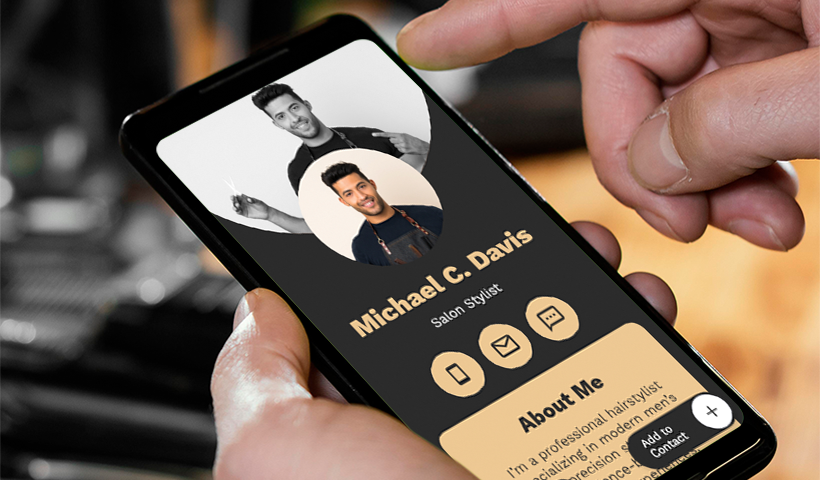
Digital cards are now the modern hairstylist’s digital storefront – fast to share, always up to date, and designed to turn curious browsers into loyal customers. Let’s take a look at how they benefit stylists.
Instant client capture with a polished brand showcase
- Impress with a short bio that effectively expresses your brand vision.
- Showcase your portfolio (your best work) in a grid or carousel format.
- Include before/after sliders to show transformation and technique.
- Showcase curated “signature looks” or seasonal or trending styles at the top for quick wins.
- Display a detailed service menu with descriptions, add-ons, price ranges, and package options.
- Maintain consistency in fonts, colors, and tone to establish trust and recognition with your brand.
Share instantly without friction
Share your digital business card via QR code-embedded business cards, NFC-enabled cards, email signatures, and even Instagram DMs in seconds. Your digital card also offers options to add it to your Google or Apple Wallet, keeping it always handy.
Update once, sync everywhere
One of the major problems with paper cards is that they’re static, and a single change to the information requires reprinting the entire batch. With digital business cards, you update the information once, and it syncs everywhere in real time; no reprinting, lower costs, and reduced waste. You can instantly edit contact details, prices, business hours, location, or any other information to keep your digital profile up to date.
Spotlight your salon’s USPs
- Highlight your seasonal services and exclusive packages for special occasions, such as festival braids, pre-holiday gloss, back-to-work refresh, and bridal specials, for easy upsells.
- Use simple promo banners or ribbons with one-tap CTAs like “Book this look.”
- Add links to product catalogs and service pages.
- Back it up with proof: star rating, awards, certifications, or years of experience.
- Provide links to gift cards, loyalty programs, referrals, and first-time visitor discounts to drive quick wins.
Get discovered instantly and seamlessly
Link your exact Google Maps location so clients can tap for directions, view hours, parking instructions, and even reviews. No need for copy-pasting addresses.
Also, include links to your social media profiles, such as Instagram, TikTok, and Pinterest, to highlight your online presence and get discovered instantly. You can showcase fresh cuts, color transformations, and behind-the-chair tips & tricks via Instagram or TikTok Reels to engage and impress clients, and to skyrocket your following.
Integrate with your existing tools
- Embed the link to your appointment scheduler, such as Calendly, to enable one-tap bookings.
- Integrate bookings with Google/Apple Calendar for targeted reminders.
- Sync form responses with your CRM system to automatically store client data. This helps you send personalized messages or reminders to clients.
Branded digital cards for every stylist
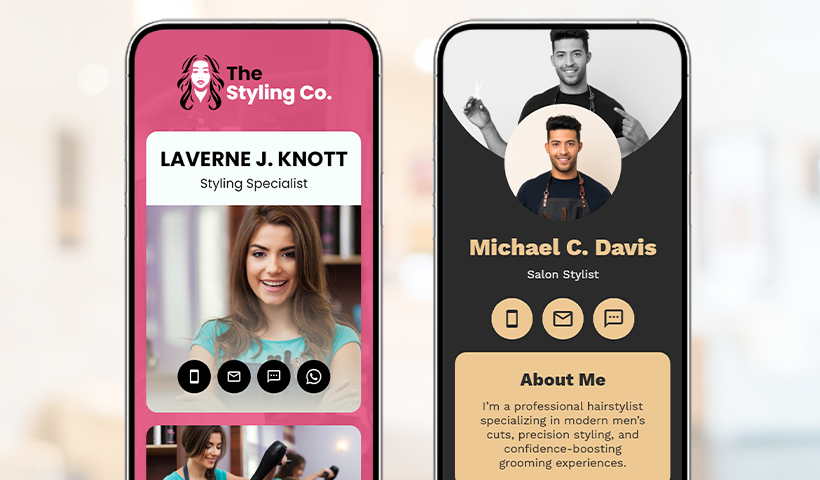
Give each stylist in your team their own digital card built from a master template with brand-aligned fonts, colors, services, pricing, and CTAs. Stylists can personalize their cards by adding a short bio, specialties, and a portfolio gallery, while maintaining brand consistency. This helps clients easily find the right professional, view their work and specialties, and book with confidence.
Add social proof to build client trust
- Link to Google reviews and highlight star ratings.
- Feature client testimonials with before-and-after clips or quick selfies, along with press mentions.
- Prompt visitors to share reviews post-visit, such as “What did you love the most about us?”
Feedback that helps improve the service
Embed a feedback form into your digital card to quickly gather your clients’ feedback and suggestions – what they liked, what issues they faced, and how they want the services to be improved. Keep the form short for faster responses and enhanced user convenience. Add a clear “Give feedback” button to your card, and ensure it loads quickly and smoothly on mobile devices.
See what drives conversions
Leverage QR code analytics to track key metrics such as total and unique scans, peak scan hours, top locations, top-performing digital business cards, and more. This helps you identify what’s working and what’s not, and refine your card content to increase engagement and boost conversions.
Templates section
Design to convert: Essential design & optimization tips for hairstylists
Turn card views into confirmed bookings with these quick design & optimization tips.
- Stay on-brand: Maintain consistency in colors, fonts, and logo throughout the card. Reuse branded sections for services and promotions.
- Use clear CTAs: Add clear, compelling CTAs like “Book now,” “See prices,” and “View latest offers here.” Keep the CTA text short and action-oriented, with easy-to-tap buttons.
- Test every link and button: Ensure they all function seamlessly to prevent user inconvenience. Fix any slow or broken links immediately.
- Ensure mobile-friendliness: Ensure your digital business card landing page loads quickly, uses thumb-friendly buttons, compresses images, and includes mobile-optimized forms.
- Put your QR everywhere: From front desks and retail shelves to mirrors, window decals, receipts, and even paper business cards, place your digital card QR code everywhere to maximize visibility and reach.
- Add a digital card to your bio and signatures: Embed your digital business card link in your Instagram/TikTok bio. Plus, include your digital card QR code in email signatures to reach more clients with every email.
- Coach the team: Train your team/stylists on how to share their digital business cards instantly (via QR/NFC) with clients during consultations and at checkout.
Make the switch to digital cards today with QRCodeChimp
Static paper business cards just don’t cut it anymore. It’s time for hairstylists to switch to a polished digital card to make a stronger impression and win more clients. With QRCodeChimp, it takes just minutes to get started.
Create branded digital business cards in an instant without any design skills. Use team-ready templates to maintain consistent branding across every stylist’s digital card, and manage multiple cards from a single platform. Also, use the platform’s cutting-edge analytics dashboard to track scans and clicks, identify what works, and double down on it.
Frequently asked questions
Can each stylist in my salon have their own card?
Yes. Use a master template for brand consistency, then let stylists add their bios, specialties, and galleries to their digital cards.
Can I update the details on my digital card without reprinting?
Yes. Edit your card anytime, and updates go live instantly—no reprints required. This lets clients always see the latest prices, hours, location, or policies.
Can I include booking and social links on my digital card?
Yes. You can add Calendly or other appointment booking links, as well as links to your Instagram, TikTok, and other social media profiles to highlight your online presence.
You may also like
When Excel Broke: How QRCodeChimp Simplified Digital Business Cards for a Fast-Growing IT/ITES Enterprise
Discover how a fast-growing IT/ITES enterprise replaced Excel uploads with QRCodeChimp’s form-based automation to create branded digital business cards faster, with HR control.
Simplifying Document Access in Real Estate with QR Codes
Learn how QR codes simplify real estate document access. Share brochures, disclosures, and closing files securely with dynamic, trackable QR codes.
30+ Proven Virtual Networking Event Ideas to Build Real Connections
Discover 30+ proven virtual networking event ideas that reduce fatigue, spark real conversations, and build lasting connections. Includes formats, platform tips, and QR code strategies.
Why Every Doctor Should Switch to Digital Business Cards
Discover how digital business cards help doctors improve patient access, simplify referrals, support telehealth, and keep contact details updated in real time.
Most Popular
Contact Sales
