For most professionals and teams, digital business cards are the better long-term choice. They can be updated anytime, shared through a QR code, link, NFC, or wallet pass, and tracked with scan analytics. That makes follow-up easier and turns a simple card exchange into a measurable business touchpoint.
Physical cards still have value when a premium, in-person handoff matters. But paper alone has limits: details go out of date, cards get misplaced, and you rarely know whether the exchange led to action. For many businesses, the strongest option is hybrid: a printed card with a QR code that opens a live digital profile.
This guide compares physical vs digital business cards on sharing, updates, cost, lead capture, analytics, and team use, so you can choose the format that fits your audience and networking goals.
- What is a digital business card?
- Physical vs digital business cards: a quick comparison
- Why digital business cards win for most professionals and teams
- When physical business cards still make sense
- The best of both: a printed card with a QR code
- Cost breakdown: physical vs digital business cards
- How QRCodeChimp helps you move from paper to digital
- Final verdict: Which should you choose?
- Frequently asked questions
What is a digital business card?
A digital business card is a shareable online profile that holds your contact details, professional information, links, and brand assets in one place. You can share it with a QR code, link, NFC card, email signature, social profile, or wallet pass.
Unlike a printed card, a digital business card stays editable after sharing. You can update your phone number, designation, company details, profile photo, calendar link, portfolio, social links, or lead form without creating a new card.
For a full breakdown of what to include, read our guide on what to put on a digital business card.
Physical vs digital business cards: a quick comparison

Both formats help you share your identity, but they work very differently after the exchange. A physical card creates a tactile impression, then stays static. A digital card stays live, measurable, and easier to act on.
| What matters | Physical business cards | Digital business cards |
|---|---|---|
| Sharing | Mostly limited to in-person handoff | Share by QR code, link, NFC, wallet, email, social media, or print |
| Updates | Requires reprinting when details change | Update anytime without changing the QR code or link |
| Lead capture | Mostly one-way sharing | Collect contact details through contact exchange or lead forms |
| Tracking | No visibility after the card is handed over | Track scan and engagement data, depending on the platform and plan |
| Team control | Hard to standardize across employees | Use templates, bulk creation, and admin controls to maintain consistency |
| Cost over time | Printing, redesigns, reorders, distribution, and waste | Free or paid platform plan, with no reprinting for updates |
| Best fit | Premium in-person moments, formal settings, traditional audiences | Sales, events, recruitment, teams, networking, and measurable follow-up |
| Best overall use | Strong for tactile impact | Strong for action, updates, analytics, and scale |
A digital card can also support printed use. You can add a QR code to a physical card, brochure, event badge, booth banner, email signature, or product insert and send people to the same live profile.
Why digital business cards win for most professionals and teams
For anyone whose work depends on follow-up, digital business cards remove the friction that makes paper leak opportunities. This matters most for sales teams, founders, consultants, recruiters, event teams, real estate professionals, agencies, and customer-facing employees.
✅ They stay current without reprinting
Printed cards become outdated the moment your contact details change. A new title, phone number, office address, landing page, calendar link, or social profile can make hundreds of cards inaccurate.
With a digital business card, you update the information once. The same QR code and link continue to work, even if the card was shared weeks or months earlier. That reduces reprint waste and keeps every touchpoint accurate.
✅ They turn a handoff into a captured lead
A physical card mostly shares your information one way. You hand it over and hope the recipient contacts you later.
A digital business card can make the exchange two-way. With QRCodeChimp, the Contact Exchange Form helps users collect basic contact details. When businesses need custom fields, they can add the Lead Collection Form component and capture the information that matters for follow-up.
That turns a networking moment into a saved contact instead of a missed opportunity.
✅ They make follow-up faster
Speed matters after a meeting, trade show, sales visit, or networking event. The longer the gap between meeting someone and following up, the easier it is for the conversation to go cold.
Digital cards help shorten that gap. Contacts collected through QRCodeChimp’s Contact Exchange Form, Lead Collection Form component, or AI card scanner are available under Contacts on the dashboard and on the user’s digital business card. From there, users can take quick actions such as email, text, or call, and add tags for easier follow-up.
✅ They give teams better brand control
For teams, physical cards create a brand management problem. Employees may use outdated designs, old job titles, inconsistent logos, different phone formats, or cards printed before the latest brand update.
Digital business cards make brand control easier. Teams can use shared templates, bulk creation, and centralized controls so every employee card looks consistent and stays accurate. Admins can also update information without waiting for employees to reorder cards.
✅ They make networking measurable
Paper cards disappear into pockets, drawers, and trash bins. You rarely know which event, booth, employee, or campaign generated interest.
Digital cards give you visibility. Depending on your QRCodeChimp plan, scan analytics can show engagement details such as scan time, location, device, browser, and more. This helps teams understand which offline touchpoints are actually driving action.
When physical business cards still make sense
Digital cards are more practical for most modern workflows, but physical cards are not useless. A well-made printed card can still support the right moment.
Physical cards make sense when the material itself adds value. Premium paper, texture, finish, or design can create a stronger impression in luxury, creative, consulting, or relationship-driven industries. They also work well in formal in-person settings where exchanging cards is expected, or with audiences that still prefer printed materials.
The weakness is that paper cannot update itself, capture leads, or show what happened after the exchange. That is why many businesses do not need to choose one format completely over the other.
The best of both: a printed card with a QR code
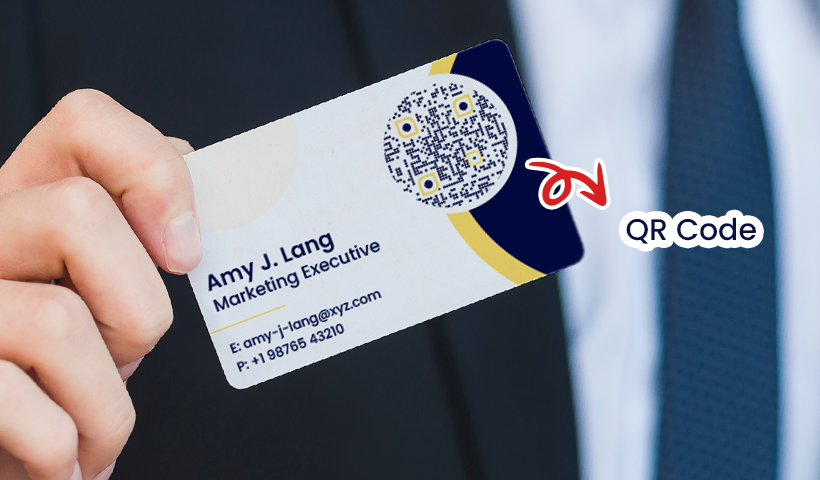
For many businesses, the strongest option is a hybrid setup: keep the printed card, but add a QR code that opens a dynamic digital business card.
This gives the recipient the tactile experience of a physical card and the convenience of a live profile. In one scan, they can view your latest contact details, save your information, open your website, book a meeting, view your portfolio, follow your social profiles, or share their details back.
You also get more control. If your phone number, title, location, or campaign link changes, you update the digital card without reprinting the physical card. The printed card stays useful because the QR code continues to point to the latest version.
This is the practical answer for businesses that still value print but want better follow-up, lower reprint waste, and measurable offline networking.
Cost breakdown: physical vs digital business cards
Physical business cards usually look cheaper at first because the cost is easy to see: design, print, and order a stack of cards. But that first order is not the full cost.

The real cost starts when details change. A new phone number, job title, office address, logo, website link, or brand guideline can make an entire batch outdated. For teams, this happens often: employees join, move roles, change locations, switch departments, or leave the company. Every update creates extra work for design, approvals, printing, shipping, distribution, and disposal of old cards.
Digital business cards reduce that repeat cost. Once the card is created, the profile can be updated anytime without changing the QR code or reprinting anything. That means fewer wasted cards, faster updates, and less dependency on print cycles.

The cost difference becomes clearer when you compare what each format actually gives you:
| Cost factor | Physical business cards | Digital business cards |
|---|---|---|
| First setup | Design and print order | Create a digital profile |
| Updates | Reprint when details change | Edit anytime without reprinting |
| Team changes | New cards for new roles, branches, or employees | Update centrally and keep cards live |
| Waste | Old cards become unusable | Existing QR code and link stay valid |
| Follow-up value | No built-in lead capture or tracking | Supports contact sharing, lead capture, and scan analytics |
| Brand control | Harder to maintain across teams | Templates and bulk creation help keep cards consistent |
For individuals, printed cards may still be manageable. For growing teams, digital business cards usually make more financial and operational sense because they reduce repeat printing, keep information current, and make networking easier to measure.
The best setup is often hybrid: use a premium printed card when the physical impression matters, but add a QR code that opens a dynamic digital business card. You keep the value of print while avoiding the biggest cost of paper: outdated information.
How QRCodeChimp helps you move from paper to digital
QRCodeChimp helps individuals and teams create digital business cards that can be shared by QR code, link, NFC, email signature, social media, and wallet pass. You can update your card anytime, so your shared profile stays accurate without reprinting.
For lead generation, QRCodeChimp supports two-way contact sharing through the Contact Exchange Form. Businesses that need custom fields can add the Lead Collection Form component to collect more specific information. Contacts collected through forms or the AI business card reader appear under Contacts on the dashboard and on the user’s digital business card, where users can call, text, email, and tag contacts for follow-up.
For teams, QRCodeChimp supports bulk creation, shared templates, scan analytics, and centralized management. Larger organizations can use features such as Active Directory integration, SSO integration, white labeling, and access controls to keep employee cards on-brand, updated, and easier to manage at scale.
If your business already uses printed cards, QRCodeChimp also makes the hybrid approach simple. Add a QR code to your physical card and link it to a dynamic digital business card. You keep the in-person handoff while giving recipients a live, measurable, and updateable way to connect.
Final verdict: Which should you choose?
For most professionals, sales teams, event teams, and growing businesses, digital business cards are the better long-term choice. They are easier to update, share, track, and scale, and they support faster follow-up than printed cards alone.
Physical business cards still have value when a premium, in-person handoff matters. But for many businesses, the best choice is not physical or digital. It is both: a quality printed card with a QR code that opens a live digital profile.
That way, you keep the physical impression and gain the practical benefits of digital networking.
Frequently asked questions
Are digital business cards better than physical business cards?
For most professionals and teams, yes. Digital business cards are easier to update, share, track, and scale. Physical cards are still useful when a tactile, premium handoff matters, which is why many businesses use both.
What is the main difference between physical and digital business cards?
A physical business card is static after printing. A digital business card stays live, so you can update the details anytime, add links and forms, and track engagement depending on your platform and plan.
Are physical business cards still useful?
Yes. Physical cards can still work well for premium branding, traditional industries, formal meetings, and audiences that prefer printed materials. They become more useful when paired with a QR code that opens a digital business card.
Can I put a QR code on a physical business card?
Yes. Adding a QR code to a physical card is one of the best ways to combine print and digital. The QR code can open your live digital business card, where recipients can view your latest details, save your contact, and share their information back.
Are digital business cards worth it for teams?
Yes, especially for teams that need brand consistency, frequent updates, lead capture, and analytics. Digital cards reduce reprinting, make employee cards easier to manage, and help teams measure engagement from events, sales visits, and offline campaigns.
Do digital business cards work without an app?
Yes. Recipients can open a digital business card by scanning a QR code, tapping an NFC card, or clicking a link. They do not need to download an app to view the card.
What is the best option for a business with many employees?
Digital business cards are usually the better option for businesses with many employees. A platform like QRCodeChimp lets teams create cards in bulk, maintain brand consistency, update details centrally, and track engagement. Businesses that still want printed cards can add a QR code that links to each employee’s digital profile.
You may also like
GS1 Application Identifiers Explained: GTIN, Batch, Serial, Expiry, and More
This guide explains the most important GS1 Application Identifiers used for product identification, traceability, retail, and packaging.
How to Group Cards in QRCodeChimp Entra ID Setup
Learn to organize digital business cards effectively using QRCodeChimp Entra ID grouping. Simplify card management by group, filter, or all-in-one.
Steps to Integrate Microsoft Entra ID (Azure AD) with QRCodeChimp
Learn how to connect Microsoft Entra ID with QRCodeChimp to automate digital business card creation, improve security, and simplify onboarding.
Bulk QR Codes for Business: Use Cases and Benefits
Discover how bulk QR codes for business can streamline product packaging, employee cards, events, multi-location campaigns, inventory, and more
Most Popular
Contact Sales
