Digital business cards have made networking more efficient, but physical cards are still widely used. Professionals continue to exchange paper cards every day, creating a disconnect between how contacts are collected and how they’re actually managed. In reality, most people don’t get around to manually entering details or organizing stacks of cards, which often leads to delayed follow-ups or missed opportunities.
An AI Business Card Reader for digital business cards bridges this gap by turning every physical card into an instantly usable digital contact without manual effort.
QRCodeChimp already allowed users to store contacts within their digital business cards, but capturing information from physical cards still required manual entry. While functional, it wasn’t the most efficient experience.
The new AI Business Card Reader changes that. You can now scan a physical business card directly through your digital business card and save the extracted details instantly.
Here’s everything you need to know about QRCodeChimp’s latest AI Business Card Reader for digital business cards.
Key Takeaways:
- Convert offline business cards into digital contacts using the AI Business Card Reader.
- Scan cards directly from your digital business card, no extra tools needed.
- Access and manage all scanned contacts from your card and dashboard.
- Capture, organize, and follow up on leads without manual effort.
- The challenge: Physical cards still dominate networking
- The solution: An AI Business Card Reader for faster, smarter contact capture
- How does the AI Business Card Reader for Digital Business Cards work?
- Benefits of an AI Business Card Reader for Digital Business Cards
- Why does an AI Business Card Reader for Digital Business Cards matter?
- Wrap up
- Frequently asked questions
The challenge: Physical cards still dominate networking
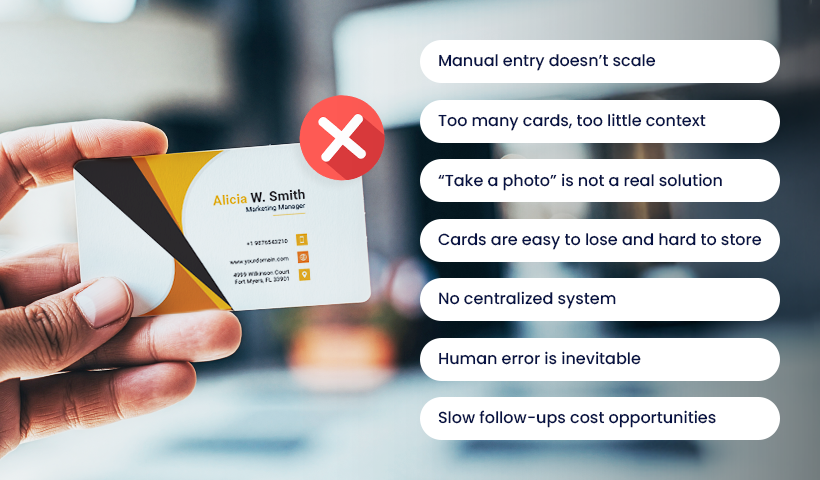
As professionals continue to carry and exchange physical cards, often in limited quantities, each interaction becomes important. In practice, though, this creates multiple friction points, such as:
- Manual entry doesn’t scale
Every card requires manually entering details like name, phone number, email, and company into your phone, CRM, or contact management system. After events, this quickly becomes time-consuming, leading many professionals to delay or skip the process altogether. - Too many cards, too little context
During events, it’s easy to collect dozens of cards, but very few of them turn into actionable contacts. With the effort required for manual entry, most people postpone adding the details, intending to do it later. That rarely happens, and valuable connections are often forgotten before they’re ever saved. - “Take a photo” is not a real solution
When time is short, or conversations move quickly, people often take photos of business cards instead of properly saving the details. But these images usually stay buried in the gallery, unorganized and rarely used when needed. - Cards are easy to lose and hard to store
Physical cards are small, easy to misplace, and inconvenient to store long-term. Carrying, sorting, and maintaining them adds unnecessary friction. - No centralized system
Contacts end up scattered across photos, notes, inboxes, and memory. Without a structured system, managing and retrieving information becomes inefficient. - Human error is inevitable
Manual data entry increases the risk of mistakes. A small typo in a phone number or email can result in a missed connection. - Slow follow-ups cost opportunities
When contact details capture is delayed, follow-ups are pushed back or forgotten altogether. In networking, timing directly impacts outcomes.
The solution: An AI Business Card Reader for faster, smarter contact capture
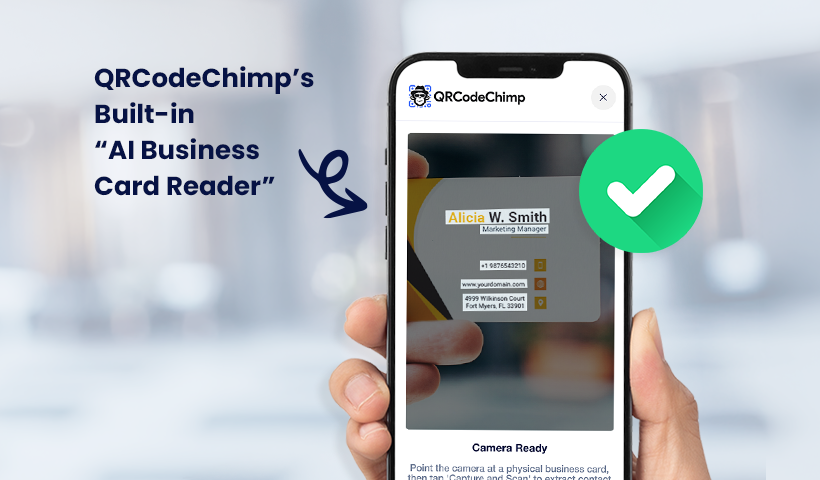
The AI Business Card Reader for digital business cards removes the friction from contact capture by turning physical cards into ready-to-use digital contacts in seconds. Powered by OCR (Optical Character Recognition) technology, it reads and extracts text from physical cards the moment your camera captures them. Instead of manually typing details, you simply scan the card and let the AI do the work.
The flow is designed to be quick and intuitive. Open your digital business card, select the ‘AI Business Card Reader’ option from the menu, and point your camera at the card. The AI instantly reads the information, extracts key details, and presents them in a pre-filled form. You can quickly review, make any necessary edits, and save.
What makes this powerful is that everything happens within your digital business card environment. There’s no need for separate scanning apps or disconnected workflows. Once saved, the contact is automatically added to your ‘Contacts’ section, giving you a clean, centralized, and instantly accessible network.
In short, it shifts contact capture from a manual task to a seamless, real-time action.
How does the AI Business Card Reader for Digital Business Cards work?
Here’s how it works:
Step 1: Create a digital business card
Log in to your QRCodeChimp account, go to the digital business card solution, and create a digital business card. For detailed steps to make one, check this.
Step 2: Open your digital business card
Once you’ve created and saved your digital business card, log in to your QRCodeChimp account on your mobile browser. From the dashboard, open your digital business card page.
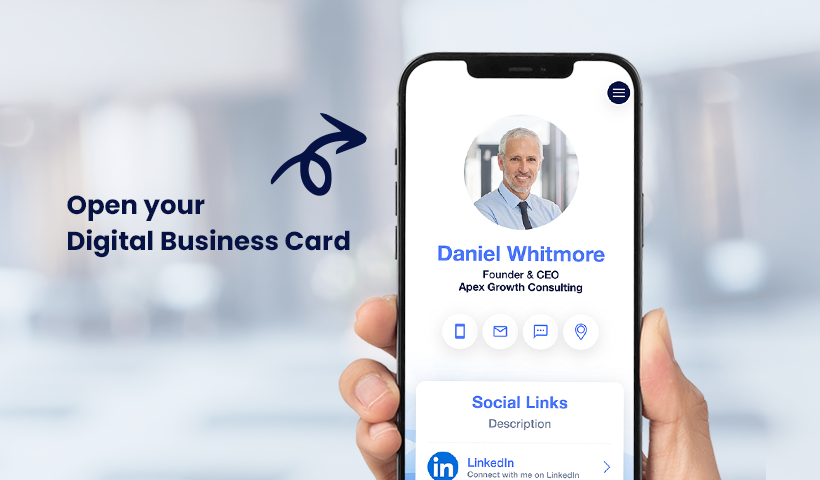
Step 3: Use the AI Business Card Reader to capture business cards
After opening the page, click on the hamburger menu in the top-right corner and click on “Capture Contact via AI Business Card Reader.” The camera will open. Point the camera towards the physical business card you want to capture. The built-in OCR engine will begin reading the card’s text immediately.
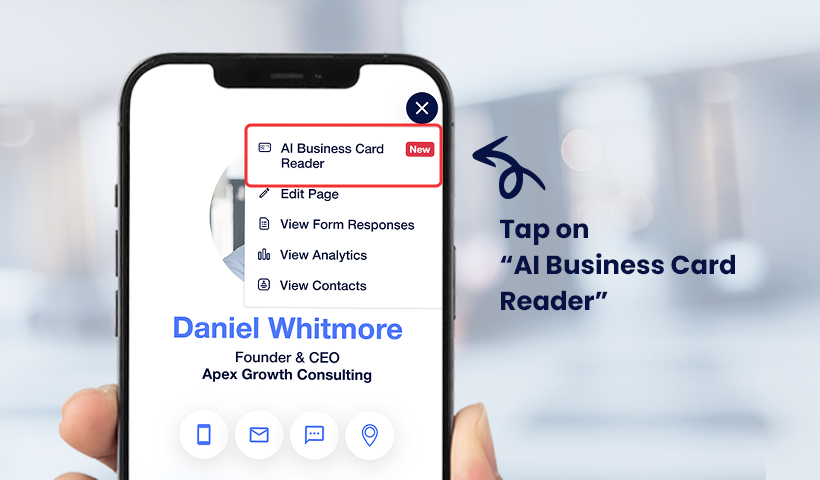
Step 4: Verify the fields
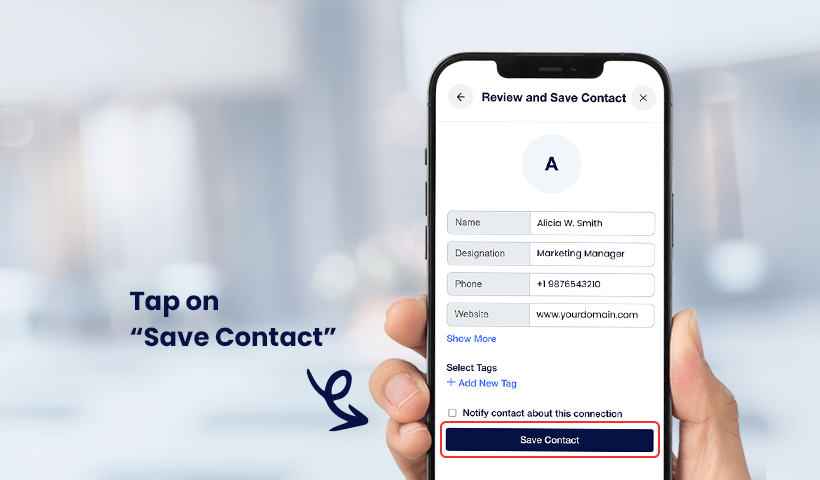
The AI sorts the extracted information into the right fields, like name, phone number, email, company, and role, and pre-fills the form for you. Before saving, you’ll see a simple checkbox prompting you to send a follow-up email to the person whose card was just scanned. If their card includes an email address, the AI generates and sends a short professional note on your behalf, letting them know their card has been saved and inviting them to save yours in return. Review the details, make any edits, and hit “Save Contact.”
Step 5: View the saved contact
Return to your digital business card page, click the hamburger menu again, and go to “View Contacts.” In the “Contacts via AI Business Card Reader” tab, you’ll see a list of all the contacts saved through the card reader.
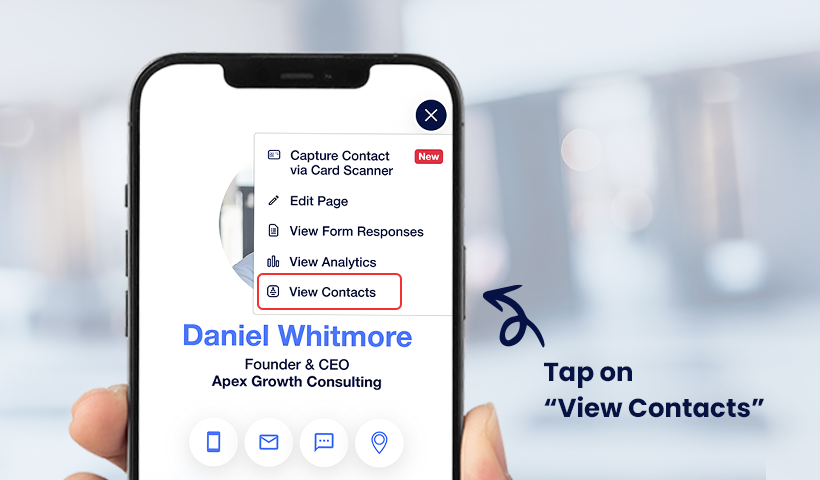
Note: You can also access these contacts directly from your dashboard under Dashboard → Contacts. From there, you can take quick actions such as calling or emailing a contact.
Benefits of an AI Business Card Reader for Digital Business Cards
A dedicated AI Business Card Reader for digital business cards doesn’t just simplify contact capture. It upgrades your entire networking workflow.
- Capture contacts in seconds: Save complete contact details instantly with a quick scan. No manual typing, no delays; ideal for fast-paced meetings and events.
- Never lose a valuable contact: The moment you receive a card, it’s digitized and stored. Even if the physical card is lost, the contact is safe and accessible.
- Improve data accuracy: The AI Business Card Reader’s OCR engine automatically extracts contact details with precision, minimizing typing errors. With a quick review before saving, your contact list stays clean and reliable.
- Keep all contacts in one place: Every scanned contact is stored in your digital business card’s ‘Contacts’ section, giving you a centralized, organized database.
- Enable faster, more effective follow-ups: When contacts are captured instantly and accurately, you can follow up while the interaction is still fresh, improving response rates and outcomes.
- Scale your networking without extra effort: Handle more connections in less time. This technology removes the bottleneck of manual data entry, allowing you to focus on building relationships rather than managing data.
Why does an AI Business Card Reader for Digital Business Cards matter?
The AI Business Card Reader aligns with how networking actually happens today: offline interactions paired with digital follow-ups. Physical business cards are still a constant, but managing them doesn’t have to be manual or fragmented. An AI Business Card Reader for digital business cards bridges this gap by converting every exchanged card into a structured, actionable contact in real time, making your digital business card a complete, self-contained networking tool.
This upgrade delivers the most value to professionals who operate in high-interaction environments, such as sales teams, business developers, recruiters, founders, and freelancers, where speed and accuracy directly influence outcomes. Regardless of whether it’s large events, conferences, or everyday meetings, it ensures every connection is captured, organized, and ready for follow-up without relying on additional tools or delayed workflows.
Wrap up
Capturing contact details from physical business cards should not be a bottleneck. The AI Business Card Reader for digital business cards removes that friction by enabling you to instantly scan, extract, and store contact information.
If your current process still involves collecting cards and “saving them later,” it’s inherently inefficient. This feature replaces that gap with a real-time, reliable system.
Try the AI Business Card Reader in your digital business card today and make your networking more efficient.
Frequently asked questions
What is an AI Business Card Reader in a digital business card?
An AI Business Card Reader in a digital business card is an AI and OCR-based feature that lets you scan physical business cards and convert them into digital contacts instantly.
How do I use an AI Business Card Reader in my digital business card?
Open your QRCodeChimp digital business card, select the AI Business Card Reader option in the hamburger menu, scan the physical card, review the extracted details, and save the contact.
Can I edit the contact details after scanning?
Yes, after scanning, the details are shown in a pre-filled form where you can review and edit before saving.
Are scanned contacts stored securely?
Yes, all scanned contacts are stored within your digital business card dashboard, ensuring they are organized and easily accessible.
Who can benefit from using an AI Business Card Reader in digital business cards?
Professionals like sales teams, recruiters, entrepreneurs, and freelancers who frequently network can benefit the most by saving time and improving follow-ups.
You may also like
GS1 Application Identifiers Explained: GTIN, Batch, Serial, Expiry, and More
This guide explains the most important GS1 Application Identifiers used for product identification, traceability, retail, and packaging.
How to Group Cards in QRCodeChimp Entra ID Setup
Learn to organize digital business cards effectively using QRCodeChimp Entra ID grouping. Simplify card management by group, filter, or all-in-one.
Steps to Integrate Microsoft Entra ID (Azure AD) with QRCodeChimp
Learn how to connect Microsoft Entra ID with QRCodeChimp to automate digital business card creation, improve security, and simplify onboarding.
Bulk QR Codes for Business: Use Cases and Benefits
Discover how bulk QR codes for business can streamline product packaging, employee cards, events, multi-location campaigns, inventory, and more
Most Popular
Contact Sales
