Recruiters often review hundreds of resumes for one role, and even strong candidates can get lost in the pile. A resume tells employers what you have done, but it does not always make it easy for them to view your portfolio, save your contact details, or remember you after a career fair or interview.
That is where digital business cards for job seekers help. You can add one to your resume with a QR code, share it in a LinkedIn message, include it in your email signature, or use it at job fairs. Recruiters get your portfolio, contact details, social links, and professional profile in one mobile-friendly page.
In this article, you’ll see how to use a digital business card to present yourself better, stay reachable, and follow up smarter during your job search.
- What is a digital business card for job seekers?
- Why digital business cards work for job seekers
- What to put on a job-seeker digital business card
- How to use your card during the job search
- Match your card to your career stage
- Tailor your card to the role you want
- Best practices for job-seeker digital business cards
- Build your job-seeker card with QRCodeChimp
- The edge it gives you
- Frequently Asked Questions
What is a digital business card for job seekers?
A digital business card for job seekers is a mobile-friendly professional profile that brings your contact details, resume links, portfolio, LinkedIn, work samples, and booking link into one shareable page.
Unlike a printed card or a static PDF, it can be updated anytime. That means the same QR code or link can continue working even if you change your phone number, portfolio URL, target role, or availability.
For job seekers, this matters because hiring conversations move quickly. The easier you make it for recruiters to understand your value and contact you, the better your chances of staying in the conversation.
Why digital business cards work for job seekers
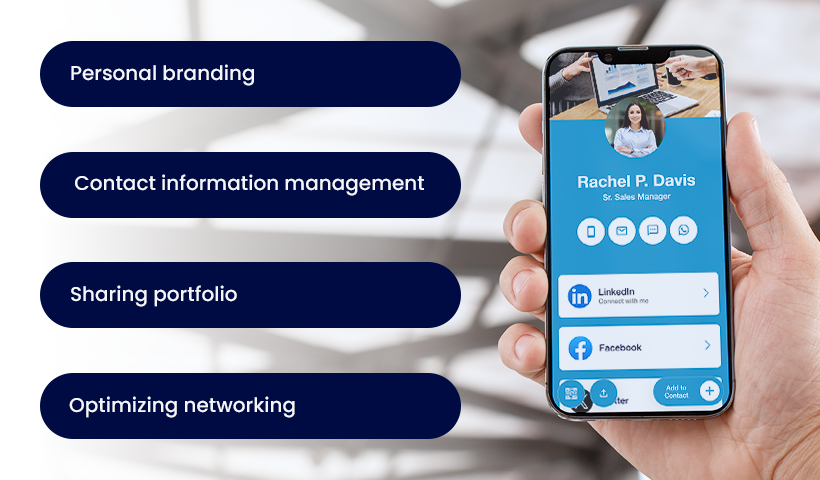
A digital business card helps job seekers turn a quick introduction into a complete professional impression. It gives recruiters a simple way to view your profile, check your work, save your contact, and return to your details later.
👉 Build a consistent personal brand
Your name should connect to a clear professional identity. A digital business card lets you present your headshot, headline, target role, portfolio, and links on one branded page, so every recruiter sees the same polished version of you.
That consistency makes you easier to remember and easier to trust.
👉 Keep your contact details current
Resumes, printed cards, and PDFs can become outdated quickly. A digital business card is dynamic, so you can update your phone number, email, location, target title, portfolio link, or calendar link anytime without changing the QR code or shared URL.
Recruiters always see your latest information, even if they open your card weeks after you first shared it.
👉 Put your portfolio in the recruiter’s hand
A resume tells recruiters what you have done. A portfolio shows it.
With a digital business card, you can link to work samples, case studies, a personal website, a GitHub profile, a design portfolio, a writing folder, or a short introduction video. This helps recruiters move from your contact details to proof of your skills without searching for you across multiple platforms.
For designers, writers, developers, marketers, photographers, and consultants, that direct access can make a strong difference.
👉 Share faster in every hiring situation
You can share your card through a link, QR code, or NFC tap. It works in person, during calls, at career fairs, in email, and on social platforms.
At a busy networking event, a recruiter may not want another printed card. But scanning a QR code or opening a link on their phone is quick and easy. The less friction you create, the more likely they are to save your details.
👉 Follow up with better context
A good digital business card platform gives you engagement insights. With QRCodeChimp, you can track scans, link clicks, contact saves, and scan locations. This helps you understand which placements and conversations are generating interest, so your follow-up is more timely and relevant.
You may not always know the exact person who scanned your card, but you can still see whether your resume QR code, event handout, LinkedIn message, or email signature is driving engagement.
What to put on a job-seeker digital business card
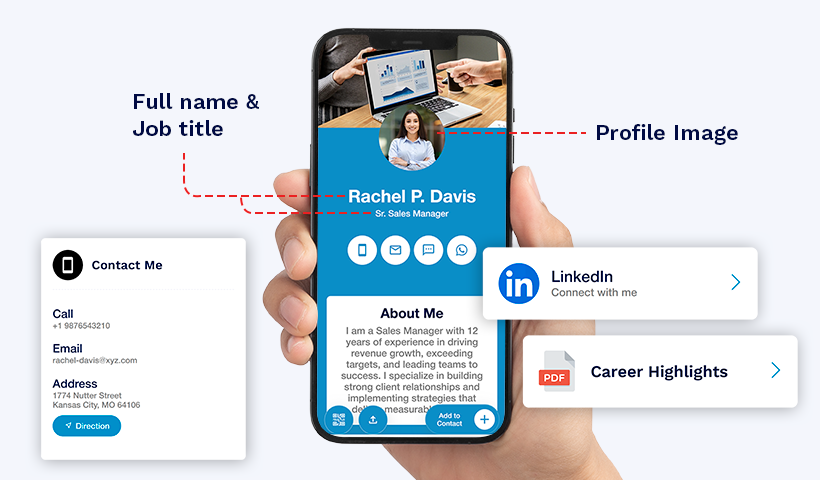
Your card should give recruiters enough information to act quickly without overwhelming them. Keep it focused, relevant, and easy to scan.
Include these essentials:
- Professional headshot: Use a clear, confident photo so recruiters can connect a face to your name.
- Full name and target title: Show the role you want, not only your current role.
- Strong headline: Write one line that explains what you do and the value you bring.
- Contact details: Add your email, phone number, and a general location if relevant.
- Resume link: Make it easy to open or download your latest resume.
- Portfolio or work samples: Link to your best work, case studies, personal site, or shared folder.
- LinkedIn profile: Keep this visible because many recruiters will check it first.
- GitHub or specialist profile: Add this if it supports your role, such as GitHub for developers or Behance for designers.
- Short video introduction: Use a 30 to 60-second video only if it adds value and feels professional.
- Calendar booking link: Let recruiters schedule a call without a long email exchange.
Not sure how much is too much? Read what to put on a digital business card for a fuller breakdown of what to include and what to leave off.
How to use your card during the job search
Creating the card is only the first step. The real value comes from placing it where recruiters, hiring managers, and professional contacts already interact with you.
👉 Add it to your resume and cover letter
Place a QR code or clickable card link near your contact details. This gives recruiters a direct path from your resume to your portfolio, LinkedIn, work samples, and updated contact information.
Keep the QR code clean and easy to scan. Add a short label such as “View my portfolio” or “Open my professional profile” so recruiters know what they will get.
👉 Include it on your LinkedIn profile
Add your digital business card link to your LinkedIn featured section, contact info, or intro message when reaching out to recruiters.
This helps your LinkedIn profile work harder. Instead of sending people to separate links for your resume, portfolio, calendar, and work samples, you can direct them to one clean page.
👉 Put it in your email signature
Every email during a job search can create another opportunity. Add your digital business card link to your email signature so recruiters, referrals, hiring managers, and interview coordinators can open your full profile without asking for extra details.
You can also read this guide on adding a digital business card to your email signature.
👉 Share it in virtual interviews and networking calls
During a video interview or networking call, you can drop your card link in the chat when it feels relevant. This works well when discussing your portfolio, past projects, or availability for the next step.
It also gives the interviewer a useful reference after the call, especially if they are comparing multiple candidates.
👉 Use it at career fairs and campus events
Career fairs move fast. Recruiters meet many candidates in a short time, and printed resumes or cards can easily get mixed up.
A QR code or NFC-enabled card lets you share your profile in seconds. Recruiters can open your details on their phone, save your contact, and revisit your portfolio later.
👉 Add it to event badges, flyers, or printed resumes
If you attend job fairs, conferences, portfolio reviews, or networking meetups, place your QR code where people can scan it easily. This could be your printed resume, name badge, small handout, or portfolio sheet.
The goal is simple: make it easy for the right person to move from a brief introduction to your complete profile.
👉 Track engagement and follow up smarter
Analytics can help you understand what is working. If your resume QR code gets scans after a career fair or your email signature link receives clicks after an interview, you know there is interest.
Use that signal to follow up with context. For example, you can thank the recruiter, mention the role discussed, and include the portfolio or project most relevant to that conversation.
Match your card to your career stage
The right content depends on where you are in your career. A fresher should not present the same proof as a senior manager, and an executive does not need the same portfolio layout as a designer.
Use your card to highlight the proof that matters most for your level.
| Career stage | What to highlight |
|---|---|
| Executives and senior leaders | Leadership roles, board memberships, press mentions, keynote talks, business outcomes, team scale |
| Managers | Team leadership, project wins, measurable results, stakeholder management, testimonials |
| Mid-level professionals | Role-specific achievements, certifications, project contributions, portfolio links, specialized skills |
| Freshers and new graduates | Internships, academic projects, volunteer work, certifications, personal projects, video introduction |
Tailor your card to the role you want
A strong digital business card should feel relevant to the role you are applying for. The basics stay the same, but the proof you highlight should change based on your field.
Use this section as a guide when deciding what to feature first.
| Role type | What to highlight |
|---|---|
| Designers and creative professionals | Portfolio, visual projects, design tools, campaign work, awards, Instagram or Behance profile |
| Writers and content professionals | Writing samples, published work, niche expertise, blog, portfolio, LinkedIn profile |
| Developers and engineers | GitHub, technical projects, certifications, tools, problem-solving examples, project outcomes |
| Medical students and healthcare professionals | Education, certifications, internships, research work, professional contact details |
| Photographers and visual artists | Gallery, best projects, specialties, client work, Instagram or portfolio website |
The goal is not to add everything you have done. It is to make the recruiter’s next step obvious: view your work, understand your fit, and contact you quickly.
Best practices for job-seeker digital business cards
A digital business card should help recruiters act faster, not make them work harder. Keep the card sharp, current, and aligned with the role you want.
✅ Keep the headline specific
Avoid broad lines such as “Looking for opportunities.” Use a headline that tells recruiters where you fit.
Better examples:
- Product Marketing Associate | SaaS Campaigns and Content Strategy
- Front-End Developer | React, JavaScript, and UI Performance
- Entry-Level Data Analyst | SQL, Excel, Python, and Dashboard Reporting
- Graphic Designer | Branding, Social Creatives, and Campaign Design
✅ Lead with your strongest proof
Recruiters do not have time to inspect every link. Put your best resume, portfolio, project, or case study near the top of the card.
If you are applying for different roles, update the featured links to match the type of job you are targeting.
✅ Keep the design clean
Your card should look professional on a phone. Use a clear photo, readable fonts, good spacing, and a simple layout. Avoid too many buttons, colors, icons, or links that compete for attention.
A clean card helps recruiters find what they need quickly.
✅ Update it before every major application push
Before sending applications or attending an event, check your card. Make sure your resume link works, your portfolio is current, your phone number is correct, and your calendar link reflects your availability.
Small errors can make a strong candidate look careless.
✅ Use one primary call to action
Do not ask recruiters to do too many things at once. Decide what matters most: view your portfolio, download your resume, book a call, or connect on LinkedIn.
Make that action easy to find.
Build your job-seeker card with QRCodeChimp
QRCodeChimp helps you create a professional digital business card that you can update, share, and track throughout your job search.
With QRCodeChimp, you can:
- Create one digital business card for free: Build a professional card and start sharing it without printing costs.
- Update your details anytime: Change your title, contact details, resume, portfolio link, or social profiles without creating a new QR code.
- Share through QR code, link, or NFC: Use your card across resumes, email signatures, LinkedIn messages, interviews, events, and NFC cards.
- Enable two-way contact sharing: The Contact Exchange Form lets recruiters share their details back with you, so promising conversations are easier to follow up on.
- Track engagement: View scans, clicks, contact saves, and location insights to understand which channels are getting attention.
- Support mobile saving: Let recruiters save your contact details more easily through phone-friendly sharing options, including Apple Wallet and Google Wallet support.
Create your digital business card and make your job search easier to remember, easier to follow up on, and easier to act on.
The edge it gives you
A digital business card gives job seekers a compact, always-current version of their professional identity. It helps recruiters open your profile in one tap, review your work, save your contact, and return to your details when a role fits.
In a crowded hiring market, the candidate who is easy to remember and easy to reach has an advantage. A strong digital business card helps you become that candidate.
Frequently Asked Questions
Are digital business cards better than paper cards for job seekers?
Yes. Digital business cards stay current, hold your resume and portfolio links, support multimedia, and can provide engagement insights. A paper card can only share static contact details.
What should a job seeker put on a digital business card?
A job seeker should include a professional headshot, target role, short headline, contact details, resume link, LinkedIn profile, portfolio or work samples, and a calendar booking link if relevant.
Do recruiters scan QR codes on resumes?
Many recruiters are comfortable scanning QR codes when the value is clear. Add a short label such as “View my portfolio” or “Open my professional profile” so they know why they should scan.
Can I track who views my digital business card?
You can track engagement such as scans, clicks, contact saves, and location insights on platforms like QRCodeChimp. You may not always know the exact person unless they share their details through a form or contact exchange.
Are digital business cards free for job seekers?
Yes. You can create one digital business card for free with QRCodeChimp. Advanced features and higher limits are available on paid plans.
Can I use one card for both job hunting and networking?
Yes. You can use one card for both, as long as the content supports your current goals. If you are applying for very different roles, separate cards may help you tailor your profile for each audience.
Should I add a video introduction to my digital business card?
Add a video only if it improves your profile. A short, confident 30 to 60-second introduction can help for client-facing, creative, sales, teaching, or leadership roles. Keep it professional and focused.
Where should I share my digital business card during a job search?
Share it on your resume, cover letter, LinkedIn profile, email signature, career fair material, portfolio, interview chat, and networking messages.
You may also like
How to Create a Circular QR Code With Logo + Best Practices and Mistakes to Avoid
Learn how to create a circular QR code (round or circle) with your logo, plus best practices, scannability tips, and mistakes to avoid. Free to start on QRCodeChimp.
How to Group Cards in QRCodeChimp Entra ID Setup
Learn to organize digital business cards effectively using QRCodeChimp Entra ID grouping. Simplify card management by group, filter, or all-in-one.
Steps to Integrate Microsoft Entra ID (Azure AD) with QRCodeChimp
Learn how to connect Microsoft Entra ID with QRCodeChimp to automate digital business card creation, improve security, and simplify onboarding.
How to Combine Multiple Links Into One Link
Combine multiple links into one shareable link and QR code. Use it in bios, emails, messages, or print, and update your links anytime.
Most Popular
Contact Sales
