Event ticketing has changed a lot in the last few years. People now expect quick entry, clear communication, and a digital ticket they can pull up on their phone.
In fact, over 58% of event ticket transactions happen on mobile devices, and 80% of event attendees prefer digital tickets.
Those numbers alone explain why QR-based tickets have become the standard for events of all sizes.
If you host any events, you already know how stressful event management can be. Long lines build up, people misplace their tickets, and your team ends up juggling spreadsheets, PDFs, and last-minute issues that slow everything down.
A QR-based ticketing system removes much of that friction. It gives you a simple way to verify attendees, validate check-ins, track attendance, and manage large crowds without chaos at the gate.
This guide breaks down everything you need to know about event ticket QR codes. By the end of this guide, you’ll have all the information needed to create and use event QR codes to enhance your event operations.
- What is an Event Ticket QR code?
- How do Event Ticket QR codes work?
- Why use QR code tickets for events?
- What information should your Event Ticket include?
- Real-world use cases of Event QR codes
- How to create an Event Ticket QR code?
- Common challenges with Event Ticket QR codes and how to solve them
- Mistakes to avoid when creating an Event Ticket QR code
- Simplify and automate event check-in with QRCodeChimp
- Final thoughts
- Frequently asked questions
What is an Event Ticket QR code?
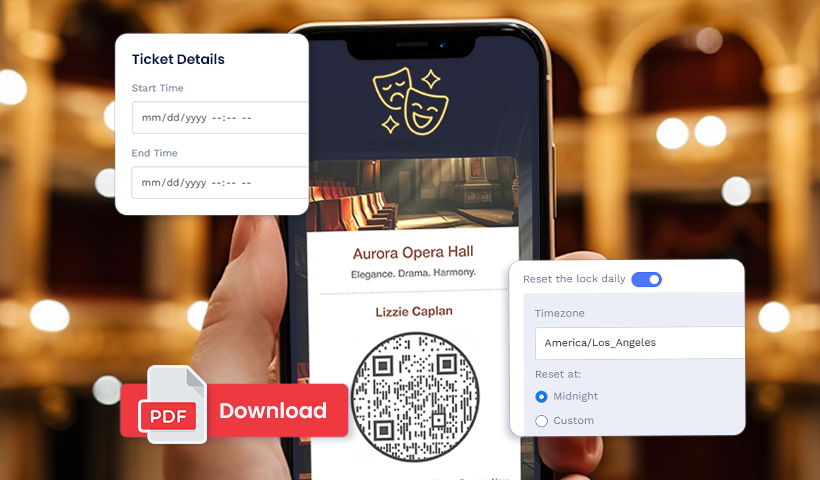
An event ticket QR code is a unique, scannable code that works as the attendee’s digital ticket. Instead of carrying a printed pass or scrolling through a long PDF, the attendee simply shows this QR code at the entrance.
When your team scans it, the system instantly pulls up their ticket details and confirms whether the ticket is valid, unused, or already scanned.
How do Event Ticket QR codes work?
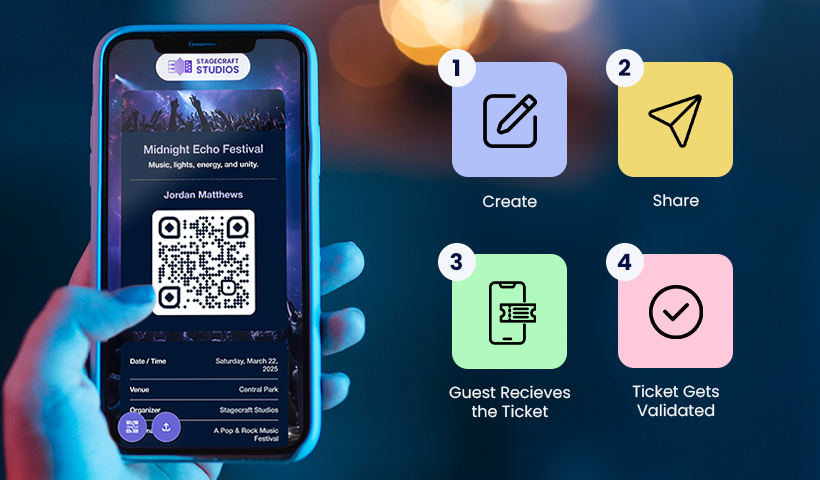
Event ticket QR codes follow a simple flow. You create the QR ticket, send it to the users, and have them show the QR code at entry to gain access.
You create an event QR code
You create an event ticket QR code and all the event details, such as the venue, time, seat number, zone, etc.
You share the event ticket
Once the tickets are ready, you share them with users via email or as printed tickets.
Guests receive the ticket
Users can view their online ticket or download the ticket PDF and save it on their mobile phones.
The ticket gets validated
The ticket is validated, and the guests are allowed to enter.
That is the entire flow. The QR code simply acts as a quick bridge between the attendee at the gate and their ticket information in your system.
Why use QR code tickets for events?
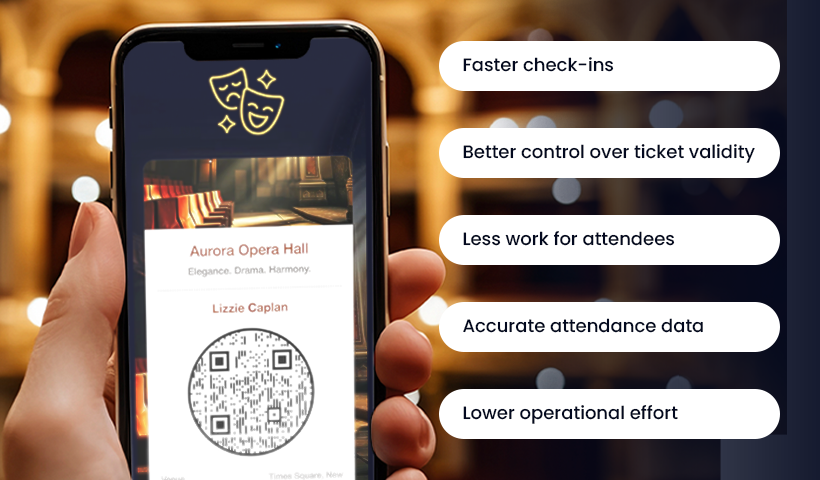
Event ticket QR codes make the whole ticketing process easier for both organizers and attendees. They reduce much of the friction in the ticket distribution or entry process, helping you manage your event with greater clarity. Here are the main reasons they are widely used.
✅Faster check-ins
Scanning a QR code takes only a moment. Guests move through the entrance quickly, and you avoid the slowdowns that happen when staff manually look up names or search through printed lists.
✅Better control over ticket validity
Each QR code is unique. When you scan it, the system instantly tells you whether the ticket is valid or has already been used. This reduces the chances of unauthorized entry or shared tickets.
✅Less work for attendees
Most guests prefer keeping their tickets on their phones. They do not need to print anything or carry extra papers. They simply show the QR code to get the entry.
✅Accurate attendance data
Every scan updates the ticket status. You know exactly how many people have arrived and are yet to arrive. This information helps with planning, staffing, and future events.
✅Lower operational effort
Since everything is digital, organizers spend less time on manual processes like checking physical tickets. Your team can focus on welcoming attendees instead of managing tedious tasks. 😀
What information should your Event Ticket include?
Here are some important details every event ticket QR code should have:
- Attendee’s name: Each ticket must include the attendee’s name, which will be verified at the time of entry.
- Event details: The ticket should have all the essential event details, like the event name, venue, and time.
- Seat and zone details: Each ticket should have a seat number. And if the venue is large, with multiple zones and rows, they should be clearly labeled to help guests find their seats easily.
- Parking details: Parking is always on the minds of all event attendees. Please include parking details to help guests plan better.
- Venue and past images: Include several images of the venue and past events to give your attendees a clear idea of what to expect.
- Organizer’s contact information: Provide your contact details so that guests can contact you if they have any concerns.
Real-world use cases of Event QR codes
Event ticket QR codes fit almost any type of gathering where attendees require tickets to enter. If you want to avoid lines, lost tickets, and slow check-ins, event ticket QR codes have you covered.
Let’s look at the real-world use cases of event ticket QR codes.
Conferences and corporate workshops
Business conferences and workshops are among the most widely held business meetings. While organizing conferences offers numerous benefits for organizers and attendees, the process can be challenging.
Imagine a long line of participants waiting to enter, and you – the organizer – asking for their names and manually entering them in the guest list to let them in.
Not a very efficient way to handle check-ins. 😨
QR-powered tickets can speed up this entire process. Just send the QR ticket to each participant; they show it at the entrance, and you scan & validate it to grant them entry.
Music concerts
Concert entrances can get chaotic, especially when large groups arrive together. Staff have to move quickly, and it becomes harder to check every ticket properly. Crowded gates also make it easier for people to try using the same ticket more than once.
QR tickets help keep things under control. Staff scan each code, and the system immediately flags duplicates or tickets that have already been used, speeding up the process and making it more secure.
College events
College festivals draw big crowds, and managing tickets for such huge crowds can be challenging. And it’s also common to see students reuse or share tickets.
Tracking who actually enters becomes difficult, and the process gets even more complicated when the event runs for several days.
QR tickets simplify all of this. You can set scan limits to prevent duplicate use, and automatically reset them each day. This lets you use a single ticket for the entire multi-day event while keeping the entry secure and organized.
Weddings and private gatherings
Private gatherings like weddings are special, memorable, and often once-in-a-lifetime events. But organizing a wedding is by no means easy.
One of the biggest challenges in weddings is forecasting resources, such as food & beverages, chairs, return gifts, and so on.
Only if there were a way to know how many people would attend, right?
Event ticket QR codes solve this problem, too! With QRCodeChimp’s event ticket QR code solution, you can send event tickets via email with an RSVP. Guests can confirm their status as Yes, No, or Maybe (and update it later) to help you plan resources effectively and reduce waste.
Charity events
In-person charity events are highly impactful. A recent study suggested that twice-a-year local fundraiser events retain about 30% more regular donors.
QR-powered event tickets let you organize charity events without the hassle of managing physical ticket entries. It also helps track participation and manage resources efficiently.
How to create an Event Ticket QR code?
Creating an event ticket QR code on QRCodeChimp is quick and easy. Follow these easy steps to make yours.
Note: You can create event tickets either individually or in bulk. Since most of you will create tickets in bulk, we’ll cover it first.
Creating an Event Ticket QR code in bulk
If you’re organizing a large event, it’s better to create event ticket QR codes in bulk. Follow these instructions after logging in to your QRCodeChimp account and going to the event ticket QR code page.
1. Enable bulk upload
On the event ticket solution page, enable the bulk upload option in the top right corner.
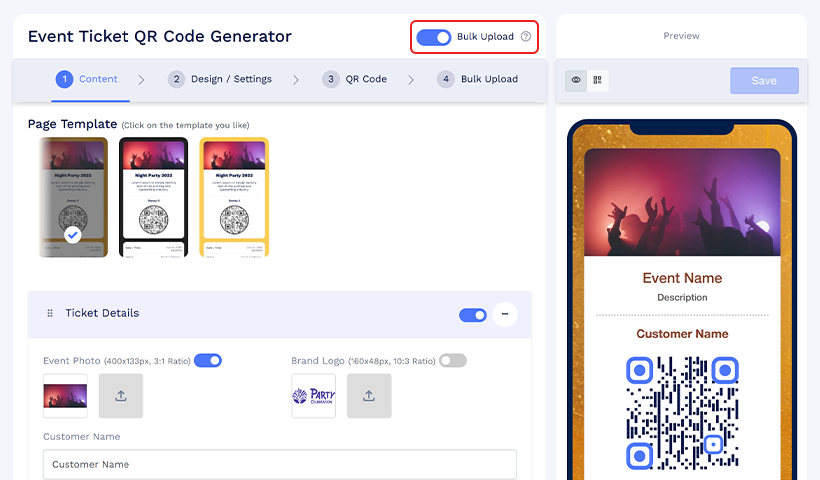
2. Create a template for bulk upload
You need to create a template (think of it as a sample ticket) that will be used for all the tickets.
In the Content tab, choose the fields you want to include in your event ticket.
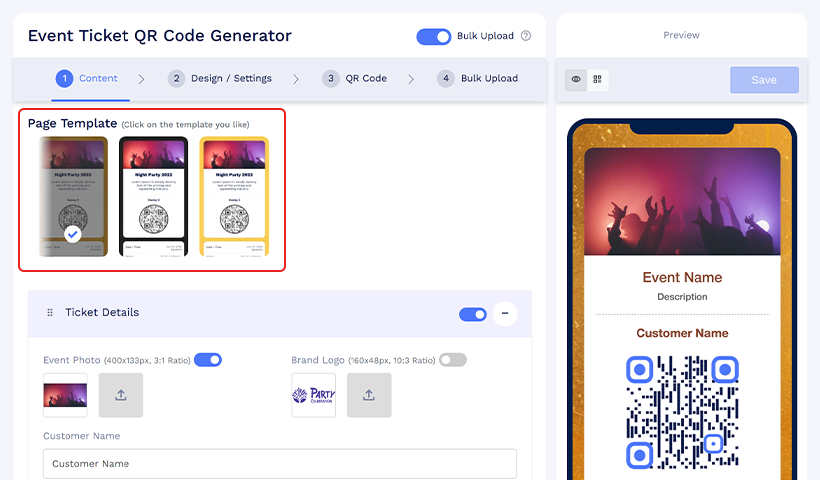
These fields will remain the same across all the tickets you create in this batch.
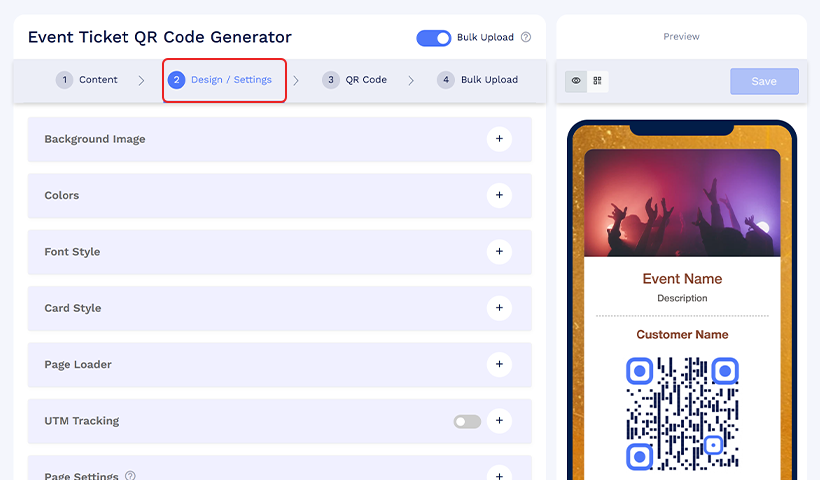
3. Update the design and settings
Head to the Design/Settings tab and follow the same steps discussed above to create an individual event ticket QR code.
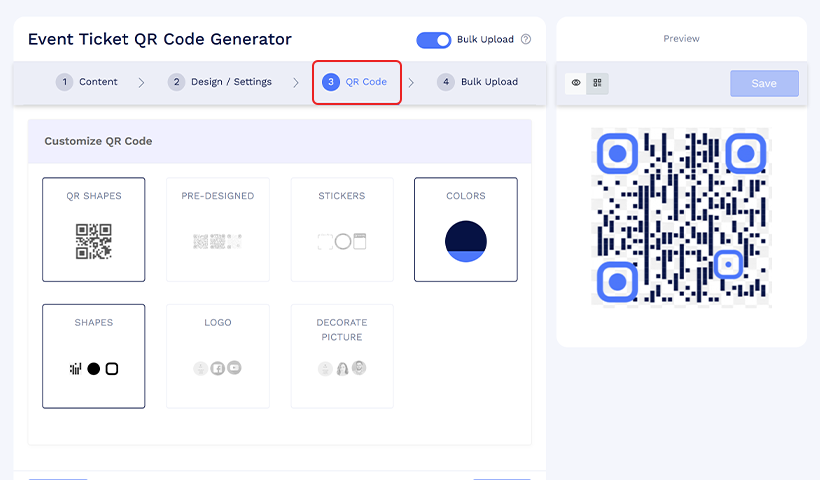
4. Customize the QR code
Go to the QR code tab and customize the QR code as you want. Note that the QR codes for all the event tickets in this batch will have a similar design.
5. Upload the bulk file
Head to the Bulk Upload tab and download the sample file. Refer to this file and add event data to a spreadsheet.
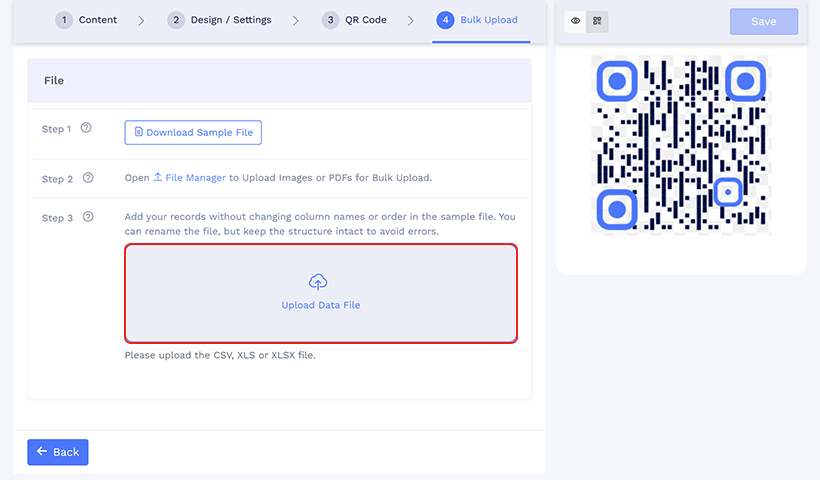
Once you’ve added all the data, upload it and generate your bulk batch.
6. Distribute the ticket
Once your bulk batch is ready, share the tickets with your guests.
How to share Event tickets created in bulk?
Follow these steps to quickly and easily share multiple event tickets with their respective ticket holders.
Locate your bulk event tickets
1. Go to your dashboard and navigate to “Bulk QR codes.” Identify your bulk event tickets using the name you assigned while creating the bulk QR code.
2. Click the 3 dots in the action column of the bulk QR code, then select “Share Ticket via Email.”
3. Preview and customize the ticket colors if needed. Once done, click “Save & Continue.”
Share event tickets in bulk
4. In the “Share Event Ticket in Bulk” pop-up, select the email address you want to use to share individual tickets from this bulk upload.
You can choose either:
- The primary email in the card profile, or
- The email address listed in the “Email for Sharing QR Code Link” column of the bulk upload file
Enable the RSVP option if required.
5. Finally, click “Share.” All event tickets will be emailed automatically to their respective recipients.
Creating an event ticket QR code individually
Log in to your QRCodeChimp account, go to the Event Ticket QR Code generator, and follow these steps.
1: Add the content for your event ticket
1.1 Enter a page code for your event ticket URL. If you don’t enter one, the system will auto-generate a page code for your event ticket page.
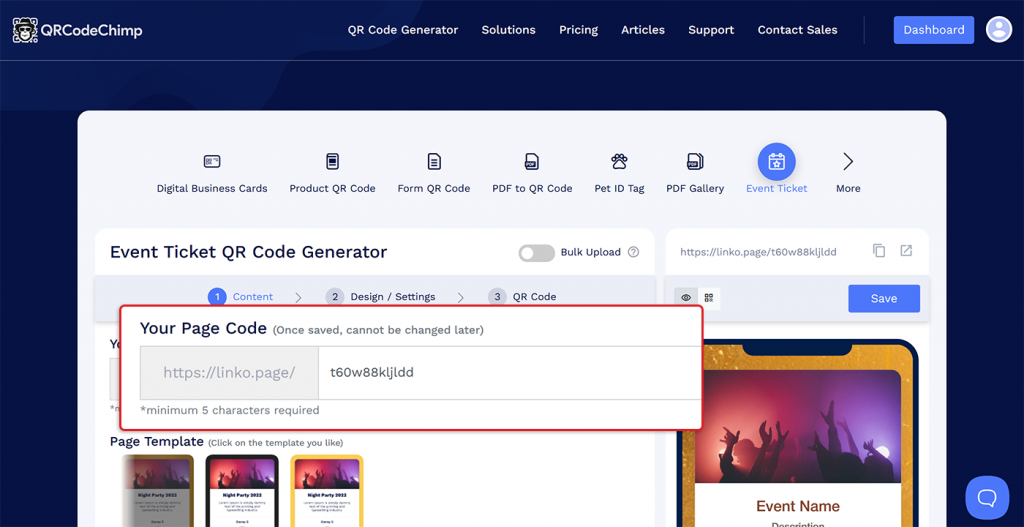
Note: If you don’t manually enter a page code, the system will automatically generate a code for you. The page code can’t be changed after the QR code is generated.
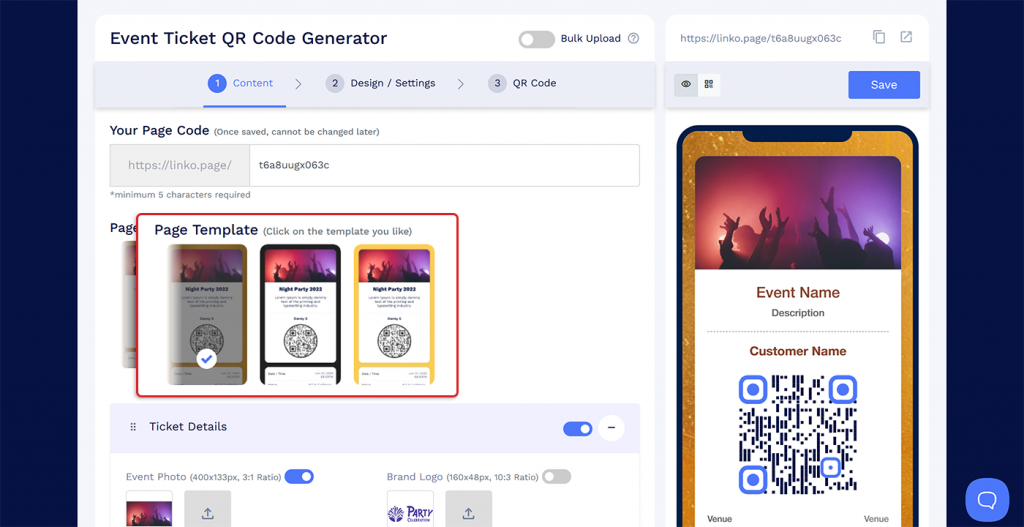
1.2 Select the page template for your event ticket page.
1.3 Enter your ticket details, like the guest’s name and event details like venue, time, etc.
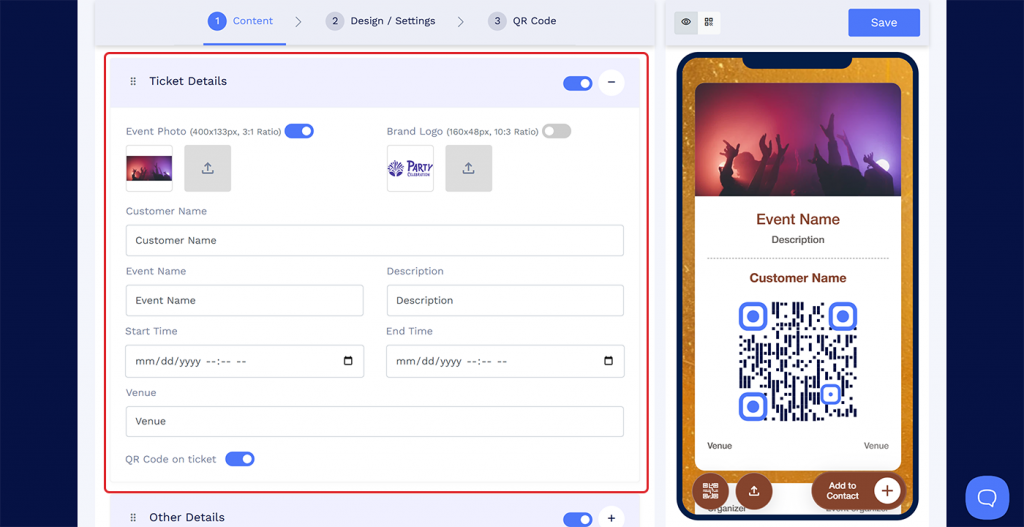
1.4 If you want to display the QR code on the event ticket page, enable the “QR Code on Ticket” option.
1.5 Add the organizer’s contact details and any other information you want to add on the event ticket page.
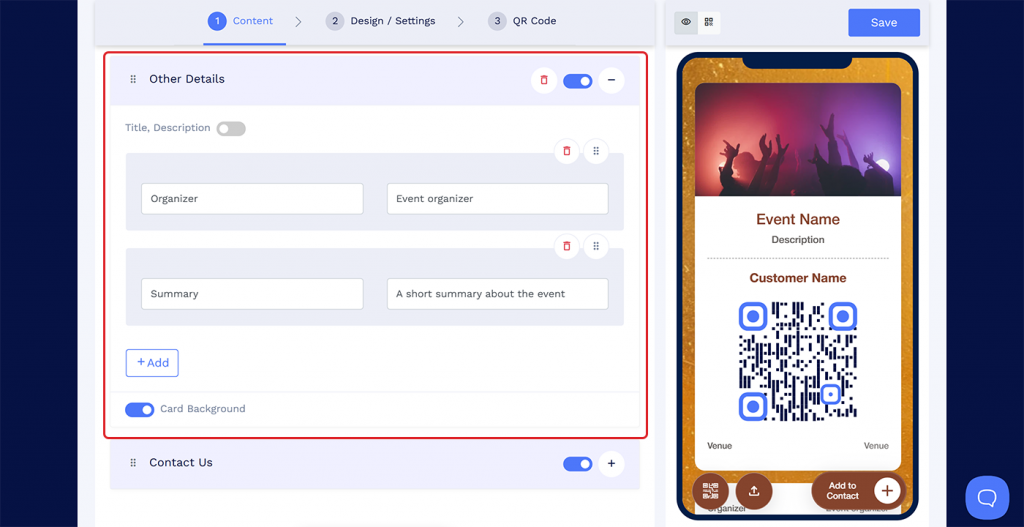
1.6 Add any additional components, like forms and images, on the event ticket.
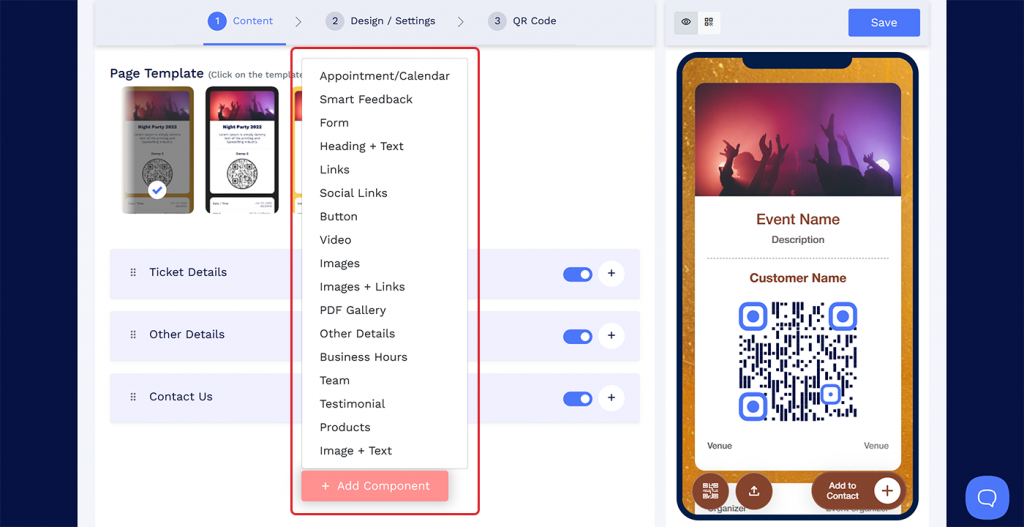
1.7 Click on “Next” to go to the Design/Settings section.
2. Set the design and settings for your event ticket
2.1 Set a background image or video for your event ticket.
2.2 Choose the color, font style, card style, and page loader.
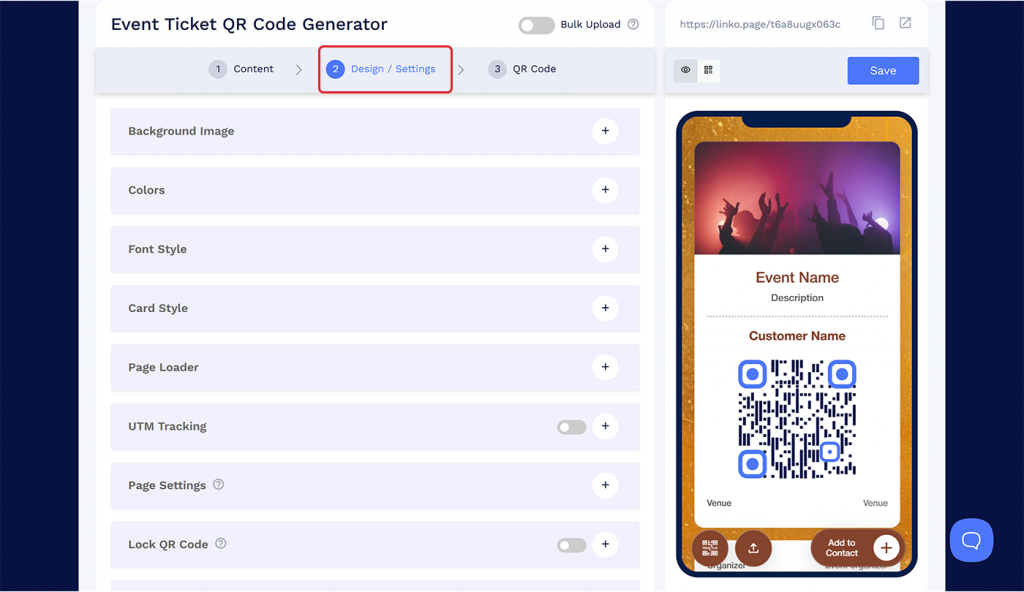
2.3 Set the scan limit for each QR code and enable “Reset the lock daily” if needed, and update the lock reset settings.
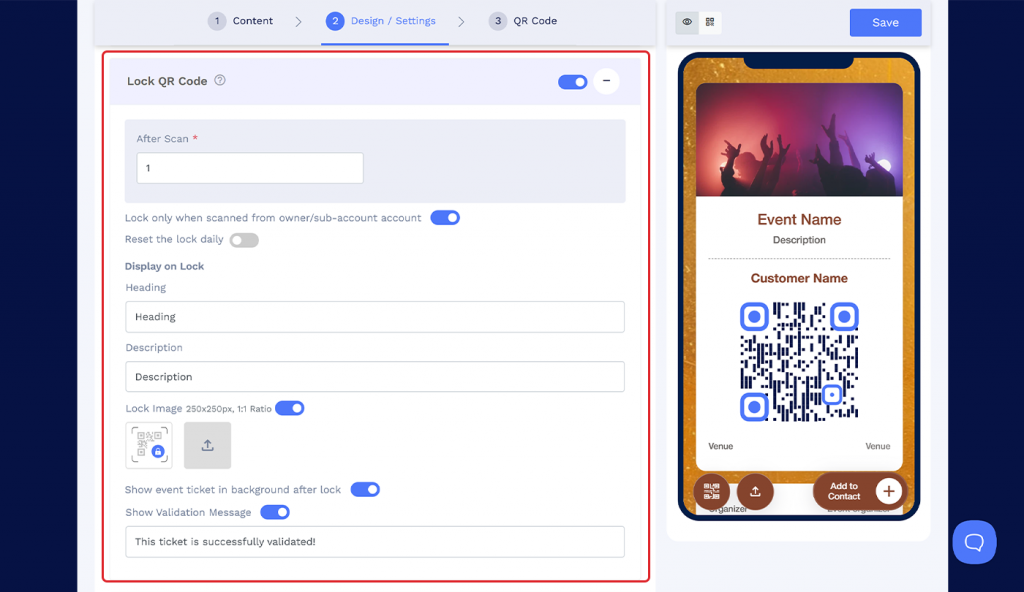
2.4 Enable or disable other settings like UTM tracking and passcode protection if needed.
2.5 Click Next to go to the QR Code section.
3. Customize your QR code
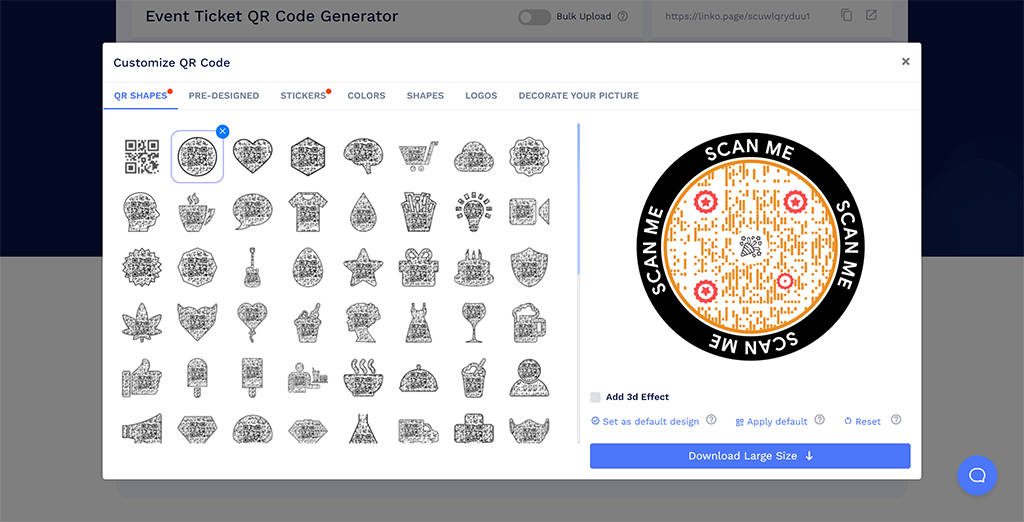
3.1 Customize the QR code using shapes, colors, stickers, and other customization options. You can also add a logo to your QR code to align it with your brand.
4. Save and distribute
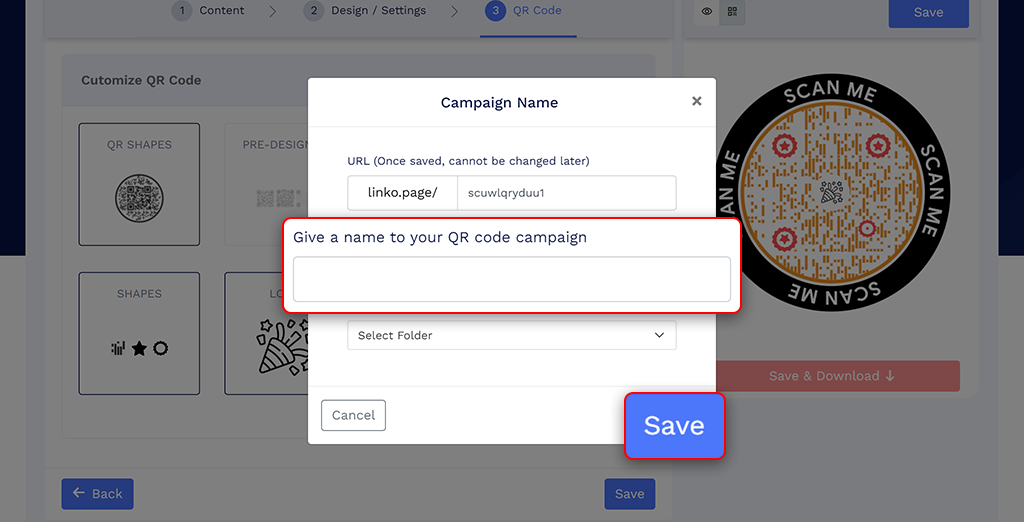
4.1 Once you’re done, save your QR code.
4.2 Go to your dashboard and share the QR code with the attendees. You can also enable RSVP when sharing the ticket via email.
For a detailed creation guide, check out: How to Create, Design, and Share Event Ticket QR Codes
Sharing an Event Ticket QR code
Follow these steps to share your Event ticket QR code.
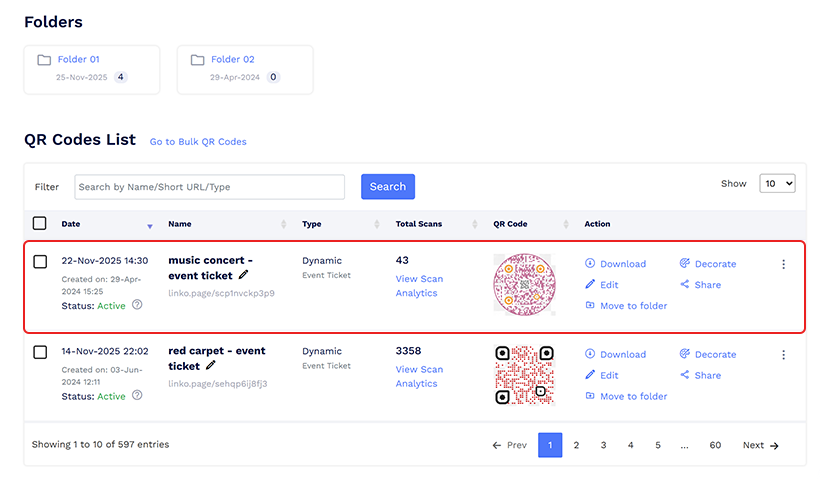
1. Find your ticket in the dashboard
Go to the dashboard and find the newly created event ticket QR code in the QR codes list.
2. Share the QR code
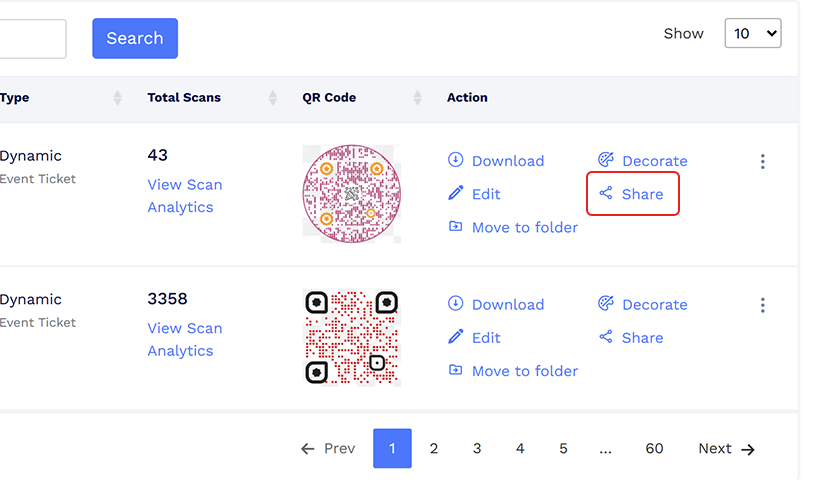
In the Action column, click the Share button. A “Share your QR code” pop-up will appear.
2.1 Share the QR code individually with your guests on LinkedIn, WhatsApp, or Email.
3. Share the event ticket via email
If you want to send the tickets to all attendees at once via email, follow these steps:
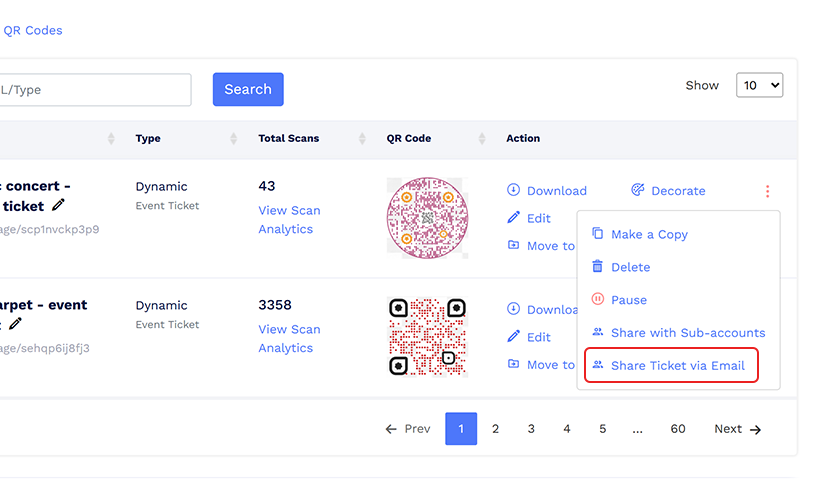
3.1 Click on the three dots in the action column and click on “Share Ticket via Email.”
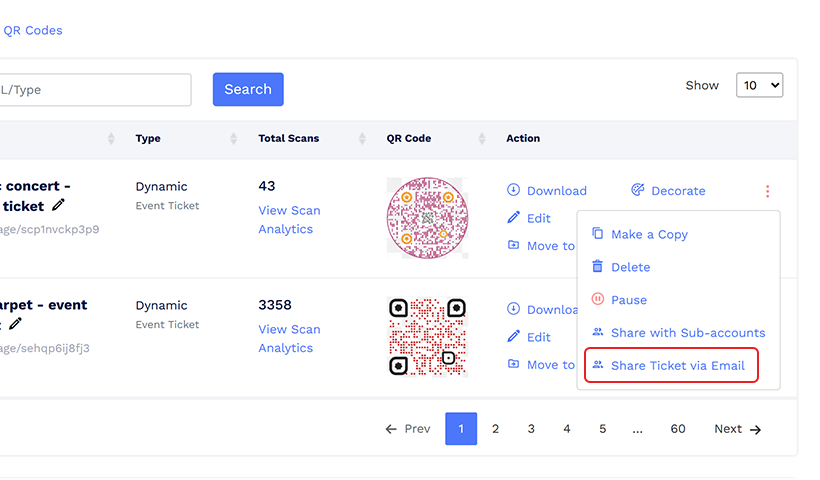
3.2 Customize the ticket colors, enable RSVP if needed, enter the recipient’s email, and click “Share.”
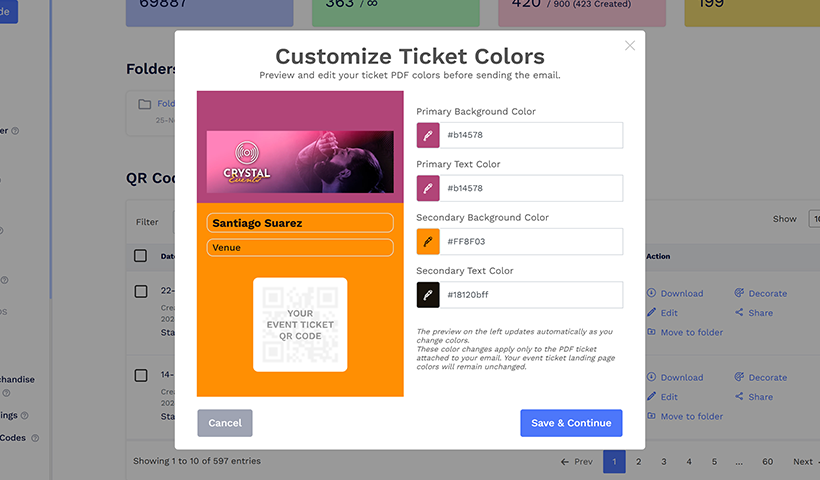
The event ticket will be delivered to the recipient’s inbox.
Common challenges with Event Ticket QR codes and how to solve them
Ticket fraud – such as duplication or reusing tickets – is a common challenge faced by organizers using event ticket QR codes.
Let’s look at two major ticket management challenges and how to solve them easily.
Ticket duplication or reuse
Imagine this scenario. You host a comedy crowdwork event and set the ticket price to $10. A person purchases the ticket, and you send them the ticket QR code.
That person sends the same ticket to 4 of his friends. Now, five people have the same QR code ticket on their phones.
Each person comes in, scans their QR code, has their ticket validated, and gets entry.
And that’s a $40 loss. Now imagine if this happens at scale. How much money would you lose?
QRCodeChimp’s event ticket solution is purpose-built to solve this problem.
In your event ticket settings, you can add a scan limit for your event ticket QR code. If you set the scan limit to 1, the QR code will be validated and locked after the first scan. If someone scans it again, the system will show that the ticket is already validated.
This helps you easily catch fraudsters who’re trying to use duplicate tickets.
❗Important note:
When you create event tickets, you may want to check how they look and how the guest experience will flow. While doing this, it is possible to accidentally scan a real guest ticket. If that happens, the ticket can reach its scan limit and become locked. Scan limits cannot be reset, so the ticket cannot be unlocked once it is marked as used.
To avoid this, you can open the ticket in an incognito window where you are not logged into your QRCodeChimp account, or you can create separate test tickets just for checking the design and user journey.
Creating tickets for multi-day events
Another challenge event managers face is creating tickets for multiday events. Let’s say you’re organizing a 4-day college fest. One approach can be to create a ticket with a scan limit of 4, but it carries the same risk discussed in the previous section.
A guest can provide the ticket to 3 other friends, and all 4 can enter the event on the same day.
QRCodeChimp solves this problem with the “Reset the lock daily” option. Every day at your specified time, the scan limit resets. As a result, you can use the same QR code across multiple days. It solves two major ticket management problems:
- The risk of duplication or reuse is eliminated.
- You don’t need to create multiple tickets for each day.
Predicting guest attendance and managing resources
Did you know that the largest expense items for planners are food & beverage (73%), audiovisual needs (66%), and venue (29%).
Moreover, perishable items like food and beverages account for significant waste at large events like weddings.
If there were a way to forecast how many guests would arrive, it would be way easier for organizers to manage resources and staffing. 🤔
Only if guests could confirm whether they’ll attend or not, right?
QRCodeChimp has solved that problem as well.
While sending an event ticket via email, you can enable the RSVP option. Guests can confirm their status by selecting Yes, No, or Maybe. This will help you forecast guest numbers and manage your resources more efficiently.
Tracking attendance and monitoring RSVP status
Keeping track of who has arrived and who is still expected is a common challenge for event managers.
Counting guests manually or juggling multiple lists often leads to confusion and inefficient use of resources. Clear visibility into attendance helps planners manage crowds, staffing, and logistics with more confidence.
QRCodeChimp helps you monitor guest attendance in real time. In the dashboard, you can open the Live Attendance Summary for each ticket batch and see the total number of attendees, those already checked in, and those still pending. You can also track RSVP responses to estimate how many more guests might arrive.
If you need detailed guest information, such as names or contact details, you can download a full report. This keeps your records organized and makes it easier to manage your event from start to finish.
Mistakes to avoid when creating an Event Ticket QR code
Here are a few mistakes to avoid when creating an event ticket QR code.
👉 Not providing enough details about the event
A ticket should include all essential details about the event, such as the date, time, venue, and entry instructions. Not doing so can create confusion and chaos, resulting in a poor guest experience.
In fact, poor communication around event details can directly harm the guest experience. And 26 percent of planners say attendees who have a negative experience are unlikely to return to the venue.
People often open their ticket only when they reach the gate, so keeping the information clear helps them move quickly. It also reduces the number of people who ask staff for basic details.
👉 Not validating the tickets after scanning
If you’re not validating each event ticket’s QR code, you’re creating room for duplicate entries and shared tickets.
Make sure to validate each QR code and set scan limits to avoid these issues. With QRCodeChimp, you can set up and automate this entire process in a few clicks.
👉 Not resetting scan limits daily for multi-day events
If your event spans several days, simply setting scan limits isn’t enough. You need to reset the scan limits each day unless every ticket is valid for a single entry only. Not doing so can lead to attendees showing up with expired tickets.
QRCodeChimp’s “Reset the daily lock” feature lets you reset scan limits daily, so you can seamlessly manage tickets for multi-day events.
👉 Not giving the organizer’s contact information
Attendees sometimes need help finding the venue, accessing their ticket, or understanding entry rules. Without a clear point of contact, they may show up frustrated or late.
Adding the organizer’s phone number or email to the ticket makes it easier for people to reach out before or during the event. It also helps your staff resolve issues quickly, rather than searching through registration records on the spot.
👉 Not sharing venue and past event images/videos
People feel more confident when they know what to expect. A quick look at the venue layout or past event highlights can help them prepare and reduce last-minute questions. Missing visuals make the ticket feel incomplete, especially for larger or unfamiliar venues.
Adding a simple link or QR code that opens maps, photos, or short clips improves the overall attendee experience.
👉 Not designing the event ticket as per your brand
A ticket is often the first thing people see after registering. If it looks plain or mismatched, it creates a weak impression.
A ticket that reflects your brand colors, logo, and tone feels more professional and helps attendees trust the event. Consistent design also makes your communication look polished, whether the ticket is digital or printed.
It is a small detail that adds credibility without much effort.
👉 Not following the QR code best practices
Low contrast, poor placement, or distorted images can make the code unreadable. You should keep enough clear space around the code, use a clean, scannable font size, and avoid overstyling it.
Testing the QR code on different screens and printers helps you catch issues early and ensures smooth scanning during the event.
💡Learn more about QR code design: How to Make Perfect Design of QR Code
Simplify and automate event check-in with QRCodeChimp
QRCodeChimp offers a powerful yet simple, structured way to create, distribute, and manage QR-based event tickets. Our solution streamlines the end-to-end event ticketing process to help you run successful events.
Here’s why you should choose QRCodeChimp’s event ticket QR code solution.
- Create custom event tickets at scale for large attendee lists
- Share tickets by email for quick and hassle-free distribution
- Track check-ins with a real-time event attendance summary
- Prevent duplicate entries by setting scan limits and locking tickets automatically
- Seamlessly handle multi-day events by resetting daily locks
- Add custom fields and components to enhance your event tickets
- Keep all attendee information organized in a secure system
Final thoughts
To sum things up, event ticket QR codes are a powerful tool for creating, managing, and distributing event tickets.
You can leverage them to create QR-based event tickets at scale and offer guests a seamless ticketing experience.
With QRCodeChimp’s event QR code solution, you can create, distribute, validate, and track event tickets in a seamless and hassle-free manner.
Head to our event QR code solution to see it in action.
You get clarity. Your team gets less stress. Your guests get in without waiting around or hunting for old emails. It is a simple shift, but it keeps the event moving as you planned.
So as you plan your next event, think about how you want that first moment at the entrance to feel. A quick scan, a confirmed entry, and a guest who walks in without friction. If that sounds right, QR-based ticketing is a solid step in that direction. You now have everything you need to put it in place with confidence.e. Start implementing QR code event tickets and simplify event management like never before.
Frequently asked questions
Can I customize the design of QR code event tickets?
Yes, you can personalize your event tickets by adding your brand logo, colors, background, and custom text to create a professional and cohesive look. Many QR code ticketing platforms offer design customization options.
What happens if an attendee loses their ticket?
If an attendee loses their ticket, you can resend the QR code via email or SMS. Since each QR code is unique, lost tickets can be reissued without security risks.
Can I integrate QR code tickets with other event platforms?
Yes, QR code event tickets can be integrated with event management platforms, CRMs, and ticketing systems to automate registration, check-ins, and analytics.
What if the internet connection at the venue is weak?
Many QR code scanning systems work offline by storing ticket validation data on the scanning device. However, syncing with the cloud requires an internet connection. To avoid disruptions, ensure backup internet access or use offline scanning tools.
Can I manually check in attendees who have trouble scanning their QR codes?
Yes, if a QR code fails to scan, you can manually verify the attendee’s details in the ticketing system and grant entry. Some systems also allow entry personnel to input ticket numbers manually.
Is the check-in process secure against ticket forgery?
Yes, QR codes are unique and encrypted, preventing duplication or tampering. The lock feature ensures that once a ticket is scanned, it cannot be reused, reducing the risk of fraud.
How can I prevent unauthorized re-entry with the same ticket?
The lock feature automatically invalidates a QR code after its first scan, preventing multiple uses. If re-entry is allowed, you can configure the ticket to permit multiple scans while tracking each check-in.
You may also like
Approval-Based Digital Business Cards: A Smarter Workflow for HR Teams
Discover how approval-based digital business cards help HR teams ensure branding consistency, prevent misuse, and manage employee cards at scale.
Best Digital Business Card Makers for 2026 – Secure, Enterprise, and Scalable
Discover the best digital business card platforms for 2026. Compare the top 8 solutions with features like branding, CRM integration, analytics, and enterprise-grade security to find the right fit for your team or business.
QRCodeChimp’s Analytics Dashboard: A Step-by-step Guide
A guide to QRCodeChimp’s analytics dashboard. Leverage the unique advanced features and metrics to optimize your marketing campaigns.
How to Make a QR Code for a Link?
Explore how to create a QR code for a link like your website, social media, or YouTube. QR codes will enhance traffic and engagement on your digital platforms.
Most Popular
Contact Sales
