Virtual networking is no longer a quick fix when you cannot meet in person. It is now a strategic channel in your event mix, good for pipeline, learning, and community. You can reach talent and customers across time zones, record sessions, and keep the conversation going long after the livestream ends.
Although access is easy nowadays, building a genuine connection is hard. Back-to-back screens create fatigue, chat flies by, and breakout rooms often feel random. People leave with a list of names, not relationships.
You can fix that with human-centric design and practical formats. If you reduce cognitive load, mimic real-life conversation, and give attendees something to make together, your virtual networking stops feeling like work and starts building trust. The sections below give you a playbook you can run this quarter.
- What makes an idea “proven” for virtual networking
- Design foundations that fight fatigue and improve connection
- 30+ virtual networking event ideas that actually build relationships
- How to pick the right platform for your format
- How to integrate QR codes into every idea
- Run-of-show templates you can copy
- Conclusion
- Frequently asked questions
What makes an idea “proven” for virtual networking
A virtual networking idea is “proven” when it consistently delivers four things.
First, it reduces fatigue. You design shorter blocks, trim on-screen time, and let people move or go audio-only when needed. This aligns with research that links long, frequent video calls to higher fatigue and lower engagement.
Second, it increases relevance. You match people by goals or roles, set crisp prompts, and keep groups at the right size to avoid social loafing. The right platform choice also matters. Proximity-based spaces, where audio gets louder as people move closer, feel more natural and support organic clustering.
Third, it produces a shared artifact. When participants co-create a board, document, playlist, or photo strip, they leave with something they built together. That artifact anchors memory and makes follow-ups easier.
Fourth, it scales facilitation. The best ideas make it simple for moderators to seed prompts, rotate pairs, and spotlight insights without overwhelming the team.
When your format checks these boxes, you see clearer outcomes: more focused conversations, higher follow-up completion, and stronger community signals.
Design foundations that fight fatigue and improve connection
- Reintroduce naturalism: Treat the screen like a room. Encourage attendees to hide their self-view to reduce the pressure of staring at their own face. Keep sessions tight, 60 to 90 minutes for deeper formats. Insert audio-only breaks so people can stand, stretch, or walk while still contributing. These simple choices map to known fatigue drivers and their remedies.
- Engineer spontaneity: When you want serendipity, pick platforms that support proximity-based chat. Spatial audio, where voices get louder as you move closer, restores the flow of real-world mingling. People drift between clusters, join side conversations, and exit gracefully. Tools like SpatialChat and Gather make this behavior possible and intuitive.
- Build a shared artifact: Move beyond talk-only rooms. Use a live doc, a whiteboard, a collaborative playlist, or a lightweight photo booth. End each segment with a quick share-out. The artifact becomes a follow-up hub and a reason to reconnect.
30+ virtual networking event ideas that actually build relationships
Below are virtual networking event ideas grouped by goal so you can build a run-of-show fast.
High-touch one-to-one ideas
- Virtual speed networking with 5 to 8 minute rotations. Tight timers, two prompts, one action at the end.
- AI-powered matchmaking sessions based on profiles and goals. Pre-tag interests, then let the system pair people.
- Speed mentoring with expert-attendee pairings. Three short rounds, one nugget per round.
- Reverse interviews where attendees query mentors. Attendees lead with real questions, and mentors answer concisely.
- Coffee roulette pairings across functions. Fun cross-pollination to break silos.
- Profile-swap intros (you pitch your partner, they pitch you). Builds active listening and empathy.
- Two truths, one asks for a quick rapport. Two facts, one help request. Easy icebreaker with purpose.
- Calendar-link exchange sprint at the end of each round. Ninety seconds to book follow-ups on the spot.
Small-group collaboration ideas
- Themed breakout rooms with a facilitator and rotations. Topic signs, 12-minute sprints, rotate twice.
- Virtual roundtables for 45 – 60 minutes on a single topic. One host, six to eight guests, one summary doc.
- Digital collaboration workshops in Miro or Google Docs that end with a share-out. Make, show, decide next steps.
- Time-boxed problem sprints with teams of 4 – 6. Define, diverge, converge, commit.
- “Stinky fish” trust accelerator to surface real challenges. One uncomfortable issue per person, then patterns.
- Team Canvas mini to align values and goals fast. Fill sections in 20 minutes, pick two norms to keep.
- Case-clinic triads to workshop one member’s live problem. Rotating roles: client, coach, observer.
- Lightning show-and-tell of one tool or tactic per person. Two minutes each, links captured in a shared doc.
Large-group energy ideas
- Interactive webinars that use polls, Q&A, and chat curation. Seed questions early and summarize midstream.
- Town hall with chat facilitators pulling the audience takes on screen. Real-time sensemaking.
- Live demos with “scan to get the deck” moments. Short demo, instant resource handoff.
- Networking bingo to script first touches. Simple grid nudges to start conversations.
- Fishbowl with rotating participant microphones. Voices rotate every five minutes.
- Lightning talks series with audience voting. Five talks, five minutes each, live vote for the encore.
Gamified mixers that lower social friction
- Virtual escape rooms for cross-team bonding. Shared puzzles create quick trust.
- Themed trivia with mixed-team tables. Rotate teammates each round.
- Scavenger hunts with hidden clues across sessions. Clues unlock in chat or slides.
- Leaderboard quests that reward key actions. Points for questions, intros, and shares.
- Sponsor passport challenge to visit booths. Stamp cards to win, real conversations required.
- Prize-backed “visit three rooms, meet three roles” challenge. Clear path and incentives.
Community bridge ideas before and after the event
- Pre-event Slack or LinkedIn group with AMA threads. Warm up discussions and names.
- Micro-mixers one week prior to warm-up faces. Short rounds to build familiarity.
- Speaker’s office hours after keynotes for an intimate Q&A. Keep the momentum going.
- Post-event follow-up circles by role or city. Make recurring peer pods.
- Keep the community hub open year-round. Monthly prompts and office hours.
- Content remix day, where attendees share one applied takeaway. Turn learning into proof.
For spontaneous chats, proximity platforms help clusters form without heavy moderation. For mapped tables and roundtables, floor plans with table caps keep discussions focused.
How to pick the right platform for your format
- When to choose structured tables: Use Remo-style floor plans when you need mapped conversations and predictable table seating. Custom layouts with table caps make it easy to run roundtables and rotations without chaos.
- When to choose spontaneous proximity: Use SpatialChat or Gather when you want cocktail-mixer serendipity, spatial audio, and organic movement between groups. People can walk in, join, and leave chats, just like in a real room.
- When to choose all-in-one suites: Use Hopin, vFairs, or Bizzabo for multi-track programs with stages, expo, networking, and matchmaking. These suites combine registration, stages, booths, and analytics in one place.
How to integrate QR codes into every idea
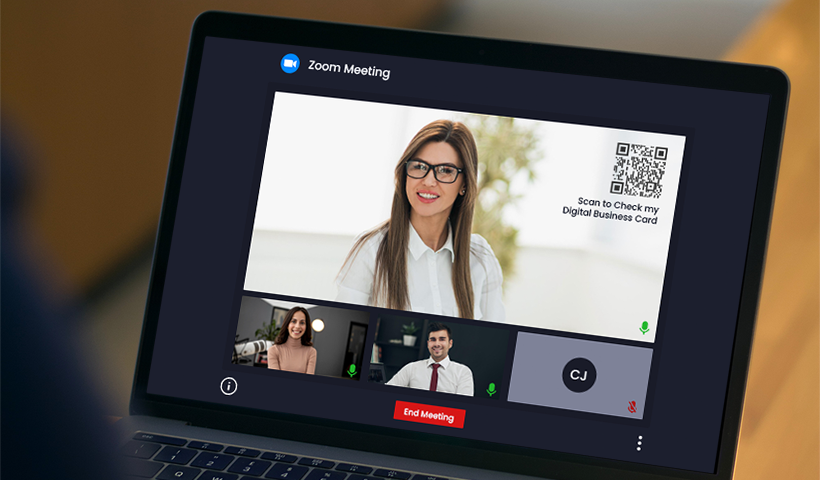
- Make instant contact exchange with Digital Business Card QR codes. Share your details with one scan. Add a Digital Business Card QR code to your virtual background, intro slide, or quick share in one-to-one rounds. Your new contact saves your info without typing. QRCodeChimp lets you create these in minutes.
- Give resources without chat chaos. Use a dynamic QR on slides to share decks, bios, booking links, or lead forms. You can update the destination without changing the QR, and you can track scans to see what resonated.
- Power engagement and games. Trigger polls, collect feedback, hide scavenger clues, or let people follow speakers with a single scan. Pair your event content with a QR-led landing page to give attendees a single, simple hub.
- Smooth logistics. Add a QR code for agendas and session switching so attendees can quickly switch between sessions on their phones. QRCodeChimp’s analytics help you see which sessions and assets attracted the most interest.
Run-of-show templates you can copy
Sixty-minute speed networking block
- Welcome and how-to (5)
- Three rotations with prompts (3 × 12)
- Debrief and “scan to connect” slide (6)
- Next steps and feedback QR (5)
Ninety-minute collaboration workshop
- Warm-up poll and norms (10)
- Team sprint on a shared board (45)
- Team share-outs (20)
- CTA and follow-ups via QR (15)
Conclusion
Design for humans first. Bring back natural conversation, respect energy, and help people make something together. Then pick formats and tech that serve connection, not the other way around. Your next step is simple. Select three to five ideas that fit your goal, add QR touchpoints for instant exchange and resources, and run a pilot. Measure scans, follow-ups, and repeat attendance to learn fast.
Frequently asked questions
How do we reduce “Zoom fatigue” during networking?
Use audio-only breaks, hide self-view, shorten blocks, and add movement. These tactics address known fatigue drivers and keep people fresh.
What is the ideal group size for breakouts?
Go one-to-one or groups of 3–4 when you want breadth. Use 5–10 when you want depth and diversity of perspectives.
Which platform is best for spontaneous chats?
Choose SpatialChat or Gather for proximity-based audio and movement that mimic real mingling.
How can sponsors get real conversations?
Run passport challenges, scavenger hunts, and book-a-demo QR on booth pages. Make the path to a meeting clear and reward quality engagement.
What if many attendees keep cameras off?
Normalize audio-only participation. Lean on chat, polls, and shared boards so contributions still flow and the conversation stays inclusive. Research supports shorter, less intense video requirements.
You may also like
Turn Your Digital Business Card into a Lead Magnet with the Lead Collection Form
Discover how digital business cards simplify lead generation and boost networking. Learn how QRCodeChimp's Digital Business Cards help you enable two-way contact sharing to capture leads instantly and manage them effectively.
People Who Save Your Contact Will Share Theirs. Are You Capturing It?
Learn how the contact exchange form on QRCodeChimp digital business cards lets you collect contact details the moment someone saves yours.
Turn Paper Cards into Contacts Instantly with a Card Scanner for Digital Business
Turn paper cards into contacts instantly with a physical card scanner. Scan, extract, and save contacts in seconds with QRCodeChimp digital business card.
Digital Business Card Statistics in 2026: Usage, Applications, Adoption, and Top Players
Discover some important statistics for digital business cards, including the market size of digital business cards, along with their key drivers, how people use them, and much more.
Most Popular
Contact Sales
