Policy documents have a way of aging badly.
A code of conduct gets revised, a data privacy policy is updated, and a vendor agreement changes its indemnity clause. Yet, an employee is still reading an eighteen-month-old version because the updated document never reliably reached them.
This is one of the quieter compliance risks that corporate legal teams live with. The gap between when a document is updated and when every relevant person actually has access to the new version. Printed handbooks, emailed PDFs, and intranet uploads – each of these works at the point of distribution. However, none of them solves the problem of what happens when the document changes.
A PDF QR code for compliance documents changes that equation entirely.
Here’s how it works.
Key Takeaways:
- One QR code, always current. Update the PDF without reprinting or redistributing.
- Scan analytics give compliance teams a passive access log for audits.
- Each use case has a distinct value: handbooks, vendor packs, and evidence packs.
- Dynamic QR codes work on any surface – printed or digital. They don’t expire.
- No new platform or IT investment. Fits within existing document workflows.
The real problem: distribution that doesn’t age well
Compliance is, at its core, a documentation problem.
Regulations shift. Policies evolve. Audit requirements change. And each time they do, the team responsible for that policy has to update the document, communicate the change, and ensure people stop referencing the old version.
Research on document management shows that 46% of employees say they “sometimes or almost always” struggle to find information they need to do their job. In a compliance context, that’s a liability issue. An employee following an outdated policy creates both operational inconsistency and audit exposure.
The traditional distribution model makes this worse.
When a compliance PDF is emailed, printed for an onboarding pack, or posted as an intranet link, it becomes a static artifact. It’s frozen at the point of distribution. When the document changes, you have to find every copy, recall it, and redistribute. Across departments and geographies, that process is exhausting and rarely complete.
A dynamic PDF QR code breaks this cycle. Instead of encoding the PDF itself, it encodes a short URL that always redirects to the document’s current version. When you update the PDF, you replace the underlying file. The QR code stays the same.
The physical distribution becomes permanent; only the content needs to change.
Also read: Use Cases of PDF QR Codes for Various Sectors
PDF QR code for compliance documents: Key use cases
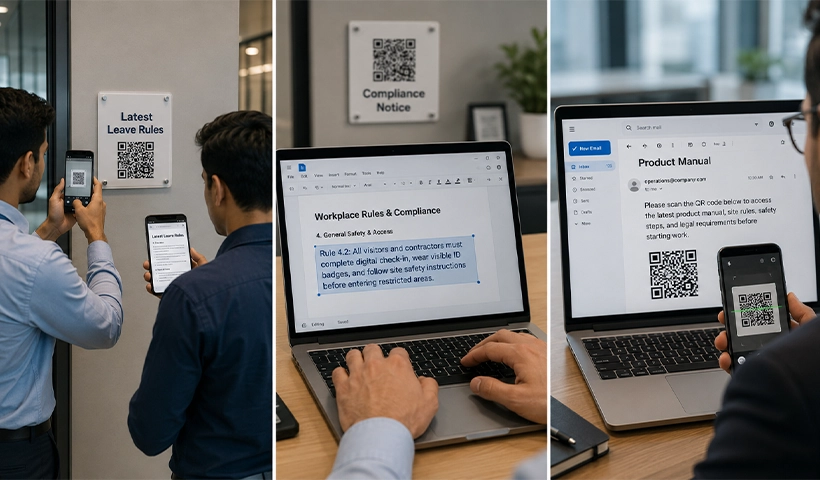
PDF QR codes are most useful wherever policy documents need to remain accessible and up to date after distribution. While the policy is typically owned by the department it governs, Corporate Legal or Compliance may oversee its review and governance. The QR code is typically created and managed by the team responsible for distributing or enforcing that policy.
Here are some of the most practical policy-document use cases:
Employee handbooks and HR policy documents (typically owned and maintained by HR teams): Disciplinary procedures, leave policies, codes of conduct, remote work policies, and employee guidelines change regularly. HR teams can embed a QR code inside a physical handbook once and update the linked PDF whenever a policy changes without reissuing the handbook.
The printed handbook remains unchanged while the linked document always reflects the latest version.
Regulatory and workplace policy notices (typically managed by Operations, Facilities, or HSE teams): Workplace rights policies, health and safety policies, visitor policies, and data-handling notices often need to remain posted visibly in physical spaces. The team responsible for maintaining those notices can place a QR code on each notice once and update the linked policy document whenever requirements change.
The notice stays in place; the policy behind it stays current.
Vendor and contractor policy packs (typically maintained by Procurement in coordination with corporate Legal and Compliance): Vendors and contractors are often provided with policy documents upon onboarding, such as supplier codes of conduct, site safety policies, confidentiality policies, and data-handling requirements. Procurement teams can add a PDF QR code to compliance paperwork so that vendors accessing it later always see the version currently in force rather than the version shared on day one.
Policy acknowledgment and compliance audits (typically coordinated by Compliance officers, corporate legal teams, or internal audit leaders): During policy reviews or audits, teams are often asked to provide the latest version of internal policies. A QR code that always links to the live policy document offers a cleaner way to demonstrate active document control than maintaining multiple email trails or manually resending updated files. It creates a single, stable access point for the current version at any time.
Related: Streamlining Documents with PDF QR Codes in the Legal Profession
What the setup looks like in practice
The workflow is straightforward.
Using QRCodeChimp’s PDF to QR Code solution, the team responsible for managing the policy uploads the current version of a policy document and generates a dynamic QR code linked to it. That code is then embedded in whatever physical or digital asset needs to reference the document – handbook, notice board, intranet banner, training deck, or onboarding pack.
When the policy is revised, the officer uploads the new PDF and replaces the linked file. The QR code remains unchanged. The next person who scans it gets the updated document with no further action required from the compliance team.
The platform also provides scan analytics, so teams can track which QR codes are being accessed, when, and from where. For compliance purposes, this creates a lightweight record of document access; useful context during audits or when demonstrating that a policy was actively circulated.
For organizations managing multiple policy documents across different departments, individual QR codes can be created for each document and organized into folders within the platform, making version management clean and auditable.
Also read: Put Together Multiple PDFs into One QR Code with a PDF Gallery QR Code
Why this matters more than it might seem

According to PwC’s Annual Global CEO Survey, nearly seven in ten CEOs feel the regulatory environment is a barrier to how their organization creates and delivers value. For compliance officers, General Counsel, and department heads making the case for better document control internally, that’s the context in which leadership is already operating. And it makes the argument easier to land.
The distribution method you use for compliance documents is not a neutral operational decision.
A method that makes documents hard to find, easy to misplace, or impossible to keep current creates latent risk. A method that ensures the document someone accesses today is always the version currently in force removes an entire category of compliance failure.
PDF QR codes for compliance documents don’t require a new platform, a new process, or a significant IT investment. They require a change in how compliance teams think about the relationship between a printed or shared artifact and the living document it’s supposed to represent.
The code is the stable identifier. The document can be changed as often as needed.
That’s a small operational shift with an outsized effect on how confidently a compliance team can say that the right people have access to the right version of the right document – right now.
Frequently asked questions
Can I update the linked PDF without changing the QR code?
Yes. Replace the underlying file, and the QR code automatically points to the new version. No redistribution needed.
How does this work for documents posted in physical spaces?
Print the QR code once on any notice, poster, or handbook. When the linked document is updated, all subsequent scans return the new version.
Can I track document access for compliance reporting?
Yes. QRCodeChimp provides scan analytics showing access volume, timing, and location. This gives compliance teams a passive record of when and where a document was accessed.
How do I manage QR codes across multiple departments and document types?
Each PDF gets its own QR code. You can organize these into folders by department, compliance area, or document category – all within a single dashboard.
Is this suitable for sensitive compliance documents?
Yes. Documents are hosted securely and served via a short URL you control. Access management is built into the platform, not in open file sharing.
You may also like
How to Secure a PDF QR Code: Passcode, Password, and Campaign Expiry
You can protect a PDF Gallery with a passcode, set an expiry date for a PDF QR code, or password-protect the PDF file itself. This guide walks you through all three methods, including how to set them up and when to use each one.
GS1 Application Identifiers Explained: GTIN, Batch, Serial, Expiry, and More
This guide explains the most important GS1 Application Identifiers used for product identification, traceability, retail, and packaging.
Steps to Integrate Microsoft Entra ID (Azure AD) with QRCodeChimp
Learn how to connect Microsoft Entra ID with QRCodeChimp to automate digital business card creation, improve security, and simplify onboarding.
Bulk QR Codes for Business: Use Cases and Benefits
Discover how bulk QR codes for business can streamline product packaging, employee cards, events, multi-location campaigns, inventory, and more
Most Popular
Contact Sales
