You’ve probably heard the saying, “It’s not about what you know; it’s about who you know.” Nowhere is this truer than in the world of networking. For students, networking can open doors to myriad opportunities and help build lasting professional relations that skills alone cannot.
Whether you’re a student looking to enroll in a prestigious institution abroad or kickstart your dream career, strong industry connections can be the driving force propelling you towards your goals. And that’s where digital business cards, a cutting-edge networking tool that gives students broad exposure to the professional world, come in.
Digital business cards can bridge ambition and opportunity, helping students make memorable first impressions on potential employers, student recruiters, and industry professionals. Read on to explore how they actually work for students, what information they contain, and some key benefits and use cases.
- What is a digital business card, and how does it work for students?
- What should digital business cards for students ideally contain?
- The advantages of digital business cards for students
- Smart ways students can use their digital business cards
- How to get started with QRCodeChimp’s digital business cards (For students)
- Best tips & practices for students
- Summing up
- Frequently asked questions
What is a digital business card, and how does it work for students?
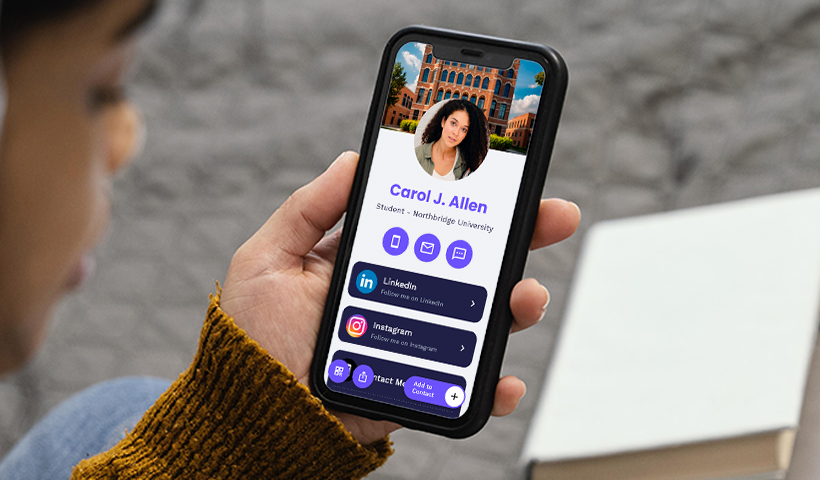
A digital business card is the new-age alternative to traditional paper cards. Unlike static paper cards, digital cards offer more comprehensive information in a sleek, interactive format, giving students remarkable flexibility. Imagine meeting a recruiter or industry professional at an event. You can share your digital card instantly through a simple QR code scan or NFC tap. This eliminates the hassle of carrying stacks of paper cards, which are often misplaced or discarded.
With a digital business card, you can go beyond just sharing your contact details. Students can include links to their LinkedIn profiles, personal websites, portfolios, resumes, or even showcase projects & achievements. Many platforms also allow customization with colors and logos, helping students build a stronger personal brand. Most importantly, digital content can be updated in real time without reprinting the entire stack.
For students, digital business cards aren’t just a networking tool, but a dynamic extension of their professional identity. Plus, they offer a modern, proactive approach to networking, enabling them to build and nurture valuable connections and stay ahead of the curve.
What should digital business cards for students ideally contain?
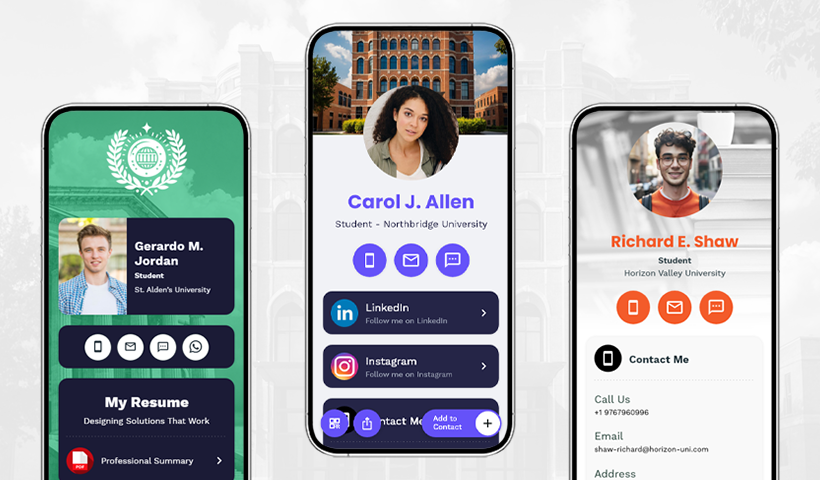
- Name + Professional photo: Your full name with a high-quality professional headshot.
- Headline: A short, clear title, for example, “Computer Science Student | Aspiring Data Analyst.”
- About Me: A short statement on what you do, what you’re great at, and what you’re aiming for.
- Intro video (optional): You may also add a 30–60 sec video introducing yourself and your career goals to impress prospects.
- Academic information: Degree, major, university, graduation date, or current year of study.
- Skills snapshot: Showcase your key skills, interests, tech stack, or areas of expertise.
- Portfolio/project links: Spotlight your best work and link to your personal website (if you have one).
- Achievements & certifications: Scholarships, awards, or completed courses.
- Experience highlights: Internships, part-time jobs, side hustles, summer jobs, or volunteer roles.
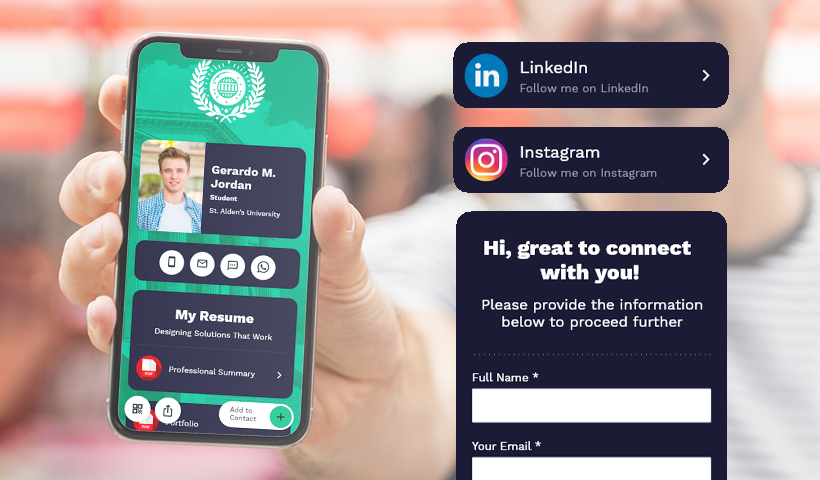
- Resume/CV: Link to your resume/CV for easy, instant access to your academic background, work experience, and skills.
- Professional links: Add links to professional platforms, such as LinkedIn, or social media platforms like Instagram, for quick networking.
- Publications: Links to research abstracts, blogs, or campus presentations.
- Extracurricular Involvement: Proof of involvement in clubs, competitions, leadership roles, or community work through images or short clips.
- Contact buttons: “Email Me” or “Call Me” to enable prospects to reach out instantly.
- Two-way contact sharing: Add contact collection forms to gather your prospect’s contact details.
- Quick note! Share your student digital card seamlessly in seconds via QR codes, links, or DMs. You can even embed the QR code on a physical business card or NFC-enabled card for instant, contactless sharing.
The advantages of digital business cards for students
Here’s how digital business cards benefit students.
©️ Showcases your personal brand
Building a personal brand is imperative in today’s competitive landscape. Your digital business card lets you showcase your personal brand by highlighting your skills, experiences, and achievements in a visually engaging format—one that your prospects will remember long after the first meeting.
📧 Multi-platform sharing
You can share your digital business card instantly at virtual conferences, webinars, online workshops, or even in group chats via QR codes. This flexibility allows you to network effectively in both online and offline settings.
📆 Always up to date
Unlike static paper cards, you can update your digital card’s content in real time, thanks to its digital, dynamic format. Whether you want to edit your contact info or add a new internship, certification, or project, you can easily update your card, and anyone with access can view the latest version. No need for reprinting in bulk.
👋 One-tap follow-ups
You can add actionable call-to-action buttons, such as “Let’s Connect on LinkedIn,” “Email me,” or “Book a chat,” to your digital card, making it effortless for your prospects to follow up.
📇 Fewer lost contacts
In most cases, paper cards are forgotten or discarded. However, that’s not the case with digital cards. Recruiters can save your card to their phones, so your details remain accessible as long as the card is active.
📊 Track what works
Digital cards’ built-in analytics let you track key metrics, such as how many people scanned, which links receive the most clicks, or the top scan locations. These insights help you measure engagement, identify what doesn’t work, and refine your networking strategy.
💲 Budget-friendly and sustainable
Students often have tight budgets, and printing multiple paper cards is costly. Digital business cards, on the other hand, are a more cost-effective and eco-friendly alternative, requiring only a one-time setup. Hence, they’re a more conscious choice for today’s youth, who truly value sustainability and prefer solutions that align with their values.
Smart ways students can use their digital business cards
Networking opportunities can arise anywhere, and your digital business card ensures you’re always ready to seize them.
Here are some smart ways to use your digital card to build strong connections and stay top of mind with your prospects.
- At overseas education fairs and scholarship expos, you can share your digital card with university representatives or student recruitment panels, demonstrating interest, initiative, and professionalism. You no longer need to carry bulky folders. A quick scan gives them direct access to your academic profile, helping you stand out in a crowded market.
- At campus placement drives, share your digital card with recruiters to make it easier to connect with you. They can easily access your resume, portfolio, and LinkedIn profile, increasing your chances of being hired.
- At university alumni events, you can share your digital profile with your university’s alumni, who can be a valuable addition to your network. Alumni can share their professional experiences with you, offering career advice, guidance, referrals, and even mentorship. They can even introduce you to their professional network via your digital card, unlocking new opportunities and connections.
- At career fairs, which are always crowded with competitors, standing out and making a lasting impression can be challenging. But with digital business cards, you gain a competitive edge and make an impact that extends beyond the first handshake. Share your resume, portfolio, LinkedIn profile, or key projects in seconds, giving potential employers a fuller picture of your capabilities.
- At industry events, such as conferences, seminars, workshops, or trade shows, you can share your digital card with professionals and experts to instantly build connections. These events are ideal for growing your network, and interacting with experts can provide you with insights into the latest and emerging trends, as well as industry best practices. Your digital card enables them to connect with you seamlessly at any time for future opportunities.
- During walk-in interviews, sharing a digital business card makes you appear modern, tech-driven, and confident, leaving a strong impression on the interviewer. With just a simple tap, interviewers can save your contact on their phones and revisit your profile later if you’re a potential hire.
- During internship programs, digital cards help you connect with supervisors and peers. This helps you expand your network while paving the way for future opportunities.
- On your resume, you can add a QR code linked to your digital business card to add an interactive element to your application. Employers can simply scan and explore your skills, projects, or certifications. Moreover, this reflects your tech-forward mindset and digital fluency.
- On social media platforms like LinkedIn and Instagram, you can share your digital card by adding the link to your bio or including a QR code in your posts. This allows recruiters and peers to easily and seamlessly reach out to you and learn more about you. You can also include your digital card QR code in your email signature, turning every email into a networking opportunity, or feature it on your personal blog or website, giving visitors an easy way to connect with you.
- When volunteering for industry-related events, you can share your digital card with the professionals you meet. This way, you can turn casual interactions into meaningful connections that may lead to exciting future opportunities.
How to get started with QRCodeChimp’s digital business cards (For students)
Here’s a clear, step-by-step guide and some practical tips for students looking to launch their digital business cards smoothly.
How to create your digital card: Easy steps to follow
Step 1: Visit QRCodeChimp and create a free account, or log in if you already have one.
Step 2: Navigate to the Solutions page and select the ‘Digital Business Cards’ solution.
Step 3: Choose from a set of professional templates that match your style (or personal brand).
Step 4: Fill in your profile content—enter your name, headline, photo, contact details, academic info, social links, and more. You can add extra components (such as video, portfolio links, contact forms, etc.) if needed.
Step 5: Design or customize your digital card. Add colors, fonts, backgrounds, and layouts to match your style.
Step 6: Then customize and generate the QR code. Design your QR using unique colors, shapes, and logos to make it visually appealing.
Step 7: Finally, save the card and the QR code. You can now share it digitally. Alternatively, you can download and print the QR code to embed on your physical card.
Best tips & practices for students
- Optimize your digital card landing page for smooth readability on mobile devices.
- Avoid overloading your card with information, as it may hinder scanning.
- Test thoroughly by scanning the code from multiple devices to ensure it works reliably.
- Use actionable CTAs, such as “Scan to connect,” to make it clear what to do.
- Leverage analytics to see how often people scan your card and measure engagement.
- Update your card content whenever you change your contact details or add new projects or skills to keep your connections informed and up to date.
For more details and tips on how to create a digital business card, check out our comprehensive guide.
Summing up
To stand out in today’s competitive academic and professional landscape, students need more than just good grades; what ultimately helps them thrive is strong networking skills. Digital business cards are a modern essential for students, offering key benefits such as increased visibility, more connections, and strong personal branding – all in one simple tool.
Unlike paper cards, digital cards are dynamic, easier to share, highly customizable, and sustainable, especially appealing to modern, eco-conscious students and professionals. By sharing them at education fairs, placement drives, career events, or even on social media, students can land significant career opportunities.
Frequently asked questions
Are digital business cards really useful for students?
Yes. They enable students to showcase their academic details, skills, projects, and contact information in one place, making networking seamless at events, interviews, and on online platforms.
Can I add my resume or portfolio to a digital business card?
Yes, you can easily add documents, links, and multimedia, allowing employers and recruiters to view your resume or portfolio instantly.
Where can I share my digital business card?
You can share your digital card at career fairs, placement drives, industry events, or alumni meetups. Share it on LinkedIn or Instagram, or embed it on your personal website or email signature.
How are digital business cards better than paper ones?
Unlike paper cards, digital cards are interactive, easy to update, and never get lost. They can include links to resumes, portfolios, and social profiles, offering much more than just contact details.
You may also like
Turn Your Digital Business Card into a Lead Magnet with the Lead Collection Form
Discover how digital business cards simplify lead generation and boost networking. Learn how QRCodeChimp's Digital Business Cards help you enable two-way contact sharing to capture leads instantly and manage them effectively.
People Who Save Your Contact Will Share Theirs. Are You Capturing It?
Learn how the contact exchange form on QRCodeChimp digital business cards lets you collect contact details the moment someone saves yours.
Turn Paper Cards into Contacts Instantly with a Card Scanner for Digital Business
Turn paper cards into contacts instantly with a physical card scanner. Scan, extract, and save contacts in seconds with QRCodeChimp digital business card.
Digital Business Card Statistics in 2026: Usage, Applications, Adoption, and Top Players
Discover some important statistics for digital business cards, including the market size of digital business cards, along with their key drivers, how people use them, and much more.
Most Popular
Contact Sales
