Your lectures are recorded, tutorials are uploaded, and yet students still dig through course pages, click into the wrong week, or time out at a login screen. The result is simple: they do not get instant access to recorded lectures when they need it the most.
The gap is the last mile. Inside complex LMS and VMS stacks, the final click from “where do I find it” to “I’m watching it now” breaks. That last-mile access failure causes friction and drop-offs, even when your content is stellar.
This article breaks down why that last click fails and how to fix it, so students can access recorded lectures and tutorials instantly, without friction, confusion, or missed learning moments.
- Why do students still struggle to find recordings?
- What “instant access” should mean in 2026
- The simple bridge from paper and slides to video
- Make it future-proof: dynamic, trackable, and secure
- Quick use case snapshots
- Troubleshooting and governance
- Move from frictional access to fluid learning
- Frequently asked questions
Why do students still struggle to find recordings?
Higher ed has become a digital labyrinth where the LMS is the crowded front door. Most institutions add 30 or more tools over time, creating link sprawl and inconsistent navigation. Students encounter different layouts across courses and struggle to build muscle memory for where recordings are stored. EDUCAUSE has repeatedly surfaced the need to unify the student digital experience and reduce fragmentation to improve findability.
Then there is the VMS. Your video management system is the secure vault that stores recordings, often hidden behind LMS buttons and additional authentication steps. Security matters, but stacking doors adds time and confusion, especially on mobile.
Shadow IT makes it worse. Well-meaning faculty post YouTube, Drive, or unlisted links outside the LMS, fragmenting the experience. Students jump between tabs, re-authenticate, and lose focus. The net effect is clear: more hunting, fewer completions.
Think of friction in three layers:
- Interaction friction is the maze of links and layouts.
- Cognitive friction is the mental load of choosing the right path when the interface does not guide you.
- Emotional friction is the frustration from errors, timeouts, and false starts. It erodes trust and drags down completion rates over the term.
Also Read: The Ultimate Guide to QR Codes for Education
What “instant access” should mean in 2026
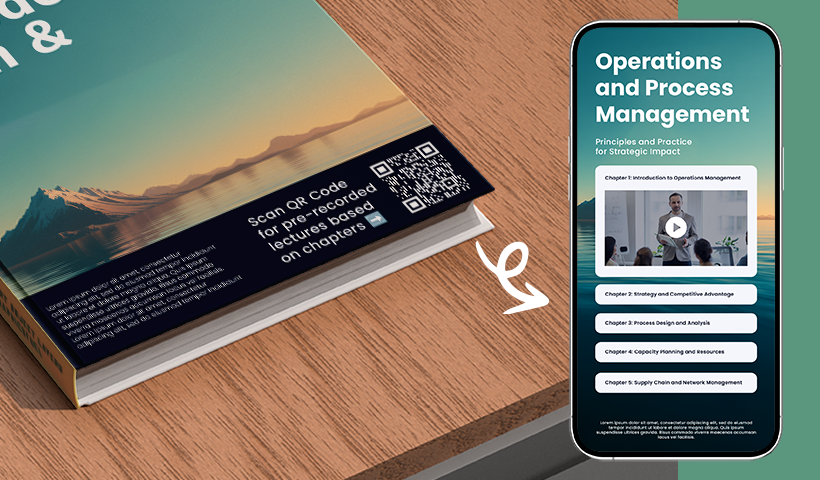
Start with a mobile-first mandate. Your students expect fast, intuitive, push-style access on phones. Nearly all adults own smartphones today, which makes mobile the default context for time-sensitive learning tasks and catch-up viewing.
Push beats pull. Instead of asking students to hunt through a portal, give them a direct scan that opens the exact video on their device. Current student preference data also shows strong support for mobile notifications over email for time-sensitive items, so building around mobile triggers aligns with what students actually respond to.
The simple bridge from paper and slides to video
QR codes are the low-friction bridge from the physical world to the exact digital video. They work with the camera students already use, are easy to print on slides and handouts, and are scannable from a reasonable distance in lecture halls. On Android, the default camera can scan QR codes without additional apps, keeping it simple.
Why do QR codes beat NFC for instant access in class? QR codes need only a camera and line of sight, so they live happily on paper, posters, lab labels, and slides. NFC requires a compatible chip and a close tap within a few centimeters, which is ideal for payments but awkward for a room full of students trying to access the same link simultaneously.
Make it future-proof: dynamic, trackable, and secure
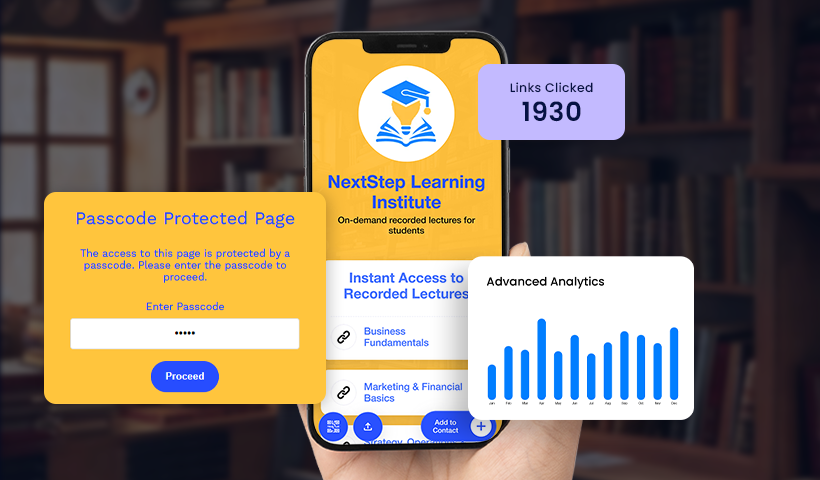
- Static vs dynamic QR codes: Static links are brittle. When a file moves or a folder changes, the code breaks. Dynamic QR codes let you change the destination after printing, which keeps your materials current without reprinting. With QRCodeChimp, dynamic codes are editable and trackable, making them the right default for courses.
- From access to insight with analytics: Once your codes are dynamic, you can see what gets used. QRCodeChimp’s analytics show scans over time, by location, device, and even link-level clicks on multi-link pages. That turns classroom access into actionable data. Example: your worksheet code outperforms the textbook code, so you prioritize worksheets in the next module.
- One-code syllabus using multi-URL: Stop printing a dozen codes per week. Create a single multi-URL QR code that opens a mobile link list for Week 1, Week 2, slides, readings, and forms. Edit that list of all terms without changing the printed code. Students scan once and always land on the current resources.
- Add passwords without adding friction: When content is sensitive, prompt for a passcode after scan. You keep a clean, single-scan experience for students and meet your privacy bar. QRCodeChimp supports password-protected QR codes, allowing you to gate select videos or files.
Quick checklist
- Use dynamic QR codes for anything that might change.
- Route through a multi-URL page for weekly bundles.
- Turn on analytics to learn which materials matter.
- Add passwords for sensitive items.
Quick use case snapshots
- Interactive textbook and worksheet: In a cardiac rhythm study, 90% of students found QR support more helpful than textbook images, and 97% reported it improved their understanding of ECG strips. That is what happens when a scan lands on the exact explainer video instead of a static image.
- Live lectures and events: Put a QR code slide up front for check-ins, polls, forms, or to access the slide deck. Studies show that QR-based registration and evaluation can increase completion rates compared to paper-based methods, as students can act in the moment on their phones.
- Smart spaces and equipment: Label lab gear with a QR code that opens a 60-second how-to video. Post a code on your office door that directs students to the booking page or a contact page. These small bridges reduce emails and help students solve problems right where they are.
Troubleshooting and governance
Common blockers and quick fixes
- “Students see a login request.” Check the video’s sharing settings on your hosting platform. Use “unlisted” or “anyone with the link” for internal courses where appropriate, and reserve stricter settings for protected content.
- “Video moved, code broke.” If you used a dynamic QR code, update the destination in your dashboard; no reprint needed.
- “Too many codes on one page.” Consolidate everything into a multi-URL hub, so one scan reveals this week’s links.
Privacy, access, and audit trails
- Use organization-appropriate sharing, add passwords for restricted content, and keep sensitive items behind a passcode prompt after scan.
- Use analytics logs as evidence of access, including time, device, and location trends, when demonstrating engagement.
Move from frictional access to fluid learning
Recorded lectures only matter if students can access them instantly. When content is buried behind logins, scattered across systems, or hard to find, learning momentum drops, no matter how good the material is.
For academic administrators, instructional designers, LMS managers, IT teams, and faculty, the fix isn’t another platform. It’s removing friction at the final step and giving students one clear path to content.
QRCodeChimp enables instant access to recorded lectures and tutorials through dynamic QR codes that work across devices and update in real time. Students scan once, from slides, handouts, LMS pages, or emails, and start learning.
Frequently asked questions
How can students access recorded lectures instantly on mobile?
Place a dynamic QR code on slides, handouts, your syllabus, and even classroom signage. Students scan with the phone camera and land on the exact video, no portal navigation required. Use a multi-URL page if you want one code for the whole term.
What is the difference between static and dynamic QR codes for courses?
Static code hardlinks to a single URL, so it breaks if the file moves. Dynamic codes let you edit the destination after printing and track scans, which is essential for semester-long materials.
How do I stop login walls when sharing lecture videos?
Set the video’s share setting to “unlisted” or “anyone with the link” when appropriate for internal courses. If the recording must be restricted, use a password-protected QR code to prompt for a passcode after the scan.
When should I use password-protected QR codes?
Use them for restricted lectures, assessments, or any video that contains sensitive student data. Students scan as usual, then enter a passcode you share in class or via LMS announcements.
How do I consolidate all the weekly videos into a single code?
Create a multi-URL QR code. It opens a mobile link list with Week 1, Week 2, slides, readings, and forms. Update the list at any time without changing the printed code.
You may also like
Simplifying Document Access in Real Estate with QR Codes
Learn how QR codes simplify real estate document access. Share brochures, disclosures, and closing files securely with dynamic, trackable QR codes.
Why Every Doctor Should Switch to Digital Business Cards
Discover how digital business cards help doctors improve patient access, simplify referrals, support telehealth, and keep contact details updated in real time.
How to Use QR Codes for Study Materials, Syllabus, and Assignments
Learn how to use QR codes for education to share syllabi, assignments, and study materials. Simplify access, save time, and track student engagement.
Valentine’s Day 2026 Retail Playbook: Lessons from 2025 You Can’t Afford to Ignore
Discover what worked in 2025 and how to use QR codes in Valentine’s Day 2026 to boost in-store conversions, reduce drop-off, and drive measurable retail sales.
Most Popular
Contact Sales
