The online event ticketing market is enormous, valued at an estimated $56.7 billion in 2024. But with this growth comes a rising challenge for organizers: ticket fraud. It is a hidden revenue killer that continues to escalate. In the UK alone, ticket fraud increased by 47 percent in 2024, costing organizers nearly £10 million.
QR-based ticket validation offers a powerful solution. Studies show that QR-powered systems can reduce average check-in time from 45 seconds to just 7 seconds, an 84 percent improvement. Error rates also drop dramatically, from 3.5 percent with manual entry to 0.5 percent with QR technology.
As events become larger and more digital, organizers need a validation method that is fast, accurate, and secure. QR code validation delivers exactly that, making check-ins smoother for attendees and more reliable for event teams.
In this guide, we’ll explore how QR-based validation works, the challenges it addresses, and how you can use it to run secure, efficient events at any scale.
- Why Ticket Validation Matters in Modern Events
- Common Check-In Challenges Without Proper Validation
- How QR Code Ticket Validation Works
- Benefits of QR-Based Ticket Validation
- Event Ticket Validation with QRCodeChimp
- Step-by-step: How to validate event tickets with QRCodeChimp’s Validator App
- Real-World Ticket Validation Scenarios
- Best Practices for Fast, Secure Ticket Validation
- Managing Multi-Day and Multi-Session Events
- Final thoughts
- Frequently asked questions
Why Ticket Validation Matters in Modern Events
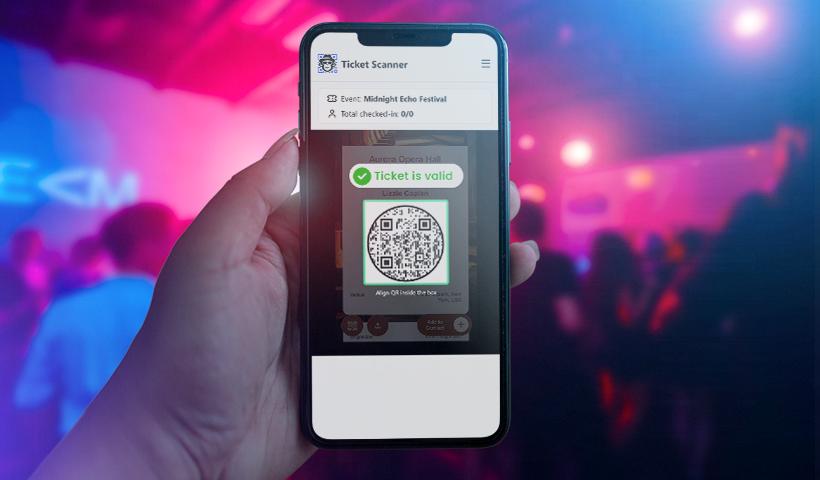
Ticket validation is a critical part of event entry. As digital ticketing becomes standard, organizers need a secure and efficient way to verify tickets, prevent misuse, and keep check-ins running smoothly.
Let’s understand the importance of adequate ticket validation in events.
Digital ticketing demands reliable validation to avoid fraudulent entries
While mobile tickets and digital passes enhance event ticketing, they also increase the risk of ticket fraud. Remember the 47% increase in ticket fraud we discussed earlier? Attendees may take screenshots of a QR code ticket and share it with others.
Event managers need a reliable way to verify each entry, and QR-based validation provides that solution.
Each QR code ticket displayed at the gate is linked to a unique record, enabling smooth validation and making check-in faster, more organized, and easier for staff to manage.
Smooth check-ins improve attendee experience
Guests notice the check-in experience right away. Slow scanning or manual checks cause long lines and frustration. Quick, accurate validation keeps lines moving, cuts down wait times, and creates a positive first impression for the rest of the event.
Validation protects event revenue
For paid events, each fraudulent entry results in a direct financial loss. Ensuring only genuine ticket holders enter helps organizers control attendance, prevent revenue loss, and keep the event safe and profitable.
Common Check-In Challenges Without Proper Validation
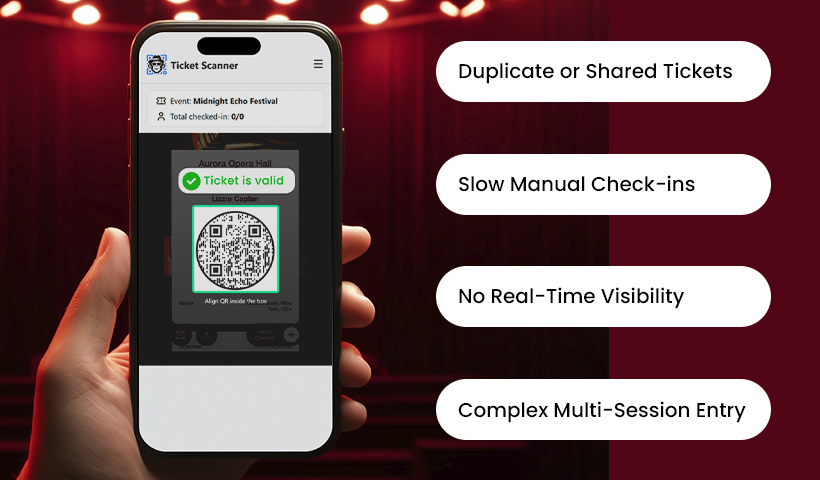
Many entry issues happen when events depend on manual or inefficient check-in methods.
Here are some of the most common problems organizers face.
Duplicate tickets, forwarded passes, and reused screenshots
Attendees can share their tickets or screenshots with others. Without real-time validation, staff cannot verify whether a ticket has already been used, which can lead to unauthorized entries and overcrowding.
Slow check-in lines due to manual checking
When staff manually check tickets or verify attendee names, the check-in process slows down and becomes less efficient. This results in long lines and a poor guest entry experience.
No real-time visibility into entries
Without a centralized validation system, organizers struggle to track attendee check-ins, monitor who has yet to arrive, or manage crowd flow effectively.
Difficulty managing multi-day or multi-session entry
Events spanning multiple days or sessions need controlled re-entry. Without tools such as scan limits or daily resets, attendees might misuse tickets to gain entry even when they are not authorized.
How QR Code Ticket Validation Works
QR-based validation enables event organizers to quickly verify tickets and ensure only authorized attendees enter the venue. Unlike manual checks, QR validation instantly compares each ticket against the event’s records to confirm it’s genuine and unused.
Here’s how the process works behind the scenes.
The concept of a unique scannable ID
Each event ticket includes a QR code that acts as a unique ID. When scanned, the system validates the ticket and displays a confirmation message. If the ticket isn’t valid or has already been used, an invalid message appears.
Scan limits and one-time use tickets
Organizers can set scan limits to control how many times a ticket can be used. For most events, the limit is one, ensuring each ticket is used only once. When a ticket hits its scan limit, the system marks it as used or locked.
This prevents duplicate entries, forwarded tickets, and reused screenshots from being accepted at the gate.
Benefits of QR-Based Ticket Validation
QR-based ticket validation offers several advantages that help organizers run secure, efficient, and well-managed events. By combining speed, accuracy, and fraud prevention, QR validation enhances both the attendee experience and the organizer’s operational control.
Faster and more efficient check-ins
QR-based validation enables staff to verify tickets in seconds, reducing wait times by 84%, as discussed earlier. This creates a smoother flow, minimizes crowding, and improves the overall attendee experience from the moment they arrive.
Stronger protection against ticket fraud
QR validation prevents duplicate entries, forwarded screenshots, and unauthorized access. Each scan instantly checks whether the ticket is genuine and unused, giving event organizers full confidence that only valid attendees enter.
Accurate and real-time attendance tracking
Every scan is recorded instantly, giving organizers a clear view of how many guests have checked in and how many are still expected. This helps manage crowd flow, monitor entry patterns, and make informed decisions throughout the event.
Better control for multi-day and re-entry events
Features such as scan limits and daily resets enable organizers to manage repeated entries safely and predictably. This ensures tickets behave exactly as intended, whether for single-entry passes or multi-day access.
Easy setup and seamless operation
QR-based validation is simple for staff to use and requires minimal training. Whether using the dashboard or validator app, organizers can implement secure ticket validation without complex hardware or software.
Event Ticket Validation with QRCodeChimp
QRCodeChimp allows you to validate tickets in two ways.
QRCodeChimp’s Event Ticket Validator Web App provides event staff with a quick and easy way to validate tickets in real time. Staff simply open the web app on any device, scan the attendee’s ticket, and instantly validate it.
The app verifies each ticket against event records and validates it instantly. One-time entry tickets lock after the first valid scan, preventing duplicates or forwarded screenshots. For multi-day or re-entry events, the app adheres to the set scan limits and daily reset rules.
For event managers, the Validator App accelerates check-ins, reduces manual effort, and ensures all staff stay up to date with real-time information. It provides quick, secure, and precise ticket validation for events of any size.
You can also verify event ticket QR codes through QRCodeChimp’s dashboard.
Log in to your QRCodeChimp account on your phone’s browser. Then, open your phone’s camera app and scan the QR code. Once scanned, the event ticket QR code will open in your browser, and a validation confirmation message will appear.
Step-by-step: How to validate event tickets with QRCodeChimp’s Validator App
Follow these steps to create and validate event ticket QR codes.
Step 1: Create event ticket QR codes
1.1 Log in to your QRCodeChimp account and go to the event ticket QR code solution.
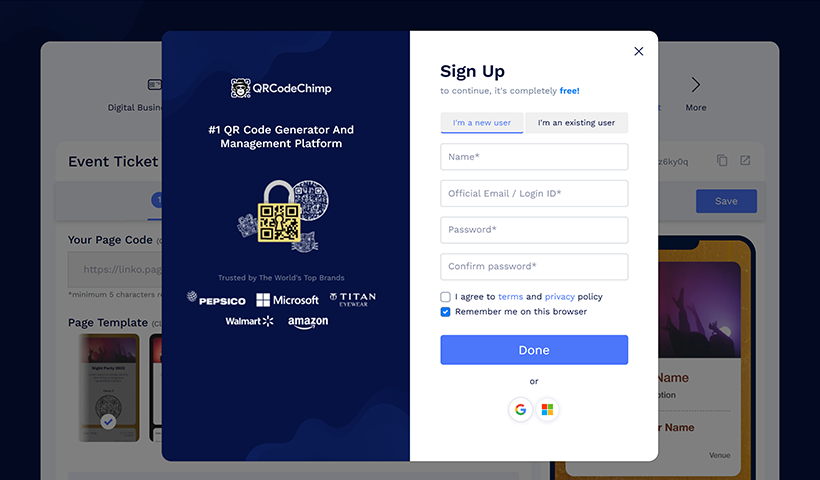
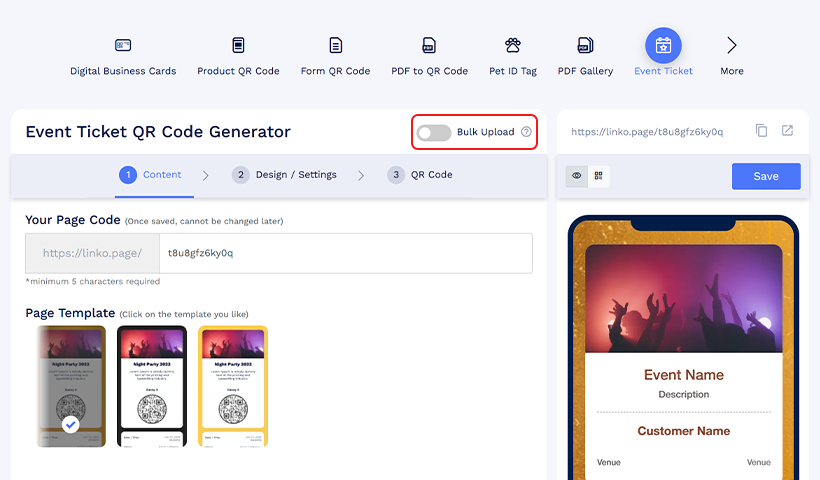
1.2 Enable bulk upload, design your event ticket template, and upload the bulk file to create event tickets.
1.3 Once your event ticket QR codes are ready, share the tickets with the respective guests.
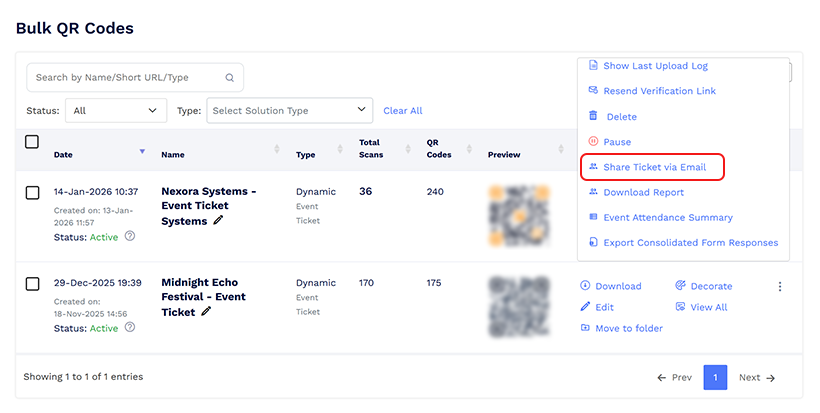
Learn more: How to Create and Design an Event Ticket QR Code
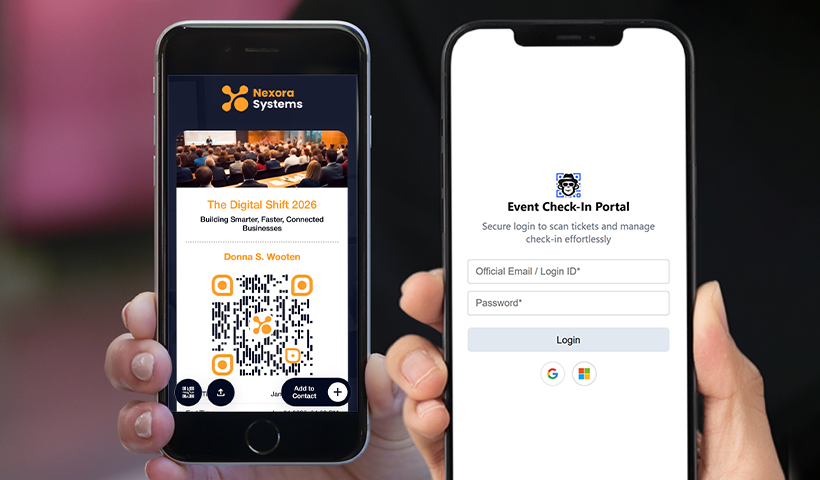
Step 2: Log in to the event ticket validator app
2.1 Open the event validator web app and log in with your QRCodeChimp account. This account should be the same account that you used to create the event tickets.
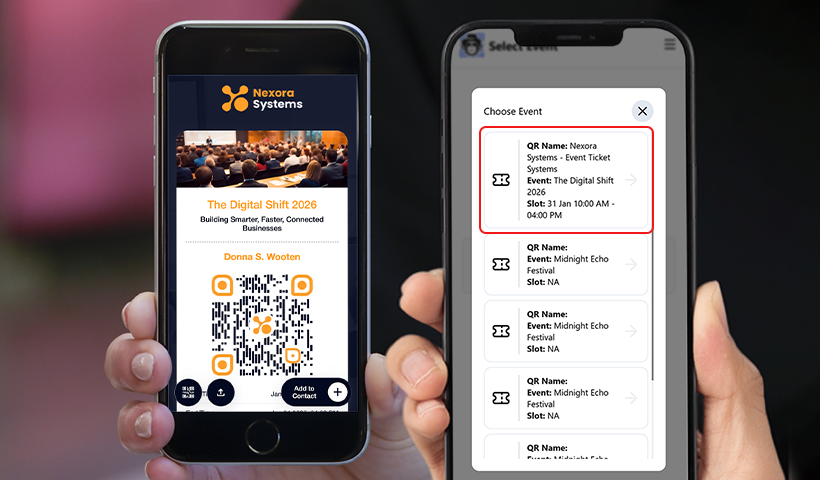
2.2 Select the event whose tickets you want to validate.
2.3 Alternatively, you can validate tickets by logging in to your QRCodeChimp account on your phone’s browser and scanning tickets using the camera app.
Step 3: Scan and validate tickets
3.1 The scanner will open. Just scan the event ticket QR code, and it’ll be validated instantly. You’ll see a validation confirmation message.
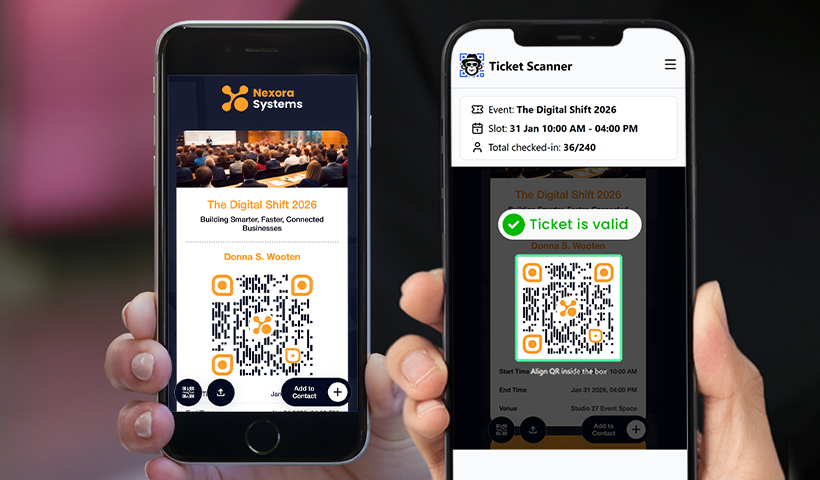
Note: If you scan a QR ticket that’s already validated or belongs to another event, you’ll see an invalid ticket message.
Real-World Ticket Validation Scenarios
QR code ticket validation is useful across a wide range of events. Here are some real-world situations where validation is essential for smooth, secure access.
Large concerts or festivals
High-attendance events like concerts and festivals often face long lines and a high risk of duplicate or forwarded tickets. QR-based validation enables fast scanning and one-time entry enforcement, helping staff manage large crowds efficiently while preventing misuse.
Conferences with multiple sessions or tracks
Conferences often include different tracks or session-specific access. Validation ensures that attendees enter only the sessions they are registered for. Scan limits and ticket statuses help staff manage access without confusion.
College events with multi-day passes
Student festivals or campus events often last several days. With daily scan limit resets, organizers can allow valid re-entry each day while stopping attendees from using the same ticket more than once.
Corporate events with restricted entry
Corporate events may require controlled access for employees, partners, or VIP guests. QR validation ensures that only authorized individuals can enter, enhancing security and preventing unauthorized access.
Private parties
For invitation-only events, QR-based validation stops uninvited guests from entering. The host can scan each ticket to verify authenticity and confirm whether the guest is on the approved guest list.
Best Practices for Fast, Secure Ticket Validation
A reliable validation system is crucial, but how it’s carried out on event day is equally important. Following these best practices will help ensure smooth entry operations and prevent ticket misuse.
Train your staff before the event
Ensure all entry staff know how to scan tickets, interpret validation statuses, and respond to invalid or used tickets. A few minutes of training can prevent confusion and delays at the gate.
Use the validator app for multi-staff setups
When multiple staff members are scanning tickets, the web-based validator app ensures all the team members’ accounts and devices stay synchronized with real-time ticket status. This prevents double entries and accelerates the overall check-in process.
Test tickets before event day
Always run a quick test by scanning a few sample tickets. This ensures that ticket settings, scan limits, and validation workflows are set up correctly before attendees arrive.
Plan for multi-entry or re-entry needs
If your event allows guests to exit and re-enter or spans multiple days, set scan limits or enable daily resets. This ensures the ticket functions as intended and prevents multiple unauthorized entries.
Managing Multi-Day and Multi-Session Events
Events that span multiple days or have multiple sessions require more advanced validation tools. QR-based ticketing makes it simple to control re-entry, manage daily access, and track attendance for each session or day.
How re-entry rules work
For events that permit guests to leave and re-enter, re-entry rules specify how many times a ticket can be scanned. By adjusting scan limits, organizers can allow multiple entries within a defined timeframe while preventing ticket abuse.
Using daily reset for multi-day events
Multi-day events typically use the same ticket for multiple days. With daily scan limit resets, a ticket can be scanned once each day, preventing attendees from gaining unlimited access. This maintains control and avoids issuing separate tickets for each day.
QRCodeChimp’s “Reset the lock daily” feature lets you set and manage daily resets effortlessly. When enabled, the scan limits reset daily at your chosen time.
Tracking attendance per day or session
Real-time validation also helps organizers track attendance more accurately. Each scan is linked to a date or session, allowing staff to monitor how many attendees have entered, how many are expected, and which sessions are drawing the most participants. This information is useful for operational planning and crowd management.
Final thoughts
A smooth and reliable check-in process is crucial for any successful event. QR-based ticket validation helps organizers prevent misuse, avoid duplicate entries, and keep lines moving efficiently. With real-time status checks, scan limits, and accurate tracking, validation guarantees that only legitimate ticket holders gain entry to your event.
With QRCodeChimp, verifying event tickets is easy, dependable, and designed for events of all sizes. Whether you’re managing single-entry passes, multi-day tickets, or session-based access, QRCodeChimp provides the tools to handle entry confidently and clearly.
A robust validation workflow not only enhances security but also improves the attendee experience. If you want faster check-ins and complete control over event entry, QRCodeChimp makes it easy to manage the entire process seamlessly.
Frequently asked questions
How do QR codes validate tickets?
QR codes store unique ticket information that gets verified when scanned, ensuring authenticity and entry access.
Can QR code tickets be used for multi-day or re-entry events?
Yes. QRCodeChimp QR-based ticket systems allow organizers to set scan limits and enable daily reset options. This ensures tickets can be scanned once per day or multiple times as permitted, making them ideal for multi-day events or events that allow controlled re-entry.
What is the ‘Lock QR Code’ feature?
This feature locks a QR code after it reaches the maximum scan limit. It ensures each code is used within its predetermined limits to prevent unauthorized access and fraud.
Can the QR code still display information after being locked?
Yes. Even after the QR code is locked, it can still show event details or tickets in the background. This keeps attendees informed about the event and enhances their experience.
Does locking the QR code affect the check-in process?
No. It streamlines the check-in process by reducing wait times and ensuring a smoother, faster entry into the event, improving the overall attendee experience.
Do event staff need special devices or training to validate QR code tickets?
No special hardware is required. Event staff can use any smartphone with a camera and internet access. The QRCodeChimp Validator App is user-friendly and requires minimal training, allowing staff to validate tickets quickly and accurately.
Can organizers track attendance in real time using QR code validation?
Yes. Every scan is recorded instantly, providing organizers with real-time visibility into attendance. This helps monitor guest arrivals, manage crowd flow, and analyze entry patterns across different days or sessions.
You may also like
Simplifying Document Access in Real Estate with QR Codes
Learn how QR codes simplify real estate document access. Share brochures, disclosures, and closing files securely with dynamic, trackable QR codes.
How to Use QR Codes for Study Materials, Syllabus, and Assignments
Learn how to use QR codes for education to share syllabi, assignments, and study materials. Simplify access, save time, and track student engagement.
How to Make a QR Code for a Link?
Explore how to create a QR code for a link like your website, social media, or YouTube. QR codes will enhance traffic and engagement on your digital platforms.
12 Practical Applications of QR Codes in Co-working Spaces
Learn practical ways to use QR codes in co-working spaces to create smarter, more connected workspaces—from streamlined check-ins to simplified meeting room bookings and payments.
Most Popular
Contact Sales
