A birthday cake that opens a video message. A cookie that reveals a special offer. A sushi dish that tells you where the fish came from. That’s what edible QR codes make possible.
These are regular QR codes printed on food using edible ink or food-safe materials. Creating one is straightforward, but ensuring it scans properly takes care.
Here’s how to make edible QR codes, what to watch out for, and how to put them to good use.
Key Takeaways:
- Edible QR codes turn food into interactive digital experiences.
- Use food-safe ink and printing equipment to create edible QR codes.
- Simple, high-contrast designs make edible QR codes easier to scan.
- QRCodeChimp lets you create, update, and track dynamic QR codes.
- Edible QR codes work well for promotions, events, and personalized gifts.
What is an edible QR code?
An edible QR code is a scannable QR code printed or formed from materials safe to eat. You can place one on a cookie, cake, chocolate decoration, or another suitable food surface.
When someone scans it with their phone, it can open a website, video, digital menu, discount offer, or just about any other online content.
The QR code itself works exactly like a regular one. The difference is how it’s printed. Instead of paper and conventional ink, edible QR codes use food-grade ingredients and printing materials.
For example, a bakery could put a QR code on a birthday cake that opens a video message from the person who ordered it. The customer scans the code, watches the message, and then enjoys the cake.
How are edible QR codes made?
There are a few ways to make edible QR codes, and some are much easier than others.
| Method | How it works | Where it’s useful |
|---|---|---|
| Edible ink on icing sheets | Print on edible frosting or sugar sheets, then apply them to food | Cakes, cookies, cupcakes |
| Wafer or rice paper | Print the code on thin edible sheets and place them on food | Desserts, sushi, food decorations |
| Direct food printing | Use specialized equipment to print edible ink directly onto food | Cookies, chocolate, coffee foam |
| Food-based patterns | Form a QR pattern using contrasting edible ingredients | Chocolate decorations, specialty desserts |
| 3D food printing | Create QR patterns within or from edible materials | Mostly experimental applications |
If you’re making edible QR codes for an event, bakery, or marketing campaign, edible printing on icing or wafer sheets is usually the most practical starting point. A specialist can print the sheets, and you can apply them to suitable food items.
Printing directly onto food is another option, but it requires appropriate equipment. Some surfaces, such as coffee foam, are particularly challenging because the pattern can distort or disappear quickly.
How to create an edible QR code?
You don’t need a special QR code generator to create an edible QR code. Any properly generated QR code will work, as long as you print it accurately on suitable edible materials.
Here’s how you can create one.
Step 1: Decide what people will see when they scan
Start with the purpose. Do you want customers to watch a video, claim a discount, see product information, or leave feedback?
For example, if you’re making QR code cookies for a corporate event, you could link them to a product demo or registration page. For a birthday cake, you might link to a personal video message.
Choose something worth scanning. People are more likely to use the code when there’s a clear reason to do so.
Step 2: Generate your QR code
Open QRCodeChimp and choose the solution that matches what you want to share.
If you already have a website or video link, use the URL QR Code generator. If you want to create a branded page with product details, pictures, videos, and offers, consider the Product QR Code solution.
For promotions or campaigns, a dynamic QR code is particularly useful. It lets you change the destination later without changing the printed code. You can also track scans to see how people interact with your campaign.
A static QR code is fine for a simple, permanent link that won’t need updating or tracking.
Step 3: Keep the QR code design simple
QRCodeChimp lets you customize QR code colors, shapes, and other design elements. But edible printing isn’t the place to get too creative.
Use a simple square or circular QR code, preferably dark on a white or light-colored background. Avoid gradients, complicated patterns, and large logos that cover parts of the code.
Remember, edible ink may not reproduce the same sharp edges and fine details you see on your screen. The simpler the design, the easier it is to print accurately.
Step 4: Download your QR code
Once you’re happy with the design, save the QR code and download it in a suitable format, such as PNG or SVG.
If you’re working with an edible-printing provider, ask which format and dimensions they require. Give them a high-quality file rather than a screenshot, which may lose clarity when resized.
Step 5: Get it printed on edible material
Send the QR code to a bakery or edible-printing provider with food-safe printing equipment and materials.
You can print the code on edible icing or wafer sheets, then apply it to cakes, cookies, or other suitable foods. Some specialist printers can print directly onto food.
Don’t use a regular office printer or conventional ink. Not all standard printers are suitable for edible printing, even if they have edible ink cartridges.
Step 6: Test the finished QR code
This is important. A QR code that scans perfectly on your computer screen may not work once printed on food.
Test the actual edible print with different phones before producing a large batch. Check it under normal lighting and after placing it on the food. If you’ll store or transport the food, check whether moisture or handling affects readability.
If scanning is unreliable, simplify the design, increase the size, or choose a flatter printing surface.
Tips to make your edible QR code easy to scan
Food isn’t a perfectly flat piece of paper. Moisture, texture, and handling can affect the QR pattern, so a few precautions make a big difference.
Use strong contrast. Dark QR codes on light backgrounds are generally easier to scan. A black code on white icing is a safer choice than a pale design on dark chocolate.
Leave enough space around the code. A QR code needs a clear border, known as a quiet zone, so a scanner can recognize its boundaries.
Avoid printing too small. Tiny QR codes are difficult to reproduce accurately, especially on food. There’s no single minimum size that works on every edible surface, so confirm the dimensions with your printer and test the finished result.
Choose a flat, stable surface. Smooth icing, fondant, or edible sheets generally give you more control than curved, wet, or uneven surfaces. Avoid placing codes where they could stretch, crack, melt, or become distorted.
Don’t overload the design. A QR code can tolerate some damage, but that doesn’t mean you should deliberately cover large sections with logos or decorations. Keep the pattern as clear as possible.
Finally, make sure people have enough time to scan. A code on melting ice cream or disappearing coffee foam may look interesting, but it isn’t necessarily practical.
Real-world examples of edible QR codes
Edible QR codes have moved beyond novelty experiments. From promotional cookies to restaurant dishes and scannable candy, here are six examples showing how they’re being used.
1. Sparko Sweets, USA: QR code lollipops (2025)
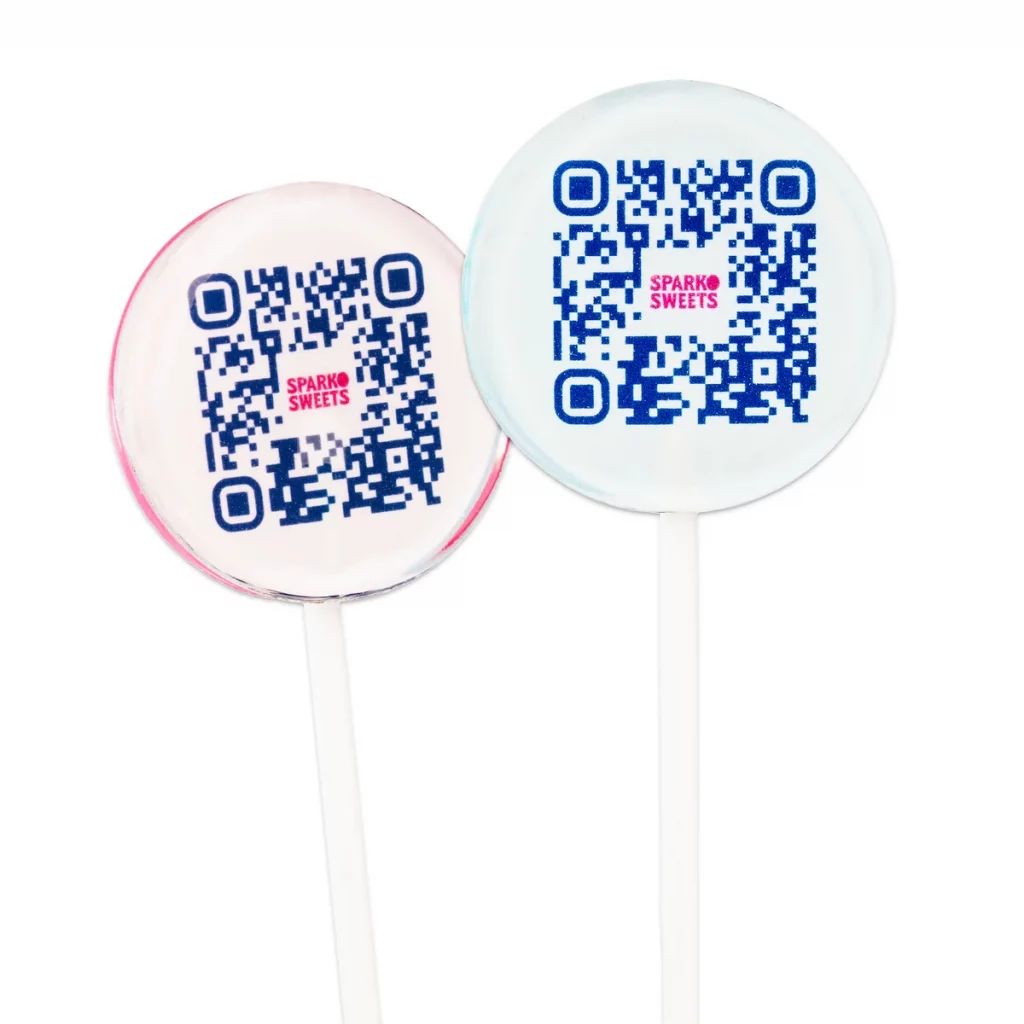
Sparko Sweets offers custom lollipops containing scannable QR codes. Businesses can use them to link recipients to videos, websites, promotions, or personalized messages. The company promotes these edible QR products for trade shows, product launches, and corporate gifting.
2. Molly’s Bakehouse, UK: Personalized QR code biscuits (2026)
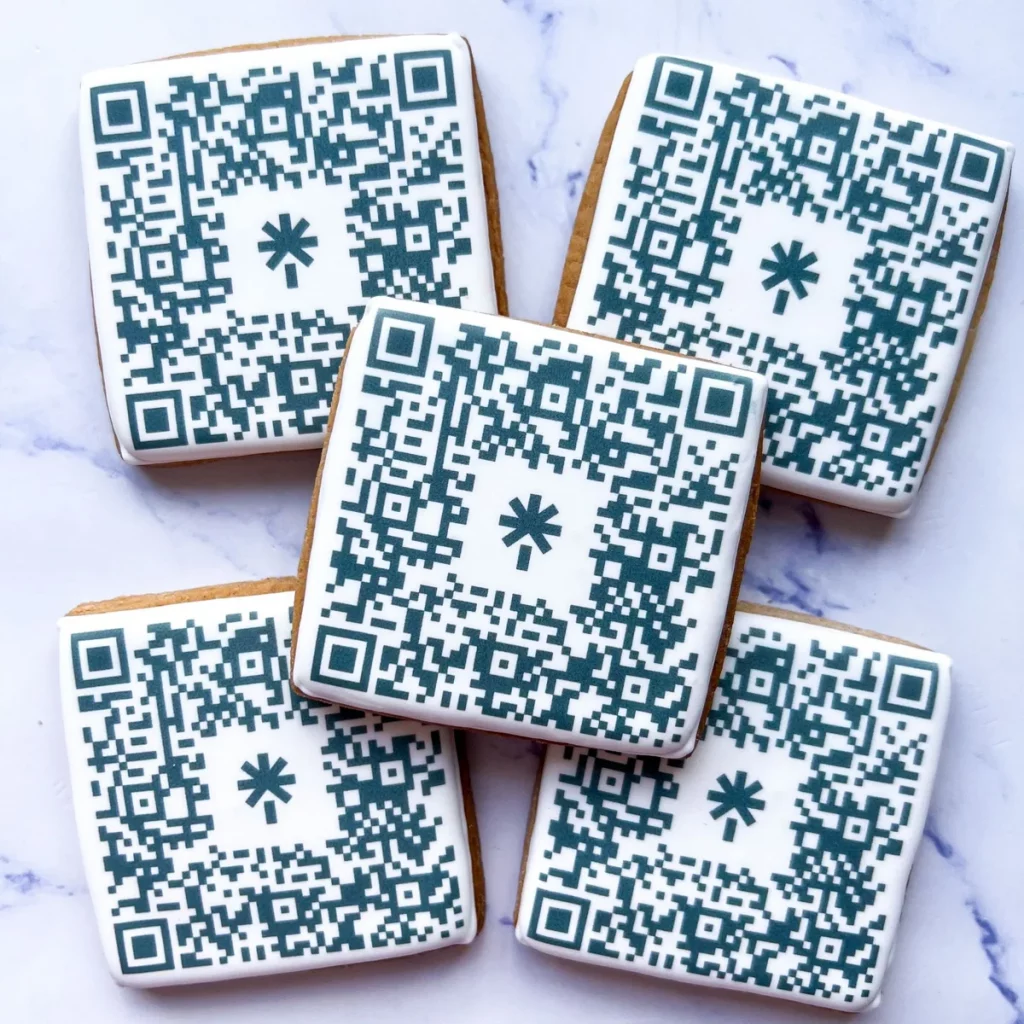
Molly’s Bakehouse offers biscuits decorated with edible QR codes for invitations, personal messages, promotional offers, and events. Customers can supply their QR code designs and order printed biscuits in different quantities.
3. Bumble & Goose, UK: Musical QR code biscuits
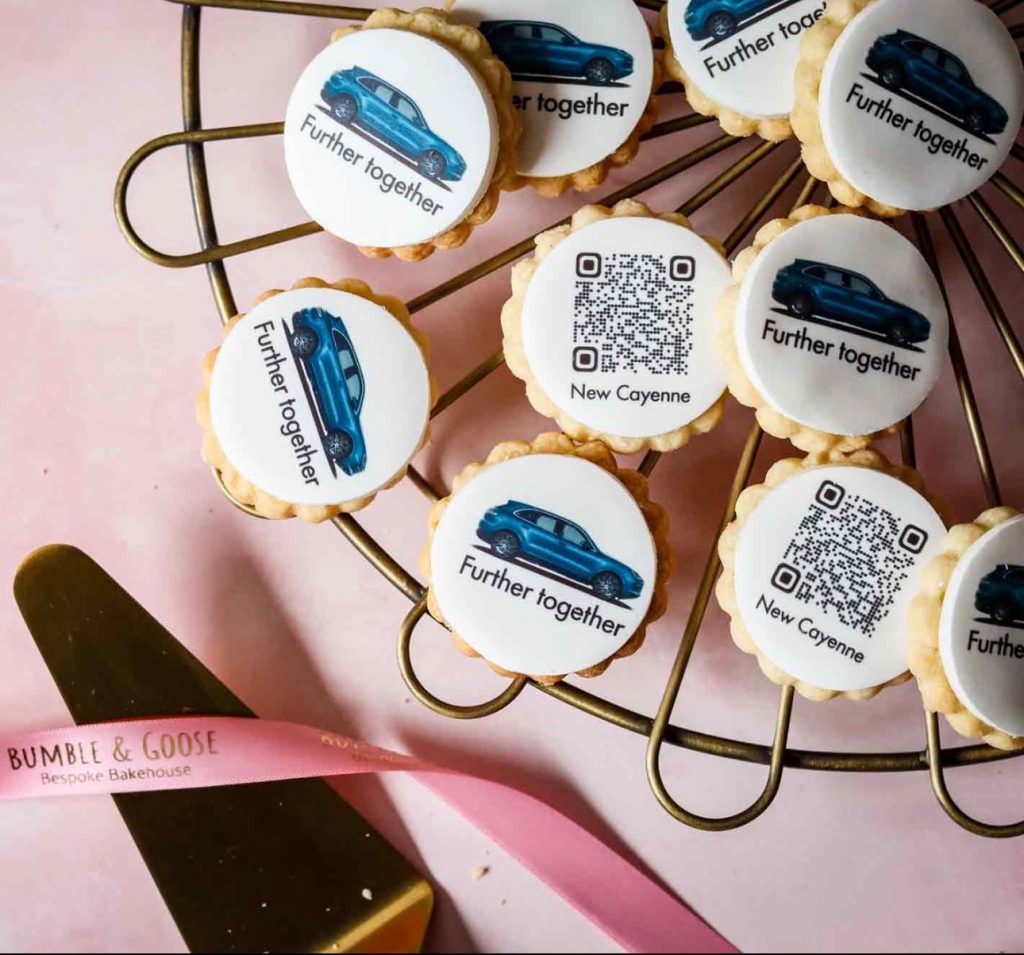
Bumble & Goose describes creating special QR code biscuits for an event honoring Snow Patrol singer Gary Lightbody. Each biscuit linked to a different song by the band, so guests discovered which song they’d received only after scanning.
4. Print Cakes and CBRE, UK: QR code biscuits for a website launch
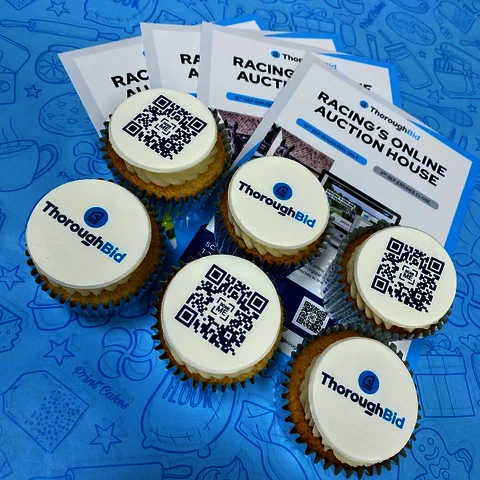
Print Cakes produced 2,800 edible QR code biscuits for commercial real estate company CBRE. Distributed across its UK offices, the biscuits marked the launch of CBRE’s new website. Each carried a scannable QR code, turning an ordinary corporate announcement into something employees could interact with and eat.
5. Harney Sushi, California: Seafood transparency
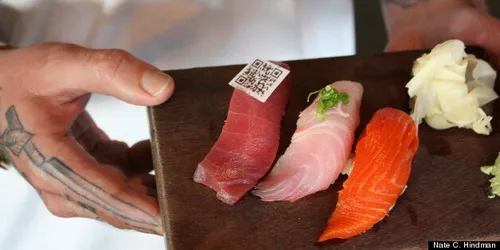
Chef Robert Ruiz used QR codes printed with edible ink on rice wafers served with sushi. Customers could scan the codes to learn about the fish, including sourcing and sustainability information. Nation’s Restaurant News covered the initiative.
6. Moshi Moshi, London: Sustainable sushi
The restaurant partnered with the Marine Stewardship Council to offer sushi with edible QR codes made from rice paper and squid ink. Scanning the codes opened information about the seafood’s sustainability. The initiative was trialed in 2012 and introduced on the restaurant’s menu in 2013. You can read about it in the Marine Stewardship Council’s announcement.
These examples show that edible QR codes can serve very different purposes. What matters isn’t just putting a code on food, but giving people a reason to scan it.
Are edible QR codes safe to eat?
Yes, edible QR codes can be safe to consume when they’re made using ingredients, printing materials, and equipment suitable for food use. But don’t assume something is safe just because it’s labeled “edible ink.”
Food coloring regulations vary by location. In the United States, for example, the FDA regulates color additives, including which foods they may be used in and under what conditions.
The printing equipment matters too. Canon specifically warns against using edible inks and icing sheets in its regular inkjet printers because they aren’t designed for food preparation.
If you’re ordering edible QR codes, ask your supplier about the ingredients, allergens, materials, and food-handling practices. If you’re serving them commercially, make sure applicable food safety and labeling requirements are followed.
Conclusion: Make your food worth scanning
Edible QR codes already make food more interactive, and researchers are finding new ways to develop them. These methods are promising, but conventional edible printing remains the practical choice for most businesses today.
Whether you’re putting a birthday video on a cake, a special offer on a cookie, or sourcing information on a restaurant dish, start with a simple QR code, choose a suitable edible-printing method, and test it before serving.
If you want to update the content later or track scans, create a dynamic QR code with QRCodeChimp. Just make sure the experience behind the code is worth discovering.
Frequently asked questions
Can I print a QR code on a cake?
Yes. You can print the QR code onto an edible icing or wafer sheet and place it on a suitable cake surface. Use a simple design and test the finished code before serving.
Can I make an edible QR code for free?
You can create a QR code using QRCodeChimp’s Free plan, subject to its applicable limits. However, printing it onto edible material will usually involve a separate cost.
Can I change what an edible QR code shows after printing?
Yes, if you use a dynamic QR code. With QRCodeChimp, you can update its destination without changing the printed pattern. A static QR code’s encoded destination cannot be changed.
Do edible QR codes work on chocolate?
Yes, but the printing method and surface matter. You may be able to use edible decorations, transfer sheets, or specialist direct-printing equipment. Smooth, contrasting surfaces are generally preferable.
Can customers scan edible QR codes with a regular smartphone?
Yes. Standard edible QR codes can be scanned with a phone’s camera, just like printed QR codes, provided the pattern is clear and the phone can recognize it. Opening online content will require an internet connection.
You may also like
GS1 Application Identifiers Explained: GTIN, Batch, Serial, Expiry, and More
This guide explains the most important GS1 Application Identifiers used for product identification, traceability, retail, and packaging.
Steps to Integrate Microsoft Entra ID (Azure AD) with QRCodeChimp
Learn how to connect Microsoft Entra ID with QRCodeChimp to automate digital business card creation, improve security, and simplify onboarding.
Bulk QR Codes for Business: Use Cases and Benefits
Discover how bulk QR codes for business can streamline product packaging, employee cards, events, multi-location campaigns, inventory, and more
How to Send QRCodeChimp Form Responses to HubSpot
Learn how to connect QRCodeChimp Forms with HubSpot, map form fields, send responses directly to your CRM, and verify successful data transfers.
Most Popular
Contact Sales
