Linktree gives users a single profile URL to share their social accounts, content, products, and other online destinations. QRCodeChimp can serve the same link-in-bio purpose through its Multi-URL and Digital Business Card solutions while offering additional tools for professional networking, QR code sharing, and campaign management.
Every QRCodeChimp-hosted page has a shareable URL. You can add it to your Instagram, TikTok, LinkedIn, YouTube, email signature, website, or messages just like a Linktree URL. The same page also comes with a customizable QR code for business cards, packaging, posters, brochures, storefronts, events, and other physical touchpoints.
This makes QRCodeChimp more than a QR-based alternative. It provides multiple ways to build and share an online profile, whether you need a simple page containing several links or a professional digital business card with contact exchange and lead collection.
QRCodeChimp vs. Linktree at a glance
| Feature | Linktree |

|
|---|---|---|
| Main focus | Link-in-bio, creator engagement, social media growth, and monetization | Shareable landing pages, digital business cards, QR codes, and campaign management |
| Link-in-bio options | Linktree profile | Multi-URL page, Digital Business Card, or social media page |
| Sharing methods | Profile URL and profile QR code | Short page URL, customizable QR code, and additional sharing options depending on the solution |
| Multiple profiles | Multiple Linktrees under one login, but each profile needs its own paid plan to access paid features | Multiple hosted pages and QR codes within one account |
| QR customization | Customization requires Pro or Premium and includes color and logo-related controls | Colors, shapes, patterns, eye designs, frames, stickers, and logos available from the free plan |
| Digital business cards | Beta Digital Card linked to the user’s Linktree | Dedicated Digital Business Card solution for individuals, professionals, teams, and enterprises |
| Account management | Each Linktree remains a separate profile | Folders, sub-accounts, bulk creation, shared access, and white labeling on eligible plans |
| Analytics | Advanced analytics on paid plans | Basic analytics on Free and more detailed analytics on eligible paid plans |
Key Takeaways:
- QRCodeChimp offers shareable pages plus deeper QR and business tools.
- Linktree lacks custom domains; QRCodeChimp supports full white-labeling.
- One QRCodeChimp account manages many profiles; Linktree charges per profile.
- QRCodeChimp QR codes offer far more design and customization options.
- Digital Business Cards give richer contact exchange than Linktree’s beta card.
- QRCodeChimp vs. Linktree at a glance
- Why QRCodeChimp Is the Best Free Linktree Alternative?
- Use a Multi-URL page as your link in bio
- Use a Digital Business Card as your link in bio
- Manage multiple profiles more efficiently
- Use your own branded domain
- Get more QR code design control
- Organize and manage your campaigns
- Which platform should you choose?
- Conclusion
- Frequently asked questions
Why QRCodeChimp Is the Best Free Linktree Alternative?
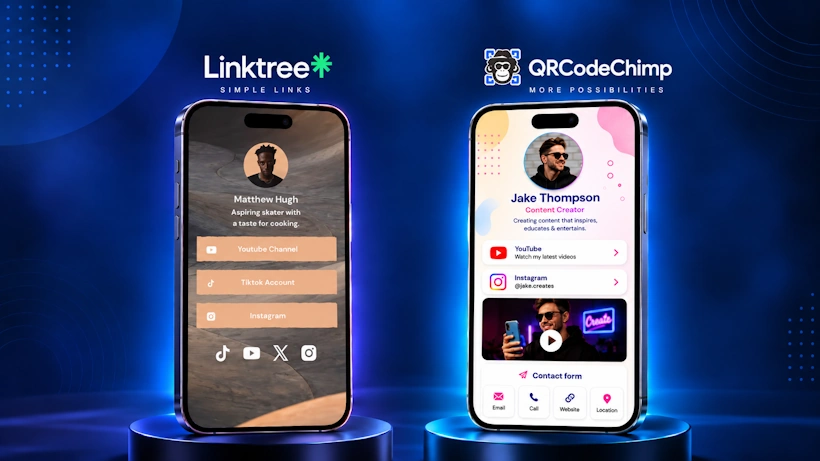
Linktree is primarily built around link-in-bio pages, creator engagement, social media growth, and monetization. Its paid plans highlight enhanced themes, advanced analytics, Instagram auto-replies, mailing-list integrations, digital product sales, affiliate tools, and social media scheduling.
QRCodeChimp is suitable for creators, professionals, businesses, and teams who need a shareable online profile and broader business features. Users can create Multi-URL pages, Digital Business Cards, social media pages, forms, product pages, event pages, and other hosted experiences within the same platform.
Its free plan includes 10 dynamic QR codes, 1,000 combined dynamic scans per month, unlimited static QR codes, two folders, basic analytics, passcode protection, and one Digital Business Card.
🔗 Read our ultimate guide to multi-URL QR codes to create a multi-URL QR code for your link-in-bio needs.
Use a Multi-URL page as your link in bio
QRCodeChimp’s Multi-URL solution lets you display your websites, social media profiles, online store, videos, PDFs, booking pages, and other links on one mobile-friendly landing page.
You can customize the page URL before saving it and share that URL directly through your social profiles and digital channels. Visitors do not have to scan the QR code to open the page.
The QR code provides an additional way to share. It connects printed and physical materials to the same page, allowing one profile to support both online and offline engagement.
You can also update, remove, or reorder links without changing the page URL or reprinting its dynamic QR code.
Try QRCodeChimp’s Multi-URL solution.
Use a Digital Business Card as your link in bio
Professionals can use a QRCodeChimp Digital Business Card URL in their social media bio instead of limiting the profile to a list of links.
A Digital Business Card can include:
- Name, job title, and company information
- Phone number and email address
- Website and social media profiles
- Profile images, videos, and documents
- Appointment booking and other action buttons
- Contact-saving options
- Contact exchange and lead-collection forms
The card can be shared through a short link, QR code, NFC card, email signature, Apple Wallet, or Google Wallet.
This makes the Digital Business Card especially useful for consultants, founders, sales professionals, executives, recruiters, freelancers, and customer-facing teams. It works as a professional online profile while helping visitors save contact details or share their own information.
A more complete digital business card solution
Linktree has introduced a Digital Card that can be saved to Apple Wallet or Google Wallet. It displays a QR code that opens the user’s Linktree. Contact saving and exchange depend on the contact and subscription features enabled on the underlying Linktree profile. The Digital Card is currently in beta and not yet available to all users.
QRCodeChimp offers a dedicated Digital Business Card solution with contact exchange, lead collection, wallet integration, NFC compatibility, analytics, and professional page customization. Businesses can access bulk card creation, shared access, sub-accounts, white labeling, SSO, and Microsoft Entra ID integration on eligible plans.
For users who need more than a social profile, QRCodeChimp provides a stronger foundation for professional networking and company-wide card management.
Try QRCodeChimp’s Digital Business Cards.
Manage multiple profiles more efficiently
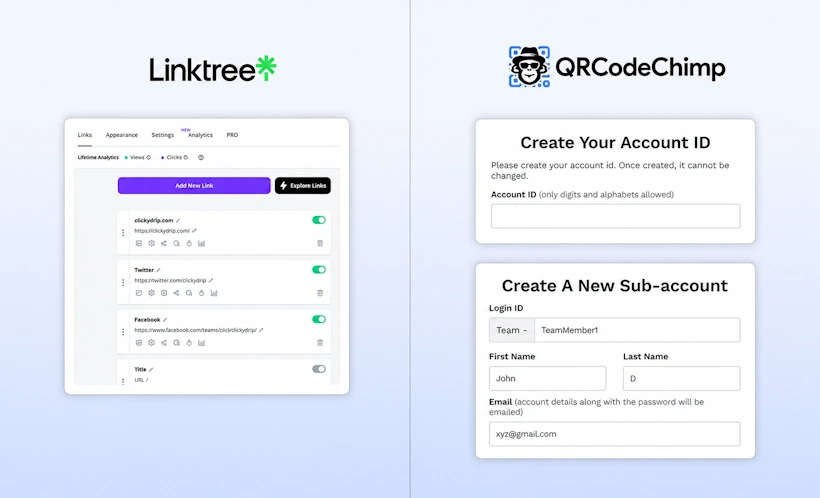
Linktree lets you manage several profiles under one login, but each paid plan only covers a single Linktree. Upgrading two profiles means two subscriptions, five means five, with cost scaling per profile.
QRCodeChimp instead lets you create multiple Multi-URL pages, Digital Business Cards, and other hosted pages within one account, subject to your plan limits. That’s useful for separate profiles across team members, brands or locations, products or campaigns, events, agency clients, or personal vs. professional identities.
Folders keep it all organized, Pro and higher plans add sub-accounts, and eligible plans include bulk creation and shared access.
Use your own branded domain
Every Linktree profile lives at a linktr.ee/username URL, and there’s no way to change that: Linktree doesn’t let you swap in your own domain, and it doesn’t offer domain-forwarding tools either. Even on a paid plan that removes Linktree’s visual branding from the page, the linktr.ee domain still shows up in the URL itself.
QRCodeChimp takes this further with domain white-labeling, available on the Ultima plan and above. You can point your own domain or subdomain at your account, replacing QRCodeChimp’s default domain, remove QRCodeChimp branding from your landing pages, and upload your own favicon. Any dynamic QR code you create or regenerate afterward will use that branded domain in its scan URL.
The result is a consistent brand experience across the profile URL, QR code, landing page, and Digital Business Card, all on a single domain. That consistency matters most for businesses issuing employee cards or running customer-facing campaigns that need to look like their own brand end-to-end, not a platform’s.
Get more QR code design control
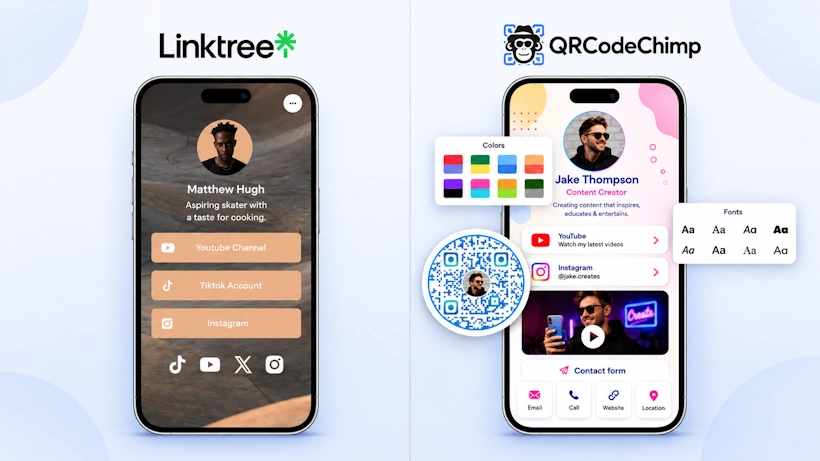
Linktree provides a downloadable QR code for each profile. However, customization requires a Pro or Premium plan. Its documented controls include changing the QR code color, adding a custom logo, and removing the Linktree logo.
QRCodeChimp offers more extensive QR code customization, including:
- Multiple QR code shapes
- Custom colors and gradients
- Different patterns and eye designs
- Frames and stickers
- Brand logos
- Pre-designed QR templates
These options are available on the free plan and help users create QR codes that fit more naturally into business cards, packaging, posters, menus, signs, advertisements, and branded campaign designs.
Organize and manage your campaigns
QRCodeChimp is built to support multiple public profiles at once, and depending on your plan, it gives you real control over how they’re organized and managed. You can group QR codes and hosted pages into folders, protect supported landing pages with a passcode, and set start and end dates so campaigns run only when you want them to.
Built-in scan and engagement tracking means you’re not flying blind on performance, and bulk creation lets you spin up pages and QR codes at scale instead of one at a time.
For teams and larger organizations, there’s more underneath that: controlled account access so team members only touch what they’re meant to, a custom white-labeled domain for a fully branded experience, and the tools to manage professional Digital Business Cards at scale.
Together, these make QRCodeChimp a practical fit for marketing teams, agencies, retailers, event organizers, educational institutions, and any company juggling multiple profiles or campaigns at once.
Which platform should you choose?
Choose Linktree when your main priorities are social media engagement, Instagram auto-replies, mailing list integrations, affiliate tools, and social media scheduling.
Choose QRCodeChimp when you need:
- A shareable link-in-bio page
- A professional Digital Business Card
- Multiple profiles and landing pages within one account
- More extensive QR code customization
- Online and offline sharing through the same page
- Lead collection and contact exchange
- Folders, team access, bulk creation, and campaign management
Linktree is a capable creator-focused platform. QRCodeChimp is the stronger alternative for users who want link-in-bio functionality, professional digital identities, customizable QR codes, and broader business management features.
Conclusion
QRCodeChimp lets you create a link-in-bio experience without restricting you to a QR code. Both Multi-URL pages and Digital Business Cards have shareable URLs that can be placed in social media bios, email signatures, websites, and messages.
The QR code adds another way to share the same profile through physical materials and in-person interactions. You also get access to deeper QR customization, multiple hosted solutions, professional Digital Business Cards, and tools for managing profiles and campaigns from one account.
For creators focused mainly on social media growth and monetization, Linktree remains a useful option. For professionals, businesses, and teams seeking a more versatile platform for profile sharing and digital business cards, QRCodeChimp offers a stronger overall solution.
Frequently asked questions
Is QRCodeChimp a free Linktree alternative?
Yes. QRCodeChimp lets users create Multi-URL pages and Digital Business Cards with shareable profile URLs. Its free plan includes 10 dynamic QR codes, 1,000 combined scans per month, two folders, basic analytics, passcode protection, and one Digital Business Card.
Can I use a QRCodeChimp page in my social media bio?
Yes. QRCodeChimp-hosted pages have shareable URLs that can be added to Instagram, TikTok, LinkedIn, YouTube, email signatures, websites, and messages. The QR code provides an additional option for print and in-person sharing.
Can I create multiple profiles with QRCodeChimp?
Yes. You can create multiple Multi-URL pages, Digital Business Cards, and other hosted pages within your account’s plan limits. Free users can create up to 10 dynamic QR codes, including one Digital Business Card.
Do I need a separate Linktree plan for every profile?
You can manage multiple Linktrees under one login, but each profile needs its own paid plan to use paid features. Linktree charges separately for each upgraded profile.
Does Linktree provide a QR code?
Yes. Linktree provides a downloadable QR code for every profile. QR code customization requires a Pro or Premium plan and includes options such as changing the color, adding a logo, or removing Linktree branding.
Can a Digital Business Card be used as a link in bio?
Yes. A QRCodeChimp Digital Business Card includes a shareable URL that can be added to a social media bio. It can display contact information, social profiles, websites, videos, documents, and action buttons while also supporting contact saving and exchange.
You may also like
QRCodeChimp vs. QRLynx: Which Is the Best Enterprise-Ready Platform for Your Business
QRCodeChimp vs. QRLynx: Discover why QRCodeChimp stands out with CRM integrations, enterprise digital business cards, GS1 QR codes, and advanced security.
How to Combine Multiple Links Into One Link
Combine multiple links into one shareable link and QR code. Use it in bios, emails, messages, or print, and update your links anytime.
How to Create One QR Code for Multiple Links
Learn how to create one QR code for multiple links. Add websites, social profiles, videos, PDFs, and more, then update links without reprinting.
QR Tiger Alternative: Why Are Teams and Brands Moving to QRCodeChimp
Compare QR Tiger and QRCodeChimp to find the better QR code platform. Discover key differences in features, pricing, analytics, and more to make the right choice.
Most Popular
Contact Sales
