A single QR code can now do a lot more.
Imagine a campaign where one QR code shows country-specific landing pages, unlocks sale offers, or rewards the first 500 scans. Different audiences, different moments, and no separate QR codes to manage.
That’s exactly what QRCodeChimp’s Smart QR Codes make possible. You set the conditions, and your QR code automatically directs consumers to the right destination. You can also set a fallback URL for scans that don’t match any of your rules.
Previously, you could do this using Device, Day, and Time conditions. Now, we’ve added six new conditions, giving you even more flexibility and control over what happens after every scan.
Let’s explore what’s new and how you can put these capabilities to work.
Key Takeaways:
- Smart QR Codes now support nine conditions for more flexible scan experiences.
- Six new conditions include Date, Language, Country, Location, Scan Count, and Browser.
- Combine multiple conditions using AND and OR to create targeted QR campaigns.
- Set a fallback URL to guide visitors when no smart rule matches their scan.
- Update existing Smart QR Codes anytime without reprinting or replacing them.
Meet the new Smart QR Code conditions
We’ve expanded Smart QR Codes from three conditions to nine, opening up new possibilities for personalized experiences, targeted promotions, and automated QR code campaigns.
Let’s explore the six new conditions and what you can do with them.
1. Date / Date Range: Your campaigns now run on your schedule
Planning a Black Friday sale? Running a week-long promotion? Or organizing an event with different activities on different dates?
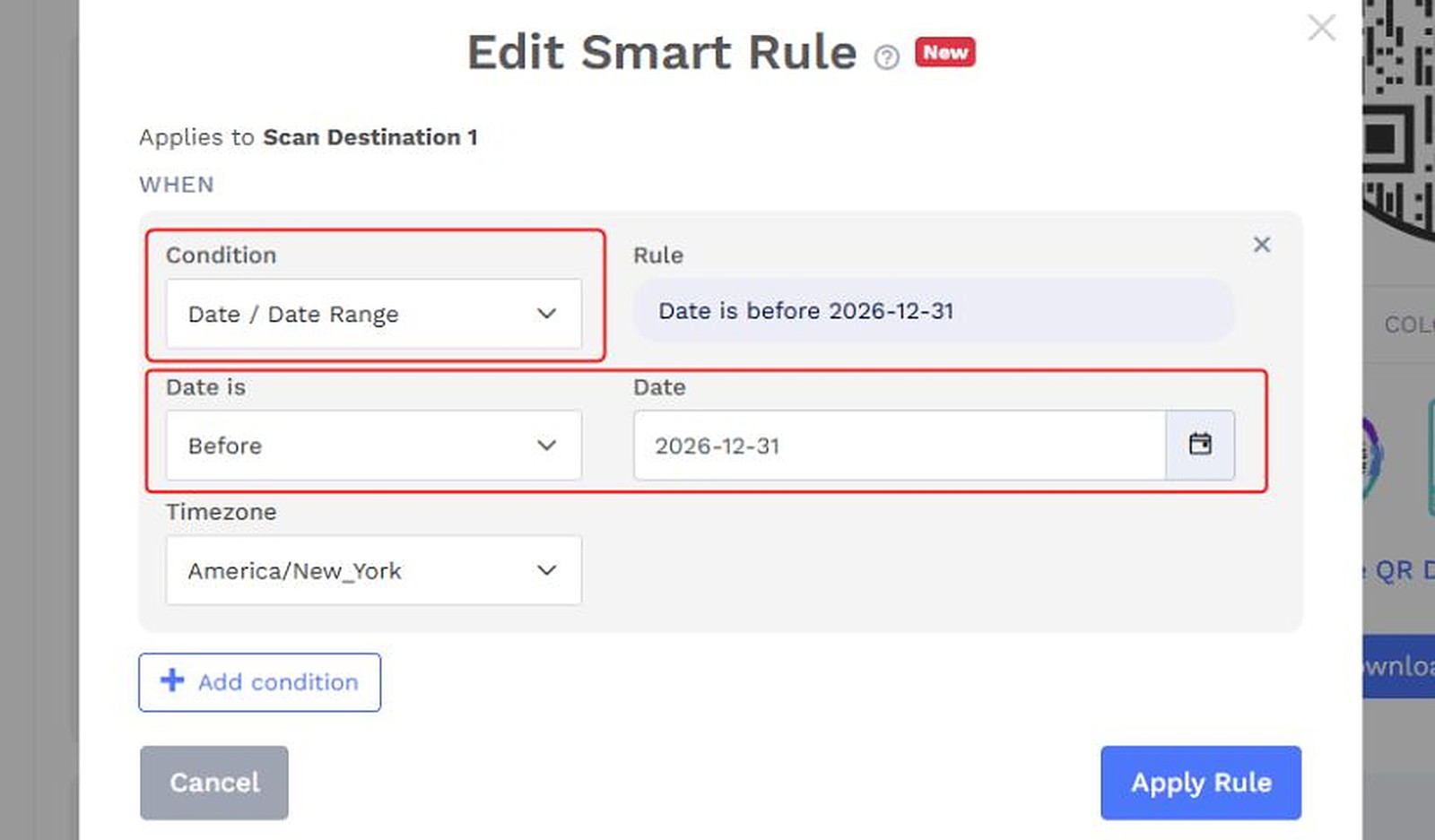
With the Date / Date Range condition, your QR code can direct scanners to different destinations based on when they scan it. You can set rules for a specific date, before or after a date, or within a selected date range.
Let’s say you’re organizing a three-day business conference. Before the event, your QR code takes visitors to the registration page. During the conference, it directs attendees to the event schedule. Once the conference ends, the same QR code leads to a feedback form.
You don’t need to make multiple QR codes, replace a printed QR code, or manually change its destination at every stage. Configure the appropriate date rules, and your QR code can handle the transitions.
2. Language: Speak your customer’s language automatically
A visitor from Germany scans your QR code and lands on an English page. They now have to find the language selector, switch to German, and then look for the information they need.
That’s unnecessary friction, especially when you already have content in multiple languages.
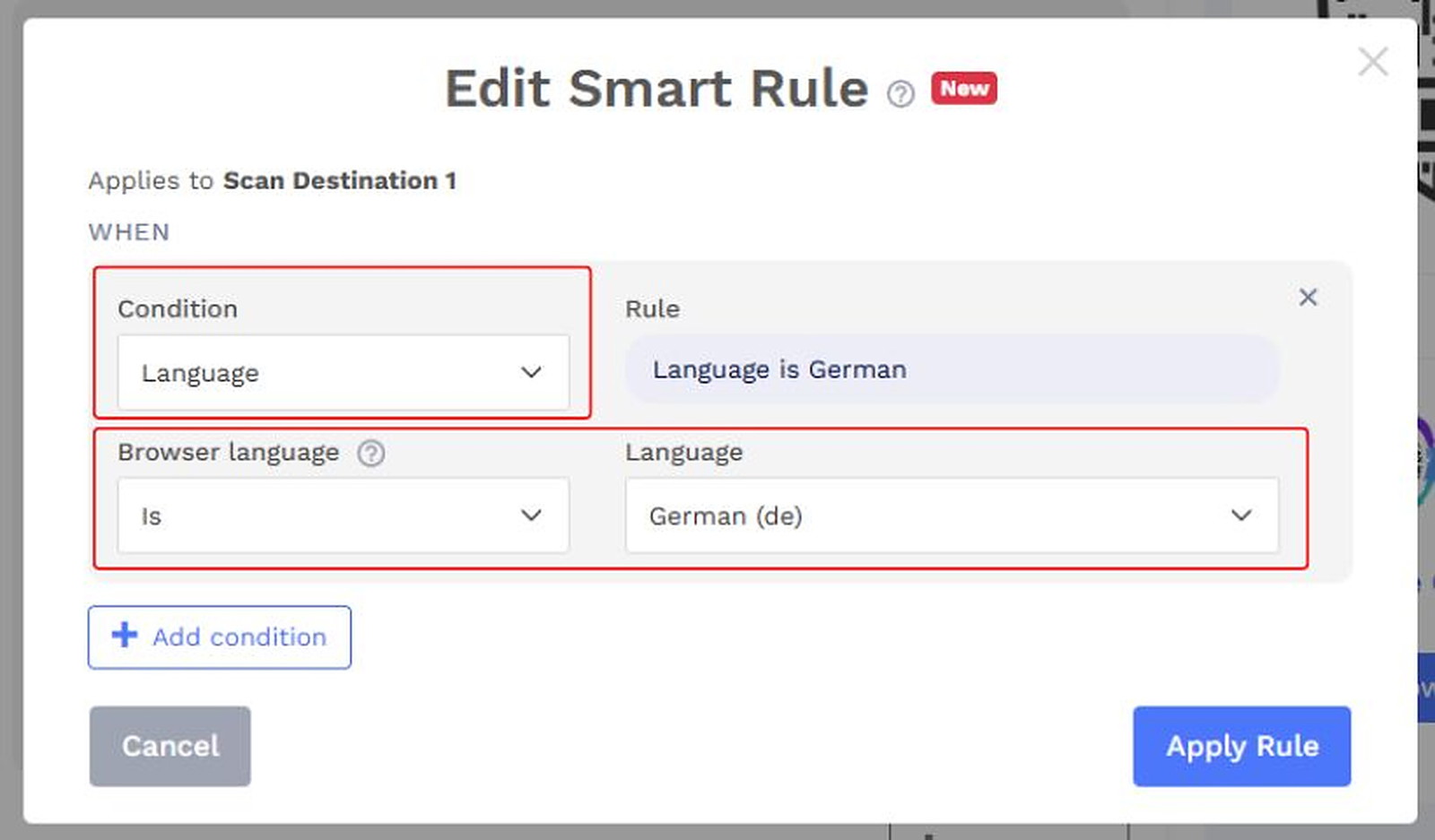
The new Language condition lets you direct scanners to different destinations based on their browser language.
For example, a hotel chain serving international travelers could use the same QR code across its properties. Visitors with English as their browser language could reach an English welcome guide, while German-speaking visitors could be directed to its German version.
This works particularly well for international marketing campaigns, multilingual product information, tourism, and customer support resources.
The result? A more familiar experience from the moment someone scans your QR code.
3. Country / Region: One QR code for multiple markets
Your business operates globally, but your campaigns, prices, and product information may differ across markets. Sending everyone to the same page isn’t always the best approach.
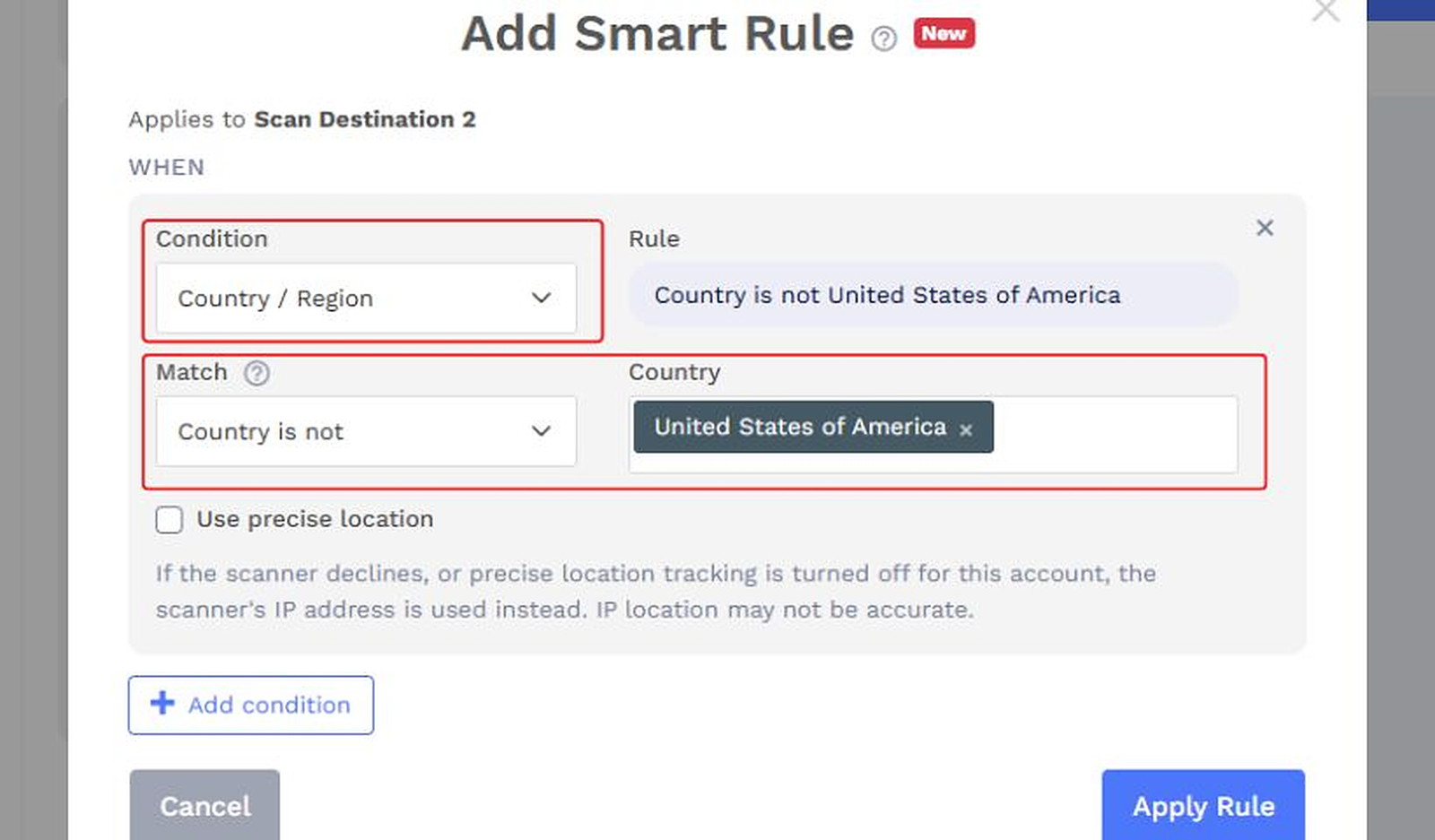
The new Country / Region condition lets you create rules based on the country or region from which someone scans your QR code.
Consider a consumer electronics brand selling the same product in the United States, Germany, and Japan. It could print one QR code design on the product packaging and configure different destinations for each market.
Customers in the US would reach the US product website, while those in Germany would land on the German version.
You could use the same approach for regional promotions, country-specific product information, localized customer support, and market-specific landing pages.
It’s particularly valuable for businesses managing campaigns across multiple regions because one QR code can serve different markets without requiring separate printed codes for each one.
4. Location / Geofencing: Make location part of the experience
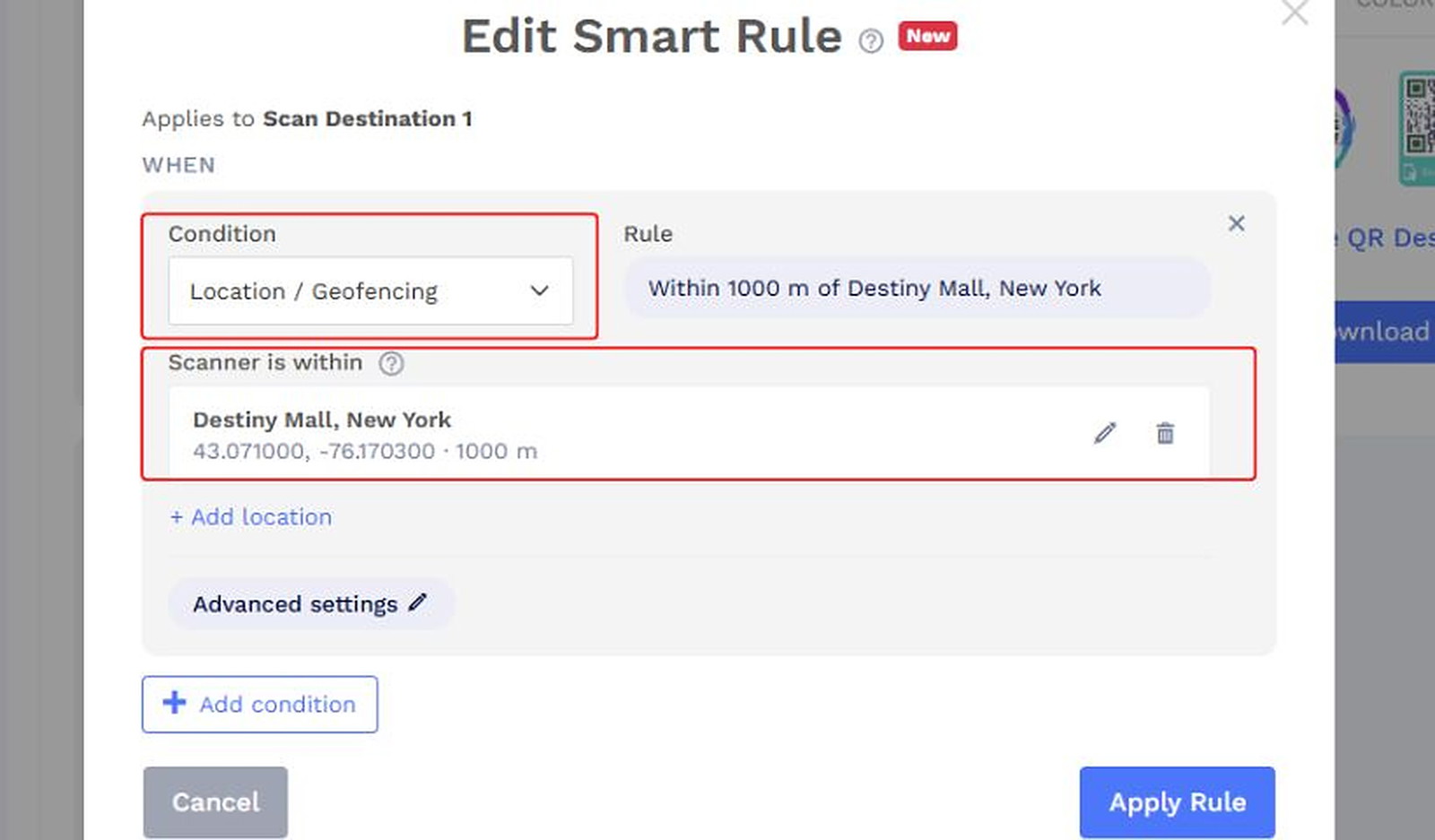
Sometimes, knowing the scanner’s country isn’t enough. You want to deliver a specific experience to people at a particular store, event venue, or campus.
That’s exactly what the new Location / Geofencing condition is designed for.
It lets you define a geographic boundary, called a geofence, and direct scanners based on whether they’re within that area.
You can configure a geofence by entering the location’s latitude and longitude, setting a radius, and choosing the measurement unit. You can also give the location a name and add multiple locations to the same rule.
Let’s say you operate a retail chain and want to run an exclusive in-store promotion at five participating outlets.
You could create a geofence with a 200-meter radius around each store. Customers scanning the QR code from within those areas would be directed to the exclusive promotional page. Those outside the configured locations could reach your regular website through the fallback URL.
The possibilities go beyond retail. Event organizers can direct on-site attendees to venue resources, while educational institutions can create location-specific experiences for different campus areas.
Geofencing gives you more precise control over where certain QR code destinations are available, helping you create experiences that are relevant to the scanner’s physical location.
5. Scan Count: Reward early scanners and manage limited offers
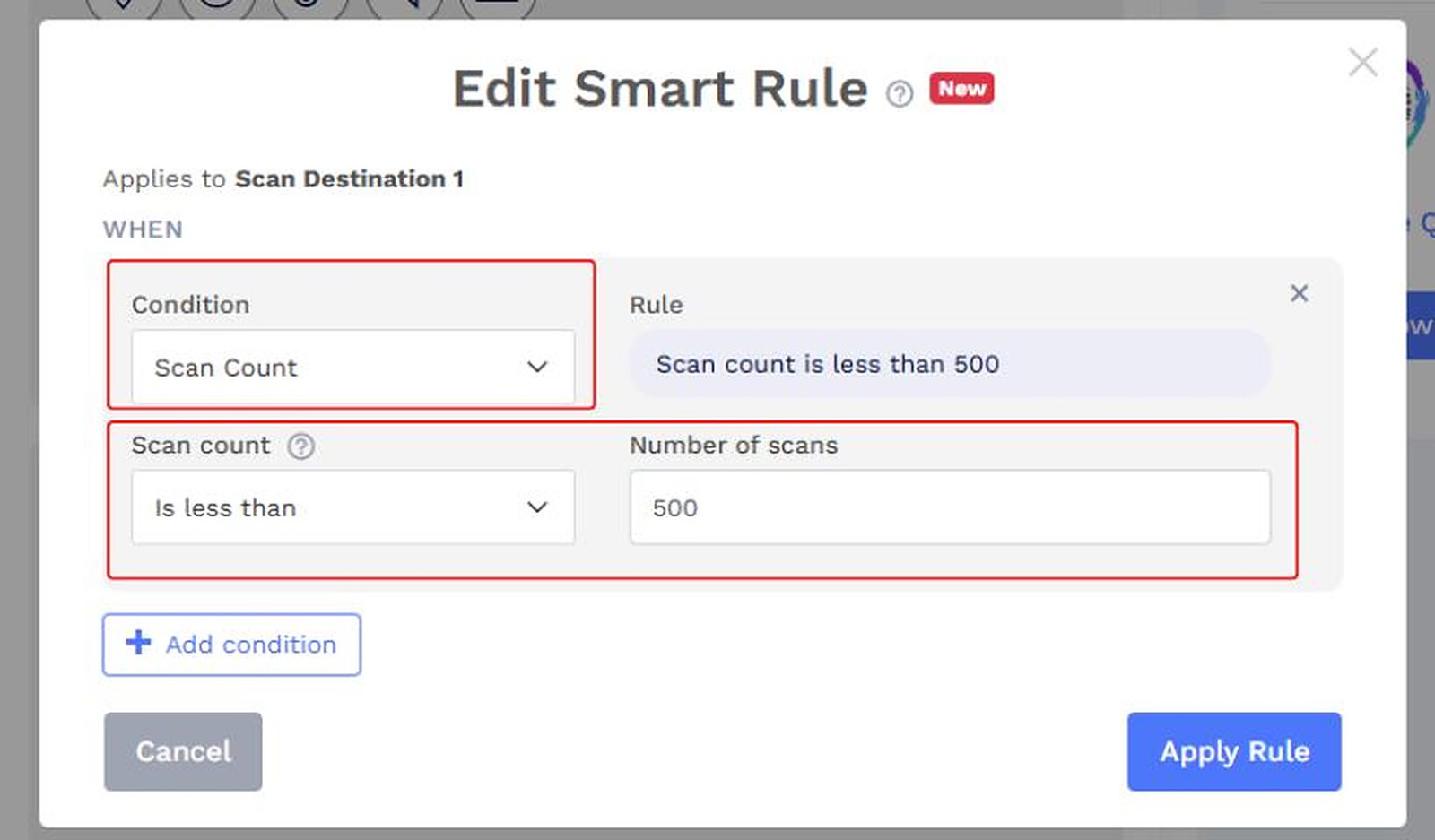
Want to give your first 500 scanners an exclusive offer? Or redirect visitors to a different page after you reach your promotional scan limit?
The new Scan Count condition makes that possible.
It lets you create rules based on how many times your QR code has been scanned. You can configure numerical thresholds and ranges to determine which destination a scanner should reach.
For example, you’re launching a new product and want to reward early interest. You create a campaign where the first 500 scans lead to a special discount page. After the scan count crosses 500, subsequent visitors are directed to the regular product page.
The best part? You don’t have to keep checking the scan count and manually changing the destination. Once the rules are configured, the QR code can route visitors according to the specified thresholds.
This opens up creative possibilities for early-bird promotions, limited-access campaigns, product launches, and scan-based rewards.
6. Browser: Give visitors a browser-specific experience
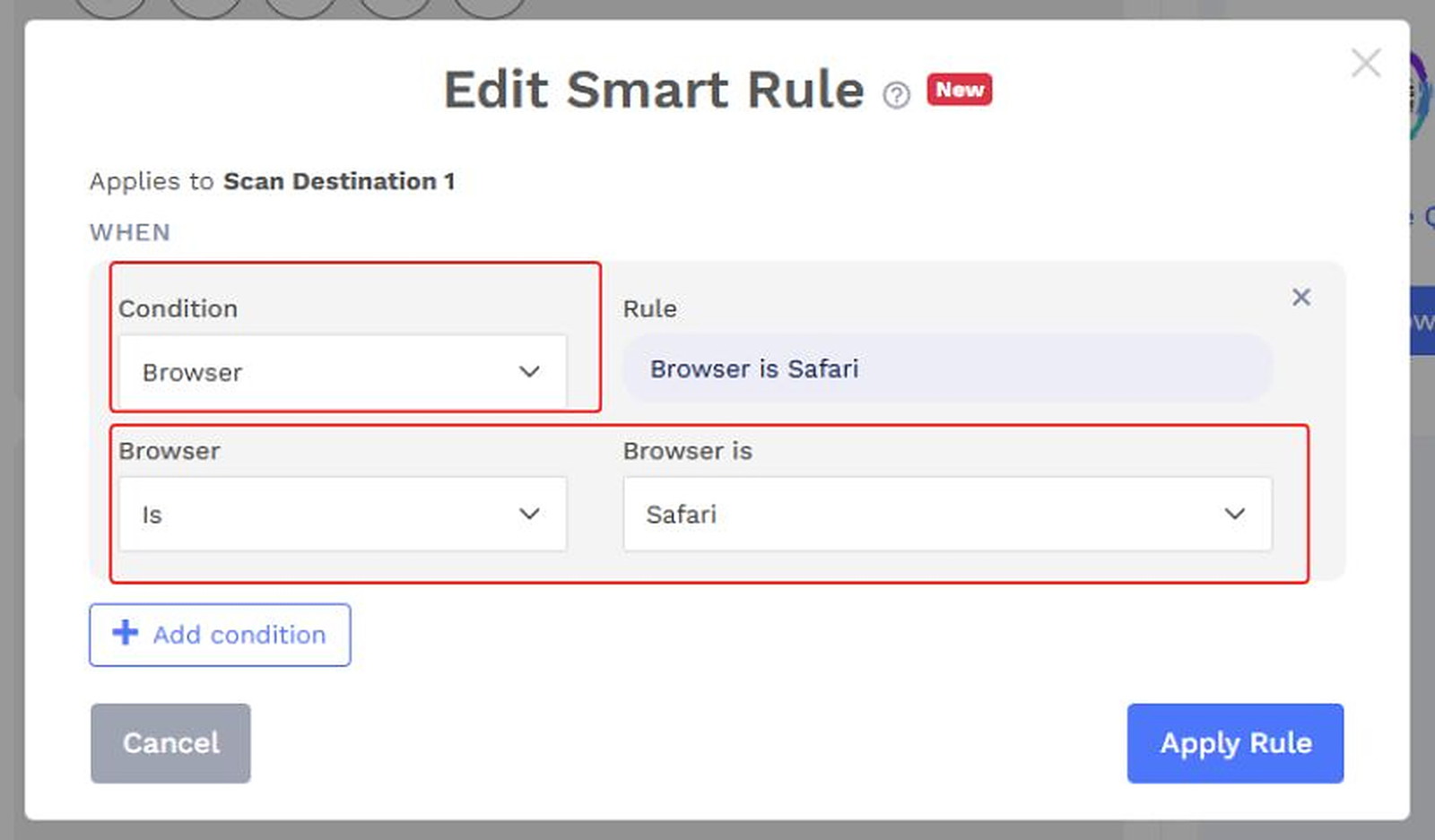
Not every website or digital experience works the same way across browsers. Sometimes, you may want visitors using Chrome to see different content from those using Safari.
The new Browser condition gives you that flexibility.
You can configure rules based on the scanner’s browser and direct them to the most appropriate destination.
For example, a software company offering a browser-based tool could create a Smart QR Code that sends Chrome users to Chrome-specific setup instructions and Safari users to a separate guide.
You can also use browser conditions to direct visitors to browser-specific landing pages or experiences.
It’s a simple addition that gives you greater control over the visitor experience after they scan.
Also read: Top 7 Use Cases for Smart QR Codes
Combine conditions for more targeted campaigns
Each new condition gives you another way to control scan destinations. But you can also combine conditions to create highly specific routing rules.
QRCodeChimp supports two ways to combine conditions:
- AND (Match all): A scan must satisfy every condition.
- OR (Match any): A scan needs to satisfy at least one condition.
Let’s say you’re launching a limited-time promotion exclusively for US customers. Instead of relying on just the date or country, you can combine both.
Country / Region is United States AND Date is November 27, 2026.
Only visitors satisfying both conditions would match the rule. You could also configure a separate destination for other visitors or use your fallback URL.
You can take this approach further by combining conditions such as language and browser, or date and location, depending on your campaign requirements.
This is where the expanded rules become especially valuable. They let you build more specific scan experiences based on several factors, rather than relying on a single condition.
Also read: How to Use Smart QR Codes to Deliver Multiple Content with One Printed QR Code
What can you do differently now?
The biggest change is the level of control you have over your QR code campaigns.
Earlier, Smart QR Codes could respond to the scanner’s device, the day of the week, or the time of day. These were useful for recurring schedules and device-specific experiences.
With the six new conditions, you can go further. A product launch can have different destinations for different countries. A retail promotion can be limited to participating locations. An exclusive offer can change destinations after reaching a scan threshold.
You can also combine these conditions to create campaigns with more specific requirements.
For businesses running campaigns across multiple markets, locations, or promotional periods, this means you can plan more of the scan experience in advance and manage it through configurable rules.
Ready to try the new conditions?
Explore all nine conditions directly in QRCodeChimp’s Smart QR Code solution.
Simply open the Smart QR Code builder, choose your scan destination, and click Add Smart Rule. Select the condition you want to use and configure its settings.
Add additional conditions, combine them using AND or OR, and configure multiple scan destinations. Set a fallback URL if needed, then customize and save your QR code.
Frequently asked questions
What new conditions have been added to QRCodeChimp’s Smart QR Codes?
QRCodeChimp has introduced six new conditions: Date / Date Range, Language, Country / Region, Location / Geofencing, Scan Count, and Browser. Combined with the existing Device, Day, and Time conditions, Smart QR Codes now support nine rule types.
Can I combine two or more new conditions in a single Smart QR rule?
Yes. You can combine multiple conditions using AND (Match all) or OR (Match any). For example, you could configure a rule that matches scans from a specific country during a selected date range.
What’s the difference between Country / Region and Location / Geofencing?
Country / Region lets you configure scan destinations based on the scanner’s country or region. Location / Geofencing provides more precise geographic targeting by allowing you to define areas using latitude, longitude, and a radius. The latter is better suited for location-specific campaigns at stores, campuses, or event venues.
Can I use Scan Count to change the destination after a certain number of scans?
Yes. The Scan Count condition lets you configure numerical thresholds and ranges. For example, you could direct the first 500 scans to a promotional page and subsequent scans to another destination.
Can I use the new conditions with my existing Smart QR Codes?
Yes. You can edit the smart rules and destinations of existing Smart QR Codes to include the new conditions. Since Smart QR Codes are dynamic, you don’t need to reprint them after updating their configuration.
You may also like
Edible QR Codes: How to Make Them + Real-world Examples
An edible QR code is a scannable QR code printed or formed from materials safe to eat. Here's how to make edible QR codes, what to watch out for, and how to put them to good use.
How to Send QRCodeChimp Form Responses to HubSpot
Learn how to connect QRCodeChimp Forms with HubSpot, map form fields, send responses directly to your CRM, and verify successful data transfers.
How Retail Stores Can Collect Customer Feedback Without Staff Prompts
Set up a feedback QR code for retail stores to collect customer feedback without relying on staff prompts. Learn where to place it and improve responses.
Are QR Codes Effective for Marketing? What Research Shows
Are QR codes effective for marketing? See what current research shows, what drives scans, and how to measure engagement, conversions, and ROI.
Most Popular
Contact Sales