After a trade show, most sales teams face the same problem: a long list of leads with very little clarity on who is actually interested. Everyone collected contacts and exchanged digital business cards. But once the event ends, prioritization becomes guesswork.
This is where digital business card analytics become valuable. Every card view, repeat visit, link click, contact save, and form submission reveals a different level of buyer intent. The challenge is not collecting the data; it’s knowing how to interpret the signals correctly.
A prospect who opens your card three times, clicks your pricing page, and saves your contact is behaving very differently from someone who viewed it once and never returned. Yet many exhibitors still follow up with both leads the same way.
Learning how to read and act on these engagement signals is the foundation of effective trade show lead scoring.
Key Takeaways:
- Repeat card views signal active consideration.
- Contact saves = strongest intent signal.
- Simple point system beats sorting by job title.
- Call high-scoring leads within 24 hours.
- Configure your card before the show, not after.
- The real cost of undifferentiated follow-up
- What digital business card analytics actually track
- Building a simple trade show lead scoring model
- Why timing still matters (even with great data)
- Segmenting your post-show outreach
- Setting this up before the show (not after)
- The shift in how we think about lead capture
- Frequently Asked Questions
The real cost of undifferentiated follow-up
Before getting into the analytics, it’s worth understanding what’s at stake.
The average cost per lead at a trade show runs around $142 per meeting. This is before you factor in booth fees, travel, and staffing. With the U.S. B2B trade show market valued at $15.8 billion in 2026, the investment is significant. Yet research consistently shows that roughly 80% of trade show leads never get properly followed up on.
The issue is more a lack of prioritization than intent. When every lead looks the same, sales reps default to working the ones they remember from the floor. Or worse, blast the entire list with the same generic email.
Meanwhile, a prospect who spent 12 minutes at your booth, saved your digital card, clicked your pricing page, and forwarded your portfolio link to a colleague gets the same lukewarm “Great meeting you at [show name]” message as someone who grabbed your card on the way out.
This is where behavioral data from a digital business card platform becomes genuinely valuable.
Also read: How to Follow Up After Networking Events (With Examples)
What digital business card analytics actually track
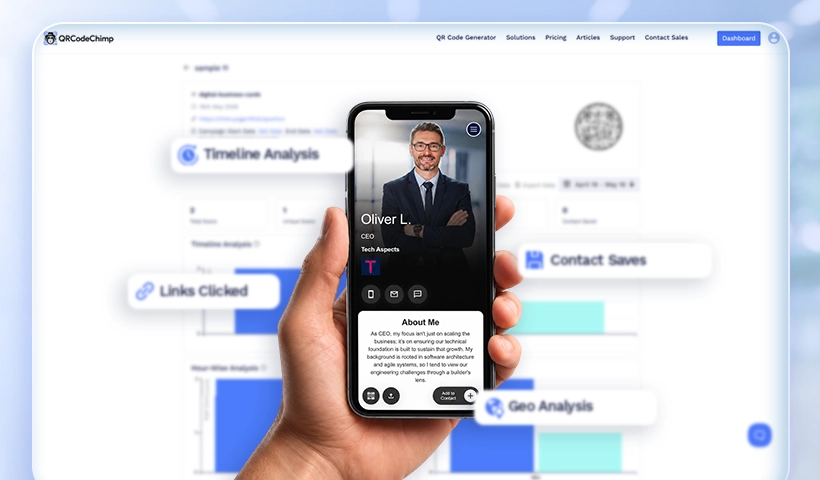
QRCodeChimp’s Digital Business Card captures behavioral signals that paper cards and badge scanners cannot. Every interaction, whether via a QR code scan or an NFC tap, generates a data point. Taken together, those data points paint a remarkably clear picture of who’s interested and how much.
Here’s what you’re working with:
Card opens and repeat visits: Someone who opens your card three times within 48 hours is behaving very differently from someone who opens it once and moves on. Repeat views signal active consideration. This person is likely comparing vendors and will return with specific information. QRCodeChimp’s real-time analytics dashboard lets you monitor this activity even while the event is still running.
Link clicks and section engagement: QRCodeChimp lets you embed pricing pages, product pages, case studies, demo booking links, brochures, videos, and social profiles directly inside the digital business card. The specific links prospects click reveal different types of intent. A pricing-page visit signals buying evaluation, a case-study click suggests research and validation, and a LinkedIn visit often signals relationship verification. These distinctions matter because they shape how your sales team should follow up.
Contact saves: When someone saves your contact information, they’re signaling genuine interest. In a crowded trade show environment, that’s a meaningful buying indicator. QRCodeChimp’s contact exchange form also helps capture prospect details at the moment of engagement, enriching your lead scoring process with richer first-party data.
Lead form submissions: QRCodeChimp enables exhibitors to embed customizable lead-capture forms directly into the digital business card experience. These submissions act as high-intent behavioral signals by capturing qualification details, meeting requests, buying timelines, and follow-up preferences in real time. The data flows directly into your analytics dashboard, giving sales teams a richer context for trade-show lead scoring without manual data entry afterward.
Geographic and time data: Knowing when and where interactions happen can surface patterns. Like a prospect who revisits your card multiple times during business hours after the show, suggesting they’re presenting your solution internally to a buying committee.
Related: Your Digital Business Card Is Ready. Here’s How to Get More Out of It
Building a simple trade show lead scoring model
The goal of trade show lead scoring isn’t to create a complex algorithm. It’s to give your sales team a ranked list so they know who to call first on Monday morning.
A practical model might look like this:
| Behavior | Point |
| Card opened | 5 |
| Card opened 2+ times | +10 |
| Pricing or product link clicked | 20 |
| Demo page clicked | 20 |
| Contact saved to phone | 15 |
| Portfolio or case study viewed | 10 |
| Social profile visited | 5 |
| Lead form submitted | 25 |
A lead who scores 40+ points within 72 hours of the show is worth a personal phone call. A lead who scores between 15 and 40 is likely to be part of a nurture sequence. Below 15, they go into a long-term drip campaign or a low-priority batch outreach.
This isn’t rocket science. But it’s dramatically more effective than sorting leads by job title alone.
Related: 7 Best Digital Tools to Capture Leads at Events (No Paper Needed)
Why timing still matters (even with great data)
Analytics tell you who to follow up with. They don’t eliminate the need to follow up fast. Research from MIT and InsideSales.com found that leads contacted within five minutes are 21 times more likely to qualify than those reached after 30 minutes. For trade shows, where the average follow-up starts days after the event, even moving to same-day outreach for high-scoring leads can significantly lift conversion rates.
The practical implication: don’t wait until you’re back in the office to check your analytics. QRCodeChimp’s real-time dashboard lets sales teams act on engagement signals the moment a prospect interacts with the card. If someone views your card, clicks your pricing page, or submits a lead form while you’re still on the show floor, you can continue the conversation immediately while the context is still fresh.
That kind of immediacy was impossible with paper cards. Now it’s just a matter of building the habit.
Segmenting your post-show outreach
Segmenting your post-show outreach starts with grouping leads based on both engagement score and behavioral intent. Prospects with repeated card visits, pricing-page clicks, and lead-form submissions can be categorized as hot leads, while moderate engagement, such as a few card views or case-study clicks, typically signals warm leads. One-time interactions with minimal activity usually fall into the cool category. Once leads are segmented this way, the follow-up strategy should vary meaningfully by tier.
Hot leads (high-engagement): Personalized outreach within 24 hours. Reference something specific, like the section of your card they visited, or the product they clicked. This signals that you’re paying attention. Conversion rates here can be substantially higher than cold follow-up, especially since 50% of deals go to the first company to follow up after an event.
Warm leads (moderate engagement): A tailored email sequence starting within 48 hours. Include content relevant to what they engaged with. If they clicked your case study link, send them another. If they visited your LinkedIn, connect there first.
Cool leads (minimal engagement): These can be added to a standard post-show nurture sequence. Don’t spend your best sales hours here, but don’t abandon them either. Some of these contacts will warm up over time, especially if you stay top of mind with periodic, valuable content.
The key insight is that converting a trade show lead costs 38% less than a cold outreach-only sales approach. That efficiency advantage compounds when you’re prioritizing effort on the leads most likely to move.
Setting this up before the show (not after)
The analytics only work if the card is configured correctly before you walk onto the show floor. A few things worth doing in advance:
- Include strategic links. Don’t just add your website homepage. QRCodeChimp lets you embed pages featuring pricing, features, demo booking, and industry-specific case studies, each of which generates more meaningful intent data than a generic homepage visit.
- Use a show-specific QR code. QRCodeChimp lets you create event-specific cards and QR codes so you can filter analytics cleanly by event. This is essential if you attend multiple shows or have multiple reps sharing cards simultaneously.
- Set up a lead capture form. Embedding a short qualification form inside your card means you’re not relying entirely on badge scans. Prospects can submit buying timelines, product interests, or meeting requests on the spot, and those responses feed directly into your scoring model.
- Brief your team on the dashboard. Your sales reps don’t need to become data analysts. They need to understand that a notification saying “this lead just viewed your card for the third time” is a green light to reach out. Centralized analytics across multiple reps also helps larger teams identify which prospects are showing the strongest engagement signals. This is critical at large events where dozens of conversations occur simultaneously.
- Connect to your CRM before the show, not after. One of the biggest post-show failures is manual data cleanup. CRM integration ensures engagement data and lead scores are automatically imported into your sales workflow, eliminating manual cleanup.
Also read: Networking Without Limits: Expanding Sales Reach with Digital Business Cards
The shift in how we think about lead capture
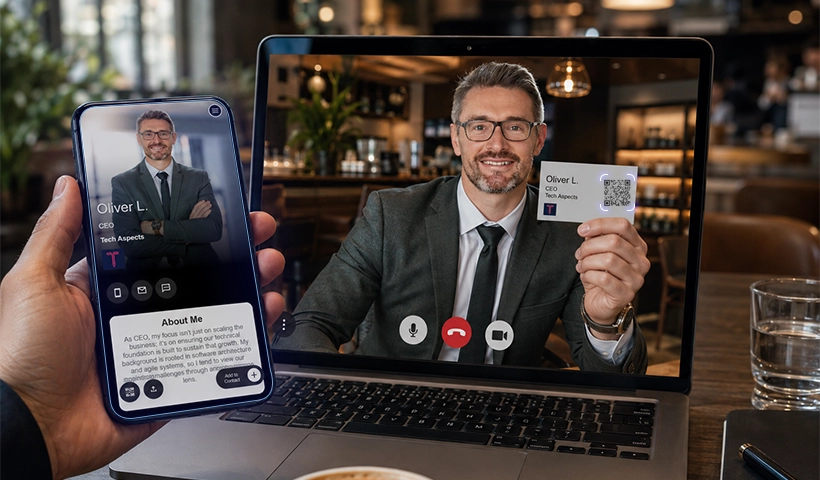
For decades, the business card was the final artifact of a trade show conversation. You handed it over, and then the responsibility shifted entirely to memory, manual follow-up, and luck.
Digital business cards move the accountability from human recall to behavioral data. The lead’s actions after the show, such as what they clicked, how many times they returned to your card, and whether they saved your number, become a continuous signal that informs sales strategy in a way a paper card never could.
The exhibitors who learn to read that signal will consistently outperform those still sorting business cards by hand after the show. That performance gap, across an industry that spends nearly $16 billion a year on face-to-face marketing, is not small.
Frequently Asked Questions
What is trade show lead scoring?
Trade show lead scoring is the process of ranking event leads based on engagement and buying intent so sales teams know who to prioritize first.
How does QRCodeChimp help with trade show lead scoring?
QRCodeChimp tracks actions like card opens, repeat visits, link clicks, contact saves, form submissions, and QR scans to help identify high-intent prospects.
Which interaction is the strongest buying signal after a trade show?
Clicks on pricing pages, demo links, or repeated visits to your digital business card are typically the strongest indicators of purchase intent.
How quickly should I follow up with high-scoring leads?
Ideally, within 24 hours. Faster follow-up improves response rates and increases the chances of conversion.
Does QRCodeChimp support teams at large trade shows?
Yes. QRCodeChimp offers team management, centralized analytics, shared access, and event-specific QR codes for multi-rep trade show setups.
Do I need a CRM to use digital business card analytics effectively?
No, but CRM integration makes it much easier to organize leads, automate follow-ups, and track conversions after the event.
You may also like
GS1 Application Identifiers Explained: GTIN, Batch, Serial, Expiry, and More
This guide explains the most important GS1 Application Identifiers used for product identification, traceability, retail, and packaging.
How to Group Cards in QRCodeChimp Entra ID Setup
Learn to organize digital business cards effectively using QRCodeChimp Entra ID grouping. Simplify card management by group, filter, or all-in-one.
Steps to Integrate Microsoft Entra ID (Azure AD) with QRCodeChimp
Learn how to connect Microsoft Entra ID with QRCodeChimp to automate digital business card creation, improve security, and simplify onboarding.
Bulk QR Codes for Business: Use Cases and Benefits
Discover how bulk QR codes for business can streamline product packaging, employee cards, events, multi-location campaigns, inventory, and more
Most Popular
Contact Sales
