Event check-in problems rarely begin at the entrance. They usually start earlier, when ticket rules, validation responsibilities, or backup processes have not been defined clearly.
A ticket may be forwarded to another person. Staff at separate entrances may follow different rules. A three-day pass may stop working after the first day. Guests may reach the venue without their tickets ready, while the entry team struggles to confirm who should be admitted.
QR code ticketing can prevent many of these issues, but the QR code alone is not enough. Organizers need a complete process for creating tickets, delivering them securely, validating entry, and managing exceptions.
This guide explains how QR code ticketing works, what to decide before issuing tickets, and how to avoid common check-in mistakes.
- What is QR code ticketing?
- How QR code ticketing works
- Plan your QR code ticketing workflow
- What information should an event ticket include?
- Implementing QR code ticketing for student events
- Common QR ticketing mistakes and how to prevent them
- When you also need a ticket-sales platform
- How QRCodeChimp fits the workflow
- Final thoughts
- Frequently asked questions
What is QR code ticketing?
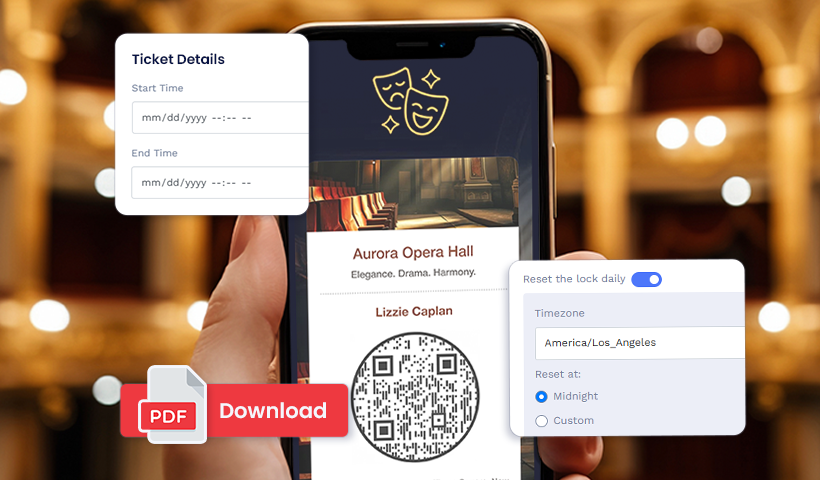
QR code ticketing is a system in which each attendee receives a ticket containing a unique QR code. Authorized staff scan the code at the entrance to confirm whether the ticket is valid and whether it has reached its permitted scan limit.
The ticket may be displayed on a phone or printed. What matters is that each attendee receives a separate code with clearly defined entry conditions.
A QR code ticketing workflow typically covers four connected tasks:
- Issuing a unique ticket to each attendee
- Delivering the ticket privately
- Validating it at the event
- Recording attendance after check-in
Ticketing does not always need to include payment processing. An organizer may collect registrations or payments through another platform and use a QR code ticketing system to issue passes, control entry, and track attendance.
Event QR codes and Event Ticket QR codes are different
👉 An Event QR Code is usually shared publicly. It helps people view event details, find the venue, check the schedule, or reach a registration or ticket-sales page.
👉 An Event Ticket QR Code is issued privately to an attendee. It is used to verify that person’s ticket and control admission.
Use an Event QR Code to promote the event. Use an Event Ticket QR Code after someone has registered, been approved, or purchased admission.
How QR code ticketing works
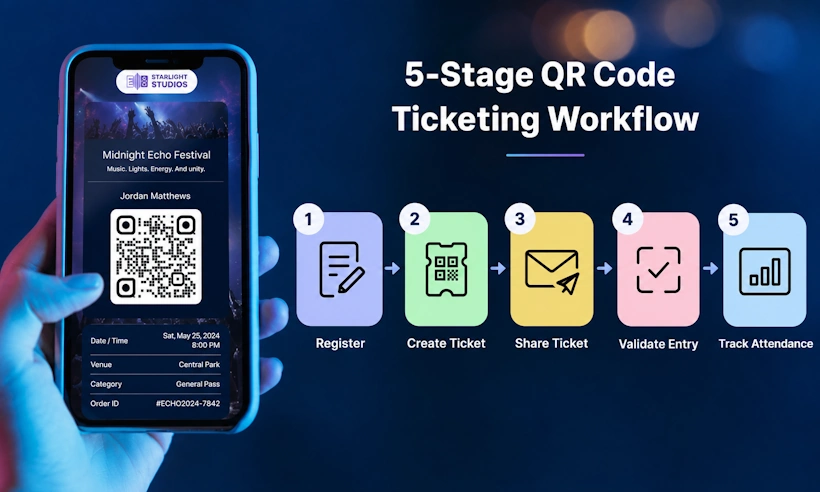
A typical QR code ticketing process follows five stages.
1. An attendee record is created
The organizer enters the attendee’s information individually, uploads an existing attendee list, or collects details through a registration form.
2. A unique ticket is issued
The system creates a separate ticket and QR code for that attendee. The ticket may include the guest’s name, event details, seat, zone, ticket category, and entry instructions.
3. The ticket is shared with the attendee
For an individually created ticket, the organizer opens the Event Ticket QR Code in the dashboard and selects Share Ticket via Email.
For bulk or form-based creation, organizers can enable automatic ticket sharing for new records. When this option is enabled, each ticket is emailed after the record is created. Otherwise, the organizer can open the ticket batch and use Share Ticket via Email to send the tickets.
The attendee can then open the ticket on their phone or download it before arriving.
4. Staff validate the ticket
At the entrance, an authorized team member scans the QR code using the event’s validation system. The result shows whether the ticket can be accepted.
5. Attendance is updated
After successful validation, the ticket’s status is updated. Organizers can monitor how many attendees have entered and how many are still expected.
Plan your QR code ticketing workflow
Do not begin by designing the ticket. Start by deciding how admission should work.
👉 Choose how tickets will be created
The right creation method depends on how attendee information reaches you.
➡ Individual creation
Individual creation works for small private events, VIP guests, speakers, performers, or last-minute additions.
The organizer enters the attendee and event details directly, configures the entry rules, customizes the ticket, and saves it.
This provides close control over each ticket but is inefficient for a large attendee list.
➡ Bulk creation
Bulk creation is better when attendee information already exists in a spreadsheet.
A ticket template is created once with the event details, branding, QR code design, and validation settings. The system then generates one QR code ticket per row, so every attendee entry in the spreadsheet becomes a separate ticket.
Details such as name, email address, ticket category, seat, or zone can vary by row while the shared ticket structure remains consistent.
Bulk creation is useful for conferences, student events, tournaments, employee gatherings, and other events involving large attendee lists.
➡ Form-based creation
Form-based ticket creation is useful when attendees need to submit their own details.
The organizer first creates an Event Ticket bulk batch, then creates a form and maps the required form fields to the corresponding fields in that batch.
When someone submits the form, the response can be handled in one of two ways:
- Create after approval: The response is added to the bulk batch only after the organizer approves it. A ticket is then created for the approved record.
- Create directly from the response: The response is added immediately as a new record in the bulk batch, and the ticket is created through the bulk workflow.
This setup works well for open registrations, invite-only events, member gatherings, student registrations requiring verification, and events with limited capacity.
👉 Define entry and re-entry rules
Decide how many times each ticket should work before issuing it.
A concert or screening may require one-time admission. A conference pass may allow attendees to leave and return. A festival ticket may need to work once per day across several days.
Avoid setting a high scan limit simply for convenience. Every additional successful validation creates another opportunity for the same ticket to be shared.
For events requiring tighter control, pair the ticket with an attendee name, membership record, wristband, or another verification method.
👉 Plan multi-day access
A multi-day ticket should not provide all its permitted scans at once.
For example, giving a three-day pass three unrestricted scans could allow three people to enter on the first day. A daily reset allows the same ticket to work again on the next event day without permitting unlimited same-day reuse.
QRCodeChimp’s Reset Lock Daily option can restore the ticket’s permitted scan allowance at a configured time.
Test the reset time carefully, especially for events that continue after midnight.
👉 Assign validators and entrances
A private gathering may need one check-in desk. A conference, tournament, or festival may require several entrances.
Decide:
- How many validation points will operate
- Who will validate tickets at each entrance
- Which team members require access
- Who can approve entry exceptions
- How staff should escalate disputed or invalid tickets
Authorized QRCodeChimp main-account and sub-account users can access the browser-based Event Ticket Validator using their own logins. Staff do not need to share the main account credentials.
Read more: Learn how to use the Event Ticket Validator
👉 Plan ticket delivery and RSVP
Send every ticket through a private channel. Avoid posting attendee tickets on public pages, shared folders, social media, or open group conversations.
Use a recognizable sender name and email subject line so attendees can locate the ticket easily. A reminder close to the event can encourage guests to download or save it before arriving.
For bulk-created Event Ticket QR Codes, organizers can also collect RSVP responses while sharing tickets through email. This helps estimate expected attendance before the event.
👉 Prepare a fallback process
Decide what staff should do when:
- An attendee cannot find the ticket
- The phone battery is dead
- The code is difficult to read
- The attendee’s details require confirmation
- Venue connectivity becomes unreliable
- A ticket is shown as already used
- A guest claims the ticket was forwarded without permission
For bulk-created tickets, keep an authorized attendee report available as a controlled fallback. Define who may approve manual admission and how the exception will be recorded.
A backup list should support the validation process, not replace it.
For a detailed creation guide, check out How to Create, Design, and Share Event Ticket QR Codes
What information should an event ticket include?

An event ticket should answer the questions an attendee is most likely to have before arriving and while standing at the entrance.
Include:
- Attendee name
- Event name
- Date and time
- Venue and entrance
- Seat, row, zone, or ticket category, when applicable
- Entry or re-entry conditions
- Organizer contact information
- The attendee’s unique QR code
Depending on the event, you may also include parking information, a map link, accessibility details, prohibited items, dress requirements, or a short schedule.
Avoid filling the ticket with promotional content that makes admission details difficult to find. At the gate, the QR code and essential instructions should be immediately visible.
Branding can make the ticket recognizable, but readability should take priority over decoration.
Implementing QR code ticketing for student events
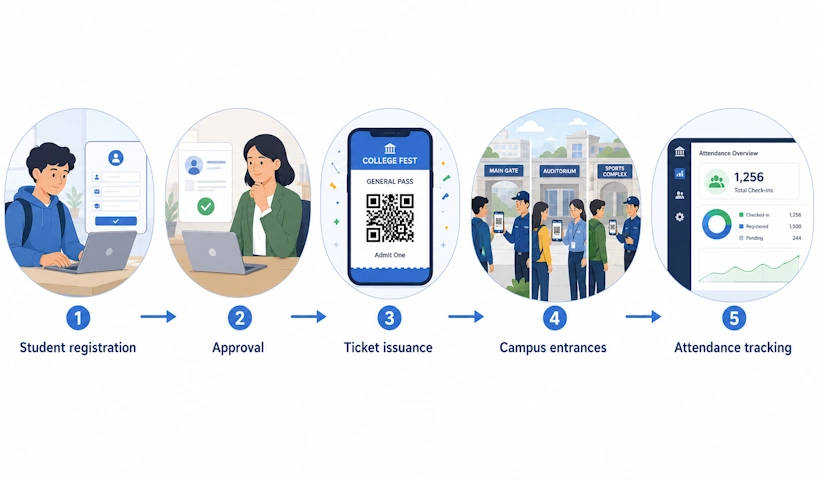
Schools and colleges may need to manage students, parents, alumni, guests, and external participants through the same event.
For a known attendee list, tickets can be created in bulk using one spreadsheet row per person. For open registrations, attendee information can be collected through a form. Approval-based creation can be used when registrations must be reviewed before tickets are issued.
A graduation ceremony may require single-entry admission. A college festival running across several days may need daily ticket resets. Larger campus events may require authorized staff at multiple entrances.
The entry rules should be defined separately for each attendee category. Students, parents, performers, staff, and external guests may not all require the same access.
Together, these steps give a school or college a complete student ticket QR entry system — registration, approval, ticket issuance, and validation in one workflow.
Common QR ticketing mistakes and how to prevent them
⚠ Using one QR code for every attendee
A shared code cannot establish which person has arrived or whether the same ticket has been reused.
Create a unique ticket for every attendee when admission control or attendance tracking matters.
⚠ Ignoring the risk of copied tickets
A person can copy or forward a ticket image. Every copy contains the same QR code.
With single-use validation, only the first accepted scan works. Later attempts appear as already used or locked. However, if the unauthorized person enters first, the genuine attendee may be rejected later.
Private delivery and additional identity checks can reduce this risk for paid, restricted, or high-value events.
⚠ Choosing the wrong scan limit
A single-entry ticket may lock too early when re-entry is permitted. A multi-scan ticket may allow more people to use the same code than intended.
Document the rule for every ticket category and test it before sending tickets.
⚠ Testing with real attendee tickets instead of test tickets
Scanning genuine attendee tickets during setup can consume their permitted entry.
Create separate test tickets for staff training and rehearsals.
⚠ Skipping the entry rehearsal
A successful QR code scan does not prove that the entire check-in operation is ready.
Test:
- Staff logins
- Device cameras
- Venue connectivity
- Event selection
- Ticket status messages
- Multiple simultaneous validations
- Gate signage
- Exception handling
For larger events, run a short simulation with several team members validating different test tickets at the same time.
⚠ Failing to test venue connectivity
Browser-based validation and real-time attendance updates require dependable internet access.
Test mobile data and venue Wi-Fi at every entrance, not only inside the main event space. Consider backup mobile connections for critical entry points.
⚠ Over designing the QR code
Custom colors and shapes can support the event’s branding, but the code still needs sufficient contrast, clear space, and an appropriate size.
Test the final ticket on different phones and under the lighting conditions expected at the venue.
⚠ Failing to brief attendees
Tell attendees:
- Which entrance to use
- When doors open
- Whether re-entry is allowed
- What they need to present
- Whether they should download the ticket in advance
Clear instructions reduce delays and disputes at check-in.
When you also need a ticket-sales platform
Some organizers need only to issue tickets, validate entry, and track attendance. Others require a broader commercial system that handles:
- Online payments
- Refunds and cancellations
- Dynamic ticket pricing
- Reserved-seat inventory
- Tax handling
- Ticket resale
- Complex order management
QRCodeChimp can support QR-based ticket creation, private distribution, validation, RSVP, check-in, and attendance tracking.
When payment or advanced sales features are required, organizers can use a separate registration or ticket-sales platform for the transaction and QRCodeChimp for the attendee ticket and entry workflow.
This allows each platform to handle the part of the event process it is designed for.
How QRCodeChimp fits the workflow
QRCodeChimp brings ticket issuance, private delivery, validation, and attendance tracking into one connected QR code ticketing and check-in system.
Organizers can create tickets individually, in bulk, or through form submissions. They can define scan limits, support multi-day entry, provide validation access to authorized team members, and use a browser-based tool to validate tickets.
For bulk-created Event Ticket QR Codes, organizers can also collect RSVP responses, monitor live attendance totals, and download reports containing attendee and validation information.
Final thoughts
QR code ticketing works best when it is treated as an entry process, not simply as a code placed on a ticket.
Decide how tickets will be created, how many times each ticket should work, who can validate it, and what staff should do when something goes wrong.
Test the complete workflow before tickets are distributed, especially for multi-day events, restricted admission, or venues with several entrances.
A well-planned process gives attendees a smoother arrival experience and gives the event team better control over admission, attendance, and exceptions.
Frequently asked questions
How many times should an event ticket QR code work?
That depends on the event. Use one successful validation for single-entry admission, multiple validations for controlled re-entry, or a daily reset for multi-day access.
Can QR code tickets be copied?
Yes. A ticket image can be copied or forwarded. However, every copy contains the same code. With single-use validation, only the first accepted scan works.
Should every attendee receive a separate QR code?
Yes. Each attendee should receive a unique code when you need to validate individual admission, detect repeated use, or track attendance accurately.
Can the same QR ticket work across several event days?
Yes. Configure a daily reset so the permitted scan allowance becomes available again at a scheduled time on each event day.
Can QR code ticketing work without payment processing?
Yes. Payments or registrations can be handled through another platform, while the QR code ticketing system manages ticket issuance, validation, check-in, and attendance.
What backup should organizers prepare for check-in problems?
Test internet access at every entrance, keep trained staff available for exceptions, and maintain an authorized attendee report for bulk-created tickets. Manual admission should be approved and recorded rather than handled informally.
You may also like
Edible QR Codes: How to Make Them + Real-world Examples
An edible QR code is a scannable QR code printed or formed from materials safe to eat. Here's how to make edible QR codes, what to watch out for, and how to put them to good use.
GS1 Application Identifiers Explained: GTIN, Batch, Serial, Expiry, and More
This guide explains the most important GS1 Application Identifiers used for product identification, traceability, retail, and packaging.
Steps to Integrate Microsoft Entra ID (Azure AD) with QRCodeChimp
Learn how to connect Microsoft Entra ID with QRCodeChimp to automate digital business card creation, improve security, and simplify onboarding.
Bulk QR Codes for Business: Use Cases and Benefits
Discover how bulk QR codes for business can streamline product packaging, employee cards, events, multi-location campaigns, inventory, and more
Most Popular
Contact Sales
