Every business with a physical address has one quiet problem: some customers who want to visit never actually arrive.
They take a wrong turn, type the address incorrectly, follow an outdated pin, or give up when they cannot find the right entrance. You may never hear about these missed visits because the customer simply chooses an easier option.
A QR code for business location can help reduce this friction. With one scan, customers can open your exact map location on their smartphone and start navigation instantly. It removes the need to type addresses, search manually, or guess which listing is correct.
This article focuses on the business impact of being easy to find. We will look at where customers drop off before arriving, how a business location QR code closes those gaps, where to place it, and how to measure whether it is helping bring people through your door.
- The hidden cost of being hard to find
- Where customers drop off before arriving
- How a QR code for business location closes the gap
- Where to Use a QR Code for Business Location
- Multi-location businesses and the branch routing problem
- Measuring whether it drives real visits
- A short pre-launch checklist
- Best practices for using a QR code for business location
- Conclusion
The hidden cost of being hard to find
Foot traffic is expensive to earn. Businesses invest in ads, signage, local SEO, social media, referrals, print campaigns, and word of mouth to convince people to visit.
The moment a customer decides to come to you is the moment your marketing has worked. But it is also the moment where friction can quietly waste that effort.
If your location is hard to find, customers may delay the visit, call your team for directions, arrive late, or choose a competitor nearby. The cost is often invisible because it shows up as an absence: an empty table, a missed appointment, a lost walk-in, or a customer who never comes back.
A QR code for business location helps protect this important moment in the customer journey. It makes the path from “I want to visit” to “I am here” simpler, faster, and less confusing.
Where customers drop off before arriving
To improve the visit experience, it helps to understand where customers usually face friction.
Address entry errors ⛔
A customer reads your address from a flyer, brochure, ad, or business card and types it manually into a map app. One wrong character, missing landmark, or incorrect building name can send them to the wrong place.
A QR code removes this step. Customers scan the code and open the intended location directly.
Similar business names 😕
Some businesses share similar names, especially franchises, branches, clinics, salons, restaurants, and local service providers. If the customer searches manually, they may select the wrong listing.
A QR code for business location helps guide customers to the specific location you want them to visit.
Wrong or outdated map pins ❌
Sometimes the map pin is not placed exactly where customers should arrive. It may point to the wrong side of a building, a nearby road, or an older location.
A well-checked location QR code helps users navigate to the precise destination you choose.
The final arrival point 🤔
Many customers reach the general area but still struggle with the last few steps. They may not know which entrance to use, where to park, which gate to enter, or which floor to visit.
For such cases, businesses can use the most accurate map link available and, where needed, support it with clear on-site signs or short instructions near the QR code.
How a QR code for business location closes the gap
The value of a business location QR code lies in what it removes from the customer journey.
Without a QR code, a customer may need to read the address, type it into a map app, select the correct listing, confirm the destination, and start navigation.
With a QR code, the process becomes much simpler. The customer scans the code, opens the location, and gets directions.
This helps businesses reduce:
- Manual address entry
- Wrong location selection
- Confusion between similar listings
- Long map links in print materials
- Repeated direction-related phone calls
- Friction between interest and visit
For best results, link the QR code to a location that clearly represents your business, such as your business listing or the most accurate map destination. When customers see your business name, address, hours, and other details, they feel more confident that they are heading to the right place.
If you use a dynamic QR code, you can also update the destination later without changing the printed QR code. This is useful if your business moves, changes its entrance, adds a new parking point, or needs to route visitors to a more accurate location.
Where to Use a QR Code for Business Location
A QR code for business location works best when it appears at the moment customers are deciding to visit or need help reaching you. The goal is not to place it everywhere, but to use it where it removes real friction.
Flyers, brochures, and local promotions

Use a business location QR code on flyers, brochures, coupons, newspaper ads, community promotions, and local campaign materials that encourage people to visit. Instead of asking customers to type your address, let them scan and open directions instantly.
Outdoor signage and directional placements
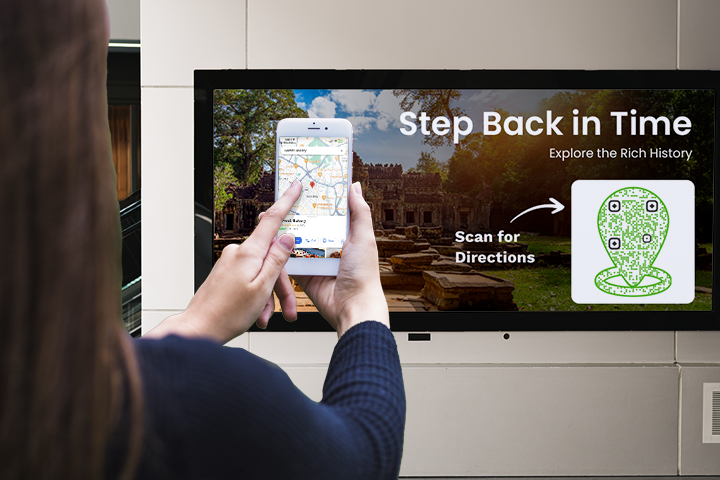
Add the QR code to billboards, standees, community boards, hoardings, or signage placed away from your exact location. This helps interested customers find your business without searching manually.
Parking and entrance instructions
If your business is inside a mall, complex, campus, hospital, business park, or multi-entrance building, use the QR code to guide visitors to the correct entrance, parking area, reception point, or meeting location.
Receipts and packaging
For restaurants, cafes, retail stores, salons, and local service businesses, adding a location QR code to receipts or packaging can make repeat visits easier. Customers who already bought from you can scan later to find their way back.
Appointment and booking communication
Add the QR code to appointment confirmations, booking emails, reminder messages, event passes, or visit instructions. This is especially useful for clinics, hotels, salons, real estate site visits, offices, and events.
Partner and referral materials
If partners, agents, or other businesses refer customers to your location, a QR code ensures they send people to the right place without explaining directions manually.
Multi-location businesses and the branch routing problem
Businesses with several branches face a challenge that single-location businesses do not. If the same QR code points to the wrong branch, customers may be routed across town instead of reaching the location they intended to visit.
The practical solution is to create a separate QR code for each business location. Each branch should have its own QR code destination, while the overall design can remain consistent across all locations.
This keeps your branding uniform and ensures that every flyer, receipt, package, poster, banner, or local campaign sends customers to the correct branch.
If you use dynamic QR codes, you can update a branch’s destination later without reprinting the QR code. This is useful when:
- A branch relocates
- A store entrance changes
- A new parking point is added
- A local campaign promotes a specific branch
- A temporary or seasonal location is introduced
- A map pin needs to be corrected
The key is simple: each physical location should have its own QR code destination, so customers always scan their way to the right place.
Measuring whether it drives real visits
A QR code for business location is not only a convenience tool. With dynamic QR codes, it can also become a measurable part of your offline marketing.
Scan data can help you understand:
- How many people scanned the code
- Which campaign material generated more scans
- Which branch received more scan activity
- Which locations or placements performed better
- Whether new print placements increased direction-related engagement
It is important to be realistic. A scan is an intent signal, not a confirmed visit. Someone may scan the QR code and still not arrive.
Even then, scan activity gives you something valuable: a measurable connection between a specific touchpoint and a customer actively trying to find your business. To explore these insights in more detail, read our guide to QRCodeChimp’s analytics dashboard.
💡 Pro tip: Want more accurate scan-location insights? Enable GPS tracking for QR code scan location to capture more precise location data when users grant permission. This can help you better understand where scans are happening and which placements are driving location interest.
A short pre-launch checklist
Before printing or publishing your QR code, check the basics carefully.
- Make sure the QR code opens the correct business location.
- Test the destination on both iPhone and Android devices.
- Confirm that the map location is accurate and easy to recognize.
- Use a separate QR code for each branch or business location.
- Choose a dynamic QR code if the destination may change later.
- Add a relevant CTA sticker so people understand the code’s purpose.
- Keep enough white space around the QR code for easy scanning.
- Use a size suitable for the viewing distance.
- Test the QR code before printing it at scale.
- Track scans if you want to measure campaign performance.
Best practices for using a QR code for business location
A business location QR code should be easy to notice, easy to scan, and clear in purpose.
Here are a few simple best practices:
- Place the QR code close to your address or visit-related message.
- Use QRCodeChimp’s ready-to-use CTA stickers to make the purpose clear.
- Customize the QR code with your brand colors and logo.
- Keep the design clean and avoid clutter around the code.
- Use high-quality QR code images for print.
- Do not shrink the QR code too much on small materials.
- Place it where customers naturally look for directions.
- Test it from the expected scanning distance.
For more detailed scan improvement ideas, you can refer to QRCodeChimp’s full guide on how to get more QR code scans.
Conclusion
A QR code for business location is not just about sharing an address. It is about protecting one of the most important moments in the customer journey: the point between deciding to visit and actually arriving.
Address typos, similar business names, unclear entrances, outdated pins, and confusing routes can quietly cost businesses real visits. A precise, editable, and trackable business location QR code helps reduce that friction.
Use it where visit intent is highest, create separate QR codes for separate branches, keep the destination editable when needed, and track scans to understand what is working.
Done well, a QR code for business location can turn “I couldn’t find you” into one more customer through the door.
You may also like
GS1 Application Identifiers Explained: GTIN, Batch, Serial, Expiry, and More
This guide explains the most important GS1 Application Identifiers used for product identification, traceability, retail, and packaging.
Steps to Integrate Microsoft Entra ID (Azure AD) with QRCodeChimp
Learn how to connect Microsoft Entra ID with QRCodeChimp to automate digital business card creation, improve security, and simplify onboarding.
Blurry QR Code? Why It Happens and How to Fix It
Blurry QR code? Learn what causes poor QR clarity and how to fix low resolution, resizing, compression, printing, and design issues for reliable scanning.
Bulk QR Codes for Business: Use Cases and Benefits
Discover how bulk QR codes for business can streamline product packaging, employee cards, events, multi-location campaigns, inventory, and more
Most Popular
Contact Sales
