The role of the barcode printed on almost every retail product is changing.
For decades, UPC and EAN barcodes have performed one essential job: identifying a product at checkout. They still do that reliably, but businesses and customers increasingly need access to information that traditional linear barcodes cannot carry or directly connect to.
This includes ingredients, allergens, expiration dates, batch details, product origin, instructions, certifications, recycling guidance, warranties, and authentication information.
That is why the retail industry is moving toward 2D barcodes powered by GS1 standards.
The goal of GS1 Sunrise 2027, also called Ambition 2027, is for retail point-of-sale systems worldwide to read and process supported GS1 2D barcodes alongside existing linear barcodes by the end of 2027. It is an industry-readiness milestone, not a deadline requiring every brand to remove its UPC or EAN barcode.
For most brands, the safest approach is gradual: add a GS1 QR code to a suitable product, test it alongside the existing linear barcode, learn from the pilot, and expand once the process works.
This GS1 Sunrise 2027 migration guide explains how to manage that transition without replacing your entire product catalogue at once.
- The short answer: What should brands do before 2027?
- What is GS1 Sunrise 2027?
- How does a GS1 Digital Link QR code work?
- GS1 QR code vs. traditional UPC/EAN barcode
- Should you use a GS1 QR code or GS1 DataMatrix?
- A step-by-step GS1 QR code migration plan
- A practical 90-day GS1 QR code pilot
- What can you measure with QRCodeChimp?
- How QRCodeChimp supports a phased rollout
- Common migration mistakes
- GS1 Sunrise 2027 readiness checklist
- Start small, but start now
- Frequently asked questions
The short answer: What should brands do before 2027?
Most brands can follow this migration path:
- Define what the 2D barcode should achieve.
- Confirm that each product has a valid GTIN.
- Decide which GS1 data should be encoded.
- Create the GS1 Digital Link and digital destination.
- Add the 2D barcode alongside the existing UPC or EAN barcode.
- Test the data, packaging, mobile experience, and retail processing.
- Start with a limited pilot before scaling across more products and markets.
You do not need to redesign your entire product catalogue on day one.
What is GS1 Sunrise 2027?
GS1 Sunrise 2027 is an industry initiative to prepare retail POS systems to process GS1-powered 2D barcodes.
The initial goal is that, by the end of 2027, retail systems should be able to extract a product’s Global Trade Item Number, or GTIN, from supported 2D barcodes as well as existing linear barcodes. Reaching that goal may require changes to imaging equipment, POS software, middleware, product databases, and back-office systems.
A device may be physically capable of reading a QR code while the wider checkout system remains unable to interpret its GS1 data or pass that information to downstream systems.
Sunrise 2027 does not mean:
- Every UPC and EAN barcode becomes invalid in 2028.
- Every retailer will be ready on the same date.
- Brands must replace existing packaging immediately.
- Every product must use the same 2D barcode format.
- Adding a QR code alone makes a business Sunrise 2027-ready.
Different retailers, regions, industries, and product categories will move at different speeds. Linear and 2D barcodes are therefore expected to coexist during the transition.
Think of 2027 as a readiness milestone
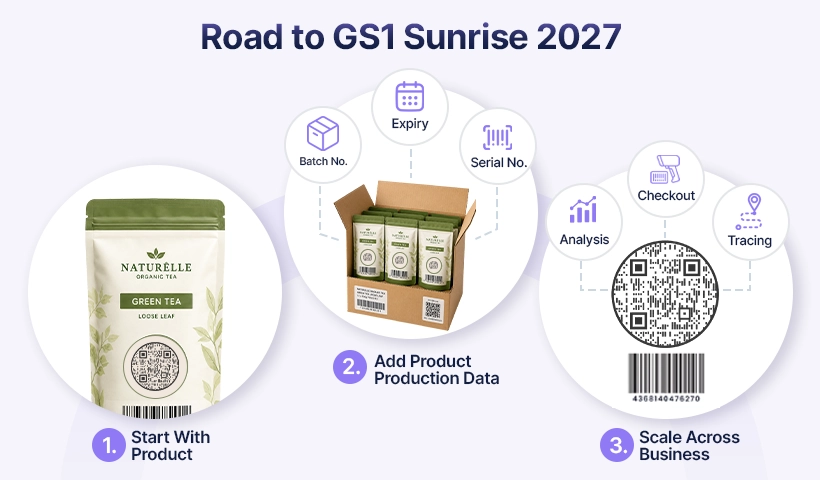
The objective is to help brands and retailers introduce richer product data without disrupting existing checkout processes.
A practical rollout typically progresses from a limited pilot to more advanced data use, then to wider adoption across products, retail systems, traceability processes, and customer experiences.
How does a GS1 Digital Link QR code work?
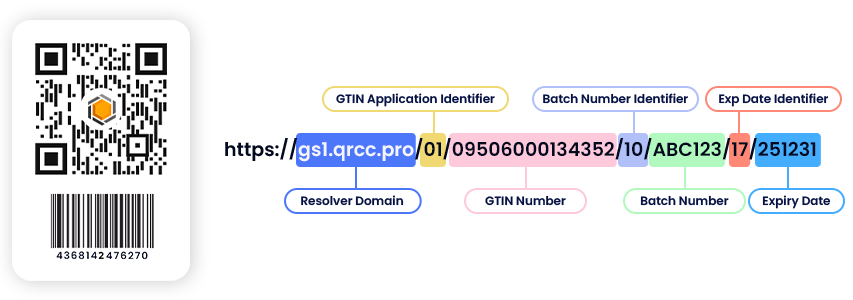
A regular QR code typically contains a conventional web address. A GS1 QR code contains a URI structured according to the GS1 Digital Link standard.
The structured URI can include recognized identifiers and attributes such as a GTIN, batch or lot number, serial number, product variant, or expiration date.
This allows the same QR code to perform two roles.
At checkout, a compatible retail system can extract the GTIN and other encoded GS1 data without opening a webpage. When a customer scans the QR code with a phone, the same URI can open product information, instructions, certifications, warranty details, support content, or another relevant destination.
An illustrative GS1 Digital Link might look like this: https://id.example.com/01/09506000134352/10/LOT123?17=271231
In this example:
01identifies the GTIN.10identifies the batch or lot number.17identifies the expiration date.id.example.comis the domain used for the Digital Link.
These numbers are GS1 Application Identifiers. They tell systems what each encoded value represents.
The encoded identifiers establish the product identity. The domain and redirection setup determine what online experience the customer sees.
GS1 QR code vs. traditional UPC/EAN barcode
A traditional linear barcode and a GS1 QR code can both identify a product, but their capabilities differ significantly.
For a broader explanation of the technologies, see this barcode vs. QR code comparison.
| Capability | UPC/EAN barcode | GS1 Digital Link QR code |
|---|---|---|
| Identifies the product | Yes | Yes |
| Carries a GTIN | Yes | Yes |
| Supports batch or lot data | Generally no | Yes |
| Supports serial numbers | Generally no | Yes |
| Supports expiration dates | Generally no | Yes |
| Opens online product information | No | Yes |
| Scannable with a smartphone camera | Usually no | Yes |
| Connects to updateable digital content | No | Yes |
| Supports direct customer engagement | Limited | Yes |
| Provides mobile-scan analytics | No | Yes, when connected to an analytics-enabled destination |
The objective is not simply to replace black lines with squares. It is to connect the product identifier with useful digital information and business processes.
Should you use a GS1 QR code or GS1 DataMatrix?
A GS1 QR code is not automatically the right choice for every product. The decision depends on the intended use case, packaging space, printing environment, industry requirements, and scanning systems.
GS1 identifies three 2D barcode options for future retail POS use: QR Code with GS1 Digital Link URI syntax, Data Matrix with GS1 Digital Link URI syntax, and GS1 DataMatrix.
| Primary requirement | Option to evaluate |
|---|---|
| Checkout and smartphone engagement | QR Code with GS1 Digital Link URI |
| Product information, instructions, warranties, or promotions | QR Code with GS1 Digital Link URI |
| Very limited packaging space | Data Matrix with GS1 Digital Link URI or GS1 DataMatrix |
| Industrial or supply-chain identification | GS1 DataMatrix |
| Regulated healthcare identification | Follow healthcare-specific GS1 DataMatrix requirements |
| Web access in a compact format | Evaluate Data Matrix with GS1 Digital Link URI |
- A GS1 Digital Link QR code is often suitable when customers are expected to scan the package and smartphone compatibility is important.
- GS1 DataMatrix may be more appropriate when compact size, operational processing, serialization, or established industry requirements matter more than customer engagement.
- Healthcare products require particular care. Do not assume that a consumer-facing QR code should replace an established GS1 DataMatrix implementation.
Consult your local GS1 Member Organization, retail partners, packaging team, and technology providers before standardizing a barcode format.
A step-by-step GS1 QR code migration plan
A successful migration requires more than generating a QR code image. It affects product identification, packaging artwork, production data, retail systems, digital content, and long-term ownership.
The following process helps brands control the rollout and resolve problems before they reach a larger number of products.
Step 1: Define why you are moving to 2D barcodes
Do not begin with the QR code design. Begin with the business problem.
Potential objectives include preparing for 2D barcode processing at checkout, improving traceability, sharing ingredients or allergens, communicating batch and expiration data, supporting recalls, providing digital instructions, simplifying warranty registration, improving authentication, or measuring customer engagement.
Choose one or two initial use cases.
A focused use case makes it easier to determine which product to select, what data to encode, what destination to create, which teams need to participate, and how success will be measured.
A GS1 migration may involve product management, packaging, manufacturing, supply chain, IT, ecommerce, marketing, compliance, customer support, and retail partners. Assign clear ownership for both the product identifiers and the linked digital content.
Step 2: Audit your GTINs and product data
The GTIN is the foundation of most retail GS1 QR code implementations.
Before generating anything, verify that:
- Every product has a valid GTIN.
- Each GTIN belongs to the correct product.
- Sizes, flavors, colors, and other variants are identified correctly.
- Consumer units, cases, and packaging levels are clearly separated.
- Product data matches across ERP, ecommerce, packaging, and retailer systems.
- Responsibility for assigning and maintaining identifiers is documented.
GTINs are issued through GS1 and its local Member Organizations. A QR code platform can use an existing GTIN to construct a GS1 Digital Link, but it does not replace the official GTIN allocation process.
An incorrect identifier does not become valid because it has been successfully encoded. Correcting the mistake after packaging has entered production can lead to reprinting, relabeling, retailer updates, and operational rework.
Step 3: Decide what information belongs in the QR code
More data is not always better.
Every additional value can increase the density and physical size requirements of the QR code. Encode information because a retail, operational, or compliance process needs it, not simply because a field is available.
For most consumer products, the primary identification key will be the GTIN.
Relevant qualifiers may include:
- Batch or lot number
- Serial number
- Consumer product variant
Data attributes may include:
- Packaging date
- Sell-by date
- Expiration date
- Country of origin
- Net weight
A packaged food product, for example, might encode the GTIN, batch number, and expiration date. Its linked page could provide ingredients, allergen information, recipes, storage instructions, origin, and recycling guidance.
The QR code does not need to contain all that content directly. It needs to identify the product and connect the user to the appropriate information.
GS1 advises businesses to encode only data required for the intended process. If information can be retrieved or linked from another identifier, it may not need to be placed inside the barcode.
Also separate static data from variable data. A GTIN may remain the same across every unit of a product, while batch numbers, serial numbers, weights, and expiration dates may change between production runs or individual items.
Variable data may require integration with production and printing workflows rather than being placed only in the master packaging artwork.
Step 4: Separate product identity from product content
This is one of the most important principles in a GS1 migration.
The product identity should remain stable. The linked product content should be able to change.
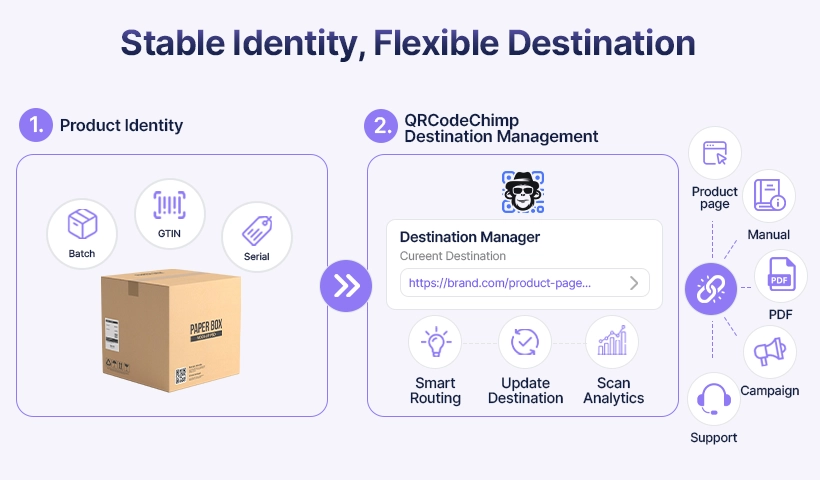
A GTIN might remain unchanged throughout the product’s lifecycle, while the destination evolves from a launch page to updated instructions, certification information, support content, or a replacement-product page.
The printed identifier should not need to change every time the digital information changes.
For long-term packaging, use a domain controlled by the organization, often through a dedicated subdomain such as:
id.yourbrand.com
A brand-controlled domain provides greater control over links that may remain in circulation for years. It also keeps product identity infrastructure separate from temporary campaigns or website redesigns.
QRCodeChimp supports custom domains and dynamic linked content, allowing businesses to update supported product pages, PDFs, campaign destinations, or support resources without replacing the printed QR code.
Step 5: Create a pilot GS1 QR code with QRCodeChimp
Start with one product or a small product family.
Choose a product that has verified data, enough packaging space, a suitable printing process, and a clear consumer or operational use case. Avoid beginning with the most technically complex or operationally critical item in the catalogue.
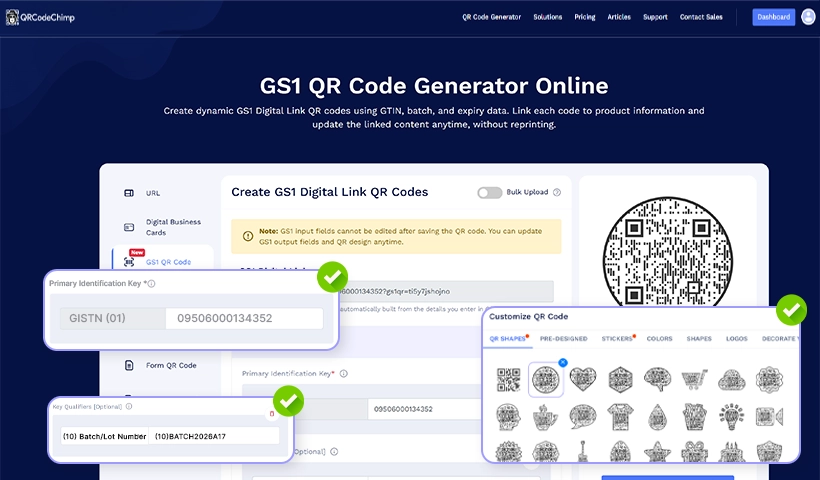
To create the pilot:
- Open the QRCodeChimp GS1 QR Code Generator.
- Enter the product’s valid GTIN or another supported primary identification key.
- Add the qualifiers and data attributes required for the use case.
- Add custom GS1 Application Identifiers where necessary.
- Choose the output, such as an existing URL, Product Page, dynamic PDF, or PDF Gallery.
- Make the output dynamic when you need content updates and mobile-scan analytics.
- Configure a custom domain where appropriate.
- Customize the QR code without weakening contrast or readability.
- Download the QR code in a production-appropriate format, such as SVG, EPS, or a high-resolution PNG.
- Test the final output before approving the packaging artwork.
QRCodeChimp locks GS1 input fields after the QR code is saved, while allowing supported output fields and the QR design to be updated.
For dual-marked artwork, use the available options to display the accompanying 1D barcode and GTIN with the GS1 QR code.
Need help planning your first GS1 QR code pilot? Talk to our team about your product data, destination, and rollout requirements.
Step 6: Use dual marking during the transition
Do not remove the existing UPC or EAN barcode merely because you have added a GS1 QR code.
During the transition, some retail systems may process only linear barcodes. Others may recognize a QR code but require software, configuration, or backend updates before they can use its GS1 data correctly.
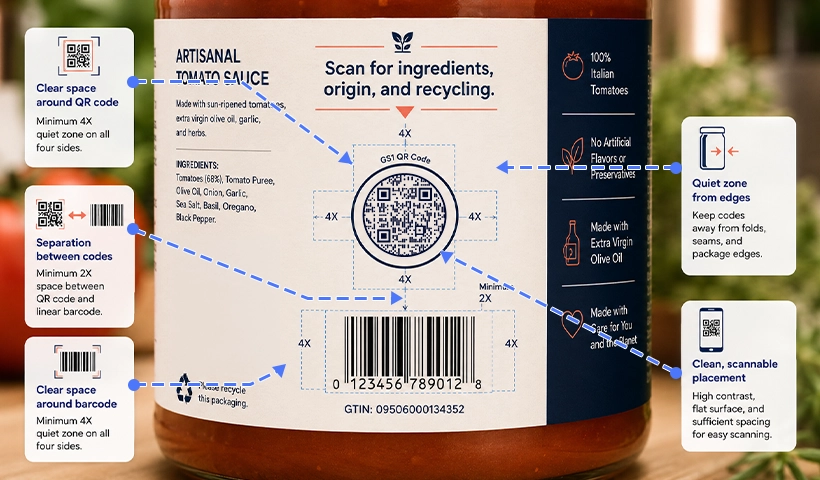
GS1 guidance states that until 90% of POS scanning solutions can use GS1-compliant 2D barcodes and capture at least the GTIN, products using retail 2D barcodes will need an accompanying POS linear barcode.
A dual-marked product may therefore display:
- The existing UPC or EAN barcode for established checkout systems
- A GS1 QR code for compatible retail processing and customer scanning
- A short call to action explaining what customers can access
Placement matters. GS1 testing found that the 2D barcode should be within 50 mm, or 1.97 inches, of the center of the linear barcode to support target retail checkout speeds. Final placement should still follow the GS1 General Specifications and be tested with packaging and retail partners.
Keep both barcodes away from:
- Folds, seams, and package edges
- Highly curved or reflective areas
- Transparent sections with inconsistent backgrounds
- Graphics that interfere with the quiet zones
- Areas likely to crease, rub, or become damaged
Avoid vague calls to action such as “Scan me.” Tell customers exactly what they will receive:
- Scan for ingredients and allergens
- Scan for setup instructions
- Scan to verify this product
- Scan for warranty and support
- Scan for recycling information
- Scan to view certifications
The destination should immediately provide the promised information. Do not send customers to a general homepage and make them search for the product.
Step 7: Test the complete system, not only the QR image
A successful phone scan from a computer screen does not prove that the QR code is ready for retail deployment.
Testing should cover four separate areas.
1. Validate the encoded data
Confirm that:
- The GTIN matches the physical product.
- Application Identifiers are used correctly.
- Dates follow the required format.
- Batch and serial values are accurate.
- The linked destination displays the correct product.
- No incorrect or duplicate identifiers were created.
2. Test the physical packaging
Test the QR code:
- At its final printed size
- On the actual packaging material
- Under realistic lighting
- On curved or reflective surfaces where relevant
- Near the proposed folds, seams, and package edges
- After normal handling, rubbing, or exposure to moisture
- From expected scanning distances
3. Test the digital experience
Check that:
- The destination opens quickly.
- The page is mobile-friendly.
- The correct product appears.
- The information promised by the CTA is easy to find.
- Redirects continue to work.
- Discontinued products have an appropriate fallback destination.
4. Test retail and operational processing
Work with retail and technology partners to verify:
- Recognition of both the linear and 2D barcodes
- GTIN extraction
- POS processing
- Behavior when both barcodes are visible
- Handling of batch, expiration, or other additional data
- Integration with backend systems
- Error and fallback behavior
GS1 strongly recommends barcode verification to assess print quality and the likelihood that a barcode will be read as intended. It also makes clear that physical verification does not validate the linked web experience, so the barcode and digital destination require separate checks.
Step 8: Scale from one product to the wider catalogue
Once the pilot has passed technical, operational, and customer-experience testing, expand gradually.
A practical rollout sequence is:
- One SKU
- One product family
- One packaging line
- One retail partner
- One market or region
- Multiple product categories
- Catalogue-wide adoption
Creating each QR code manually becomes inefficient when managing multiple SKUs, batches, variants, seasonal packages, manufacturing runs, or regional product versions.
QRCodeChimp supports bulk creation using structured product data. Teams can upload CSV, XLS, or XLSX files to create GS1 QR codes for multiple records.
Before processing a large file:
- Validate every GTIN.
- Confirm dates and data formats.
- Remove duplicate records.
- Preserve the required column names and file structure.
- Separate fixed product data from variable production data.
- Test a small batch before generating the complete set.
- Review the downloaded QR codes before sending them to production.
Document who can approve a QR code, update the linked destination, access analytics, and retire content. A scalable rollout depends as much on governance as it does on QR code generation.
Managing multiple products, batches, or markets? Speak with to our team about a scalable GS1 QR code setup.
A practical 90-day GS1 QR code pilot
The exact schedule will depend on the product, packaging workflow, and systems involved. A 90-day framework can keep the project moving without forcing a rushed launch.
| Period | Main objective | Typical work |
|---|---|---|
| Days 1 to 15 | Define the pilot | Select the use case, product, team, barcode type, GTIN, and retail partners |
| Days 16 to 30 | Build the experience | Configure the Digital Link, domain, destination, data fields, and QR design |
| Days 31 to 60 | Validate production | Print samples and test product data, packaging, mobile access, and retail processing |
| Days 61 to 90 | Run a limited launch | Monitor engagement, collect feedback, document issues, and decide the next rollout stage |
The pilot should end with a clear decision. The team may approve expansion, revise the implementation, or delay it until a retailer or production system is ready.
A pilot that identifies a serious problem has still succeeded because it prevented the same issue from reaching the complete catalogue.
What can you measure with QRCodeChimp?
When a customer scans a dynamic GS1 QR code with a phone and reaches a QRCodeChimp-managed destination, the platform can report engagement by time, device, and location.
These insights can help teams understand:
- Which products receive the most customer scans
- Where scans are occurring
- Which packaging CTA performs better
- Whether customers are looking for recipes, manuals, warranties, or support
- How engagement changes after a campaign or packaging update
Customer scans are not the same as POS transactions
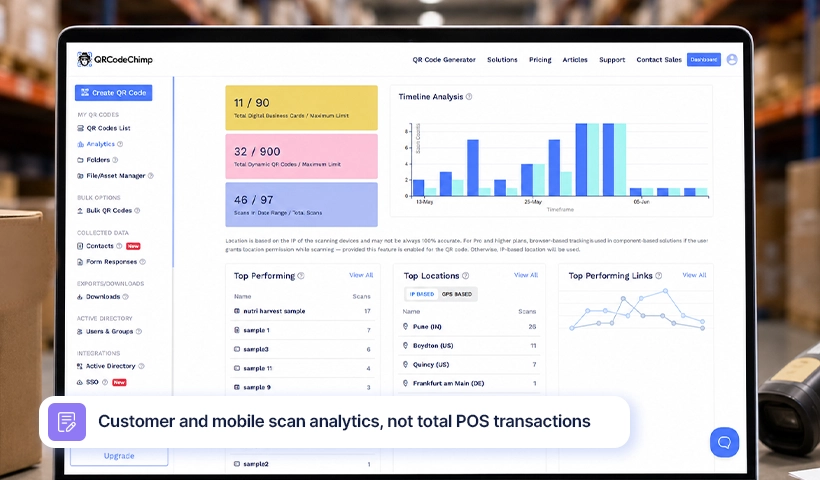
A compatible POS system can extract the GTIN directly from the GS1 Digital Link without opening its web destination.
That checkout interaction may therefore never appear in QRCodeChimp’s mobile-scan analytics.
Do not interpret web scan analytics as total checkout scans, units sold, inventory movement, or retail revenue. Those metrics usually remain within retailer, ERP, POS, warehouse, or supply-chain systems.
QRCodeChimp analytics measure digital interactions that reach the managed online experience.
How QRCodeChimp supports a phased rollout
QRCodeChimp helps brands manage the digital and customer-facing parts of a GS1 QR code deployment without building every component internally.
Teams can use the platform to:
- Structure GS1 Digital Links using product identifiers and supported Application Identifiers.
- Connect QR codes to URLs, Product Pages, dynamic PDFs, or PDF Galleries.
- Update supported linked content without reprinting the QR code.
- Use a custom domain for long-term brand control.
- Display an accompanying 1D barcode and GTIN for dual-marked layouts.
- Create QR codes in bulk for multiple products or records.
- Apply consistent branding across product packaging.
- Track customer scans by time, device, and location.
Dynamic destinations reduce reprinting when product information changes. Bulk creation reduces manual work during larger rollouts. Custom domains strengthen brand consistency, while analytics show how customers engage with the digital information connected to the package.
QRCodeChimp should be treated as the QR code creation, destination management, branding, bulk generation, and digital engagement layer.
GTIN allocation, barcode verification, production printing, retail-system readiness, and regulatory obligations still require the appropriate GS1, packaging, retail, technology, and compliance processes.
Create a pilot GS1 Digital Link QR code, test it alongside your existing barcode, and build a controlled path toward 2D barcode readiness.
Common migration mistakes
Most migration problems occur when teams treat the project as a simple barcode replacement rather than a connected product-data and packaging initiative.
❌ Removing the UPC or EAN barcode too early
Keep the linear barcode until the relevant retail environments can process the 2D barcode reliably and applicable transition requirements have been met.
❌ Using an incorrect GTIN or variable value
Validate identifiers before creating the final packaging artwork. Correcting product identity errors after distribution can be expensive.
❌ Encoding unnecessary data
More data can make the QR code denser and harder to print at a practical size. Put detailed product content on the linked destination instead.
❌ Testing only with smartphones
A successful phone scan does not validate POS processing, print quality, production data, or the behavior of two barcodes on the same package.
❌ Sending customers to a generic homepage
A product scan should open product-specific information and immediately fulfill the promise made beside the QR code.
GS1 Sunrise 2027 readiness checklist
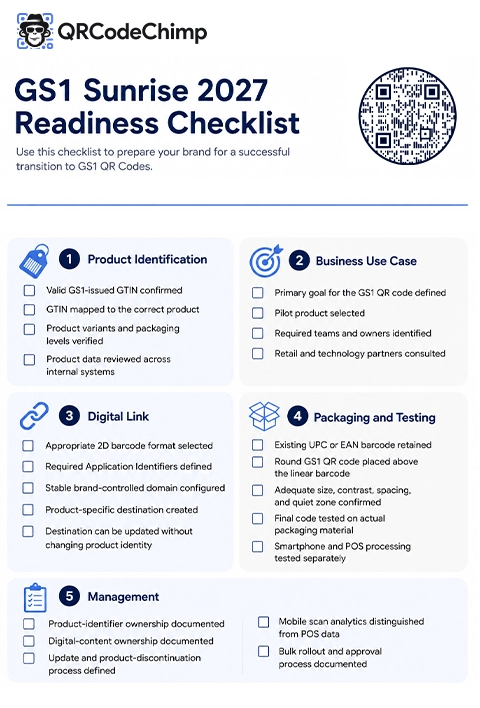
Before approving the pilot for production, confirm the following.
Product identification
- The product has a valid and correctly assigned GTIN.
- Product variants and packaging levels are identified correctly.
- Product data has been reviewed across internal and retailer systems.
Business use case
- The QR code has a clearly defined purpose.
- A suitable pilot product has been selected.
- Packaging, operations, IT, marketing, and compliance responsibilities are documented.
Digital Link
- The selected 2D barcode is appropriate for the use case.
- Only the required Application Identifiers are encoded.
- The Digital Link uses a stable domain.
- The destination opens the correct product-specific content.
Packaging and testing
- The existing linear barcode remains on the package.
- The QR code has adequate size, contrast, and quiet space.
- The placement follows applicable GS1 guidance.
- The barcode has been tested on the actual packaging material.
- Retail processing and the mobile experience have been tested separately.
Management
- Ownership of product identifiers and linked content is documented.
- A process exists for updates, discontinued products, and destination failures.
- The team understands the difference between mobile engagement and POS data.
- The rollout process has been documented before bulk creation begins.
Start small, but start now
Moving to GS1-powered 2D barcodes is not simply a packaging change. It connects product identity, retail processing, operational data, and the customer experience.
But the migration does not need to be disruptive.
Keep the existing linear barcode. Select one suitable product. Verify its GTIN. Define a clear use case. Create the GS1 Digital Link QR code. Test it on real packaging and with real systems. Then expand using what you learn.
QRCodeChimp gives businesses the tools to create, manage, customize, and measure GS1 Digital Link QR codes from one platform.
Frequently asked questions
Do I have to replace my UPC or EAN barcode by 2027?
No. Sunrise 2027 is an industry goal for retail systems to process supported GS1 2D barcodes alongside existing linear barcodes. Both formats are expected to coexist during the transition.
Can the same GS1 QR code work at checkout and on a smartphone?
Yes, when correctly implemented and supported by the retail system. A compatible POS system can extract the GTIN, while a phone can open the linked digital experience.
Can I change product information after printing?
Yes, when the implementation uses a managed dynamic destination. QRCodeChimp lets you update supported output content while keeping the saved GS1 input fields unchanged.
Can QRCodeChimp create GS1 QR codes in bulk?
Yes. QRCodeChimp supports structured spreadsheet uploads for creating multiple product, batch, SKU, or variant records.
Does QRCodeChimp analytics show every retail checkout scan?
No. QRCodeChimp measures scans that reach the managed web destination. A POS system may extract the GTIN without opening that destination, so checkout transactions must be measured through the relevant retail or business system.
Should regulated healthcare products use GS1 Digital Link QR codes?
Do not assume they should. GS1 DataMatrix is widely established for healthcare identification, and regulated products may have market-specific requirements. Consult the relevant GS1 and regulatory guidance before implementation.
You may also like
GS1 Application Identifiers Explained: GTIN, Batch, Serial, Expiry, and More
This guide explains the most important GS1 Application Identifiers used for product identification, traceability, retail, and packaging.
Steps to Integrate Microsoft Entra ID (Azure AD) with QRCodeChimp
Learn how to connect Microsoft Entra ID with QRCodeChimp to automate digital business card creation, improve security, and simplify onboarding.
Bulk QR Codes for Business: Use Cases and Benefits
Discover how bulk QR codes for business can streamline product packaging, employee cards, events, multi-location campaigns, inventory, and more
How to Send QRCodeChimp Form Responses to HubSpot
Learn how to connect QRCodeChimp Forms with HubSpot, map form fields, send responses directly to your CRM, and verify successful data transfers.
Most Popular
Contact Sales
